


- Posts: 379
- Thank you received: 6
3 Post Moderation Rule for New Boarders (25 Jan 2021)
New boarders will have their posts moderated - Don't worry if you cannot see your post immediately.
RX 4 (advanced)
- Marc Lucas
-
 Topic Author
- Offline
- Platinum Member
-

Less
More
09 Apr 2015 19:57 #62418
by Marc Lucas
RX 4 (advanced) was created by Marc Lucas
Anyone who has this how does it integrate with FCPX?
Is it used as a plugin/effect or is it a standalone plugin that you have to round trip. I'm mostly interested in the 'Loudness' feature for broadcast levels and compliance. I've seen that you can purchase Loudness as a standalone plugin but it will only work with PP, Pro Tools so how will it work inside of RX4 with FCPX?
Is it used as a plugin/effect or is it a standalone plugin that you have to round trip. I'm mostly interested in the 'Loudness' feature for broadcast levels and compliance. I've seen that you can purchase Loudness as a standalone plugin but it will only work with PP, Pro Tools so how will it work inside of RX4 with FCPX?
Please Log in to join the conversation.
- jeff_kirkland
-

- Offline
- Senior Member
-

09 Apr 2015 22:22 #62436
by jeff_kirkland
Replied by jeff_kirkland on topic RX 4 (advanced)
You can use it as either a stand-alone app or as a plugin within FCPX. It's at it's best within an actual audio app like Audition or Logic though.
I personally tend to export to Adobe Audition for that last bit of audio mastering as I've found some things like noise reduction are a little tricky to use within the FCPX UI.
I personally tend to export to Adobe Audition for that last bit of audio mastering as I've found some things like noise reduction are a little tricky to use within the FCPX UI.
Please Log in to join the conversation.
- ronny courtens
-

- Offline
- Moderator
-

Less
More
- Posts: 4455
- Thank you received: 962
09 Apr 2015 23:03 #62438
by ronny courtens
Replied by ronny courtens on topic RX 4 (advanced)
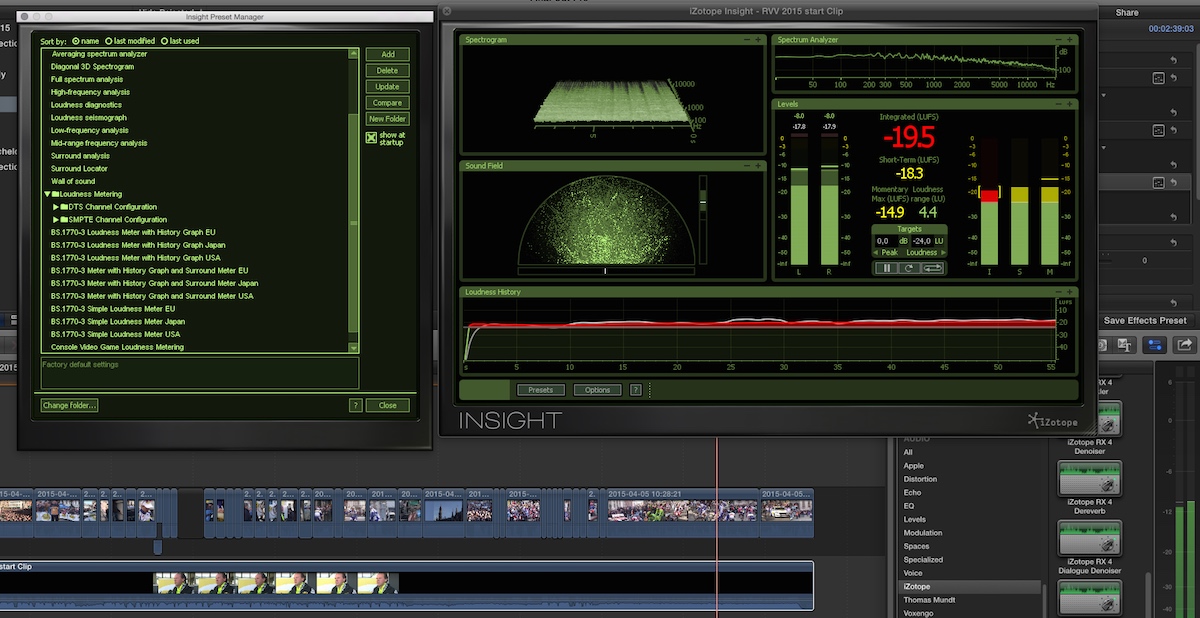
As Jeff said, it works natively in FCP X. Personally I don't have any trouble using the iZotope noise reduction inside FCP X, it works exceptionally well. The meter plugin is called Insight and it appears in your Audio plugins browser. Once applied you can open the presets window where you find a sleuth of metering presets, from spectrum analyzers to various standard loudness meters:
- Ronny
- Ronny
Please Log in to join the conversation.
- Marc Lucas
-
Topic Author
- Offline
- Platinum Member
-
Less
More
- Posts: 379
- Thank you received: 6
09 Apr 2015 23:44 #62440
by Marc Lucas
Replied by Marc Lucas on topic RX 4 (advanced)
Thanks guys.
The plugin I was referring to Ronny is this one.
www.izotope.com/en/products/audio-repair/rx/features/#loudness
That has the broadcast loudness specs so this runs OK using it in FCPX or would this be better used on the audio in a project out of FCPX?
The plugin I was referring to Ronny is this one.
www.izotope.com/en/products/audio-repair/rx/features/#loudness
That has the broadcast loudness specs so this runs OK using it in FCPX or would this be better used on the audio in a project out of FCPX?
Please Log in to join the conversation.
- ronny courtens
-
- Offline
- Moderator
-
Less
More
- Posts: 4455
- Thank you received: 962
10 Apr 2015 07:35 - 10 Apr 2015 07:39 #62446
by ronny courtens
Replied by ronny courtens on topic RX 4 (advanced)
Ah, that one. That's a master processing plugin, it automatically conforms your master mix to the loudness standard you choose. As any automatic process, it can be quite drastic but your entire mix will be compliant in no time. To use it you export your audio mix, you launch the app and you drop the audio onto it. Then you choose a preset and when you press Process the complete master is conformed to the preset. Here's an extreme example:
Original audio from a short clip mixed for the web:
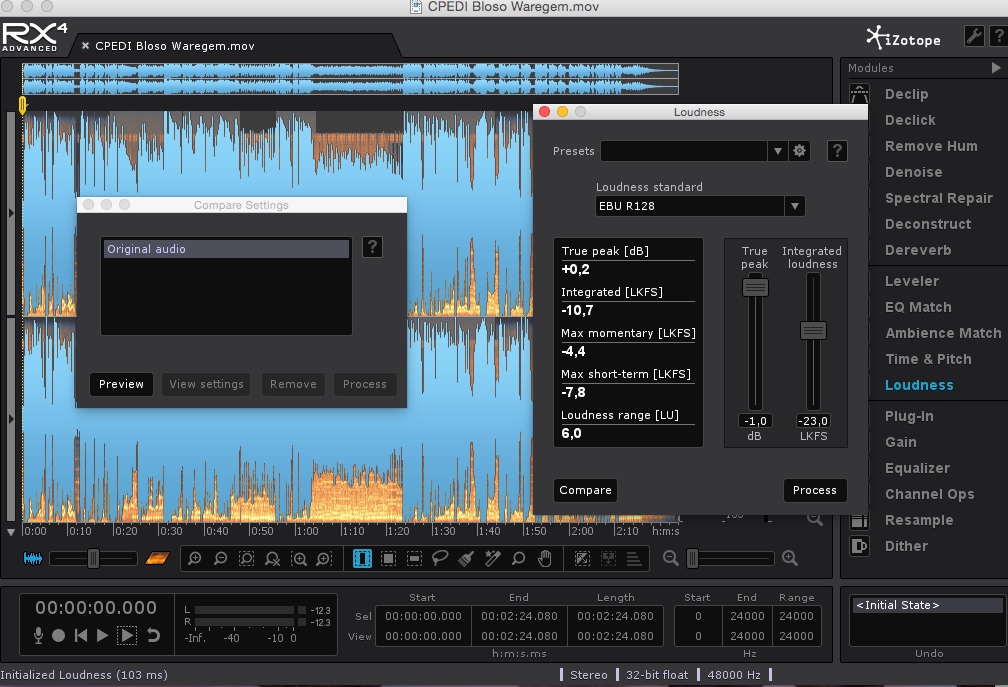
Modified audio after applying the EBU R128 loudness preset:
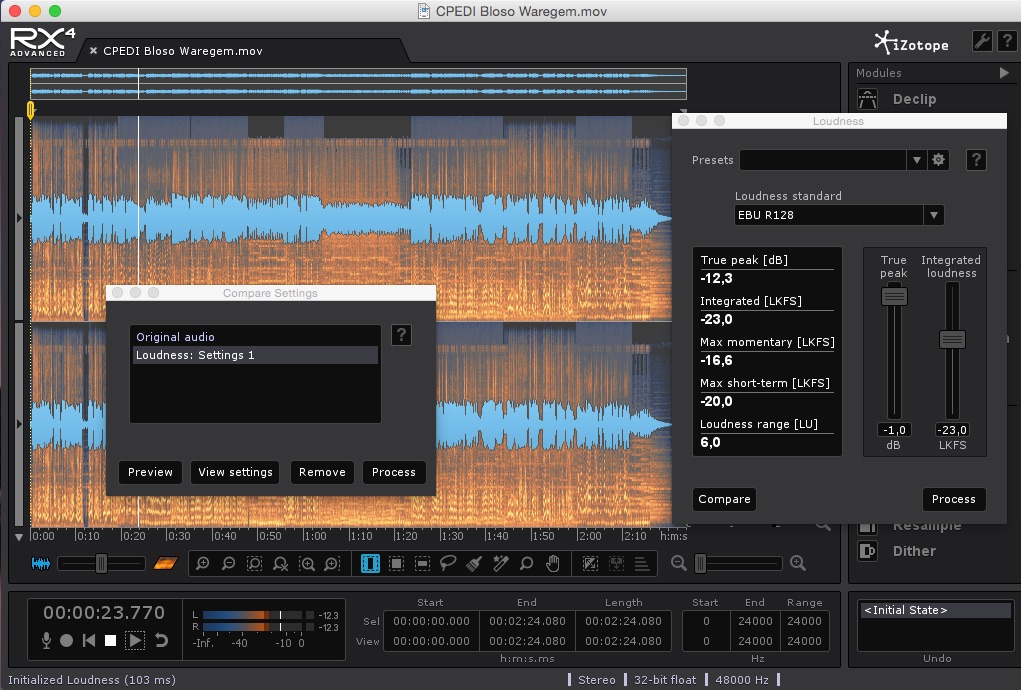
Export to AIFF to replace web audio with loudness compliant audio:
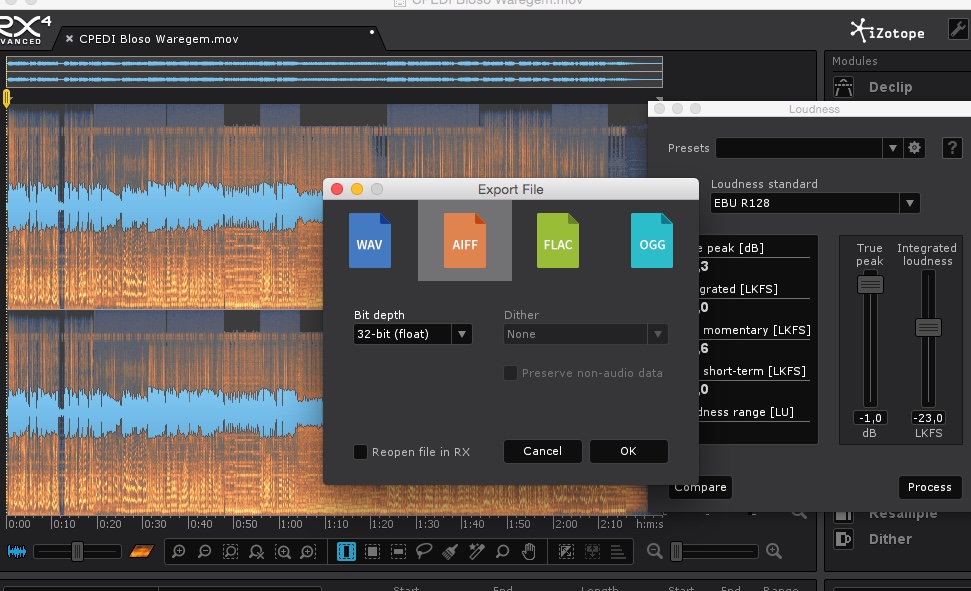
It's a very fast process.
- Ronny
Original audio from a short clip mixed for the web:
Modified audio after applying the EBU R128 loudness preset:
Export to AIFF to replace web audio with loudness compliant audio:
It's a very fast process.
- Ronny
Last edit: 10 Apr 2015 07:39 by ronny courtens.
Please Log in to join the conversation.
- Marc Lucas
-
Topic Author
- Offline
- Platinum Member
-
Less
More
- Posts: 379
- Thank you received: 6
10 Apr 2015 11:20 #62450
by Marc Lucas
Replied by Marc Lucas on topic RX 4 (advanced)
Thanks Ronny for the info and screen shots. I looked at the Loudness plugin as a standalone and was as much as the current deal they have on RX4 advanced so its a no brainer really to get the whole advanced version.
Thanks again for your insight really appreciated.
Thanks again for your insight really appreciated.
Please Log in to join the conversation.
10 Apr 2015 16:24 #62464
by Soundwise
Replied by Soundwise on topic RX 4 (advanced)
For RS128 compatibility check on levels I run my mixes through LoudnessChange:
www.videotoolshed.com/product/68/loudnesschange
www.videotoolshed.com/product/68/loudnesschange
Please Log in to join the conversation.

10 Apr 2015 21:23 #62471
by Redifer
Replied by Redifer on topic RX 4 (advanced)
The problem using the Izotope plugins inside of FCPX is that it does not render audio, it always plays it in real time. So if you have multiple layers/channels of audio all going at once then it will mess up and sound pretty bad and yes it even exports that way. I prefer to use it as a stand-alone app.
Please Log in to join the conversation.
- Marc Lucas
-
Topic Author
- Offline
- Platinum Member
-
Less
More
- Posts: 379
- Thank you received: 6
10 Apr 2015 23:01 #62475
by Marc Lucas
Replied by Marc Lucas on topic RX 4 (advanced)
Thanks guys
Please Log in to join the conversation.
- simon.a.billington
-
- Offline
- Elite Member
-

Less
More
- Posts: 179
- Thank you received: 10
19 Apr 2015 09:52 - 19 Apr 2015 09:52 #63207
by simon.a.billington
Replied by simon.a.billington on topic RX 4 (advanced)
Yeah you do have to watch out for some latency inducing plugins. Linear EQs & Compressors, some Limiters and Noise Gates and possibly loudness control all induce extra latency.
I've never tried those tools in FCPX because if I'm at the stage where I need to crack out the heavy arsenal I'll work externally in either RX or Logic. If, however, what the guys are saying is true, it sounds like Final Cut doesn't fully account for plugin latency. Which I would say is another reason for them to include a role-based mixer, because I'm pretty sure that will make it possible.
Some of these extra latencies can be circumvented in certain plugins by reducing their "lookahead" time to 0ms. You may even be able to find this in the plugin's settings.

Plugins like Loudness, which is great idea from iZotope, should be one of the last processes to be used just before finalising a project ready for export in much the same way you would make sure your image is in broadcast legal limits.
www.izotope.com/en/products/post-product...rx-loudness-control/
Now it does say that RX Loudness uses a new algorithm and works "faster than real-time." If what they say is true, latency MAY not be an issue in this case.
I've never tried those tools in FCPX because if I'm at the stage where I need to crack out the heavy arsenal I'll work externally in either RX or Logic. If, however, what the guys are saying is true, it sounds like Final Cut doesn't fully account for plugin latency. Which I would say is another reason for them to include a role-based mixer, because I'm pretty sure that will make it possible.
Some of these extra latencies can be circumvented in certain plugins by reducing their "lookahead" time to 0ms. You may even be able to find this in the plugin's settings.
Plugins like Loudness, which is great idea from iZotope, should be one of the last processes to be used just before finalising a project ready for export in much the same way you would make sure your image is in broadcast legal limits.
www.izotope.com/en/products/post-product...rx-loudness-control/
Now it does say that RX Loudness uses a new algorithm and works "faster than real-time." If what they say is true, latency MAY not be an issue in this case.
Last edit: 19 Apr 2015 09:52 by simon.a.billington.
Please Log in to join the conversation.
- simon.a.billington
-
- Offline
- Elite Member
-
Less
More
- Posts: 179
- Thank you received: 10
19 Apr 2015 10:02 #63208
by simon.a.billington
Replied by simon.a.billington on topic RX 4 (advanced)
Although, in retrospect it does seem functionally very similar, if not the same as
Waves WLM Plus.

It's $400 now, but finds itself often in sales for $150 or less, that's how i managed to pick it up.
So, while for a short moment i may actually pick up RX Loudness, I'm starting to have second thoughts because of WLM.
It's $400 now, but finds itself often in sales for $150 or less, that's how i managed to pick it up.
So, while for a short moment i may actually pick up RX Loudness, I'm starting to have second thoughts because of WLM.
Please Log in to join the conversation.
- Marc Lucas
-
Topic Author
- Offline
- Platinum Member
-
Less
More
- Posts: 379
- Thank you received: 6
19 Apr 2015 11:38 #63210
by Marc Lucas
Replied by Marc Lucas on topic RX 4 (advanced)
Thanks for the info Simon.
So the Waves has to work as a standalone or I take it in Logic?
So the Waves has to work as a standalone or I take it in Logic?
Please Log in to join the conversation.
- simon.a.billington
-
- Offline
- Elite Member
-
Less
More
- Posts: 179
- Thank you received: 10
19 Apr 2015 12:26 #63211
by simon.a.billington
Replied by simon.a.billington on topic RX 4 (advanced)
It comes in multiple plugin formats including Audio Units, so it should load up in Final Cut Pro as well. In fact, Final Cut is officially supported by Waves as well.
Please Log in to join the conversation.
- ronny courtens
-
- Offline
- Moderator
-
Less
More
- Posts: 4455
- Thank you received: 962
19 Apr 2015 13:23 #63212
by ronny courtens
Replied by ronny courtens on topic RX 4 (advanced)
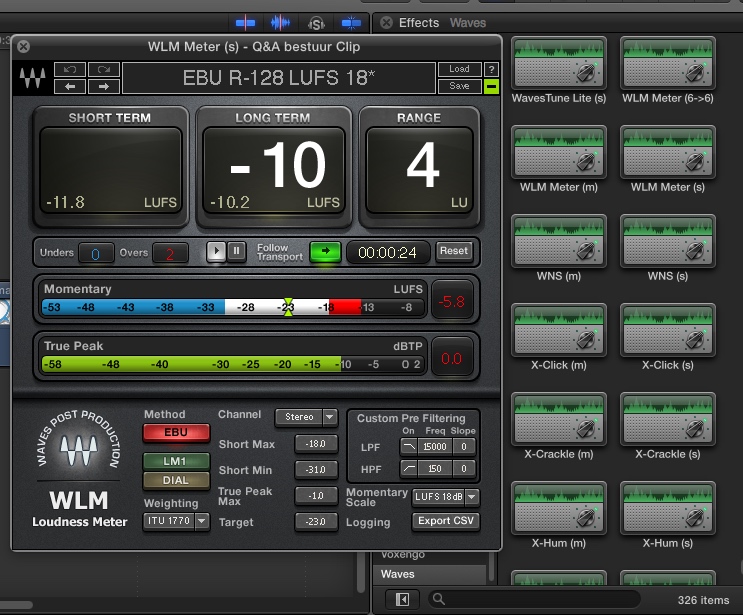
It works natively in Final Cut, and in realtime. This is the previous version I have at home:
- Ronny
- Ronny
Please Log in to join the conversation.
- Marc Lucas
-
Topic Author
- Offline
- Platinum Member
-
Less
More
- Posts: 379
- Thank you received: 6
09 May 2015 17:38 #64243
by Marc Lucas
Replied by Marc Lucas on topic RX 4 (advanced)
I've since got RX4 Advanced and very impressed with it very worthwhile purchase.
After looking at a few Youtube tuts I have noticed that the new plugin version (standalone) of Loudness has a few extra presets available specially for the EBU 128 standards. I know that broadcast standard Broadcast standards are always changing so am I missing out by not having the new EBU presets that are included in the new plugin version?
After looking at a few Youtube tuts I have noticed that the new plugin version (standalone) of Loudness has a few extra presets available specially for the EBU 128 standards. I know that broadcast standard Broadcast standards are always changing so am I missing out by not having the new EBU presets that are included in the new plugin version?
Please Log in to join the conversation.
- simon.a.billington
-
- Offline
- Elite Member
-
Less
More
- Posts: 179
- Thank you received: 10
10 May 2015 13:48 #64258
by simon.a.billington
Replied by simon.a.billington on topic RX 4 (advanced)
I don't think you're missing much from my perspective, it's usually just very minor changes, and will probably settle soon.
For the most part, the measuring of the different standards are largely just presets, although, there are occasionally changes that do have to happen within the code, but that's why plugins are upgraded periodically. So I wouldn't worry to much about that.
For the most part, the measuring of the different standards are largely just presets, although, there are occasionally changes that do have to happen within the code, but that's why plugins are upgraded periodically. So I wouldn't worry to much about that.
Please Log in to join the conversation.
