


- Posts: 19
- Thank you received: 0
3 Post Moderation Rule for New Boarders (25 Jan 2021)
New boarders will have their posts moderated - Don't worry if you cannot see your post immediately.
Cropping for zoom 4k to 1080p. NOT downsampling.
- delirium trigger
-
 Topic Author
- Offline
- New Member
-

Less
More
03 Apr 2015 20:11 #62205
by delirium trigger
Cropping for zoom 4k to 1080p. NOT downsampling. was created by delirium trigger
I know how to downsample, I also know how to crop. However, unlike photo editing footage it doesn't provide a crop grid which says, "This much of it is 1080p." So, I do not know how much 4k to crop to get a zoom in 1080p factor. If I just drop the 4k on a 1080p timeline, It will just simply down convert it
How do I figure out how much can be taken out?
How do I figure out how much can be taken out?
Please Log in to join the conversation.
- ronny courtens
-

- Offline
- Moderator
-

Less
More
- Posts: 4455
- Thank you received: 962
03 Apr 2015 22:18 #62208
by ronny courtens
Replied by ronny courtens on topic Cropping for zoom 4k to 1080p. NOT downsampling.
Hi Justin,
Select the clip and in the Inspector > Video tab set Spatial Conform to "None".
- Ronny
Select the clip and in the Inspector > Video tab set Spatial Conform to "None".
- Ronny
Please Log in to join the conversation.
- delirium trigger
-
Topic Author
- Offline
- New Member
-
Less
More
- Posts: 19
- Thank you received: 0
03 Apr 2015 22:33 #62209
by delirium trigger
Replied by delirium trigger on topic Cropping for zoom 4k to 1080p. NOT downsampling.
Okay after I do that how do I tell how much I can crop to 1080p?
Please Log in to join the conversation.

03 Apr 2015 23:02 #62212
by BenB
Replied by BenB on topic Cropping for zoom 4k to 1080p. NOT downsampling.
If it is in a 1080 Timeline, then the viewable frame in the Viewer is 1080. The 4K image will be MUCH larger, so cropping or shrinking it to fit inside the viewable area will tell you what is 1080.
Do what Ronny said, select the 4K clip in the Timeline, turn on the screen controls for Transform in the Viewer, zoom out (Command with the - key). You will have to zoom out really far. You'll eventually see the edges of that 4K clip, being much larger than the viewable area of the video frame.
Do what Ronny said, select the 4K clip in the Timeline, turn on the screen controls for Transform in the Viewer, zoom out (Command with the - key). You will have to zoom out really far. You'll eventually see the edges of that 4K clip, being much larger than the viewable area of the video frame.
Please Log in to join the conversation.
- delirium trigger
-
Topic Author
- Offline
- New Member
-
Less
More
- Posts: 19
- Thank you received: 0
03 Apr 2015 23:13 #62217
by delirium trigger
Replied by delirium trigger on topic Cropping for zoom 4k to 1080p. NOT downsampling.
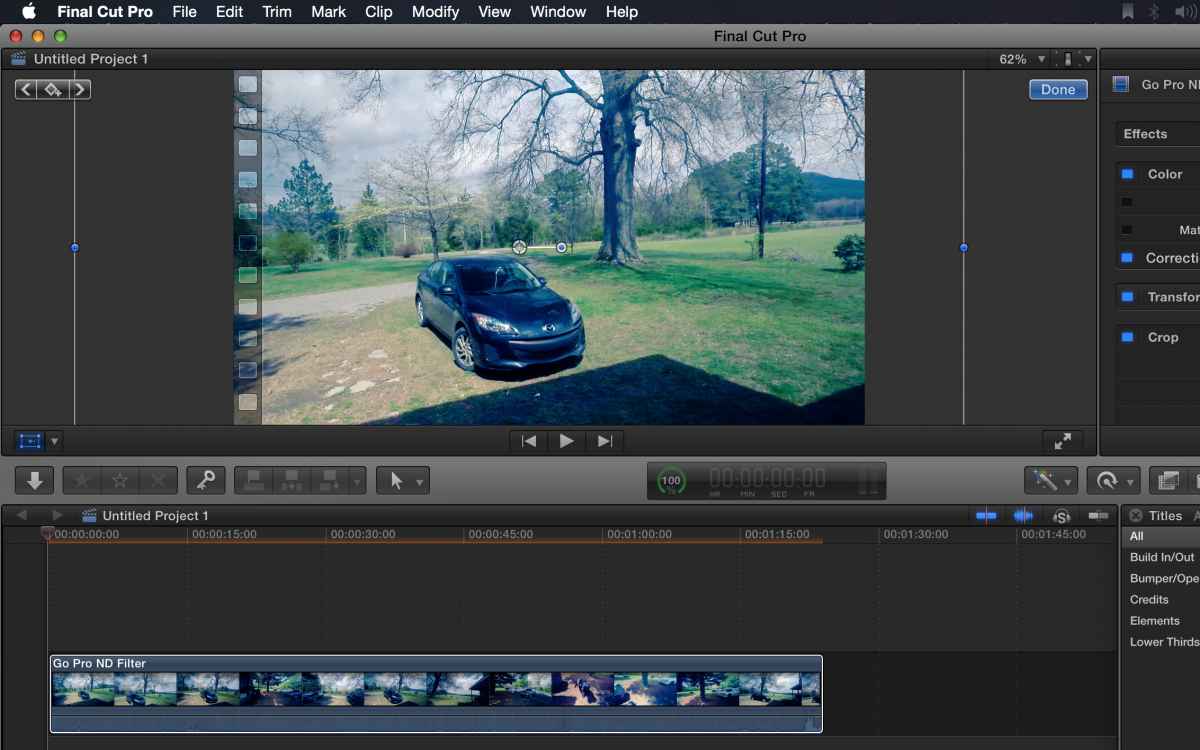
Okay, I see what you are saying, Even though I hit "none" like said, it still fits it in the 1080, because when I hit transform I see where it's supposed to be, but it's still in the 1080 as if it's just downscaled. I want to drag it out all to the 4k, that way I just get the 1080p crop of it. Here is a picture of what it is doing. Keep in mind, this is the whole frame, like I said as if it is downscaled.
Please Log in to join the conversation.
- delirium trigger
-
Topic Author
- Offline
- New Member
-
Less
More
- Posts: 19
- Thank you received: 0
03 Apr 2015 23:24 #62218
by delirium trigger
Replied by delirium trigger on topic Cropping for zoom 4k to 1080p. NOT downsampling.
Okay, Nevermind I get it now. Thanks.
Please Log in to join the conversation.
04 Apr 2015 00:48 #62223
by BenB
Replied by BenB on topic Cropping for zoom 4k to 1080p. NOT downsampling.
Yay!
Please Log in to join the conversation.
- Karsten Schlüter
-

- Offline
- Moderator
-
Less
More
- Posts: 3790
- Thank you received: 718
04 Apr 2015 08:16 - 04 Apr 2015 08:30 #62237
by Karsten Schlüter
On a lazy Saturday morning… I think, you're 'feature request' is a bit like my Magnifier plug-in (you find it under Simulations in the plug-in-corner of this board).
So, quick'n dirty re-built:
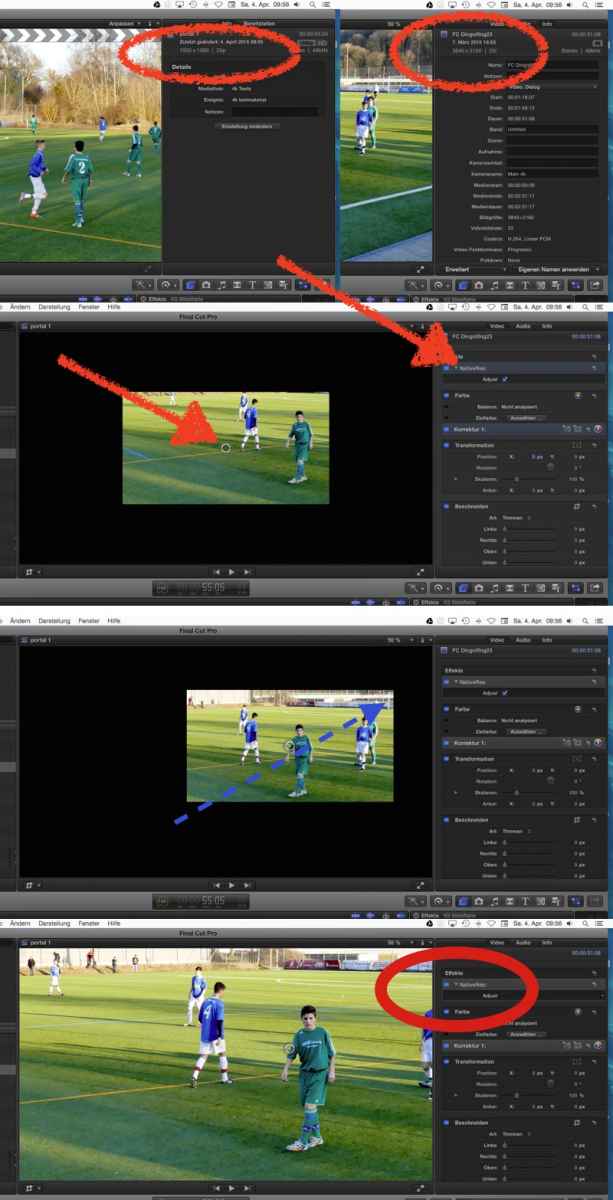
Here's a 1080 project, and a 4k clip ...
Then, I drag my effect on it = > you only see a segment of the clip, which shows 1080 from that 4k clip.
Move the segment with the OnScreenControl…
uncheck 'Adjust' in the InfoPane (yeah, very little controls )
boom! clip cropped to 1080...
How's that?
As you see in the screenshots, it doesn't fit a 100% - that's due to my complete ignorance to understand the coordinates system of Motion!! :silly:
A variatiom: semi-transparent original .. for better navigation ...
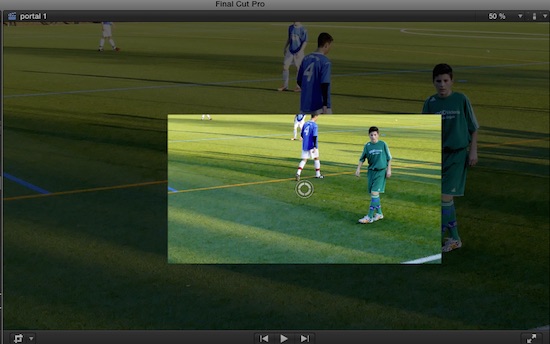
To make that an 'official' plug-in, some smarter guy should adjust the numbers ... if anybody's interested, I can upload here ...............
Another idea: adding a drop-down menu for selection Cinema4k to 1080, UHD to 1080, C4k to 720. UHD to 720, C4k/UHD/1080 to 720, C4k/UHD/1080/HD to SD ... but that's all mathematics, my ol' battered brain doesn't get anymore ... :blink:
Replied by Karsten Schlüter on topic Cropping for zoom 4k to 1080p. NOT downsampling.
delirium trigger wrote: … how to crop. However, unlike photo editing footage it doesn't provide a crop grid which says, "This much of it is 1080p.…
On a lazy Saturday morning… I think, you're 'feature request' is a bit like my Magnifier plug-in (you find it under Simulations in the plug-in-corner of this board).
So, quick'n dirty re-built:
Here's a 1080 project, and a 4k clip ...
Then, I drag my effect on it = > you only see a segment of the clip, which shows 1080 from that 4k clip.
Move the segment with the OnScreenControl…
uncheck 'Adjust' in the InfoPane (yeah, very little controls
)boom! clip cropped to 1080...
How's that?
As you see in the screenshots, it doesn't fit a 100% - that's due to my complete ignorance to understand the coordinates system of Motion!! :silly:
A variatiom: semi-transparent original .. for better navigation ...
To make that an 'official' plug-in, some smarter guy should adjust the numbers ... if anybody's interested, I can upload here ...............
Another idea: adding a drop-down menu for selection Cinema4k to 1080, UHD to 1080, C4k to 720. UHD to 720, C4k/UHD/1080 to 720, C4k/UHD/1080/HD to SD ... but that's all mathematics, my ol' battered brain doesn't get anymore ... :blink:
Last edit: 04 Apr 2015 08:30 by Karsten Schlüter.
Please Log in to join the conversation.
- Karsten Schlüter
-
- Offline
- Moderator
-
Less
More
- Posts: 3790
- Thank you received: 718
05 Apr 2015 13:19 #62262
by Karsten Schlüter
Replied by Karsten Schlüter on topic Cropping for zoom 4k to 1080p. NOT downsampling.
And if you don't have access to plug-ins etc. - the built-in features of FCPX do a lot:
This is 4k material within a 1080 project.
Factory pre-set is 'Fit' for the spatial conforming - which makes all the 4000 px fit into a 'small' 1920 screen. Pic #1
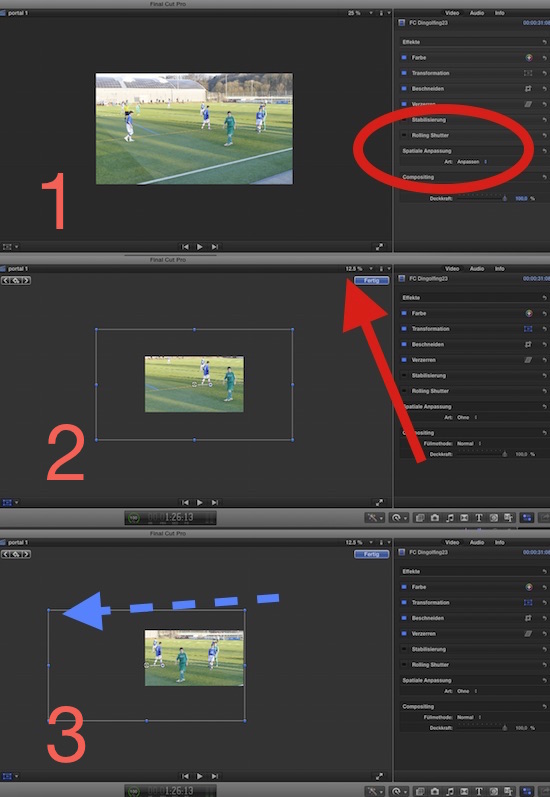
But when you check 'non' under spatial conform, you get the full size; and to see, how much bigger it is,
set the preview window to 12.5 percent and click on the transform tool - you then see Pic#2 the full size of the 4k recording.
Zoom it, as you like and need it - still native resolution, nice quality!
It gets really crazy, when you work with 720-projects and a 4k-cam:
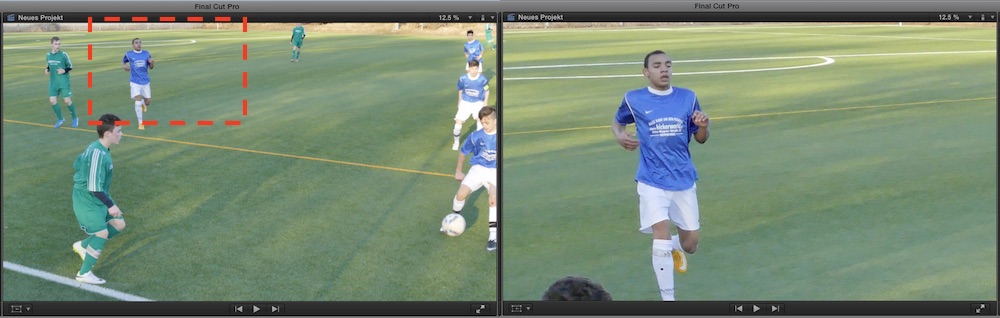
…then, even the fastest soccer-play is easy done, no pans needed, I decide at home, close-up or wide shot …………LOL ..
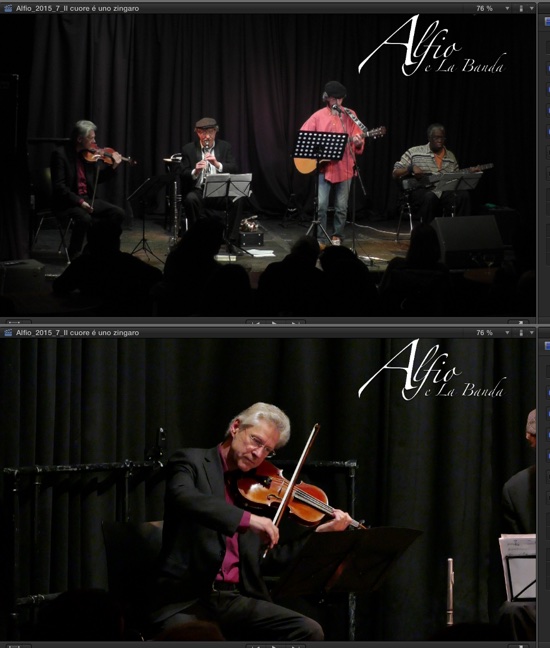
Or, when I'm recording a concert alone, the unmanned 4k cam offers enough resolution for all sorts of pans, close-ups, 'Ken Burns 'til you're seasick' as I call it...
This is 4k material within a 1080 project.
Factory pre-set is 'Fit' for the spatial conforming - which makes all the 4000 px fit into a 'small' 1920 screen. Pic #1
But when you check 'non' under spatial conform, you get the full size; and to see, how much bigger it is,
set the preview window to 12.5 percent and click on the transform tool - you then see Pic#2 the full size of the 4k recording.
Zoom it, as you like and need it - still native resolution, nice quality!
It gets really crazy, when you work with 720-projects and a 4k-cam:
…then, even the fastest soccer-play is easy done, no pans needed, I decide at home, close-up or wide shot …………LOL ..
Or, when I'm recording a concert alone, the unmanned 4k cam offers enough resolution for all sorts of pans, close-ups, 'Ken Burns 'til you're seasick' as I call it...
Please Log in to join the conversation.

06 Apr 2015 14:36 #62285
by lichinho
Replied by lichinho on topic Cropping for zoom 4k to 1080p. NOT downsampling.
Just to add a little note to Karsten post: capturing at 4K also allows you to easily do multicam without shooting multiple angles.
Here is Steve Martin of Ripple Training explaining how to do precisely this:
www.rippletraining.com/free-videos/4k-multicam-magic/
Here is Steve Martin of Ripple Training explaining how to do precisely this:
www.rippletraining.com/free-videos/4k-multicam-magic/
Please Log in to join the conversation.
- Karsten Schlüter
-
- Offline
- Moderator
-
Less
More
- Posts: 3790
- Thank you received: 718
07 Apr 2015 05:28 #62302
by Karsten Schlüter
as an off-topic, under us 'Soccer Dads':
Imagine four 4k devices on high poles/tripods around the green - would the making of our lil' game-reports sooo easy ...
doesn't have it at hand, but in the video, included in this article
www.theverge.com/2013/11/25/5141600/any-...ctacle-of-nfl-on-fox
you see, the pros reframe exactly like that: a wide 4k shot, and picking up the close-up 'later' ...
just dreaming ... :lol:
Replied by Karsten Schlüter on topic Cropping for zoom 4k to 1080p. NOT downsampling.
lichinho wrote: … capturing at 4K also allows you to easily do multicam without shooting multiple angles.
as an off-topic, under us 'Soccer Dads':
Imagine four 4k devices on high poles/tripods around the green - would the making of our lil' game-reports sooo easy ...
doesn't have it at hand, but in the video, included in this article
www.theverge.com/2013/11/25/5141600/any-...ctacle-of-nfl-on-fox
you see, the pros reframe exactly like that: a wide 4k shot, and picking up the close-up 'later' ...
just dreaming ... :lol:
Please Log in to join the conversation.
07 Apr 2015 07:11 #62303
by lichinho
Just drooling here
Replied by lichinho on topic Cropping for zoom 4k to 1080p. NOT downsampling.
Karsten Schlüter wrote:
lichinho wrote: … capturing at 4K also allows you to easily do multicam without shooting multiple angles.
as an off-topic, under us 'Soccer Dads':
Imagine four 4k devices on high poles/tripods around the green - would the making of our lil' game-reports sooo easy ...
Just drooling here
Please Log in to join the conversation.
- Paul Anderegg
-

- Offline
- Senior Member
-

Less
More
- Posts: 47
- Thank you received: 3
26 Mar 2017 22:02 - 26 Mar 2017 22:03 #86733
by Paul Anderegg
Replied by Paul Anderegg on topic Cropping for zoom 4k to 1080p. NOT downsampling.
I came across this in a google search, so I thought I would update it with what I discovered in FCPX. When in crop mode, the viewer will display, at the top, the pixels and percentage of the crop. If you have 4K material on a 1080p timeline, then you pull the edge of your crop from the corner until you see the viewer display "100%", you are now cropping an exact 1920x1080 box. If you move that box around, FCPX viewer will also show a four square grid, for 1080p quadrants. No more guessing.
Paul
Paul
Last edit: 26 Mar 2017 22:03 by Paul Anderegg.
Please Log in to join the conversation.
