


- Posts: 2
- Thank you received: 0
3 Post Moderation Rule for New Boarders (25 Jan 2021)
New boarders will have their posts moderated - Don't worry if you cannot see your post immediately.
Help!! Grey Bar Appearing on Left Side of Photos when Using Fade To Color Transition
29 Mar 2015 19:08 #62053
by aprilb95
Help!! Grey Bar Appearing on Left Side of Photos when Using Fade To Color Transition was created by aprilb95
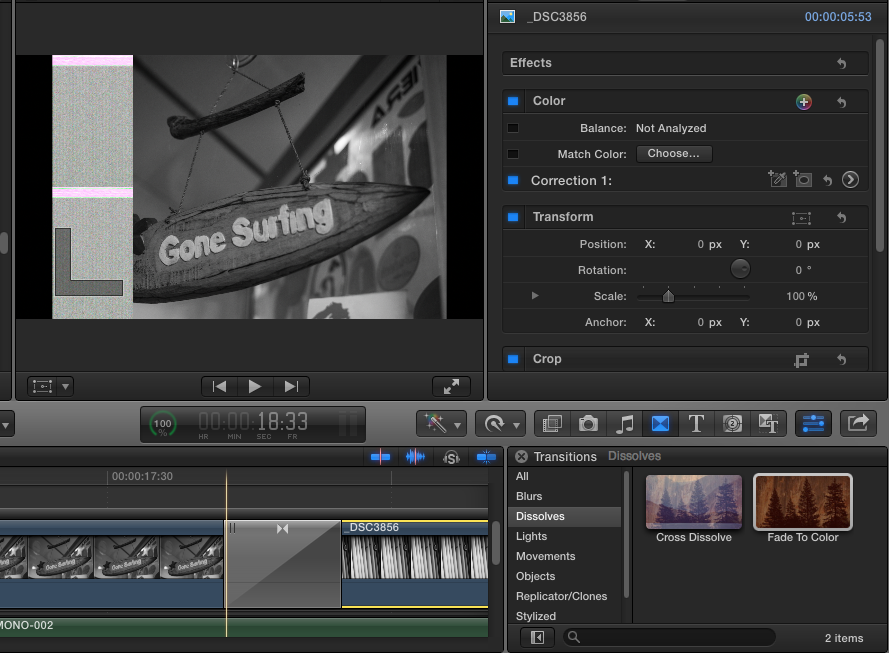
I'm editing a slideshow and am using the "Fade to Color" transition between every photo. Some are responding normally, but many of the photos have a grey bar that appears on the left during each transition period (see photo below). When I delete the transition, the bar doesn't show up. Anyone know what could be causing this/how to fix it? I tried exporting and it's still there. I would greatly appreciate any help. It's OSX 10.8.5, FCPX 10.0.8. The Photos are .jpg, between 11mb and 21mb, 6000 x 4000 or 4000 x 6000px . I also have a couple of photos mixed in that are less than 1mb and are around 960 x 720. The grey bar showing up doesn't seem to correlate with the change in file size, just shows up during many of the transitions- and goes away once the transition has completed.
Thanks !!
Thanks !!
Please Log in to join the conversation.
- Jonathan Levin
-

- Offline
- Platinum Member
-

Less
More
- Posts: 786
- Thank you received: 21
30 Mar 2015 03:17 #62066
by Jonathan Levin
Replied by Jonathan Levin on topic Help!! Grey Bar Appearing on Left Side of Photos when Using Fade To Color Transition
April,
Not sure if this is any help but fcp x is now at version 10.1.4. You're version is several updates old as well as your OS. Any reason you have not updated? This would be the best place to start depending on your hardware. So many little anoyances have been addressed.
Jonathan
Not sure if this is any help but fcp x is now at version 10.1.4. You're version is several updates old as well as your OS. Any reason you have not updated? This would be the best place to start depending on your hardware. So many little anoyances have been addressed.
Jonathan
Please Log in to join the conversation.
- ronny courtens
-

- Offline
- Moderator
-

Less
More
- Posts: 4455
- Thank you received: 962
30 Mar 2015 06:30 #62069
by ronny courtens
Replied by ronny courtens on topic Help!! Grey Bar Appearing on Left Side of Photos when Using Fade To Color Transition
Hi April, welcome to the forum.
Jonathan is correct, you are using an outdated version of FCP X. Updates are free, there is no reason for not updating to the latest version. But that's not the primary reason for your issue.
The "grey bar" in your screenshot is not a bar, it's a graphics card error. Please give the following information:
- What computer do you work on? (model + year)
- How much RAM do you have installed?
- Ronny
Jonathan is correct, you are using an outdated version of FCP X. Updates are free, there is no reason for not updating to the latest version. But that's not the primary reason for your issue.
The "grey bar" in your screenshot is not a bar, it's a graphics card error. Please give the following information:
- What computer do you work on? (model + year)
- How much RAM do you have installed?
- Ronny
Please Log in to join the conversation.
30 Mar 2015 06:39 #62071
by aprilb95
Replied by aprilb95 on topic Help!! Grey Bar Appearing on Left Side of Photos when Using Fade To Color Transition
Hi Ronny
I have an early 2011 Macbook Pro, 4GB RAM.
And I will definitely update soon!
Thanks.
I have an early 2011 Macbook Pro, 4GB RAM.
And I will definitely update soon!
Thanks.
Please Log in to join the conversation.
- ronny courtens
-
- Offline
- Moderator
-
Less
More
- Posts: 4455
- Thank you received: 962
30 Mar 2015 06:51 #62073
by ronny courtens
Replied by ronny courtens on topic Help!! Grey Bar Appearing on Left Side of Photos when Using Fade To Color Transition
Hey April,
Your computer has an Intel HD Graphics 3000 with 384MB of DDR3 SDRAM which is shared with the main memory. This may not be enough to handle oversized stills with effects.
Try this:
- Create a new Project and drop two small photos on the timeline (960x720).
- Now add the transition between the two photos. Do you get the grey bar?
- Ronny
Your computer has an Intel HD Graphics 3000 with 384MB of DDR3 SDRAM which is shared with the main memory. This may not be enough to handle oversized stills with effects.
Try this:
- Create a new Project and drop two small photos on the timeline (960x720).
- Now add the transition between the two photos. Do you get the grey bar?
- Ronny
Please Log in to join the conversation.
