


- Posts: 786
- Thank you received: 21
3 Post Moderation Rule for New Boarders (25 Jan 2021)
New boarders will have their posts moderated - Don't worry if you cannot see your post immediately.
New audio import problem?
- Jonathan Levin
-
 Topic Author
- Offline
- Platinum Member
-

Less
More
27 Mar 2015 16:33 #61996
by Jonathan Levin
New audio import problem? was created by Jonathan Levin
I have two audio files that I am importing that were recorded and imported exactly the same way.
Why would one appear this way:
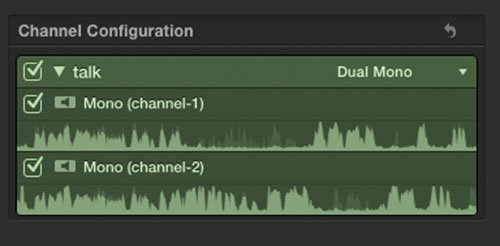
and the other file look like this?:
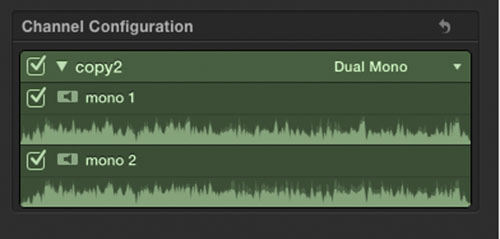
Why would one appear this way:
and the other file look like this?:
Please Log in to join the conversation.
- Jonathan Levin
-
Topic Author
- Offline
- Platinum Member
-
Less
More
- Posts: 786
- Thank you received: 21
27 Mar 2015 16:50 #61998
by Jonathan Levin
Replied by Jonathan Levin on topic New audio import problem?
GGAAAHH....so frustrating!!!!
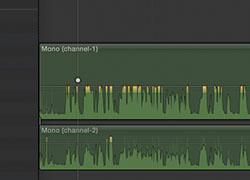
If I select one audio file in the browser and "Open in Timeline" I get this which is great:
But if I do exactly the same thing on another audio clip, I get this!!!!:
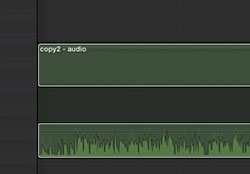
The first example I can alter each channel. And I am not sure why they are behaving differently!!!!
May be time for an early happy hour
If I select one audio file in the browser and "Open in Timeline" I get this which is great:
But if I do exactly the same thing on another audio clip, I get this!!!!:
The first example I can alter each channel. And I am not sure why they are behaving differently!!!!
May be time for an early happy hour
Please Log in to join the conversation.


28 Mar 2015 02:18 #62028
by BenB
Replied by BenB on topic New audio import problem?
First image is of an audio clip connected to a different on in the Primary Storyline.
Second image is of a single clip with the "Expand Audio/Video" command.
Apples to onions.
Second image is of a single clip with the "Expand Audio/Video" command.
Apples to onions.
Please Log in to join the conversation.
- Jonathan Levin
-
Topic Author
- Offline
- Platinum Member
-
Less
More
- Posts: 786
- Thank you received: 21
28 Mar 2015 16:20 #62035
by Jonathan Levin
Replied by Jonathan Levin on topic New audio import problem?
Thanks BenB.
I think I've sorted this out.
The channels with Mono (channel 1) and Mono (channel 2) are the channels of the original audio that was recorded with the the video. The channels that just say Mono 1 and Mono 2 are the channels from the ext. recorder. All making sense to me. after expanding everything....
JL
I think I've sorted this out.
The channels with Mono (channel 1) and Mono (channel 2) are the channels of the original audio that was recorded with the the video. The channels that just say Mono 1 and Mono 2 are the channels from the ext. recorder. All making sense to me. after expanding everything....
JL
Please Log in to join the conversation.
