




- Posts: 25
- Thank you received: 1
3 Post Moderation Rule for New Boarders (25 Jan 2021)
New boarders will have their posts moderated - Don't worry if you cannot see your post immediately.
Move libraries from local location to network drive
26 Mar 2015 10:16 #61926
by ShortyDK
Move libraries from local location to network drive was created by ShortyDK
Hello ya'll.
I've always been able to get awesome help quick in here, so I'm hoping you guys can help - again I am looking to move my libraries from a local location folder on my iMac to a network drive - and hense forth import media into that same network drive-location.
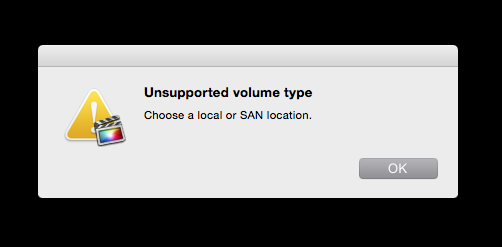
I tried copying a library into the network drive and opening it in Final Cut Pro X, but I got an error (see attachment).
Furthermore, I have been able to find the preferences, where I can change the default location for importing media.
Thanks for your help
Best regards,
ShortyDK
I've always been able to get awesome help quick in here, so I'm hoping you guys can help - again
I am looking to move my libraries from a local location folder on my iMac to a network drive - and hense forth import media into that same network drive-location.I tried copying a library into the network drive and opening it in Final Cut Pro X, but I got an error (see attachment).
Furthermore, I have been able to find the preferences, where I can change the default location for importing media.
Thanks for your help
Best regards,
ShortyDK
Please Log in to join the conversation.


26 Mar 2015 10:40 - 26 Mar 2015 10:41 #61927
by BenB
Replied by BenB on topic Move libraries from local location to network drive
What type of network, what type of network drive?
Default location for importing media into a Library is in the Inspector. Select the Library in the Libraries pane, go to the Inspector. The top section is Storage Location, where you'll see a Modify Settings button.
Default location for importing media into a Library is in the Inspector. Select the Library in the Libraries pane, go to the Inspector. The top section is Storage Location, where you'll see a Modify Settings button.
Last edit: 26 Mar 2015 10:41 by BenB.
Please Log in to join the conversation.
26 Mar 2015 11:44 - 26 Mar 2015 11:44 #61928
by ShortyDK
Replied by ShortyDK on topic Move libraries from local location to network drive
I believe the network is an SMB - if that makes any sense?
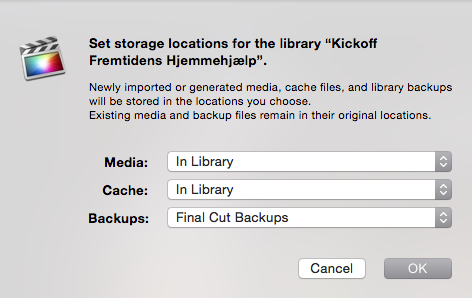
When selecting a Library, I found "Modify Settings" in the Inspector, but when I clicked on it, it only allows me opportunities to set storage locations for that specific library (see attachment)... I have one library for each individual video project... Was that a mistake?
When selecting a Library, I found "Modify Settings" in the Inspector, but when I clicked on it, it only allows me opportunities to set storage locations for that specific library (see attachment)... I have one library for each individual video project... Was that a mistake?
Last edit: 26 Mar 2015 11:44 by ShortyDK.
Please Log in to join the conversation.
- ronny courtens
-

- Offline
- Moderator
-

Less
More
- Posts: 4455
- Thank you received: 962
26 Mar 2015 12:32 #61930
by ronny courtens
Replied by ronny courtens on topic Move libraries from local location to network drive
You cannot store Libraries on an SMB network drive. Needs to be SFP.
- Ronny
- Ronny
Please Log in to join the conversation.
26 Mar 2015 12:36 #61931
by ShortyDK
Replied by ShortyDK on topic Move libraries from local location to network drive
You gotta be kidding me, Ronny! We specifically had our own network drive installed to store these high volume files  There is no workaround to make it possible?
 Please Log in to join the conversation.
- ronny courtens
-
- Offline
- Moderator
-
Less
More
- Posts: 4455
- Thank you received: 962
26 Mar 2015 13:11 - 26 Mar 2015 15:53 #61932
by ronny courtens
Replied by ronny courtens on topic Move libraries from local location to network drive
Hi Shorty,
Video networking is a very serious matter, I never make jokes about that
You can store FCP X Libraries on DAS (direct attached storage), on Xsan volumes or on any NAS drive using the NFS protocol. The SMB protocol does not work. This has been extensively documented, anyone who has installed that drive for you knows (or at least: should know) that you cannot use SMB with FCP X Libraries.
Workarounds:
1. Ask your systems integrator to use NFS instead of SMB and all your problems are solved.
2. If he doesn't know how to do this, or if the system you have bought is not capable of using the NFS protocol:
- You can store your Libraries locally and import your media from the SMB drive leaving files in place. That should work.
- If you really want to store your Libraries on an SMB network drive you can use the Sparse Disk Images workflow. Libraries stored inside Sparse Disk Images can be opened from an SMB or AFP network drive.
I see you are from Denmark. My friends at Metronome Productions Copenhagen are now running a shared storage system with 30 FCP X clients attached to a 98TB network drive over NFS. Works like a charm and speeds are impressive, even with all Libraries and Cache stored on the SAN. So if you can, switch to NFS. If not, use Sparse Disk Images or keep your Libraries local and your media on the SMB drive.
- Ronny
Video networking is a very serious matter, I never make jokes about that
You can store FCP X Libraries on DAS (direct attached storage), on Xsan volumes or on any NAS drive using the NFS protocol. The SMB protocol does not work. This has been extensively documented, anyone who has installed that drive for you knows (or at least: should know) that you cannot use SMB with FCP X Libraries.
Workarounds:
1. Ask your systems integrator to use NFS instead of SMB and all your problems are solved.
2. If he doesn't know how to do this, or if the system you have bought is not capable of using the NFS protocol:
- You can store your Libraries locally and import your media from the SMB drive leaving files in place. That should work.
- If you really want to store your Libraries on an SMB network drive you can use the Sparse Disk Images workflow. Libraries stored inside Sparse Disk Images can be opened from an SMB or AFP network drive.
I see you are from Denmark. My friends at Metronome Productions Copenhagen are now running a shared storage system with 30 FCP X clients attached to a 98TB network drive over NFS. Works like a charm and speeds are impressive, even with all Libraries and Cache stored on the SAN. So if you can, switch to NFS. If not, use Sparse Disk Images or keep your Libraries local and your media on the SMB drive.
- Ronny
Last edit: 26 Mar 2015 15:53 by ronny courtens.
Please Log in to join the conversation.
26 Mar 2015 13:33 #61933
by ShortyDK
Replied by ShortyDK on topic Move libraries from local location to network drive
Haha, fair enough, my mistake 
I will definitely ask whether it is possible to use NFS or SFP instead of SMB, thanks for the tip!
In relation to your solution where we leave the libraries in place and import the media from SMB drive leaving them in place, that places me in a different problem. We are two users on this iMac and we would like to have access to all the libraries we each create - I suppose that is not possible if we leave the individual libraries in place on the computer in each of our accounts?
If everything else fails I will try looking into the Sparse Disk Images-solution, but for now I will move forward with the NFS or SFP possibility - thanks a lot!
I will definitely ask whether it is possible to use NFS or SFP instead of SMB, thanks for the tip!
In relation to your solution where we leave the libraries in place and import the media from SMB drive leaving them in place, that places me in a different problem. We are two users on this iMac and we would like to have access to all the libraries we each create - I suppose that is not possible if we leave the individual libraries in place on the computer in each of our accounts?
If everything else fails I will try looking into the Sparse Disk Images-solution, but for now I will move forward with the NFS or SFP possibility - thanks a lot!
Please Log in to join the conversation.
- ronny courtens
-
- Offline
- Moderator
-
Less
More
- Posts: 4455
- Thank you received: 962
26 Mar 2015 15:51 - 26 Mar 2015 15:55 #61939
by ronny courtens
Replied by ronny courtens on topic Move libraries from local location to network drive
I mistakingly mentioned SFP, that's not a network protocol. It should be NFS.
Oh yes you can collaborate with local Libraries. Some people do this even with Xsan or NFS storage networks.
Create the Master Library on Edit station 1, import media from the network drive leaving files in place. Store everything outside of the library to keep it as lean as possible.
Then you can collaborate using many different workflows. Here's one:
Create a Master Library for your production on Edit Station 1.
Set all Library storage locations to the network drive, except Backups (which should always remain local).
Import your media from the network drive, leaving Files in Place.
Then make a copy of the Library and put it on Edit Station 2. As everything points to the network drive, media should relink immediately.
From here you can work in any way you want: export XML, use Transfer Libraries to copy Projects from one Library to the other... there are many different workflows.
Once you know how you will work with the network drive (SMB or NFS, local or centralized, sparse images or not), drop me an e-mail and I will explain how you can best collaborate from this system: ronnycourtens at mac dot com.
- Ronny
Oh yes you can collaborate with local Libraries. Some people do this even with Xsan or NFS storage networks.
Create the Master Library on Edit station 1, import media from the network drive leaving files in place. Store everything outside of the library to keep it as lean as possible.
Then you can collaborate using many different workflows. Here's one:
Create a Master Library for your production on Edit Station 1.
Set all Library storage locations to the network drive, except Backups (which should always remain local).
Import your media from the network drive, leaving Files in Place.
Then make a copy of the Library and put it on Edit Station 2. As everything points to the network drive, media should relink immediately.
From here you can work in any way you want: export XML, use Transfer Libraries to copy Projects from one Library to the other... there are many different workflows.
Once you know how you will work with the network drive (SMB or NFS, local or centralized, sparse images or not), drop me an e-mail and I will explain how you can best collaborate from this system: ronnycourtens at mac dot com.
- Ronny
Last edit: 26 Mar 2015 15:55 by ronny courtens.
Please Log in to join the conversation.
- ronny courtens
-
- Offline
- Moderator
-
Less
More
- Posts: 4455
- Thank you received: 962
26 Mar 2015 17:47 #61945
by ronny courtens
Replied by ronny courtens on topic Move libraries from local location to network drive
By the way, we had another thread about a similar problem when working with the AFP protocol:
www.fcp.co/fcp-forum/4-final-cut-pro-x-f...ied-file-error#61944
Switching the server to NFS not only solved the problem, the system also runs faster now than over AFP or SMB.
- Ronny
www.fcp.co/fcp-forum/4-final-cut-pro-x-f...ied-file-error#61944
Switching the server to NFS not only solved the problem, the system also runs faster now than over AFP or SMB.
- Ronny
Please Log in to join the conversation.
