


- Posts: 12
- Thank you received: 0
3 Post Moderation Rule for New Boarders (25 Jan 2021)
New boarders will have their posts moderated - Don't worry if you cannot see your post immediately.
Can not write file
- LDMartin1959
-
 Topic Author
- Offline
- New Member
-

Less
More
25 Mar 2015 18:57 #61880
by LDMartin1959
Can not write file was created by LDMartin1959
I am a novice FCP user so this may be a basic question but I have been unable to find information which seems to address this issue, either on the internet in general or here on these forums. I apologize if this is in fact similar to another post elsewhere.
I suddenly can not edit a project. Final Cut X is telling me that it can not write the file, due either to a permissions issue or insufficiant space. Yet, neither of these seems likely. Here is why:
Permissions: The project file is on an external drive and as such, permissions do not appear to be a relevant issue.
Insufficiant space: I have roughly 1/2 tb of available space on the external drive where the file resides. The file in question is several hundred gb in size, but given the amount of available space on the drive, I do not think that should be the issue.
FCP is up to date with all the latest updated from Apple, as is the OS.
Anyone got any suggestions? Any help would be greatly appreciate.
I suddenly can not edit a project. Final Cut X is telling me that it can not write the file, due either to a permissions issue or insufficiant space. Yet, neither of these seems likely. Here is why:
Permissions: The project file is on an external drive and as such, permissions do not appear to be a relevant issue.
Insufficiant space: I have roughly 1/2 tb of available space on the external drive where the file resides. The file in question is several hundred gb in size, but given the amount of available space on the drive, I do not think that should be the issue.
FCP is up to date with all the latest updated from Apple, as is the OS.
Anyone got any suggestions? Any help would be greatly appreciate.
Please Log in to join the conversation.
- ronny courtens
-

- Offline
- Moderator
-

Less
More
- Posts: 4455
- Thank you received: 962
25 Mar 2015 19:05 #61881
by ronny courtens
Replied by ronny courtens on topic Can not write file
Hi Lesley, welcome to the forum.
You say the file is several hundreds of GB. How many GB exactly and how much space do you have left on your system drive?
- Ronny
You say the file is several hundreds of GB. How many GB exactly and how much space do you have left on your system drive?
- Ronny
Please Log in to join the conversation.
- LDMartin1959
-
Topic Author
- Offline
- New Member
-
Less
More
- Posts: 12
- Thank you received: 0
25 Mar 2015 19:17 #61882
by LDMartin1959
Replied by LDMartin1959 on topic Can not write file
Ronny, thanks for the welcome. It’s nice for a change to be welcomed as so many other technical forums I’ve been on seem very unwelcoming. And don’t dare ask a newbie question!! 
The project file in question is approximately 525gb, my system drive has roughly 800gb available. And as I indicated in my inital post, the external drive which is home to the project file has roughly 500gb available.
Added note, on the off chance the project file was corrupted and somehow causing this issue, I’ve initiated a restore from my TimeMachine. Not sure at this point if that was a smart idea or not. :huh:
The project file in question is approximately 525gb, my system drive has roughly 800gb available. And as I indicated in my inital post, the external drive which is home to the project file has roughly 500gb available.
Added note, on the off chance the project file was corrupted and somehow causing this issue, I’ve initiated a restore from my TimeMachine. Not sure at this point if that was a smart idea or not. :huh:
Please Log in to join the conversation.
- ronny courtens
-
- Offline
- Moderator
-
Less
More
- Posts: 4455
- Thank you received: 962
25 Mar 2015 19:32 - 25 Mar 2015 19:33 #61883
by ronny courtens
Replied by ronny courtens on topic Can not write file
No problem, this is a very user-friendly forum and we respect everyone here 
I don't think it's your project file.
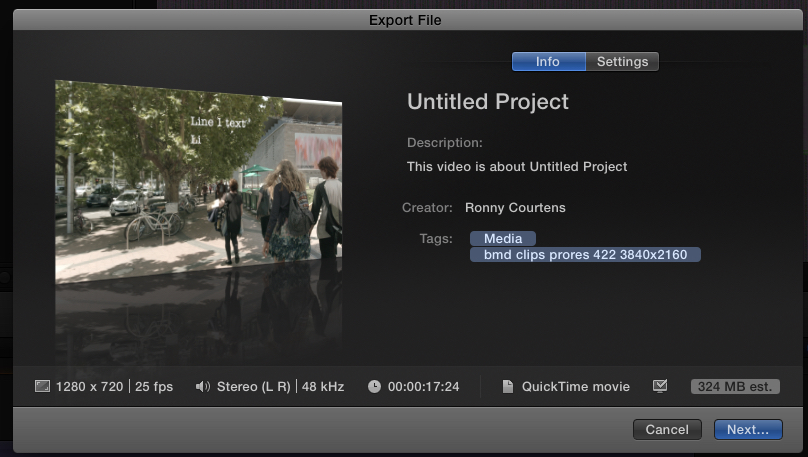
So you have put a 525 GB clip on the FCP X timeline and now you want to export the timeline to your external drive, is that correct? If so, what is your estimated export file size? Let me explain:
When you click Share and you select an export format, a window opens where you can change the Settings for your export and where you can press Next to confirm the share operation (see screenshot). Can you post a screenshot of that window? If not, what is the estimated file size that you can see at the bottom right of the window?
- Ronny
I don't think it's your project file.
So you have put a 525 GB clip on the FCP X timeline and now you want to export the timeline to your external drive, is that correct? If so, what is your estimated export file size? Let me explain:
When you click Share and you select an export format, a window opens where you can change the Settings for your export and where you can press Next to confirm the share operation (see screenshot). Can you post a screenshot of that window? If not, what is the estimated file size that you can see at the bottom right of the window?
- Ronny
Last edit: 25 Mar 2015 19:33 by ronny courtens.
Please Log in to join the conversation.

25 Mar 2015 19:35 #61884
by BenB
Replied by BenB on topic Can not write file
HEY KID! GET THE HELL OFF MY LAWN!
Just kidding, welcome! There are no newbie questions, just newbie answers, and then stuff that makes no sense. I mean, how the hell does that damned computer even work in the first place? Helicopters! There's one for ya! How the hell do they even fly? Anyway...
What are the total capacities of these drives? That seems like plenty of free space, but just curious, to get the numbers nailed down.
Permissions can in fact be an issue with external drives. Did this just suddenly occur when you opened this Library one day, or were you having issues leading up to it? Were any changes made to your system at all (new software installed, old software uninstalled, new peripherals, etc)?
If you select the external drive, Command-i, bottom of the Get Info window, can you give us a screen shot of that? Just curious...
Just kidding, welcome! There are no newbie questions, just newbie answers, and then stuff that makes no sense. I mean, how the hell does that damned computer even work in the first place? Helicopters! There's one for ya! How the hell do they even fly? Anyway...
What are the total capacities of these drives? That seems like plenty of free space, but just curious, to get the numbers nailed down.
Permissions can in fact be an issue with external drives. Did this just suddenly occur when you opened this Library one day, or were you having issues leading up to it? Were any changes made to your system at all (new software installed, old software uninstalled, new peripherals, etc)?
If you select the external drive, Command-i, bottom of the Get Info window, can you give us a screen shot of that? Just curious...
Please Log in to join the conversation.
- LDMartin1959
-
Topic Author
- Offline
- New Member
-
Less
More
- Posts: 12
- Thank you received: 0
25 Mar 2015 19:57 - 25 Mar 2015 20:35 #61890
by LDMartin1959
Replied by LDMartin1959 on topic Can not write file
Ronny: No, I am not trying to export yet, I am just trying to do more editing. The first edit I make results in the error message popping up and the only option is to select “okay” and close FCP.
BenB: Helicopters don’t fly, they just fall horizontally!
Drive capacities: The system drive is a 2tb, the external is also a 2tb.
Permissions: My belief about permissions was based on the fact that DiskUtility only provides a “Repair Permissions” option for the system drive. I stand corrected. And yes, the problem seemed to just magically appear one day. The last time I actually edited the project, everything seemed fine. Then a couple days later, I went back in and the error situation began. There have been no changes to the system, either hardware or software.
I have attached a screenshot, however the values show are inaccurate inasmuch as I reformated the drive and am currently in the middle of a restore of the files from my TimeMachine. As I said, it may not have been a smart idea, but as a former Windows victim…er, user …the first thing you learn is that when you have a problem is that the official answer from Microsoft is to delete and reinstall everything. Old habits die hard.
BenB: Helicopters don’t fly, they just fall horizontally!
Drive capacities: The system drive is a 2tb, the external is also a 2tb.
Permissions: My belief about permissions was based on the fact that DiskUtility only provides a “Repair Permissions” option for the system drive. I stand corrected. And yes, the problem seemed to just magically appear one day. The last time I actually edited the project, everything seemed fine. Then a couple days later, I went back in and the error situation began. There have been no changes to the system, either hardware or software.
I have attached a screenshot, however the values show are inaccurate inasmuch as I reformated the drive and am currently in the middle of a restore of the files from my TimeMachine. As I said, it may not have been a smart idea, but as a former Windows victim…er, user
…the first thing you learn is that when you have a problem is that the official answer from Microsoft is to delete and reinstall everything. Old habits die hard. 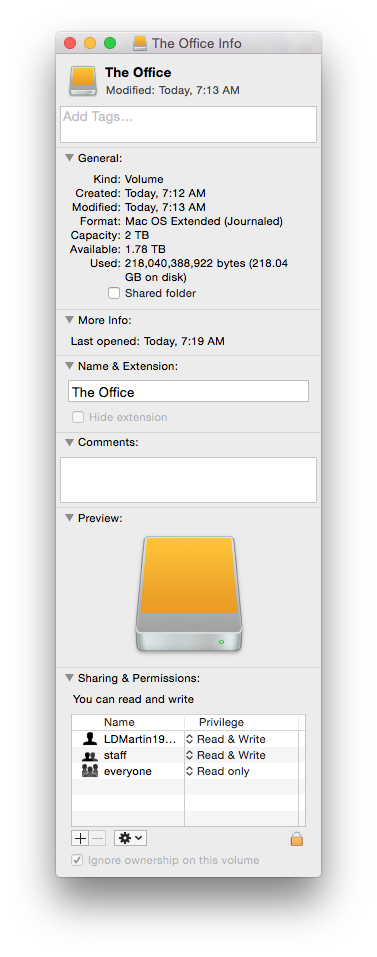
Last edit: 25 Mar 2015 20:35 by LDMartin1959. Reason: grammer
Please Log in to join the conversation.
- ronny courtens
-
- Offline
- Moderator
-
Less
More
- Posts: 4455
- Thank you received: 962
26 Mar 2015 21:00 #61950
by ronny courtens
Replied by ronny courtens on topic Can not write file
Hi Leslie,
Now THAT is very drastic
Keep us posted on the progress you are making with this issue.
- Ronny
Now THAT is very drastic
Keep us posted on the progress you are making with this issue.
- Ronny
Please Log in to join the conversation.
- LDMartin1959
-
Topic Author
- Offline
- New Member
-
Less
More
- Posts: 12
- Thank you received: 0
26 Mar 2015 22:54 #61957
by LDMartin1959
Replied by LDMartin1959 on topic Can not write file
I discovered that some file types had been associated with copies of apps in my TimeMachine. Not sure how that happened. And I'm not sure that was the cause or even a factor in the problem I was experiencing. But between fixing the associations and restoring the project file from my TimeMachine, it looks like things are back to normal. (sigh)
Please Log in to join the conversation.
27 Mar 2015 00:12 #61959
by BenB
Replied by BenB on topic Can not write file
I'd be tempted to run Disk Warrior on that drive. If it can't fix something, that drive has major issues and may die. I'm sure I'm over reacting. But that just seems not so kosher to me.
OR you needed to run maintenance before the last TimeMachine backup (Disk Utility, Disk Warrior).
I dunno, but I'd be nervous, and perhaps look for a more reliable, professional backup app, like Carbon Copy Cloner.
Again, I may be over reacting...
OR you needed to run maintenance before the last TimeMachine backup (Disk Utility, Disk Warrior).
I dunno, but I'd be nervous, and perhaps look for a more reliable, professional backup app, like Carbon Copy Cloner.
Again, I may be over reacting...
Please Log in to join the conversation.
- LDMartin1959
-
Topic Author
- Offline
- New Member
-
Less
More
- Posts: 12
- Thank you received: 0
27 Mar 2015 16:49 #61997
by LDMartin1959
Replied by LDMartin1959 on topic Can not write file
They say there's no such thing as being too rich, too thin, or too paranoid. If I had my way I'd have quadruple the storage I have for back-ups and keep multiple mirrors of everything. My philosophy sorta runs along the lines of: 'no matter how many back up copies I have, I should probably have at least one more.' As it is, I can only afford one on-site back up (TimeMachine) and BackBlaze.
Not familiar with Disk Warrior. I'll check it out. In all likelihood, I'm gonna guess that I probably did something to screw things up. Not sure what, but odd are, I'm at fault.
Not familiar with Disk Warrior. I'll check it out. In all likelihood, I'm gonna guess that I probably did something to screw things up. Not sure what, but odd are, I'm at fault.
Please Log in to join the conversation.
28 Mar 2015 02:21 #62029
by BenB
Replied by BenB on topic Can not write file
How you backup, and with what software, and with what options all make a vast difference.
Carbon Copy Cloner lets me to incremental backups, and do various levels of error checking, that TimeMachine simply doesn't afford you. It also gives me reports about each backup. What went right, what went wrong, etc.
Disk Warrior, simply to keep a drive cancer free, period.
Carbon Copy Cloner lets me to incremental backups, and do various levels of error checking, that TimeMachine simply doesn't afford you. It also gives me reports about each backup. What went right, what went wrong, etc.
Disk Warrior, simply to keep a drive cancer free, period.
Please Log in to join the conversation.
- LDMartin1959
-
Topic Author
- Offline
- New Member
-
Less
More
- Posts: 12
- Thank you received: 0
28 Mar 2015 02:41 #62030
by LDMartin1959
Replied by LDMartin1959 on topic Can not write file
BenB, I realize TimeMachine has a number of limitations in comparison, but I'm not sure I need the granularity of something like a Carbon Copy Cloner. I understand about Disk Warrior, and I will look into it further. I took a peak at it earlier and was a bit taken aback at the price. At least because at the moment it is not in the budget.
Please Log in to join the conversation.
