


- Posts: 80
- Thank you received: 5
3 Post Moderation Rule for New Boarders (25 Jan 2021)
New boarders will have their posts moderated - Don't worry if you cannot see your post immediately.
Importing XDCam
- Bluebicycle
-
 Topic Author
- Offline
- Premium Member
-

Less
More
23 Mar 2015 10:30 #61739
by Bluebicycle
Importing XDCam was created by Bluebicycle
I've posted on this topic before, but didn't get a response, so thought I'd try again, as it's driving me nuts.
When Importing XDCam camera rushes, Apple say you need a plugin:
support.apple.com/en-gb/HT202252
You need to install this:
www.sonycreativesoftware.com/pdzk-lt2
Install and it works, but in FCP the field dominance is set to "none", when inspecting the files. I'm working with PAL SD 720x576 50i files, which are UK standard "upper field first" and by default, FCP is interpreting them as being "lower first",(e.g. like DV) resulting in FCP playing out the fields in the wrong order, and unusable jerky motion, (when displayed on a monitor that displays fields.)
A workaround is to select all files and change to "upper" after import, but it is so easy to forget and is an absolute nightmare to discover a clip is wrong, once the edited piece has been exported. You
often don't notice until it is too late, when working with computer screens.
I've contacted Sony about this, but had no response. Maybe it's an FCP bug. Others must be experiencing the same thing, as I can't believe everyone out there is only working in progressive.
Any feedback welcome. In the meantime I'm thinking of going back to XDCam Transfer, until it's resolved.
John
When Importing XDCam camera rushes, Apple say you need a plugin:
support.apple.com/en-gb/HT202252
You need to install this:
www.sonycreativesoftware.com/pdzk-lt2
Install and it works, but in FCP the field dominance is set to "none", when inspecting the files. I'm working with PAL SD 720x576 50i files, which are UK standard "upper field first" and by default, FCP is interpreting them as being "lower first",(e.g. like DV) resulting in FCP playing out the fields in the wrong order, and unusable jerky motion, (when displayed on a monitor that displays fields.)
A workaround is to select all files and change to "upper" after import, but it is so easy to forget and is an absolute nightmare to discover a clip is wrong, once the edited piece has been exported. You
often don't notice until it is too late, when working with computer screens.
I've contacted Sony about this, but had no response. Maybe it's an FCP bug. Others must be experiencing the same thing, as I can't believe everyone out there is only working in progressive.
Any feedback welcome. In the meantime I'm thinking of going back to XDCam Transfer, until it's resolved.
John
Please Log in to join the conversation.
- ronny courtens
-

- Offline
- Moderator
-

Less
More
- Posts: 4455
- Thank you received: 962
23 Mar 2015 11:02 - 23 Mar 2015 11:11 #61740
by ronny courtens
Replied by ronny courtens on topic Importing XDCam
Hi John,
The XAVC/XDCAM plugin does not set a flag for XDCAM SD interlaced footage, that's why FCP X interprets it as "None". XDCAM HD 50i however is correctly flagged as "Upper Field First".
XDCAM SD is a dying format, so I don't expect Sony to do something about this anymore. Sony is notorious for not doing much about improving compatibility of their camera formats with any NLE, even not with their own Media 100 (-:
So you can group-select the imported files and set the correct field order to all clips at once (which takes 2 seconds), or you can use XDCAM Transfer to convert the files. In both cases you will have to make sure you don't forget to do this if you want your clips to play at the correct field order.
- Ronny
The XAVC/XDCAM plugin does not set a flag for XDCAM SD interlaced footage, that's why FCP X interprets it as "None". XDCAM HD 50i however is correctly flagged as "Upper Field First".
XDCAM SD is a dying format, so I don't expect Sony to do something about this anymore. Sony is notorious for not doing much about improving compatibility of their camera formats with any NLE, even not with their own Media 100 (-:
So you can group-select the imported files and set the correct field order to all clips at once (which takes 2 seconds), or you can use XDCAM Transfer to convert the files. In both cases you will have to make sure you don't forget to do this if you want your clips to play at the correct field order.
- Ronny
Last edit: 23 Mar 2015 11:11 by ronny courtens.
Please Log in to join the conversation.
- Bluebicycle
-
Topic Author
- Offline
- Premium Member
-
Less
More
- Posts: 80
- Thank you received: 5
23 Mar 2015 12:10 #61741
by Bluebicycle
Replied by Bluebicycle on topic Importing XDCam
HI Ronnie
thanks that clears things up. Your right it's a simple job to set afterwards, I had a fairly non-techy assistant so remembering was sometimes a problem. I think you are saying that it would be the same problem even if I used XDCam Transfer, with SD, although I don't recall having the problem when I used it with FCP7.
One fix, would be to get the cameras to shoot 1080i, 50Mbit, which wouldn't create larger files, and edit those into an SD Project along with the SD live coverage. Could you forsee any problem with that workflow.? I'm using a new MacPro 6 core.
I can't easliy work in HD, my MovieRecorder recordings are SD, and unbelievably ,BBC2, isn't HD in Scotland, and the whole show has to be delivered on DigiBeta!.
I really must get a decent monitor hooked up that displays fields.
thanks that clears things up. Your right it's a simple job to set afterwards, I had a fairly non-techy assistant so remembering was sometimes a problem. I think you are saying that it would be the same problem even if I used XDCam Transfer, with SD, although I don't recall having the problem when I used it with FCP7.
One fix, would be to get the cameras to shoot 1080i, 50Mbit, which wouldn't create larger files, and edit those into an SD Project along with the SD live coverage. Could you forsee any problem with that workflow.? I'm using a new MacPro 6 core.
I can't easliy work in HD, my MovieRecorder recordings are SD, and unbelievably ,BBC2, isn't HD in Scotland, and the whole show has to be delivered on DigiBeta!.
I really must get a decent monitor hooked up that displays fields.
Please Log in to join the conversation.
- ronny courtens
-
- Offline
- Moderator
-
Less
More
- Posts: 4455
- Thank you received: 962
23 Mar 2015 20:24 - 23 Mar 2015 20:24 #61769
by ronny courtens
Replied by ronny courtens on topic Importing XDCam
So currently your cameras record in the XDCAM MPEG IMX SD codec? I think the reason why the field order gets messed up by the plugin is that the XDCAM format can also use DVCAM (Lower First) as an SD recording option, and the plugin does not see the difference.
The 1080i50 MPEG HD 422 codec @50Mbit will give you a better picture quality to start with and you won't get any issues with field ordering, everything will be Upper First. But there could be another problem...
When you drop a 16:9 HD square pixel clip in an anamorphic PAL SD timeline the square pixel video does not fit in the non-square pixel frame:
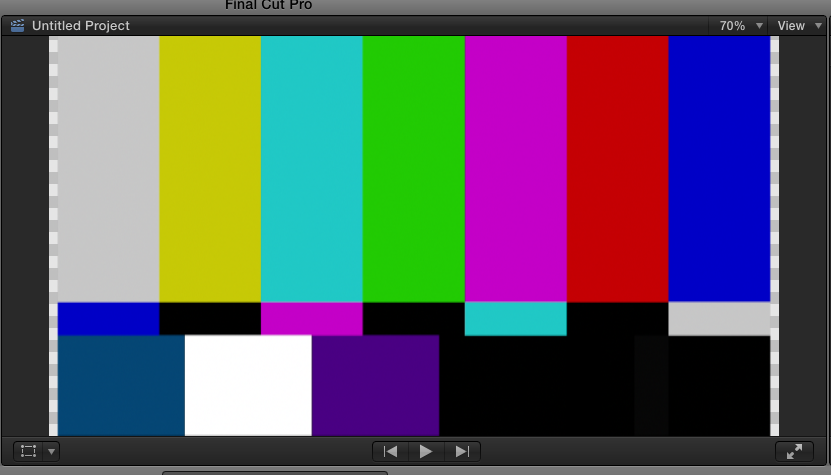
That's because PAL SD anamorphic is not true 16:9. To solve this you would have to set Spatial Conform to Fill for every HD clip. You can do this for all clips in the browser at once, but again it's an extra action you need to undertake. PAL Anamorphic SD is indeed a problem-child in the modern square HD world (-:
Of course this is something that you will notice much easier while editing than a wrong field order. But I would advise you to test this workflow before making any decisions.
- Ronny
The 1080i50 MPEG HD 422 codec @50Mbit will give you a better picture quality to start with and you won't get any issues with field ordering, everything will be Upper First. But there could be another problem...
When you drop a 16:9 HD square pixel clip in an anamorphic PAL SD timeline the square pixel video does not fit in the non-square pixel frame:
That's because PAL SD anamorphic is not true 16:9. To solve this you would have to set Spatial Conform to Fill for every HD clip. You can do this for all clips in the browser at once, but again it's an extra action you need to undertake. PAL Anamorphic SD is indeed a problem-child in the modern square HD world (-:
Of course this is something that you will notice much easier while editing than a wrong field order. But I would advise you to test this workflow before making any decisions.
- Ronny
Last edit: 23 Mar 2015 20:24 by ronny courtens.
Please Log in to join the conversation.
- Bluebicycle
-
Topic Author
- Offline
- Premium Member
-
Less
More
- Posts: 80
- Thank you received: 5
24 Mar 2015 09:20 #61786
by Bluebicycle
Replied by Bluebicycle on topic Importing XDCam
Yes Ronnie, I can see that would be a problem. 720x576 was never even a 4:3 ratio before 16:9, came along, as the square pixel equivalent would be 768x576. HD really is so much simpler now the pixels are square. If only there had been a way to also ditch fields and standardise on colour space in HD for TV.
I'll stick with SD for now and remember to set the flag, after import. Workarounds are always more palatable once you know what's going on. Thanks again.
One other question if you don't mind! I have a Sonnet SXS Thunderbolt Card reader. When I use it on my MBPro laptop using SXS1 32GB cards it goes like lightning, but the same reader plugged into the MacPro 6 Core, is importing barely real time. I've attached the driver display list which is identical on both machines. Maybe there is something else I need to install on the MacPro, that have on my laptop not shown in that list?
I'll stick with SD for now and remember to set the flag, after import. Workarounds are always more palatable once you know what's going on. Thanks again.
One other question if you don't mind! I have a Sonnet SXS Thunderbolt Card reader. When I use it on my MBPro laptop using SXS1 32GB cards it goes like lightning, but the same reader plugged into the MacPro 6 Core, is importing barely real time. I've attached the driver display list which is identical on both machines. Maybe there is something else I need to install on the MacPro, that have on my laptop not shown in that list?
Please Log in to join the conversation.
- ronny courtens
-
- Offline
- Moderator
-
Less
More
- Posts: 4455
- Thank you received: 962
24 Mar 2015 09:32 #61787
by ronny courtens
Replied by ronny courtens on topic Importing XDCam
If only there had been a way to also ditch fields and standardise on colour space in HD for TV.
Ha, you are asking for standards in television world? Blasphemy!!
As to your question about the Sonnet card reader: I don't haven any of these, so I cannot do the test myself. But this is a very interesting observation and I honestly have no clue what could be causing this difference.
Could you try to re-attach the driver list? It's not showing right now. Are both the MBPro and the NMPro running the same OS? I would certainly like to find out why the difference is so big.
- Ronny
Ha, you are asking for standards in television world? Blasphemy!!
As to your question about the Sonnet card reader: I don't haven any of these, so I cannot do the test myself. But this is a very interesting observation and I honestly have no clue what could be causing this difference.
Could you try to re-attach the driver list? It's not showing right now. Are both the MBPro and the NMPro running the same OS? I would certainly like to find out why the difference is so big.
- Ronny
Please Log in to join the conversation.
- Bluebicycle
-
Topic Author
- Offline
- Premium Member
-
Less
More
- Posts: 80
- Thank you received: 5
24 Mar 2015 09:51 #61789
by Bluebicycle
Replied by Bluebicycle on topic Importing XDCam
Not sure why the file wasn't there I've tried to insert below as well. Both Macs are running the same OS 10.10.2.
I faffed around for ages to get the files importing properly on my Macbook, as it was originally a problem on there too. I think it's something to do with the SXS1 cards only, do they use a different format than the later ones, i.e. 64GB, UDF?
I don't have any cards at home as they so expensive, and I don't own any, so am not able to do any tests
I faffed around for ages to get the files importing properly on my Macbook, as it was originally a problem on there too. I think it's something to do with the SXS1 cards only, do they use a different format than the later ones, i.e. 64GB, UDF?
I don't have any cards at home as they so expensive, and I don't own any, so am not able to do any tests
Please Log in to join the conversation.


24 Mar 2015 09:52 #61790
by rjvddoes
Replied by rjvddoes on topic Importing XDCam
Hi John,
You might want to check if you have the SxS UDF V2.1.1.1 Driver from Sony installed on your 6 core mac.
You can find it here:
www.sony.co.uk/pro/support/software/SET_.../20?log_success=true
If the link doesn't work because a login to the Sony resource site is required, you can register and do a search for UDF driver or try the following link:
www.vocas.nl/support/sony-sxs-pro-device-driver-en-udf-driver
Hope this helps.
Regards,
Robbert-Jan
You might want to check if you have the SxS UDF V2.1.1.1 Driver from Sony installed on your 6 core mac.
You can find it here:
www.sony.co.uk/pro/support/software/SET_.../20?log_success=true
If the link doesn't work because a login to the Sony resource site is required, you can register and do a search for UDF driver or try the following link:
www.vocas.nl/support/sony-sxs-pro-device-driver-en-udf-driver
Hope this helps.
Regards,
Robbert-Jan
Please Log in to join the conversation.
- Bluebicycle
-
Topic Author
- Offline
- Premium Member
-
Less
More
- Posts: 80
- Thank you received: 5
24 Mar 2015 10:03 #61791
by Bluebicycle
Replied by Bluebicycle on topic Importing XDCam
Thanks Robbert
I think I have that installed already. Maybe I need re-install in a different order. Here's the grab again as a Jpg this time
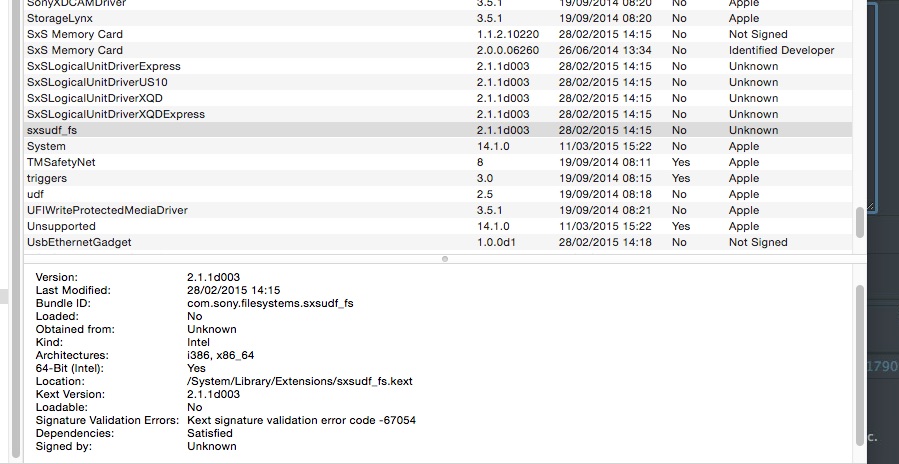
I think I have that installed already. Maybe I need re-install in a different order. Here's the grab again as a Jpg this time
Please Log in to join the conversation.
