


- Posts: 377
- Thank you received: 9
3 Post Moderation Rule for New Boarders (25 Jan 2021)
New boarders will have their posts moderated - Don't worry if you cannot see your post immediately.
use event clip layout?
22 Mar 2015 16:25 #61699
by dkag7
use event clip layout? was created by dkag7
Hi,
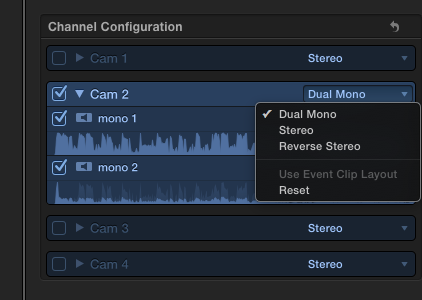
In the audio properties in the inspector window, under channel config, if you select the pull down to change the chanel config (stereo/dual mono/ etc) there is also a 'use event clip layout' selection. What is this and how to change the 'event clip layout?'
when working with multicam clips:
1. when adding in/out points etc... (editing the clip) in the event browser, the audio configuration for the clips never saves. If I select dual mono for the clip, for example, .. edit another clip, then come back to the clip I set to dual mono, it is set back again to stereo, why?
2. Once I change it again to dual mono, then take a portion of the clip to the timeline, I still need to go into the audio properties of the clip now on the timeline, and de-select 'use event clip layout' because the mono is only coming out one side. once use event clip layout is de selected, then the audio is correct coming out 2 speakers. Why do I always need to change this again once in the timeline? I'd imagine the event clip layout is what needs to be set right, but where to set it so the changes in the event clip (while working in the browser on a clips audio config) will stay that way once taken to the timeline..?
thanks
Kurt
In the audio properties in the inspector window, under channel config, if you select the pull down to change the chanel config (stereo/dual mono/ etc) there is also a 'use event clip layout' selection. What is this and how to change the 'event clip layout?'
when working with multicam clips:
1. when adding in/out points etc... (editing the clip) in the event browser, the audio configuration for the clips never saves. If I select dual mono for the clip, for example, .. edit another clip, then come back to the clip I set to dual mono, it is set back again to stereo, why?
2. Once I change it again to dual mono, then take a portion of the clip to the timeline, I still need to go into the audio properties of the clip now on the timeline, and de-select 'use event clip layout' because the mono is only coming out one side. once use event clip layout is de selected, then the audio is correct coming out 2 speakers. Why do I always need to change this again once in the timeline? I'd imagine the event clip layout is what needs to be set right, but where to set it so the changes in the event clip (while working in the browser on a clips audio config) will stay that way once taken to the timeline..?
thanks
Kurt
Please Log in to join the conversation.
- ronny courtens
-

- Offline
- Moderator
-

Less
More
- Posts: 4455
- Thank you received: 962
22 Mar 2015 17:25 #61701
by ronny courtens
Replied by ronny courtens on topic use event clip layout?
Hi Kurt,
When you have a clip in the Event that is Stereo and you make it Dual Mono, you are changing the Event clip layout.
The Event clip layout applies to the entire clip in the event, so you cannot set the Event clip layout to Dual Mono for one part of the clip in the event and to Stereo for another part of it, that's obvious.
When you modify the Event clip layout and you put the Event clip or any part of it into the timeline the clip in the timeline will have exactly the same layout as the clip in the Event. You can see this when you click on the little triangle on the channel configuration for the clip in the timeline: "Use Event clip layout" will be checked.
If you want to make the layout for the clip in the timeline different from the parent clip in the Event: de-select Use Event clip layout and you will be able to set a different audio channel configuration for the clip in the timeline.
- Ronny
When you have a clip in the Event that is Stereo and you make it Dual Mono, you are changing the Event clip layout.
The Event clip layout applies to the entire clip in the event, so you cannot set the Event clip layout to Dual Mono for one part of the clip in the event and to Stereo for another part of it, that's obvious.
When you modify the Event clip layout and you put the Event clip or any part of it into the timeline the clip in the timeline will have exactly the same layout as the clip in the Event. You can see this when you click on the little triangle on the channel configuration for the clip in the timeline: "Use Event clip layout" will be checked.
If you want to make the layout for the clip in the timeline different from the parent clip in the Event: de-select Use Event clip layout and you will be able to set a different audio channel configuration for the clip in the timeline.
- Ronny
Please Log in to join the conversation.
22 Mar 2015 17:41 #61703
by dkag7
Replied by dkag7 on topic use event clip layout?
Hi Ronny,
What I am trying to do is make it so the clip in the event, IS the same layout of the timeline, so when in the timeline I don't need to keep changing every clip so it is set correctly.
I don't know why, but choosing dual mono in the event clip, is not sounding 'dual mono. it is only coming out one channel (this is noticeable if one channel has less or very little volume). But do this in the timeline (set to dual mono) and it sounds correct.
So I keep needing to de select use event clip layout in the timeline clip so the audio will play dual mono out both channels instead of one (like it does in the event viewer).
When in the event viewer, you can select dual mono, but 'use event clip layout ' is greyed out. Only in the timeline is is selectable.
What I am trying to do is make it so the clip in the event, IS the same layout of the timeline, so when in the timeline I don't need to keep changing every clip so it is set correctly.
I don't know why, but choosing dual mono in the event clip, is not sounding 'dual mono. it is only coming out one channel (this is noticeable if one channel has less or very little volume). But do this in the timeline (set to dual mono) and it sounds correct.
So I keep needing to de select use event clip layout in the timeline clip so the audio will play dual mono out both channels instead of one (like it does in the event viewer).
When in the event viewer, you can select dual mono, but 'use event clip layout ' is greyed out. Only in the timeline is is selectable.
Please Log in to join the conversation.
22 Mar 2015 17:46 #61704
by dkag7
Replied by dkag7 on topic use event clip layout?
Please Log in to join the conversation.
- ronny courtens
-
- Offline
- Moderator
-
Less
More
- Posts: 4455
- Thank you received: 962
22 Mar 2015 18:16 - 22 Mar 2015 18:17 #61705
by ronny courtens
Replied by ronny courtens on topic use event clip layout?
Use event clip layout is not available in the Event, because you actually SET the event clip layout in the event.
When you set a layout for the event clip and you put the clip, or part of it, in the timeline the clip in the timeline will ALWAYS have exactly the same layout as the clip in the event.
But when you play a clip in the event it may SOUND differently than when you play the same clip in the timeline, especially if this is a stereo file and the volume of both channels is noticeably different. That's because the clip in the event plays back the audio channels as they are, but when you drop the clip on the timeline the audio channels are mapped to the stereo audio configuration of your timeline.
Anyway, I understand what you want to do, and here's how to do this:
Select the clip in the Event and set it to dual mono.
Then set the Pan mode to Stereo Left/Right and play the clip in the Event.
Now drop the clip onto the timeline. It should sound exactly the same as it plays in the Event.
- Ronny
When you set a layout for the event clip and you put the clip, or part of it, in the timeline the clip in the timeline will ALWAYS have exactly the same layout as the clip in the event.
But when you play a clip in the event it may SOUND differently than when you play the same clip in the timeline, especially if this is a stereo file and the volume of both channels is noticeably different. That's because the clip in the event plays back the audio channels as they are, but when you drop the clip on the timeline the audio channels are mapped to the stereo audio configuration of your timeline.
Anyway, I understand what you want to do, and here's how to do this:
Select the clip in the Event and set it to dual mono.
Then set the Pan mode to Stereo Left/Right and play the clip in the Event.
Now drop the clip onto the timeline. It should sound exactly the same as it plays in the Event.
- Ronny
Last edit: 22 Mar 2015 18:17 by ronny courtens.
Please Log in to join the conversation.
22 Mar 2015 18:38 - 22 Mar 2015 18:46 #61706
by dkag7
Replied by dkag7 on topic use event clip layout?
Thanks Ronny,
But I don't see pan mode at all in the event viewer...?
Here is a screenshot of my fop window layout and the audio settings as well..
But I don't see pan mode at all in the event viewer...?
Here is a screenshot of my fop window layout and the audio settings as well..
Attachment ScreenShot2015-03-22at11.45.12AM.png not found
Attachments:
Last edit: 22 Mar 2015 18:46 by dkag7.
Please Log in to join the conversation.
- ronny courtens
-
- Offline
- Moderator
-
Less
More
- Posts: 4455
- Thank you received: 962
22 Mar 2015 18:59 #61710
by ronny courtens
Replied by ronny courtens on topic use event clip layout?
Ah I see, this is a multicam clip. In that case you won't be able to set the Pan mode in the Event.
But when you set the Event multiclip to dual mono and you drop the clip onto the timeline it still will be Dual Mono and you won't have to change anything to play out the audio in both channels, correct?
- Ronny
But when you set the Event multiclip to dual mono and you drop the clip onto the timeline it still will be Dual Mono and you won't have to change anything to play out the audio in both channels, correct?
- Ronny
Please Log in to join the conversation.
22 Mar 2015 19:08 #61711
by dkag7
Replied by dkag7 on topic use event clip layout?
no, I need to de select use event clip layout, for every clip... fustrating.
Please Log in to join the conversation.
- ronny courtens
-
- Offline
- Moderator
-
Less
More
- Posts: 4455
- Thank you received: 962
22 Mar 2015 19:40 - 22 Mar 2015 19:43 #61712
by ronny courtens
Replied by ronny courtens on topic use event clip layout?
Well, that's strange.
I have tried to reproduce the issue.
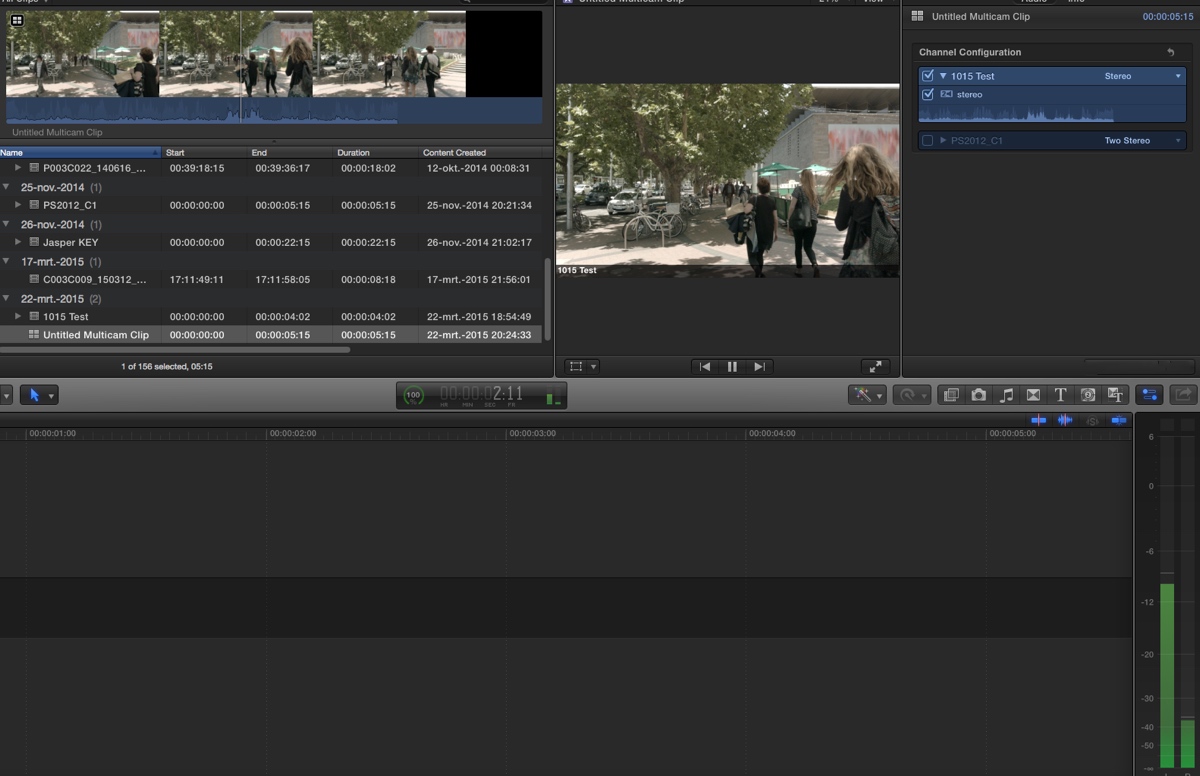
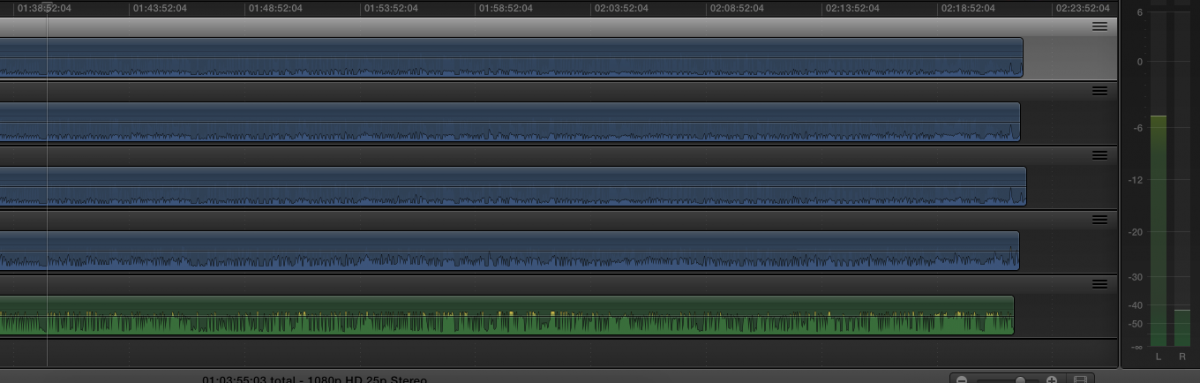
Here's a multicam clip with a stereo audio file that has 2 channels with different audio levels. When the event clip layout is set to Stereo and I play the clip the audio in the meters shows the audio exactly as it is: stereo with 2 different volumes:
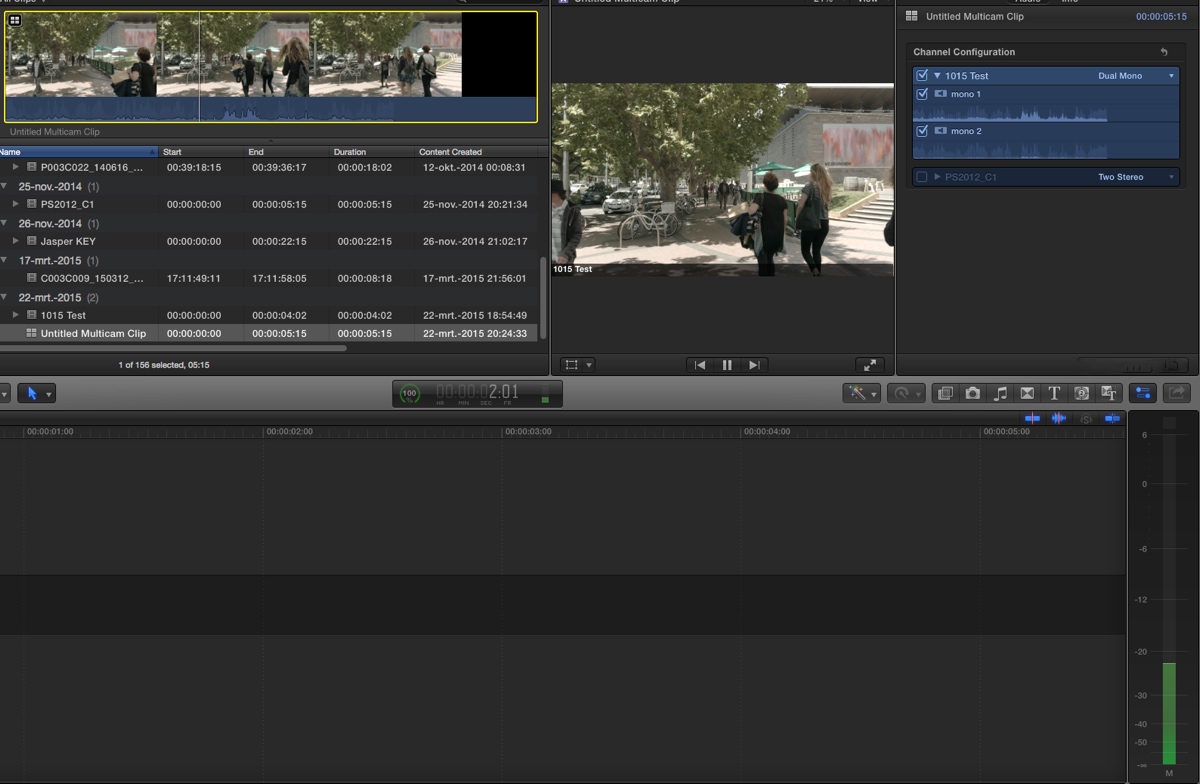
Now I change the event clip layout to Dual Mono. When I play the clip I see a mono channel in the audio meters, which is again correct:
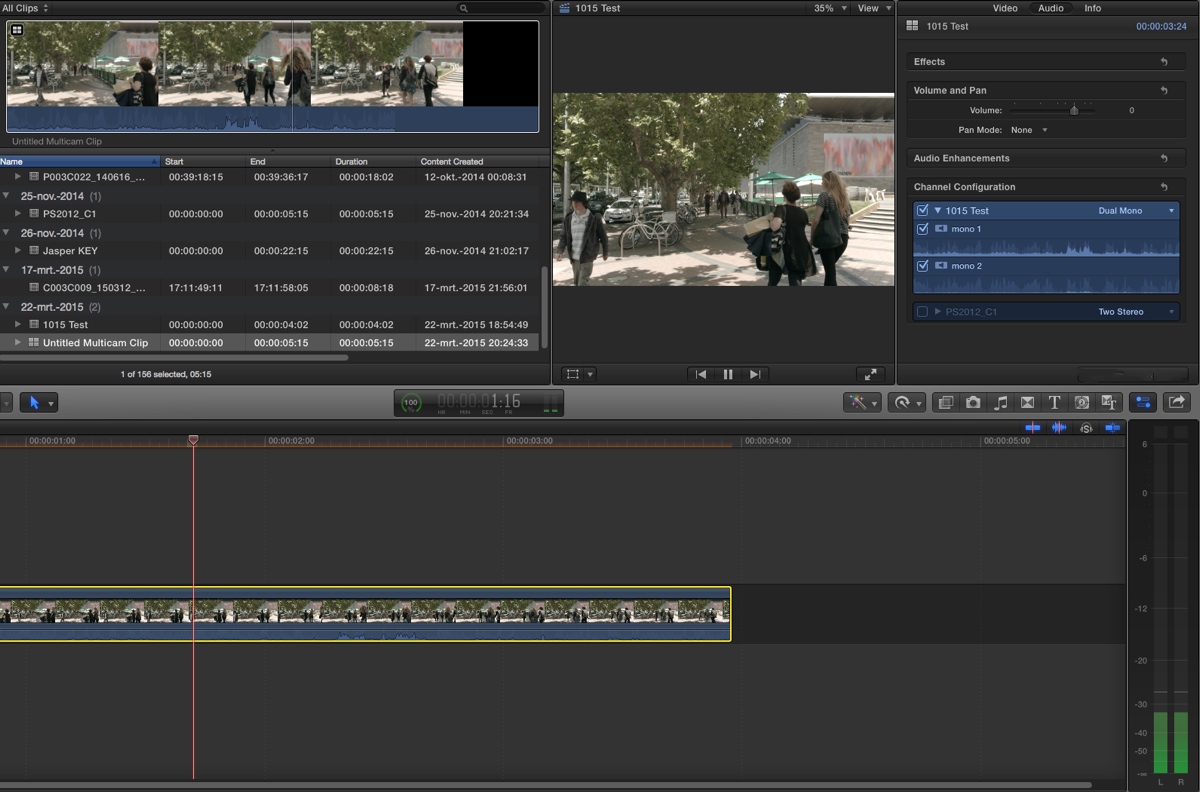
I drop the clip onto the timeline. The layout is Dual Mono, which is correct, and when i play the clip the audio plays in both channels, which again is correct:
So I don't need to disable the event layout to get correct playback. Am I missing something?
- Ronny
I have tried to reproduce the issue.
Here's a multicam clip with a stereo audio file that has 2 channels with different audio levels. When the event clip layout is set to Stereo and I play the clip the audio in the meters shows the audio exactly as it is: stereo with 2 different volumes:
Now I change the event clip layout to Dual Mono. When I play the clip I see a mono channel in the audio meters, which is again correct:
I drop the clip onto the timeline. The layout is Dual Mono, which is correct, and when i play the clip the audio plays in both channels, which again is correct:
So I don't need to disable the event layout to get correct playback. Am I missing something?
- Ronny
Last edit: 22 Mar 2015 19:43 by ronny courtens.
Please Log in to join the conversation.
22 Mar 2015 20:27 #61716
by dkag7
Replied by dkag7 on topic use event clip layout?
here is mine..
I also see this if the audio I select is from within a video clip as well.
Maybe it has something to do with the multicam clip itself, what angle is on/off within the multicam timeline..?
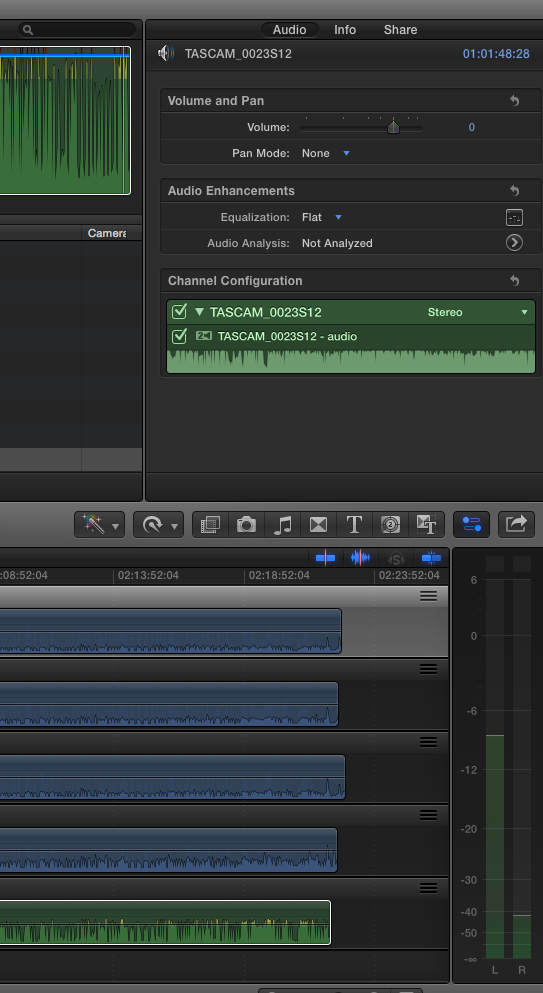
I also see this if the audio I select is from within a video clip as well.
Maybe it has something to do with the multicam clip itself, what angle is on/off within the multicam timeline..?
Please Log in to join the conversation.
22 Mar 2015 20:30 #61720
by dkag7
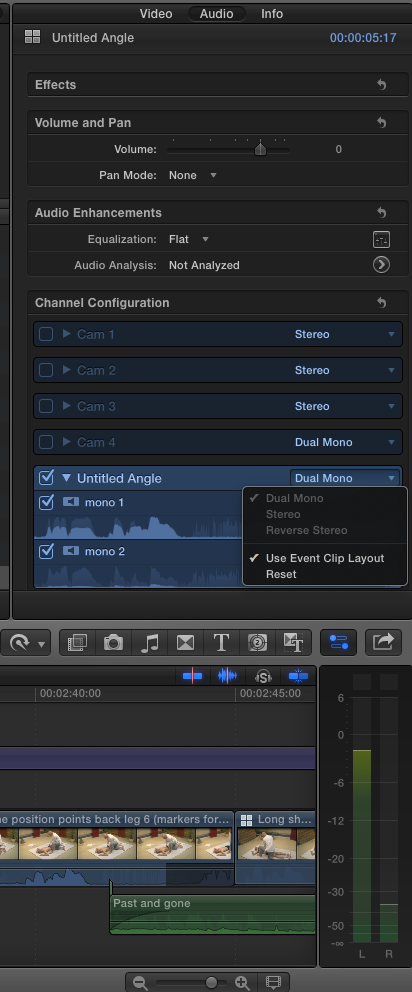
Replied by dkag7 on topic use event clip layout?
Please Log in to join the conversation.
22 Mar 2015 20:33 #61721
by dkag7
Replied by dkag7 on topic use event clip layout?
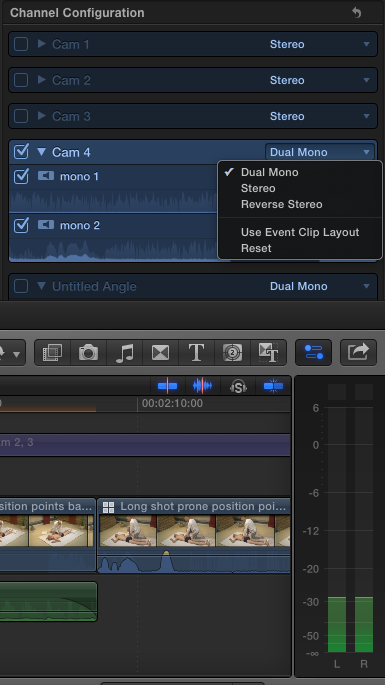
once I change it..
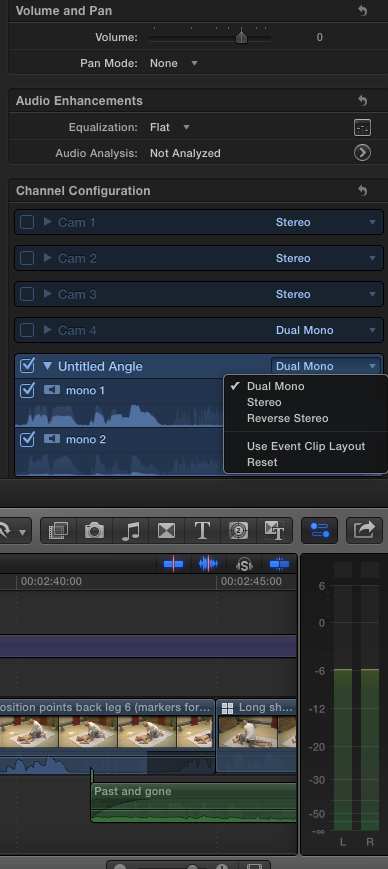
Please Log in to join the conversation.
22 Mar 2015 20:45 #61722
by dkag7
Replied by dkag7 on topic use event clip layout?
here is the same with a clips audio embedded..
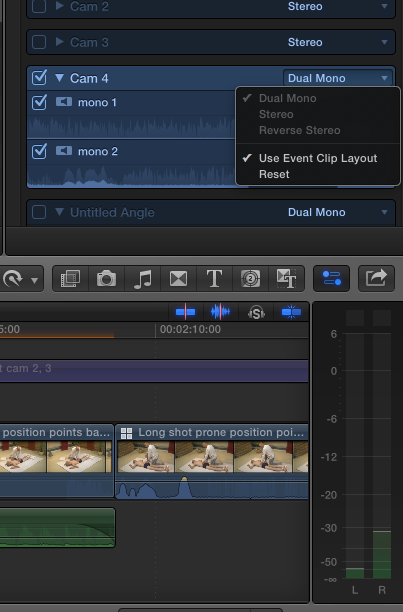
Please Log in to join the conversation.
- ronny courtens
-
- Offline
- Moderator
-
Less
More
- Posts: 4455
- Thank you received: 962
22 Mar 2015 21:26 #61724
by ronny courtens
Replied by ronny courtens on topic use event clip layout?
I think the mistake you are making is that your Event clip layout, which in this case is the layout of your entire multiclip, is not set to Dual Mono.
Select the multiclip in your Event and set it to Dual Mono. This will override any individual layouts of the clips inside it.
- Ronny
Select the multiclip in your Event and set it to Dual Mono. This will override any individual layouts of the clips inside it.
- Ronny
Please Log in to join the conversation.
22 Mar 2015 21:45 #61725
by dkag7
Replied by dkag7 on topic use event clip layout?
Thanks for looking into it, but that is what I am doing.
The event clip is set to dual mono.
Take it to the timeline and it is still dual mono, but I need to de select use event clip layout or the file plays back in the timeline like it does in the viewer, louder audio on one side..
thanks
Kurt
The event clip is set to dual mono.
Take it to the timeline and it is still dual mono, but I need to de select use event clip layout or the file plays back in the timeline like it does in the viewer, louder audio on one side..
thanks
Kurt
Please Log in to join the conversation.
- ronny courtens
-
- Offline
- Moderator
-
Less
More
- Posts: 4455
- Thank you received: 962
22 Mar 2015 22:02 #61727
by ronny courtens
Replied by ronny courtens on topic use event clip layout?
Okay, open the multicilp in the Angle viewer and in the Angle Viewer select the problematic audio clip and set its audio channel configuration to Dual Mono. When you now scrub the clip in the Angle Viewer you should see only one audio channel in the audio meters.
Close the Angle Viewer and in the Event browser select the multiclip and set the audio channel configuration of the multiclip to Dual Mono as well.
Then drop the multiclip on the empty timeline. Now when you play the multiclip in the timeline you should see the audio playing equally in both meters. This works correctly here.
- Ronny
Close the Angle Viewer and in the Event browser select the multiclip and set the audio channel configuration of the multiclip to Dual Mono as well.
Then drop the multiclip on the empty timeline. Now when you play the multiclip in the timeline you should see the audio playing equally in both meters. This works correctly here.
- Ronny
Please Log in to join the conversation.
23 Mar 2015 15:00 #61751
by dkag7
Replied by dkag7 on topic use event clip layout?
Hi Ronny,
Here is a clip. playing from the event viewer that will not show single meters when playing dual mono.
(cam 4 is set to dual mono as well, and also plays with stereo meters)
Setting the multicam timeline to various angles for the audio (on/off) makes no difference
The problem may lie here... why is a dual mono clip playing stereo meters (and the volumes are not the same)?
Once this clip is taken to the timeline, it needs to have use event clip layout de-selectd to play w/ same volume levels per side.
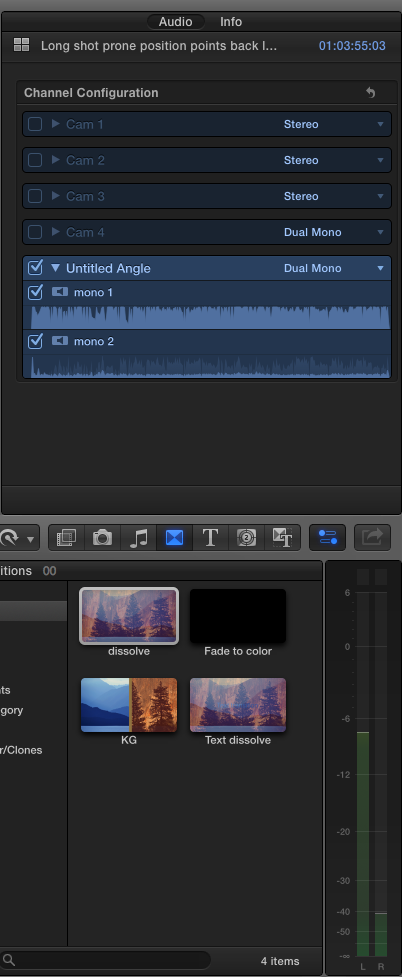
Here is a clip. playing from the event viewer that will not show single meters when playing dual mono.
(cam 4 is set to dual mono as well, and also plays with stereo meters)
Setting the multicam timeline to various angles for the audio (on/off) makes no difference
The problem may lie here... why is a dual mono clip playing stereo meters (and the volumes are not the same)?
Once this clip is taken to the timeline, it needs to have use event clip layout de-selectd to play w/ same volume levels per side.
Please Log in to join the conversation.
23 Mar 2015 15:14 #61754
by dkag7
Replied by dkag7 on topic use event clip layout?
looking deeper...
The clip within the multicam timeline that you will be using for audio, needs to be set to dual mono for the meters to play correctly when playing the clip in the event viewer.
It don't matter what clip is selected in the multicam timeline (audio clip on/off) but it does matter what the clip is set too. (stereo dual mono etc..)
I presume this is the problem all along, Ill need to test some more to be sure.
It don't seem logical to me that you don't need to worry about what audio angle is on or off within the multicam timeline, but you do need to worry about what that angles audio is set too.
The clip within the multicam timeline that you will be using for audio, needs to be set to dual mono for the meters to play correctly when playing the clip in the event viewer.
It don't matter what clip is selected in the multicam timeline (audio clip on/off) but it does matter what the clip is set too. (stereo dual mono etc..)
I presume this is the problem all along, Ill need to test some more to be sure.
It don't seem logical to me that you don't need to worry about what audio angle is on or off within the multicam timeline, but you do need to worry about what that angles audio is set too.
Please Log in to join the conversation.
