


- Posts: 46
- Thank you received: 2
3 Post Moderation Rule for New Boarders (25 Jan 2021)
New boarders will have their posts moderated - Don't worry if you cannot see your post immediately.
adding another sound effects library ?
- Happyfingers
-
 Topic Author
- Offline
- Senior Member
-

Less
More
21 Mar 2015 21:33 #61682
by Happyfingers
adding another sound effects library ? was created by Happyfingers
newbie question
sorry :silly:
where do you get sound effects that can be used in fcpx
the sound effects that are there are good just they dont always seems to have what im looking for
i typed in fart and got nothing, nothing i tell you :woohoo: :woohoo: :woohoo:
i mean are they free, do you buy them, do they just appear in fcpx after downloading. ?
sorry :silly:
where do you get sound effects that can be used in fcpx
the sound effects that are there are good just they dont always seems to have what im looking for
i typed in fart and got nothing, nothing i tell you :woohoo: :woohoo: :woohoo:
i mean are they free, do you buy them, do they just appear in fcpx after downloading. ?
Please Log in to join the conversation.
- ronny courtens
-

- Offline
- Moderator
-

Less
More
- Posts: 4455
- Thank you received: 962
21 Mar 2015 21:54 #61686
by ronny courtens
Replied by ronny courtens on topic adding another sound effects library ?
If you need a specific sound effect you can google for it, there are many free samples available on the Net. Download any samples you wish and put them into a specific folder ("My Sound Effects") on your drive.
Then launch FCP X and drag the folder into the Music and Sound window. This will create a folder called "Folders" and inside it you will see your My Sound Effects folder with all the sound effects you have added to it
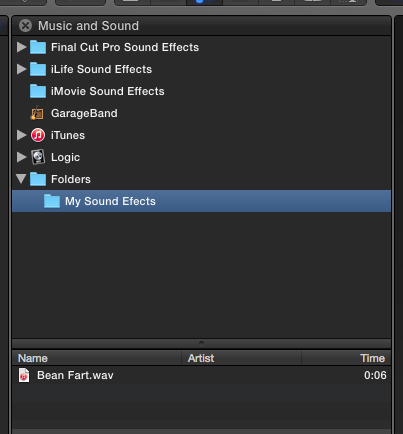
The beauty of this is that any time you add a new sound effect to the folder on your drive, it will be automatically added to the folder in the FCP X Music and Sound window.
If you need more elaborate collections of sound effects you can buy entire Libraries from Sony or BBC with tens of thousands of effects. But these collections are not cheap.
- Ronny
Then launch FCP X and drag the folder into the Music and Sound window. This will create a folder called "Folders" and inside it you will see your My Sound Effects folder with all the sound effects you have added to it
The beauty of this is that any time you add a new sound effect to the folder on your drive, it will be automatically added to the folder in the FCP X Music and Sound window.
If you need more elaborate collections of sound effects you can buy entire Libraries from Sony or BBC with tens of thousands of effects. But these collections are not cheap.
- Ronny
Please Log in to join the conversation.
