


- Posts: 16
- Thank you received: 1
3 Post Moderation Rule for New Boarders (25 Jan 2021)
New boarders will have their posts moderated - Don't worry if you cannot see your post immediately.
A Clip Went Rogue
21 Mar 2015 05:17 #61645
by hightone
A Clip Went Rogue was created by hightone
Hi, it's my first time posting here and I'm a noob to FCPX. Hopefully I won't mess up the terminology too badly.
It all started when I tried to post a cutaway shot to my secondary timeline. That's what it's meant for right? Only the clip didn't sit where I dropped it, I guess because of the magnetic timeline it appended to the end of the last clip in the secondary timeline. I tried to drag it back and it moved around a bit, it ended up between other clips in the secondary timeline. So I deleted it and tried again.
After a little bit of a fight the clip disappeared from the editing area. But when I played back the video from the timeline it showed up where I didn't want it. The problem is that I can't see it in any timeline. The point where is shows up has nothing in the secondary timeline so I deleted the clip from my primary timeline.
I checked my source clip, it's a synchronized clip, so I deleted it and recreated it from scratch and put it back in the primary timeline so it would be clean, but the rogue clip keeps appearing, but only when I playback the edit.
It's nowhere to be found in the timelines.
It all started when I tried to post a cutaway shot to my secondary timeline. That's what it's meant for right? Only the clip didn't sit where I dropped it, I guess because of the magnetic timeline it appended to the end of the last clip in the secondary timeline. I tried to drag it back and it moved around a bit, it ended up between other clips in the secondary timeline. So I deleted it and tried again.
After a little bit of a fight the clip disappeared from the editing area. But when I played back the video from the timeline it showed up where I didn't want it. The problem is that I can't see it in any timeline. The point where is shows up has nothing in the secondary timeline so I deleted the clip from my primary timeline.
I checked my source clip, it's a synchronized clip, so I deleted it and recreated it from scratch and put it back in the primary timeline so it would be clean, but the rogue clip keeps appearing, but only when I playback the edit.
It's nowhere to be found in the timelines.
Please Log in to join the conversation.

21 Mar 2015 07:24 #61647
by Overturf
Replied by Overturf on topic A Clip Went Rogue
Sounds like you should post a screenshot of your project for us to look at!
You should also do some training in FCPX, I guess, I recommend rippletraining.com.
Good Luck!
You should also do some training in FCPX, I guess, I recommend rippletraining.com.
Good Luck!
Please Log in to join the conversation.
- ronny courtens
-

- Offline
- Moderator
-

Less
More
- Posts: 4455
- Thank you received: 962
21 Mar 2015 08:23 #61649
by ronny courtens
Replied by ronny courtens on topic A Clip Went Rogue
Hi Tony, welcome to the forum.
It's good to learn on actual test projects. But I think you are trying to work with synchronized clips in secondary storylines while you are not familiar yet with the very basics of FCP X. Try learning it with a very simple Library and a very simple project, not using synchronized clips or secondary storylines. And once you feel comfortable with this, then move on to the next step.
Now to your specific problem.
Hard to know what really happened, you are describing so many things that could have caused something to go wrong. The "rogue clip" just may be some bad render file.
To start with I would advise you to go to Preferences and turn Background Rendering OFF. Leave it OFF at all times.
Then delete all render files for this project, this will probably deal with the "rogue clip" when you playback the timeline.
Or just delete the project and create a brand new one.
Then start with simple things first.
- Add clips to the primary storyline using D,W and E and not by dragging them around
- Add cutaways using Q, there is no need for secondary storylines just to add a cutaway
- Learn how to add video and audio only (Shift 1,2,3) and so on...
You will enjoy learning FCP X much more when you do it step by step. Follow some basic training before you tackle a more complex project with synchronized clips and secondary storylines.
- Ronny
It's good to learn on actual test projects. But I think you are trying to work with synchronized clips in secondary storylines while you are not familiar yet with the very basics of FCP X. Try learning it with a very simple Library and a very simple project, not using synchronized clips or secondary storylines. And once you feel comfortable with this, then move on to the next step.
Now to your specific problem.
Hard to know what really happened, you are describing so many things that could have caused something to go wrong. The "rogue clip" just may be some bad render file.
To start with I would advise you to go to Preferences and turn Background Rendering OFF. Leave it OFF at all times.
Then delete all render files for this project, this will probably deal with the "rogue clip" when you playback the timeline.
Or just delete the project and create a brand new one.
Then start with simple things first.
- Add clips to the primary storyline using D,W and E and not by dragging them around
- Add cutaways using Q, there is no need for secondary storylines just to add a cutaway
- Learn how to add video and audio only (Shift 1,2,3) and so on...
You will enjoy learning FCP X much more when you do it step by step. Follow some basic training before you tackle a more complex project with synchronized clips and secondary storylines.
- Ronny
Please Log in to join the conversation.
21 Mar 2015 14:43 #61662
by hightone
Replied by hightone on topic A Clip Went Rogue
Thank you Overturf and Ronny for responding.
Overturf I am uploading a sceen capture of the issue. You can see in the playback monitor the beach scene. In the clip library you can see what I expect to see there, the singer. Also in the timeline you can see the singer and no secondary clip.
Ronny, I agree it would be nice to have the luxury to learn gradually, but I’ve taken on this ambitious project and I have very little time to do it in. I am grateful for the tips you provided and I will try your suggestions.
Overturf I am uploading a sceen capture of the issue. You can see in the playback monitor the beach scene. In the clip library you can see what I expect to see there, the singer. Also in the timeline you can see the singer and no secondary clip.
Ronny, I agree it would be nice to have the luxury to learn gradually, but I’ve taken on this ambitious project and I have very little time to do it in. I am grateful for the tips you provided and I will try your suggestions.
Please Log in to join the conversation.
21 Mar 2015 14:47 #61663
by hightone
Replied by hightone on topic A Clip Went Rogue
Attempt to upload screen capture
Please Log in to join the conversation.
21 Mar 2015 14:55 #61665
by hightone
Replied by hightone on topic A Clip Went Rogue
My upload of the screen capture was blocked due to the file size. I put the image in my Google Drive. Here is the link:
drive.google.com/file/d/0B8f7P7kR-TJDLTh...eEk/view?usp=sharing
drive.google.com/file/d/0B8f7P7kR-TJDLTh...eEk/view?usp=sharing
Please Log in to join the conversation.
- ronny courtens
-
- Offline
- Moderator
-
Less
More
- Posts: 4455
- Thank you received: 962
21 Mar 2015 14:59 #61667
by ronny courtens
Replied by ronny courtens on topic A Clip Went Rogue
Select your Library in the browser, then choose File > Delete Generated Library Files.
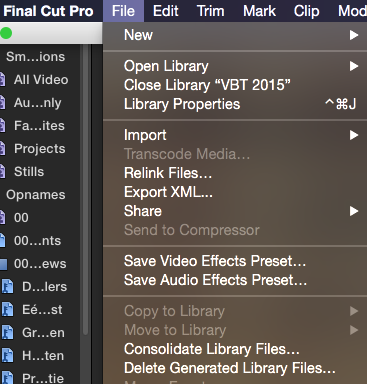
- Ronny
- Ronny
Please Log in to join the conversation.
21 Mar 2015 15:02 #61668
by hightone
Replied by hightone on topic A Clip Went Rogue
Awesome! Thank you Ronny!!
Please Log in to join the conversation.
- ronny courtens
-
- Offline
- Moderator
-
Less
More
- Posts: 4455
- Thank you received: 962
21 Mar 2015 15:07 #61669
by ronny courtens
Replied by ronny courtens on topic A Clip Went Rogue
You are welcome.
And don't forget to turn Background Rendering OFF in the Preferences to avoid such things in the future. The "rogue image" was an old render file referencing your synchronized clip, caused by constant re-rendering. You can render manually any time you wish.
- Ronny
And don't forget to turn Background Rendering OFF in the Preferences to avoid such things in the future. The "rogue image" was an old render file referencing your synchronized clip, caused by constant re-rendering. You can render manually any time you wish.
- Ronny
Please Log in to join the conversation.
