


- Posts: 9
- Thank you received: 0
3 Post Moderation Rule for New Boarders (25 Jan 2021)
New boarders will have their posts moderated - Don't worry if you cannot see your post immediately.
encoding/decoding - codec format
16 Mar 2015 23:25 - 17 Mar 2015 00:04 #61427
by Vaani
encoding/decoding - codec format was created by Vaani
I'm making my first feature film and I'm using FCPx for editing. I need some advice and hope someone can help me.
I'm using Canon 5D Mark iii for filming.
1) I need to send some editted footages for VFX/CGI works. The VFX guy is using PC. I'm wondering what is the best format to send him the editted footages without loss of quality - codec format ProRes 422 or ProRes 422(HQ) or ProRes 4444 or anything else?
2) Since the VFX guy is using PC, what is the best format for him to send me back the VFX completed footages without loss of quality, so that I can use the footages on FCPx?
3) As I'm planning for limited theatrical release (digital projection), what would be the best format for the final export - codec format ProRes 422 or ProRes 422(HQ) or ProRes 4444?
Many thanks. Appreciate your help.
I'm using Canon 5D Mark iii for filming.
1) I need to send some editted footages for VFX/CGI works. The VFX guy is using PC. I'm wondering what is the best format to send him the editted footages without loss of quality - codec format ProRes 422 or ProRes 422(HQ) or ProRes 4444 or anything else?
2) Since the VFX guy is using PC, what is the best format for him to send me back the VFX completed footages without loss of quality, so that I can use the footages on FCPx?
3) As I'm planning for limited theatrical release (digital projection), what would be the best format for the final export - codec format ProRes 422 or ProRes 422(HQ) or ProRes 4444?
Many thanks. Appreciate your help.
Last edit: 17 Mar 2015 00:04 by Vaani.
Please Log in to join the conversation.
- ronny courtens
-

- Offline
- Moderator
-

Less
More
- Posts: 4455
- Thank you received: 962
17 Mar 2015 06:33 - 17 Mar 2015 06:50 #61436
by ronny courtens
Replied by ronny courtens on topic encoding/decoding - codec format
Hi Vaani, welcome to the forum. Making your first feature film is always big adventure and I wish you all the best with this.
1. The first thing you need to do is contact the VFX guy and ask him what format he would like to receive. If he can deal with ProRes files on his PC you will need to send him ProRes 44444 to preserve the best quality for VFX. If he cannot handle ProRes, ask him what he can work with and we can help you with delivering that format.
2. Again, that depends on what formats he can export from his PC system. So you should sit down with him and discuss what would be the best way you can work together. Once you know exactly what he can work with you can post back here if you have further questions.
3. If this is for large-screen projection in movie theaters you will need to create a DCP package from your final edit. If you don't have any experience with this it is best to contact a company that can do this for you. If this is for small-scale projection using a conventional projector you can use ProRes 422. If you use 4444 you will need to play the file from a fast external hard drive.
There are many people here who have gone through the process of making their first feature. So don't be shy and feel free to ask questions whenever they arise.
- Ronny
1. The first thing you need to do is contact the VFX guy and ask him what format he would like to receive. If he can deal with ProRes files on his PC you will need to send him ProRes 44444 to preserve the best quality for VFX. If he cannot handle ProRes, ask him what he can work with and we can help you with delivering that format.
2. Again, that depends on what formats he can export from his PC system. So you should sit down with him and discuss what would be the best way you can work together. Once you know exactly what he can work with you can post back here if you have further questions.
3. If this is for large-screen projection in movie theaters you will need to create a DCP package from your final edit. If you don't have any experience with this it is best to contact a company that can do this for you. If this is for small-scale projection using a conventional projector you can use ProRes 422. If you use 4444 you will need to play the file from a fast external hard drive.
There are many people here who have gone through the process of making their first feature. So don't be shy and feel free to ask questions whenever they arise.
- Ronny
Last edit: 17 Mar 2015 06:50 by ronny courtens.
Please Log in to join the conversation.
17 Mar 2015 11:30 #61444
by Vaani
Replied by Vaani on topic encoding/decoding - codec format
Hi Ronny,
Hope you are well. Many thanks for your advice & wishes. I'll definitely have thousands of questions I'll discuss with my VFX guy and will come back to you. I'm not really a technical person but I'm trying to learn. So please forgive me if I didn't use the correct technical terms
By the way, a few weeks ago, the VFX guy did suggest that he prefer to work on png format however I noticed that FCPx does not recognise png movie files. And also I came across from a couple of forums that png file is not good as prores to retain the high quality.
Kindly, please let me know your thoughts. Thanks.
Hope you are well. Many thanks for your advice & wishes. I'll definitely have thousands of questions
I'll discuss with my VFX guy and will come back to you. I'm not really a technical person but I'm trying to learn. So please forgive me if I didn't use the correct technical terms By the way, a few weeks ago, the VFX guy did suggest that he prefer to work on png format however I noticed that FCPx does not recognise png movie files. And also I came across from a couple of forums that png file is not good as prores to retain the high quality.
Kindly, please let me know your thoughts. Thanks.
Please Log in to join the conversation.

17 Mar 2015 11:57 #61445
by BenB
Replied by BenB on topic encoding/decoding - codec format
I think he was talking about Image Sequences. You'd create a custom one in Compressor to use in FCPX. That is common for FX guys, old school, but still popular and good for retaining quality. There is a debate about PNG vs TIFF for image quality. Open EXR image sequences are probably the way to go. But if he wants a PNG image sequence, give it to him. FCPX can export that. You'd run it through Compressor when you get it back to convert it to a ProRes 4444 file, to go back into FCPX.
As for Compressor, someone can set up a custom setting for you, and those can be shared between users. So you don't have to be a Compressor guru, just know someone who can do it.
As for Compressor, someone can set up a custom setting for you, and those can be shared between users. So you don't have to be a Compressor guru, just know someone who can do it.
Please Log in to join the conversation.
- ronny courtens
-
- Offline
- Moderator
-
Less
More
- Posts: 4455
- Thank you received: 962
17 Mar 2015 12:33 #61449
by ronny courtens
Replied by ronny courtens on topic encoding/decoding - codec format
Hi Vaani,
Uncompressed PNG sequences are a common exchange format for VFX. As Ben says, most VFX artists prefer uncompressed image sequences above video files because it's easier for VFX people to replace frames in an image sequence than in a self-contained movie file.
If he prefers PNG sequences you can export the clips right inside FCP X using Share > Export Image Sequence > PNG. But you also can send complete FCP X projects straight to After Effects or Nuke using ClipExporter: www.clipexporter.com
So it is impossible to say what exactly you should do until you have seen the guy, you now what application(s) he works with and you know how he would like to receive your clips for VFX. First get this information and then we can offer specific advice.
- Ronny
Uncompressed PNG sequences are a common exchange format for VFX. As Ben says, most VFX artists prefer uncompressed image sequences above video files because it's easier for VFX people to replace frames in an image sequence than in a self-contained movie file.
If he prefers PNG sequences you can export the clips right inside FCP X using Share > Export Image Sequence > PNG. But you also can send complete FCP X projects straight to After Effects or Nuke using ClipExporter: www.clipexporter.com
So it is impossible to say what exactly you should do until you have seen the guy, you now what application(s) he works with and you know how he would like to receive your clips for VFX. First get this information and then we can offer specific advice.
- Ronny
Please Log in to join the conversation.
18 Mar 2015 11:45 #61514
by Vaani
Replied by Vaani on topic encoding/decoding - codec format
Hi there,
I managed to obtain some information from my VFX Artist. Hence, I need some help.
1) My VFX Artist doesn't mind having the footages in any format so long it is in high quality and he has no problem opening the files. I did send him prores 4444 movie file to test and he is able to open it on his system. However, he'll not be able to send me back in prores 4444 format and he suggested he could send me the completed file in png image sequence. He said png image sequence is the best way to retain quality.
So could you please suggest the best way for us to work:-
a) sending him 'prores 4444' movie file and he'll send me back in 'png image sequence' (or)
b) sending him 'png image sequence' and he'll send me back in 'png image seqence '.
Currently I don't have compressor in my FCPx, hence I'm going to install it.
- Q: Will I be able to convert the png image sequence to prores 4444 movie file using the compressor.
- Q: In my FCPx under share, there is no option of Export Image Sequence > PNG. Do I need to add this option manually?
2) As my VFX artist is using Affter Effects & Nuke, therefore 'clipexporter' could also be an option. However, only a few footages require VFX works, hence not sure if this is the best option. Nevertheless, are there any drawbacks that you think I should know about clip exporter.
Since we used DSLR for filming (Canon 5d Mark iii) and they are not raw footages, one of my main concerns is not to affect the quality dramatically by sending the footages back and forth . Hence I need some advice and suggestion before I finalise our work method with my VFX Artist. Many thanks.
Regards,
Vaani
I managed to obtain some information from my VFX Artist. Hence, I need some help.
1) My VFX Artist doesn't mind having the footages in any format so long it is in high quality and he has no problem opening the files. I did send him prores 4444 movie file to test and he is able to open it on his system. However, he'll not be able to send me back in prores 4444 format and he suggested he could send me the completed file in png image sequence. He said png image sequence is the best way to retain quality.
So could you please suggest the best way for us to work:-
a) sending him 'prores 4444' movie file and he'll send me back in 'png image sequence' (or)
b) sending him 'png image sequence' and he'll send me back in 'png image seqence '.
Currently I don't have compressor in my FCPx, hence I'm going to install it.
- Q: Will I be able to convert the png image sequence to prores 4444 movie file using the compressor.
- Q: In my FCPx under share, there is no option of Export Image Sequence > PNG. Do I need to add this option manually?
2) As my VFX artist is using Affter Effects & Nuke, therefore 'clipexporter' could also be an option. However, only a few footages require VFX works, hence not sure if this is the best option. Nevertheless, are there any drawbacks that you think I should know about clip exporter.
Since we used DSLR for filming (Canon 5d Mark iii) and they are not raw footages, one of my main concerns is not to affect the quality dramatically by sending the footages back and forth . Hence I need some advice and suggestion before I finalise our work method with my VFX Artist. Many thanks.
Regards,
Vaani
Please Log in to join the conversation.
- ronny courtens
-
- Offline
- Moderator
-
Less
More
- Posts: 4455
- Thank you received: 962
18 Mar 2015 12:29 - 18 Mar 2015 12:31 #61515
by ronny courtens
Replied by ronny courtens on topic encoding/decoding - codec format
Hi Vaani,
The VFX guy obviously is able to read ProRes files, but as he is on a PC he cannot render out to ProRes.
So:
- Just export your footage for the VFX guy in ProRes 4444, no need to convert to PNG sequences.
- When he sends the VFX shots back to you as PNG image sequences, open every image sequence in Compressor and convert back to ProRes 4444.
This is how it works:
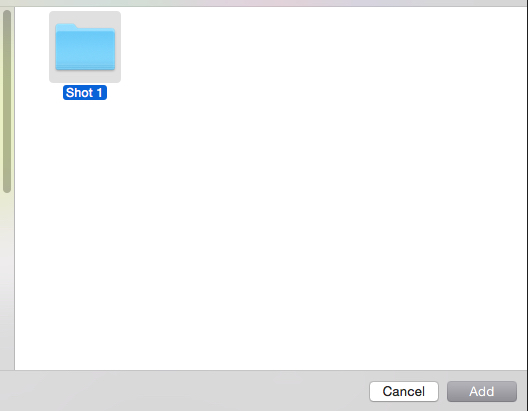
- He will send you every shot as a PNG image sequence. Each shot will be in a separate folder containing all the PNG stills for the sequence.
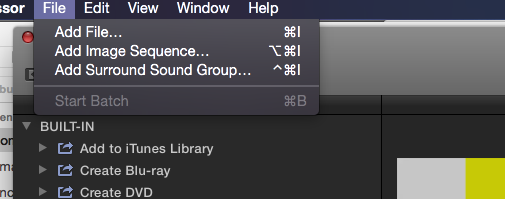
- Launch Compressor and choose File > Add Image Sequence
- Select the folder of the shot you want to open and click Add.
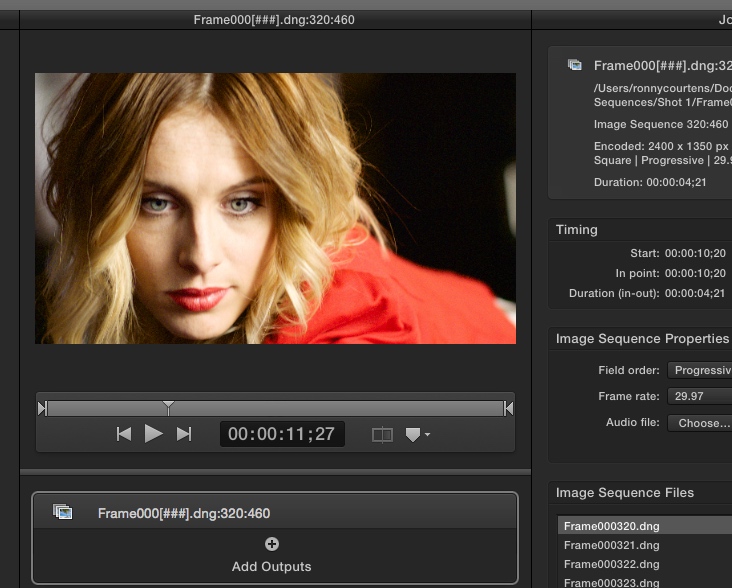
- Compressor will load the sequence in its batch window.
- Go to the Settings tab, select the ProRes4444 preset
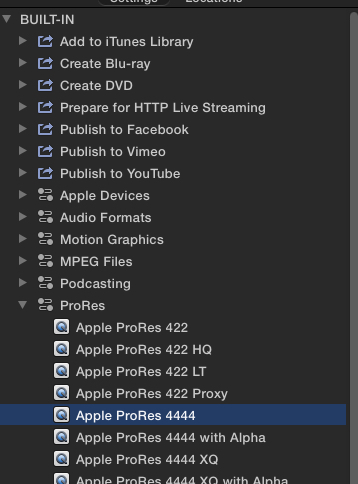
- Drag the preset onto the sequence in the batch window, set a Destination for your ProRes 4444 file and press the Batch button
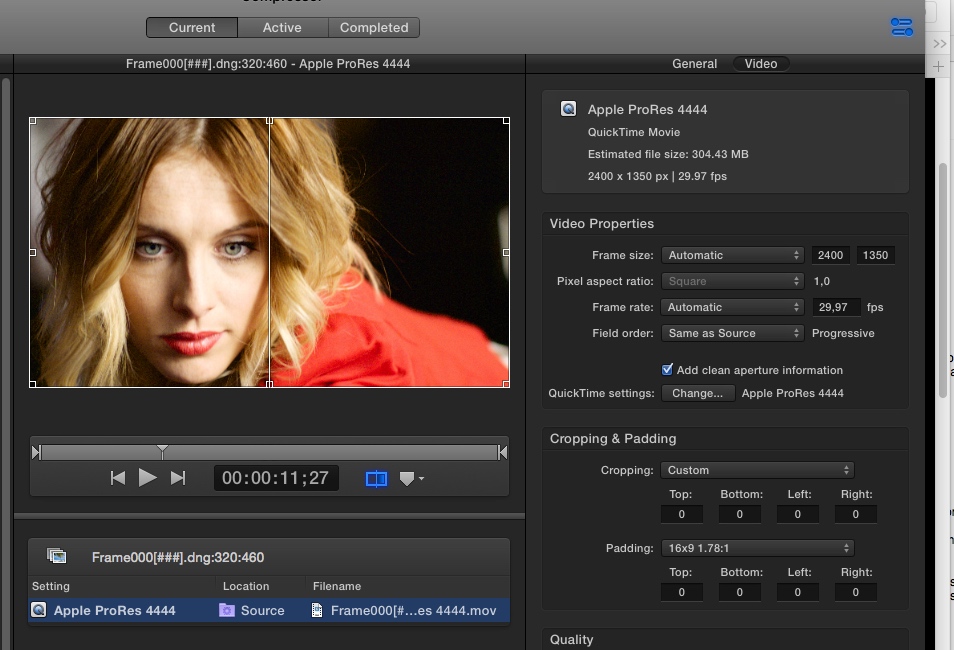
Compressor will convert the PNG image sequence to a ProRes4444 that you can import in FCP X.
As always I would advise you to try out this workflow first. Send him one 4444 clip and ask him to send it back to you as a PNG sequence. Then you convert it back to ProRes 4444 and you compare it with the original clip in your timeline to see if there won't be any issues with color shifts due to the re-encoding.
Normally this should not be any problem, but testing is always a good idea when collaborating with someone else, especially when he works on a different platform.
If you have any more questions, we are here to assist you.
- Ronny
The VFX guy obviously is able to read ProRes files, but as he is on a PC he cannot render out to ProRes.
So:
- Just export your footage for the VFX guy in ProRes 4444, no need to convert to PNG sequences.
- When he sends the VFX shots back to you as PNG image sequences, open every image sequence in Compressor and convert back to ProRes 4444.
This is how it works:
- He will send you every shot as a PNG image sequence. Each shot will be in a separate folder containing all the PNG stills for the sequence.
- Launch Compressor and choose File > Add Image Sequence
- Select the folder of the shot you want to open and click Add.
- Compressor will load the sequence in its batch window.
- Go to the Settings tab, select the ProRes4444 preset
- Drag the preset onto the sequence in the batch window, set a Destination for your ProRes 4444 file and press the Batch button
Compressor will convert the PNG image sequence to a ProRes4444 that you can import in FCP X.
As always I would advise you to try out this workflow first. Send him one 4444 clip and ask him to send it back to you as a PNG sequence. Then you convert it back to ProRes 4444 and you compare it with the original clip in your timeline to see if there won't be any issues with color shifts due to the re-encoding.
Normally this should not be any problem, but testing is always a good idea when collaborating with someone else, especially when he works on a different platform.
If you have any more questions, we are here to assist you.
- Ronny
Last edit: 18 Mar 2015 12:31 by ronny courtens.
Please Log in to join the conversation.
- ronny courtens
-
- Offline
- Moderator
-
Less
More
- Posts: 4455
- Thank you received: 962
18 Mar 2015 12:38 #61516
by ronny courtens
Replied by ronny courtens on topic encoding/decoding - codec format
Oh yes, I forgot about your second question.
The advantage of ClipExporter is that it can export your shots with handles, i.e. it will add a few seconds before and after the actual shot to give some headroom to the VFX guy. If he does not really needs this you can just Range-select the shots in the timeline and export each shot as is to proRes 4444.
Again, trying this with one file first will quickly show you what is the best way to proceed.
- Ronny
The advantage of ClipExporter is that it can export your shots with handles, i.e. it will add a few seconds before and after the actual shot to give some headroom to the VFX guy. If he does not really needs this you can just Range-select the shots in the timeline and export each shot as is to proRes 4444.
Again, trying this with one file first will quickly show you what is the best way to proceed.
- Ronny
Please Log in to join the conversation.


18 Mar 2015 14:14 - 18 Mar 2015 14:15 #61518
by joema
Vaani, I don't know how you are sending the files, but I just recently tested this new file transfer app called "Infinit" which works very well. Besides no file size limit, it allows direct peer-to-peer transfer, bypassing the upload/download phases. It also has no speed limitation (beyond your ISP). infinit.io/
I previously used TransferBigFiles.com and WeTransfer.com, both of which worked OK but would not work at my full ISP speed. This is just a suggestion; I have no relationship with the company or product.
If you already have a solution for this, don't get bogged down in trying some other thing -- just focus on your main task.
Replied by joema on topic encoding/decoding - codec format
Vaani wrote: ...I did send him prores 4444 movie file to test and he is able to open it on his system. However, he'll not be able to send me back in prores 4444 format and he suggested he could send me the completed file in png image sequence...
Vaani, I don't know how you are sending the files, but I just recently tested this new file transfer app called "Infinit" which works very well. Besides no file size limit, it allows direct peer-to-peer transfer, bypassing the upload/download phases. It also has no speed limitation (beyond your ISP). infinit.io/
I previously used TransferBigFiles.com and WeTransfer.com, both of which worked OK but would not work at my full ISP speed. This is just a suggestion; I have no relationship with the company or product.
If you already have a solution for this, don't get bogged down in trying some other thing -- just focus on your main task.
Last edit: 18 Mar 2015 14:15 by joema.
Please Log in to join the conversation.
18 Mar 2015 14:28 - 18 Mar 2015 14:43 #61520
by Vaani
Replied by Vaani on topic encoding/decoding - codec format
hi Ronny
Million Thanks. you're a super star
I've a another question, this could be a silly one.
I saved some footages in prores 4444 and the size of the file is 1.07 GB. As my VFX guys is in Romania, so I sent him the footages via wetransfer. However, after the transfer completed, wetranfer indicates that the size of the file is 1020 MB. May I know why the size has became smaller?
Thanks.
Million Thanks. you're a super star
I've a another question, this could be a silly one.
I saved some footages in prores 4444 and the size of the file is 1.07 GB. As my VFX guys is in Romania, so I sent him the footages via wetransfer. However, after the transfer completed, wetranfer indicates that the size of the file is 1020 MB. May I know why the size has became smaller?
Thanks.
Last edit: 18 Mar 2015 14:43 by Vaani.
Please Log in to join the conversation.
18 Mar 2015 14:30 #61521
by Vaani
Replied by Vaani on topic encoding/decoding - codec format
Hi Joema,
I've been using wetransfer and it take hours to upload. Thanks for introducing 'Infinit. I'll definitely try it.
Regards,
Vaani
I've been using wetransfer and it take hours to upload. Thanks for introducing 'Infinit. I'll definitely try it.
Regards,
Vaani
Please Log in to join the conversation.
18 Mar 2015 14:33 #61522
by joema
Replied by joema on topic encoding/decoding - codec format
Note for the optimal peer-to-peer mode, both sender and recipient must have the Infinit software installed and both computers be on line. If not it will revert to the traditional upload/download style. Client software is available for Windows, OS X and iOS.
Please Log in to join the conversation.
- ronny courtens
-
- Offline
- Moderator
-
Less
More
- Posts: 4455
- Thank you received: 962
18 Mar 2015 14:46 #61523
by ronny courtens
Replied by ronny courtens on topic encoding/decoding - codec format
Hi Vaani,
WeTransfer is not always very accurate in calculating the file size, so I wouldn't worry about that.
@Joema,
I haven't tried Infinit yet, but this peer-to-peer mode surely sounds promising. Will definitely try this out.
- Ronny
WeTransfer is not always very accurate in calculating the file size, so I wouldn't worry about that.
@Joema,
I haven't tried Infinit yet, but this peer-to-peer mode surely sounds promising. Will definitely try this out.
- Ronny
Please Log in to join the conversation.
18 Mar 2015 15:09 #61526
by VidGreg
Replied by VidGreg on topic encoding/decoding - codec format
Vaani, Good Luck with your project.
I was wondering if anyone has tried Mail Drop yet? Apple says up to 5GB, stays on Apple servers, will immediately download to another Mac or will send notification to PC with URL for download. Curious how well it works.
Thanks, Greg
I was wondering if anyone has tried Mail Drop yet? Apple says up to 5GB, stays on Apple servers, will immediately download to another Mac or will send notification to PC with URL for download. Curious how well it works.
Thanks, Greg
Please Log in to join the conversation.
18 Mar 2015 15:26 #61529
by Vaani
Replied by Vaani on topic encoding/decoding - codec format
Thanks for the wishes VidGreg
I've never used Mail Drop, so hope someone can advise you.
I've never used Mail Drop, so hope someone can advise you.
Please Log in to join the conversation.
- ronny courtens
-
- Offline
- Moderator
-
Less
More
- Posts: 4455
- Thank you received: 962
18 Mar 2015 15:52 #61530
by ronny courtens
Replied by ronny courtens on topic encoding/decoding - codec format
Vaani,
I just saw the website of the movie you are making. Could you send me an e-mail so we can have a chat?
ronnycourtens@mac.com
- Ronny
I just saw the website of the movie you are making. Could you send me an e-mail so we can have a chat?
ronnycourtens@mac.com
- Ronny
Please Log in to join the conversation.
20 Mar 2015 20:15 #61633
by Vaani
Replied by Vaani on topic encoding/decoding - codec format
Hi Ronny,
I've sent you an email. Hope've received it.
Regards,
Vaani
I've sent you an email. Hope've received it.
Regards,
Vaani
Please Log in to join the conversation.
- ronny courtens
-
- Offline
- Moderator
-
Less
More
- Posts: 4455
- Thank you received: 962
20 Mar 2015 20:16 #61634
by ronny courtens
Replied by ronny courtens on topic encoding/decoding - codec format
Yes I have, and I already have sent you a reply
- Ronny
- Ronny
Please Log in to join the conversation.
30 Mar 2015 13:50 - 30 Mar 2015 13:53 #62083
by Vaani
Replied by Vaani on topic encoding/decoding - codec format
Hi There,
I need some help.
I shot the film in 24 fps. I sent some footage to my Vfx artist in proress 4444 - 24fps. After completing Vfx on the footage, he sent me the footage in png image sequence. I used compressor to change it back to proress 4444 but it shows 30fps.
When I change the 30fps back to 24fps, the footage is jerking ( skipping). I checked with my Vfx artist and he said he did not change the fps. May I know, why it's happening? Could you please tell me, how can I retain the 24fps.
Many Thanks.
Regards,
Vaani
I need some help.
I shot the film in 24 fps. I sent some footage to my Vfx artist in proress 4444 - 24fps. After completing Vfx on the footage, he sent me the footage in png image sequence. I used compressor to change it back to proress 4444 but it shows 30fps.
When I change the 30fps back to 24fps, the footage is jerking ( skipping). I checked with my Vfx artist and he said he did not change the fps. May I know, why it's happening? Could you please tell me, how can I retain the 24fps.
Many Thanks.
Regards,
Vaani
Last edit: 30 Mar 2015 13:53 by Vaani.
Please Log in to join the conversation.
