


- Posts: 786
- Thank you received: 21
3 Post Moderation Rule for New Boarders (25 Jan 2021)
New boarders will have their posts moderated - Don't worry if you cannot see your post immediately.
Going crazy- Color transition of word in a text clip
- Jonathan Levin
-
 Topic Author
- Offline
- Platinum Member
-

Less
More
15 Mar 2015 20:59 #61379
by Jonathan Levin
Hi everyone.
OK. I think I am having a mental breakdown.
What I am trying to do is this:
I want to create a basic title that has four lines. Each line has one word in black font. I am trying to get one of those lines to dissolve from black to say red and then maybe back to black. A bullet point if you will. I can't find a way to keyframe this. I can highlight in the text input box the word (line) I want this transition to happen, but I can't keyframe this.
Or do I need to create a separate title for each word (line) and do each one individually?
Your help as usual life changing....
Jonathan
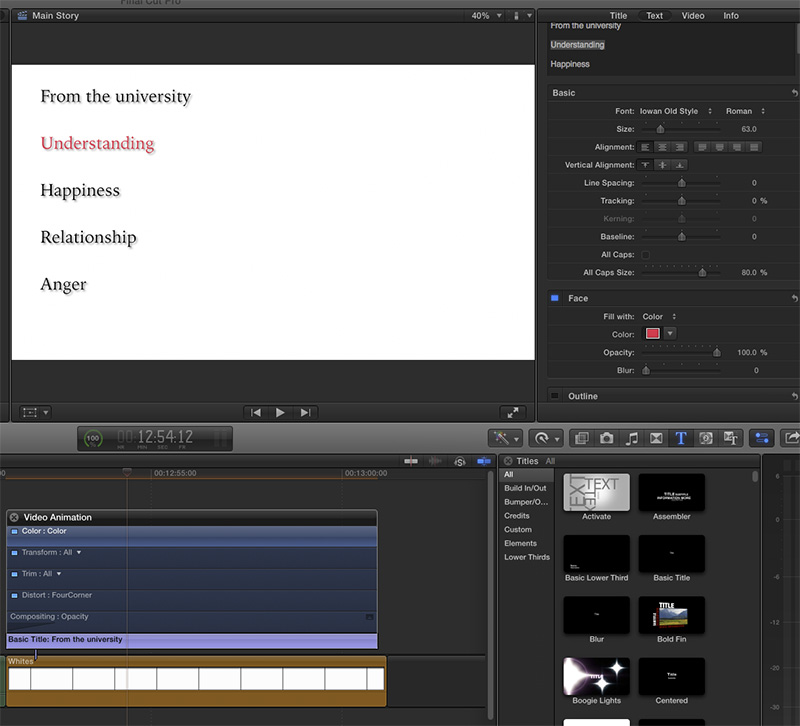
OK. I think I am having a mental breakdown.
What I am trying to do is this:
I want to create a basic title that has four lines. Each line has one word in black font. I am trying to get one of those lines to dissolve from black to say red and then maybe back to black. A bullet point if you will. I can't find a way to keyframe this. I can highlight in the text input box the word (line) I want this transition to happen, but I can't keyframe this.
Or do I need to create a separate title for each word (line) and do each one individually?
Your help as usual life changing....
Jonathan
Please Log in to join the conversation.

15 Mar 2015 21:15 #61380
by Jimmyfinn
Replied by Jimmyfinn on topic Going crazy- Color transition of word in a text clip
One quick way is to create your text in black. Then copy that clip and make the colour change to the desired word on the copy.
Create a dissolve between the two clips as required !
Create a dissolve between the two clips as required !
Please Log in to join the conversation.
- Jonathan Levin
-
Topic Author
- Offline
- Platinum Member
-
Less
More
- Posts: 786
- Thank you received: 21
15 Mar 2015 22:29 #61381
by Jonathan Levin
Replied by Jonathan Levin on topic Going crazy- Color transition of word in a text clip
Hi Jimmy.
before I wrote my initial post I did copy and paste an identical clip from original thinking that I could overlay the first one and have it some how do what I was hoping to achieve. The result I saw in the viewer made the type look strange... Like it got darker. It should be in perfect register but something doesn't look quite right. I will add that I did not render those two overlaying clips so maybe once rendered it appears OK.
I know theres something I'm missing. I do gave Motion but the most experise I have there is paying for the app :dry:
Maybe this is something I do in Photoshop using a bunch of layers???
Jonathan
before I wrote my initial post I did copy and paste an identical clip from original thinking that I could overlay the first one and have it some how do what I was hoping to achieve. The result I saw in the viewer made the type look strange... Like it got darker. It should be in perfect register but something doesn't look quite right. I will add that I did not render those two overlaying clips so maybe once rendered it appears OK.
I know theres something I'm missing. I do gave Motion but the most experise I have there is paying for the app :dry:
Maybe this is something I do in Photoshop using a bunch of layers???
Jonathan
Please Log in to join the conversation.
- Jonathan Levin
-
Topic Author
- Offline
- Platinum Member
-
Less
More
- Posts: 786
- Thank you received: 21
15 Mar 2015 22:37 #61382
by Jonathan Levin
Replied by Jonathan Levin on topic Going crazy- Color transition of word in a text clip
Jimmy after re-reading your reply, it finally sunk in. Let me get to my computer and try the method you just stated.
Thanks again
JL
Thanks again
JL
Please Log in to join the conversation.
- Jonathan Levin
-
Topic Author
- Offline
- Platinum Member
-
Less
More
- Posts: 786
- Thank you received: 21
16 Mar 2015 15:18 - 16 Mar 2015 15:19 #61407
by Jonathan Levin
Replied by Jonathan Levin on topic Going crazy- Color transition of word in a text clip
Yes that does work!
So let me ask you guys this: Let's say I want one word (Line) of the above sample to slowly zoom larger. From 65% to 110% to make that point stand out.
Again I can select the text in the text input box, and then adjust the size of that text, but the keyframe option is unavailable. Of coarse this also moves my other lines of text too.
So in this case I'm wondering if I'd make a separate title layer for each line, in this case, five titles, overlap them in the project and adjust the size, position, etc. using the transform command.
Thanks again.
Jonathan
So let me ask you guys this: Let's say I want one word (Line) of the above sample to slowly zoom larger. From 65% to 110% to make that point stand out.
Again I can select the text in the text input box, and then adjust the size of that text, but the keyframe option is unavailable. Of coarse this also moves my other lines of text too.
So in this case I'm wondering if I'd make a separate title layer for each line, in this case, five titles, overlap them in the project and adjust the size, position, etc. using the transform command.
Thanks again.
Jonathan
Last edit: 16 Mar 2015 15:19 by Jonathan Levin.
Please Log in to join the conversation.
- haysoos123
-

- Offline
- Platinum Member
-
Less
More
- Posts: 402
- Thank you received: 72
16 Mar 2015 18:32 #61412
by haysoos123
Replied by haysoos123 on topic Going crazy- Color transition of word in a text clip
You can't keyframe the font size in the text panel, as you know, but you can keyframe the scale in the video panel (under transform). You can even use Ken Burns zoom on the text if you want.
There are a bunch of ways you can do a title, either from the built in titling tools, or you can have them as layers in a PSD which you import, and FCPX will keep the layers. Personally, if it's this simple in design, I would use the built-in title tools as separate layers, and each line would be its own title.
There are a bunch of ways you can do a title, either from the built in titling tools, or you can have them as layers in a PSD which you import, and FCPX will keep the layers. Personally, if it's this simple in design, I would use the built-in title tools as separate layers, and each line would be its own title.
Please Log in to join the conversation.
- Jonathan Levin
-
Topic Author
- Offline
- Platinum Member
-
Less
More
- Posts: 786
- Thank you received: 21
16 Mar 2015 20:38 #61415
by Jonathan Levin
Replied by Jonathan Levin on topic Going crazy- Color transition of word in a text clip
Thanks Haysoos!
That's kind of what I thought: the old stacking thing.
I might make a template in PS like I used to and then see what that does for me. I do recall that in PS I need to make any type layers with a drop shadow or effect into a Smart object in order for tht to show up in FCP.
Jonathan
That's kind of what I thought: the old stacking thing.
I might make a template in PS like I used to and then see what that does for me. I do recall that in PS I need to make any type layers with a drop shadow or effect into a Smart object in order for tht to show up in FCP.
Jonathan
Please Log in to join the conversation.
