


- Posts: 181
- Thank you received: 6
3 Post Moderation Rule for New Boarders (25 Jan 2021)
New boarders will have their posts moderated - Don't worry if you cannot see your post immediately.
Using dedicated FCPX library to replace Digital Juice Juicer
- mobiletaylor
-
 Topic Author
- Offline
- Elite Member
-

Less
More
13 Mar 2015 22:11 #61322
by mobiletaylor
I have a few Digital Juice Jumpback sets that I want to have available. Instead of using the Juicer I was going to dedicate a library in FCPX with keywords. Here is my question: What files in the Juicer should I be using? There are three sets of files. .AVI, .MOV (DV format), and .MOV (PNG format). I assume I should use one of the .MOV files. Anyone do something similar?
Please Log in to join the conversation.
14 Mar 2015 01:15 #61328
by ddixon
Replied by ddixon on topic Using dedicated FCPX library to replace Digital Juice Juicer
I've done a similar thing on a small basis - using an FCPX library as an organizational tool. I created one with some overlay transitions (not true FCPX transitions) from Rampant. I would put in the library whichever version you want to use in FCPX. When you used the Juicer, which version did you select? Use that one 
The only glitch I ran into is that the Rampant overlay transitions had an alpha channel which was lost when converted to ProRes 422. I had to covert the clips to Animation codec to retain those alpha channels. Jumpbacks probably won't have that problem.
The only glitch I ran into is that the Rampant overlay transitions had an alpha channel which was lost when converted to ProRes 422. I had to covert the clips to Animation codec to retain those alpha channels. Jumpbacks probably won't have that problem.
Please Log in to join the conversation.
- mobiletaylor
-
Topic Author
- Offline
- Elite Member
-
Less
More
- Posts: 181
- Thank you received: 6
14 Mar 2015 02:18 - 14 Mar 2015 02:21 #61330
by mobiletaylor
Replied by mobiletaylor on topic Using dedicated FCPX library to replace Digital Juice Juicer
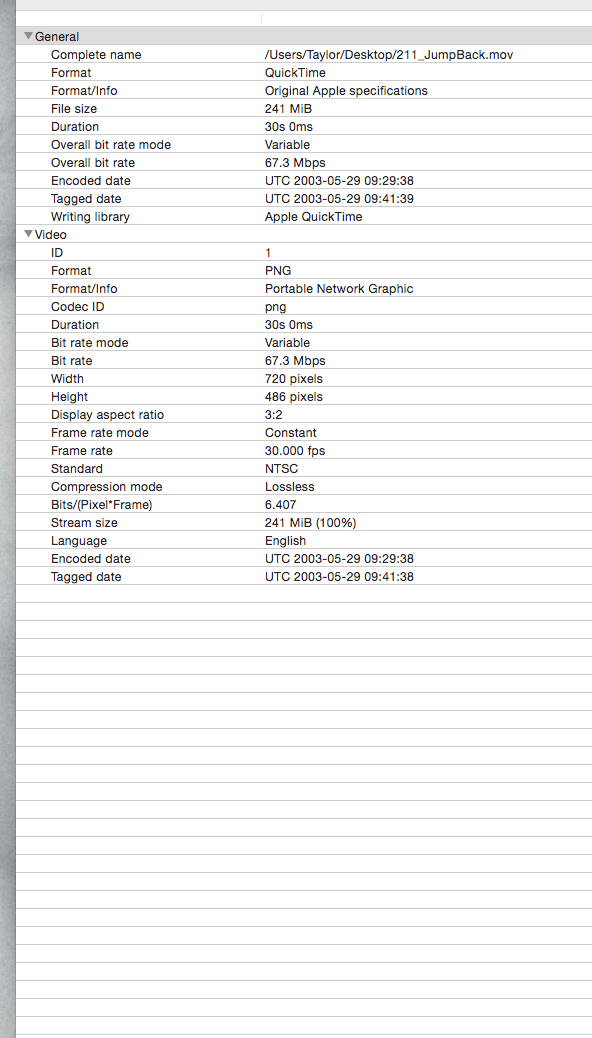
I'm not sure which one the Juicer would pull out? I just want to make sure I get the best quality clips. So I don't have to go back later to update. I'll post some info from MediaInfo. Maybe someone could see if there is a clear winner?
Last edit: 14 Mar 2015 02:21 by mobiletaylor.
Please Log in to join the conversation.
- mobiletaylor
-
Topic Author
- Offline
- Elite Member
-
Less
More
- Posts: 181
- Thank you received: 6
14 Mar 2015 02:22 - 14 Mar 2015 02:27 #61331
by mobiletaylor
Replied by mobiletaylor on topic Using dedicated FCPX library to replace Digital Juice Juicer
Or this one?

Last edit: 14 Mar 2015 02:27 by mobiletaylor.
Please Log in to join the conversation.
- ronny courtens
-

- Offline
- Moderator
-

Less
More
- Posts: 4455
- Thank you received: 962
14 Mar 2015 08:27 #61337
by ronny courtens
Replied by ronny courtens on topic Using dedicated FCPX library to replace Digital Juice Juicer
The PNG sequence has a far better quality than the DV clip. But working with image sequences is not ideal in FCP X.
You would have to export the PNG sequence from Juicer, open the PNG sequence in Motion (or Compressor or QT7Pro) and convert it to ProRes422 (or ProRes4444 if the image requires an alpha channel). Then you import the ProRes clip in your FCP X Library.
Can you also give us the MediaInfo on the AVI export from Juicer? It might be easier to use that one instead.
- Ronny
You would have to export the PNG sequence from Juicer, open the PNG sequence in Motion (or Compressor or QT7Pro) and convert it to ProRes422 (or ProRes4444 if the image requires an alpha channel). Then you import the ProRes clip in your FCP X Library.
Can you also give us the MediaInfo on the AVI export from Juicer? It might be easier to use that one instead.
- Ronny
Please Log in to join the conversation.
- mobiletaylor
-
Topic Author
- Offline
- Elite Member
-
Less
More
- Posts: 181
- Thank you received: 6
16 Mar 2015 16:20 #61409
by mobiletaylor
Replied by mobiletaylor on topic Using dedicated FCPX library to replace Digital Juice Juicer
Ronny,
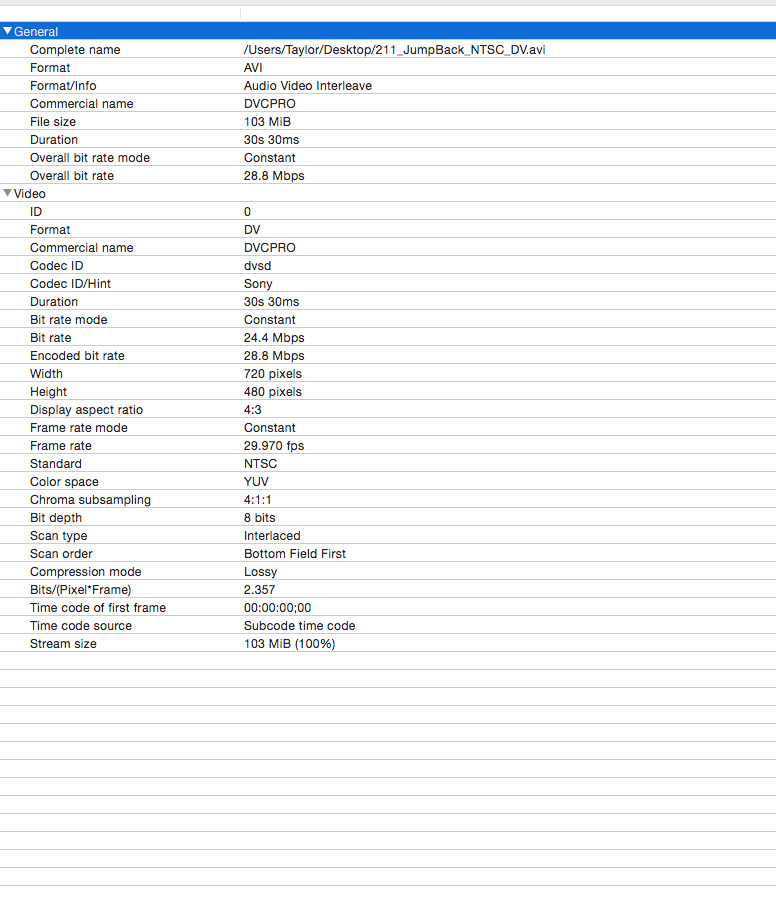
Here is the .AVI file info.
Is it any better?
Here is the .AVI file info.
Is it any better?
Please Log in to join the conversation.
- mobiletaylor
-
Topic Author
- Offline
- Elite Member
-
Less
More
- Posts: 181
- Thank you received: 6
16 Mar 2015 16:30 #61410
by mobiletaylor
Replied by mobiletaylor on topic Using dedicated FCPX library to replace Digital Juice Juicer
I imported all three file types to FCPX and they seemed to play just fine. But I didn’t do any color corrections or add effects. It was also just a short clip.
I started teaching video production at high school this year and there is a classroom set of many Digital Juice products. My thought was to take a Mac Mini and set that up as the station to work with the Juice files. My hope was that my students wouldn’t need to go through Juicer, but could just use the one library to look through and use. I could take all the PNG files and convert them in Compressor, but that would be a lot of extra time. I was hoping there was a clear winner with one of these files types.
JT
I started teaching video production at high school this year and there is a classroom set of many Digital Juice products. My thought was to take a Mac Mini and set that up as the station to work with the Juice files. My hope was that my students wouldn’t need to go through Juicer, but could just use the one library to look through and use. I could take all the PNG files and convert them in Compressor, but that would be a lot of extra time. I was hoping there was a clear winner with one of these files types.
JT
Please Log in to join the conversation.
- ronny courtens
-
- Offline
- Moderator
-
Less
More
- Posts: 4455
- Thank you received: 962
16 Mar 2015 16:47 #61411
by ronny courtens
Replied by ronny courtens on topic Using dedicated FCPX library to replace Digital Juice Juicer
All these files are SD. The QT files are either lossless PNG (higher quality) or DV (standard quality). The AVI file is DVCPRO (standard quality).
The PNG sequences will provide the best picture quality but, as you say, converting them to ProRes will take some work. And the ProRes files will also take up much more space than DV or DVCPRO.
You can set up a batch in Compressor and let it run overnight, so if quality is your primary concern you should do this. If you can live with a bit more compression, just use QT DV.
- Ronny
The PNG sequences will provide the best picture quality but, as you say, converting them to ProRes will take some work. And the ProRes files will also take up much more space than DV or DVCPRO.
You can set up a batch in Compressor and let it run overnight, so if quality is your primary concern you should do this. If you can live with a bit more compression, just use QT DV.
- Ronny
Please Log in to join the conversation.
- mobiletaylor
-
Topic Author
- Offline
- Elite Member
-
Less
More
- Posts: 181
- Thank you received: 6
16 Mar 2015 19:36 #61414
by mobiletaylor
Replied by mobiletaylor on topic Using dedicated FCPX library to replace Digital Juice Juicer
Ronny,
Thanks for that explanation, it helps. Two more:
1 - The only reason not to use the PNG natively is processor overhead? They will play, but need to be rendered in the timeline?
2 - If I batch convert with Compressor, what format would I use to keep the quality, but also keep the lowest file size?
Thank you again,
JT
Thanks for that explanation, it helps. Two more:
1 - The only reason not to use the PNG natively is processor overhead? They will play, but need to be rendered in the timeline?
2 - If I batch convert with Compressor, what format would I use to keep the quality, but also keep the lowest file size?
Thank you again,
JT
Please Log in to join the conversation.
- ronny courtens
-
- Offline
- Moderator
-
Less
More
- Posts: 4455
- Thank you received: 962
16 Mar 2015 21:16 #61417
by ronny courtens
Replied by ronny courtens on topic Using dedicated FCPX library to replace Digital Juice Juicer
Hi James,
1. Yep, that's the main reason. Plus you will have to make compound clips of every PNG sequence if you want to work easily with them in a timeline.
2. If you will need to color correct or key the images ProRes 422 will give you the best quality to start from. If you don't need to color correct or key the images, ProRes LT will deliver the best visual quality vs. file size.
- Ronny
1. Yep, that's the main reason. Plus you will have to make compound clips of every PNG sequence if you want to work easily with them in a timeline.
2. If you will need to color correct or key the images ProRes 422 will give you the best quality to start from. If you don't need to color correct or key the images, ProRes LT will deliver the best visual quality vs. file size.
- Ronny
Please Log in to join the conversation.
- mobiletaylor
-
Topic Author
- Offline
- Elite Member
-
Less
More
- Posts: 181
- Thank you received: 6
16 Mar 2015 21:42 #61419
by mobiletaylor
Replied by mobiletaylor on topic Using dedicated FCPX library to replace Digital Juice Juicer
OK, ProResLT would probably work.
I'm still confused on the PNG files. Why would they need to be put into a compound clip? Are there different types of PNG sequences?
I'm still confused on the PNG files. Why would they need to be put into a compound clip? Are there different types of PNG sequences?
Please Log in to join the conversation.
- ronny courtens
-
- Offline
- Moderator
-
Less
More
- Posts: 4455
- Thank you received: 962
16 Mar 2015 22:01 #61420
by ronny courtens
Replied by ronny courtens on topic Using dedicated FCPX library to replace Digital Juice Juicer
Ah my bad, I thought these were PNG still image sequences. But now I see that they are lossless QT movies in PNG format. So no, no need to create compound clips. Actually you can use the native files in FCP X but you will definitely need to render them for smooth playback. If you do convert them to ProRes they will play smoothly without rendering.
- Ronny
- Ronny
Please Log in to join the conversation.
- mobiletaylor
-
Topic Author
- Offline
- Elite Member
-
Less
More
- Posts: 181
- Thank you received: 6
18 Mar 2015 18:56 #61542
by mobiletaylor
Replied by mobiletaylor on topic Using dedicated FCPX library to replace Digital Juice Juicer
Thank you Ronny!
I really appreciate your time with this.
JT
I really appreciate your time with this.
JT
Please Log in to join the conversation.
