


- Posts: 786
- Thank you received: 21
3 Post Moderation Rule for New Boarders (25 Jan 2021)
New boarders will have their posts moderated - Don't worry if you cannot see your post immediately.
Photoshop layered file problem, I think.
- Jonathan Levin
-
 Topic Author
- Offline
- Platinum Member
-

Less
More
13 Mar 2015 17:00 - 13 Mar 2015 17:01 #61305
by Jonathan Levin
Photoshop layered file problem, I think. was created by Jonathan Levin
Hi all.
I created a four layer PS file that I want to work with in FCPX (10.1.4) The layers are type layers and un-rasterized, in case I need to edit copy later.
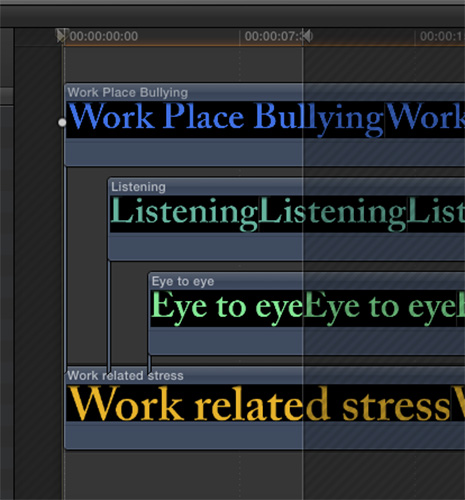
I imported and added clip to my project, but I am have a problem moving the individual layers. As you can see hopefully in my attachment, when I double click on the PS clip in the project, I then get the viewer that shows all four of my layers. As you can see, I am trying to have the layers appear on screen at different times.
I can individually move three out of the four layers, but when I move the fourth, it moves the other three with it. And I'm also confused as to why there are connection points, and multiples of connection points????
Any ideas?
Thanks Jonathan
I created a four layer PS file that I want to work with in FCPX (10.1.4) The layers are type layers and un-rasterized, in case I need to edit copy later.
I imported and added clip to my project, but I am have a problem moving the individual layers. As you can see hopefully in my attachment, when I double click on the PS clip in the project, I then get the viewer that shows all four of my layers. As you can see, I am trying to have the layers appear on screen at different times.
I can individually move three out of the four layers, but when I move the fourth, it moves the other three with it. And I'm also confused as to why there are connection points, and multiples of connection points????
Any ideas?
Thanks Jonathan
Last edit: 13 Mar 2015 17:01 by Jonathan Levin.
Please Log in to join the conversation.
- Tom Wolsky
-

- Offline
- Moderator
-

13 Mar 2015 17:06 #61306
by Tom Wolsky
Replied by Tom Wolsky on topic Photoshop layered file problem, I think.
The bottom layer is the primary storyline. Activate the Position tool and hold the `/~ key to move that layer along the timeline without moving the items.
Please Log in to join the conversation.
- Jonathan Levin
-
Topic Author
- Offline
- Platinum Member
-
Less
More
- Posts: 786
- Thank you received: 21
13 Mar 2015 17:37 #61307
by Jonathan Levin
Replied by Jonathan Levin on topic Photoshop layered file problem, I think.
Thanks Tom. That worked. But why are there connection points for independent layers? Is it just me or shouldn't layers just move independently even using just the Section tool or at least the Position tool with out having to use an additional key. Just crabby...
And it has been a while since I've worked with a PS layered file, but is this a new "feature"? So just to clarify, I need to press and hold `/~ while using the position tool to move layered files? Does this apply to layered TIFFs as well?
And it has been a while since I've worked with a PS layered file, but is this a new "feature"? So just to clarify, I need to press and hold `/~ while using the position tool to move layered files? Does this apply to layered TIFFs as well?
Please Log in to join the conversation.
- ronny courtens
-

- Offline
- Moderator
-
Less
More
- Posts: 4455
- Thank you received: 962
13 Mar 2015 17:48 #61308
by ronny courtens
Replied by ronny courtens on topic Photoshop layered file problem, I think.
Tom's suggestion is correct. A different approach could be:
Select the bottom layer and press ALT+CMD+ArrowUP. This will lift the bottom layer from the storyline.
Now you can drag any of the layers to wherever you wish without changing your tool or holding any extra key..
- Ronny
Select the bottom layer and press ALT+CMD+ArrowUP. This will lift the bottom layer from the storyline.
Now you can drag any of the layers to wherever you wish without changing your tool or holding any extra key..
- Ronny
Please Log in to join the conversation.
- Jonathan Levin
-
Topic Author
- Offline
- Platinum Member
-
Less
More
- Posts: 786
- Thank you received: 21
13 Mar 2015 17:59 #61309
by Jonathan Levin
Replied by Jonathan Levin on topic Photoshop layered file problem, I think.
Thanks Ronny. So it's always just that bottom layer then that's connected. Moving it up seems like an option too, but then if the layers are in order, that might be a problem. I will work with it though.
Good to hear from you both.
Jonathan
Good to hear from you both.
Jonathan
Please Log in to join the conversation.
- ronny courtens
-
- Offline
- Moderator
-
Less
More
- Posts: 4455
- Thank you received: 962
13 Mar 2015 18:03 #61310
by ronny courtens
Replied by ronny courtens on topic Photoshop layered file problem, I think.
When you lift the bottom layer the others will move with it, so the order will never change.
- Ronny
- Ronny
Please Log in to join the conversation.
- Jonathan Levin
-
Topic Author
- Offline
- Platinum Member
-
Less
More
- Posts: 786
- Thank you received: 21
13 Mar 2015 18:47 #61311
by Jonathan Levin
Replied by Jonathan Levin on topic Photoshop layered file problem, I think.
Thanks Ronny.
You are correct as usual. Lifting that bottom layer does not change the order, and as Tom mentioned it is now off the primary storyline, AND I can move each layer independently without using a modifier key.
Trying to wrap my head around why FCP treats any part of the layered file as a "Primary" story line. This I can live with easily though.
Thank you and everyone have a great weekend.
Jonathan
You are correct as usual. Lifting that bottom layer does not change the order, and as Tom mentioned it is now off the primary storyline, AND I can move each layer independently without using a modifier key.
Trying to wrap my head around why FCP treats any part of the layered file as a "Primary" story line. This I can live with easily though.
Thank you and everyone have a great weekend.
Jonathan
Please Log in to join the conversation.
- ronny courtens
-
- Offline
- Moderator
-
Less
More
- Posts: 4455
- Thank you received: 962
13 Mar 2015 19:00 #61312
by ronny courtens
Replied by ronny courtens on topic Photoshop layered file problem, I think.
Actually FCP X treats a layered graphic just like FCP7 does. When you double-click the layered graphic it opens in its own timeline. An FCP7 timeline only has individual tracks, an FCP X timeline always has as a primary storyline and connected clips. So there is nothing really unusual about this.
Have a nice weekend!
- Ronny
Have a nice weekend!
- Ronny
Please Log in to join the conversation.
