


- Posts: 1
- Thank you received: 0
3 Post Moderation Rule for New Boarders (25 Jan 2021)
New boarders will have their posts moderated - Don't worry if you cannot see your post immediately.
Help needed - "missing proxy"
12 Mar 2015 09:36 #61233
by CirrusPro
Help needed - "missing proxy" was created by CirrusPro
I've just joined this forum, so hello to everyone! 
I have an issue with imported video files in FCPX. I've been video editing for the past 6 months without any issues but now (all of a sudden) all video files I import into my project say "missing proxy".
I used to be able to simply import and I could work with/preview the clips straight away but I haven't changed any settings so this is baffling me slightly, not to mention increasing my editing time (ten-fold) whilst they render.
Any advice would be much appreciated.
FYI - I'm creating proxy media for imports, not optimised.
I have an issue with imported video files in FCPX. I've been video editing for the past 6 months without any issues but now (all of a sudden) all video files I import into my project say "missing proxy".
I used to be able to simply import and I could work with/preview the clips straight away but I haven't changed any settings so this is baffling me slightly, not to mention increasing my editing time (ten-fold) whilst they render.
Any advice would be much appreciated.
FYI - I'm creating proxy media for imports, not optimised.
Please Log in to join the conversation.
- ronny courtens
-

- Offline
- Moderator
-

Less
More
- Posts: 4455
- Thank you received: 962
12 Mar 2015 09:59 #61234
by ronny courtens
Replied by ronny courtens on topic Help needed - "missing proxy"
Hi Simon, welcome to the forum.
Choose Final Cut Pro > Preferences and press the Import tab.
Is "Create Proxy Media" checked in the Transcoding options?
If it isn't, and you always want FCP X to create proxy media while importing, you should keep this preference checked. That's for any future productions.
Now for your current production:
Set the Viewer to Proxy and in the Clip Browser FCP X will show you all the clips that have missing proxies:
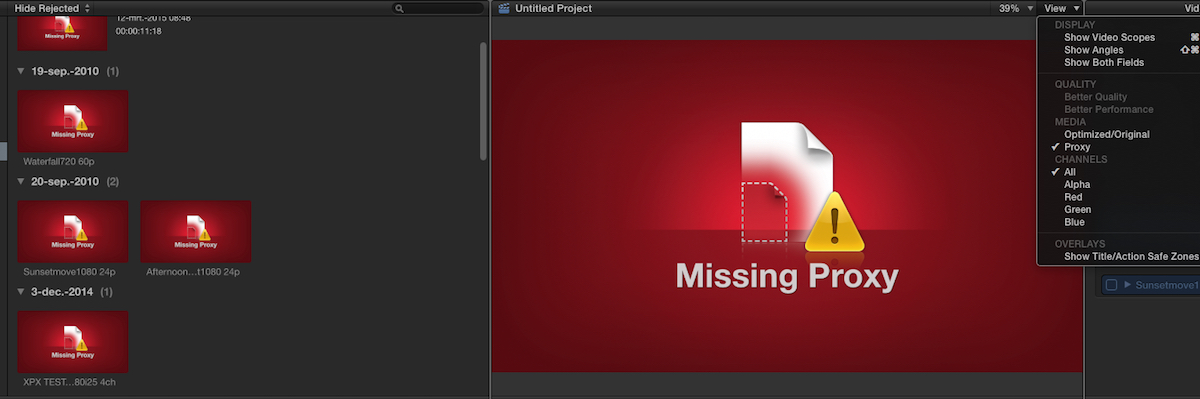
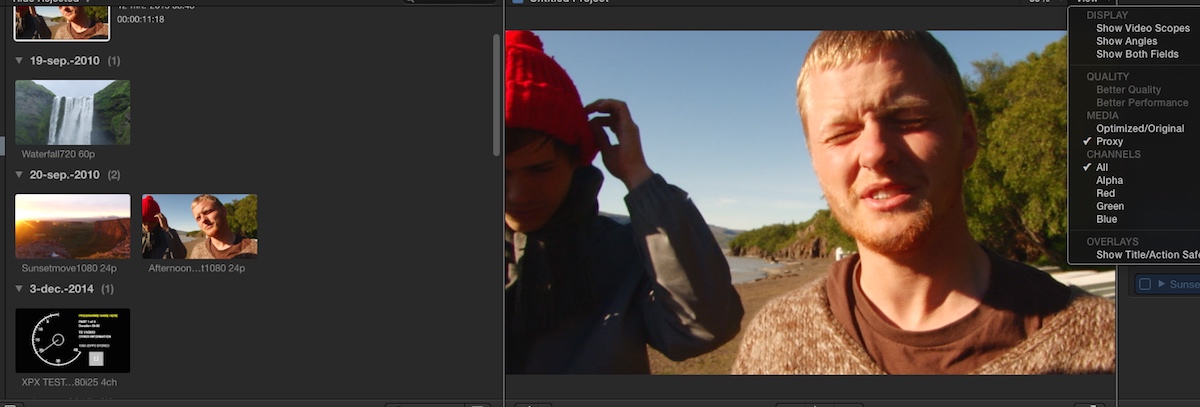
Group-select these clips, R)click the selection and choose "Transcode Media". The Transcoding Media window will pop up, just select "Create proxy media" and press OK. Wait until the proxy media have been created. Now all you clips will heave proxy media and you will get no missing proxy warnings again:
- Ronny
Choose Final Cut Pro > Preferences and press the Import tab.
Is "Create Proxy Media" checked in the Transcoding options?
If it isn't, and you always want FCP X to create proxy media while importing, you should keep this preference checked. That's for any future productions.
Now for your current production:
Set the Viewer to Proxy and in the Clip Browser FCP X will show you all the clips that have missing proxies:
Group-select these clips, R)click the selection and choose "Transcode Media". The Transcoding Media window will pop up, just select "Create proxy media" and press OK. Wait until the proxy media have been created. Now all you clips will heave proxy media and you will get no missing proxy warnings again:
- Ronny
Please Log in to join the conversation.

Less
More
- Posts: 971
- Thank you received: 46
12 Mar 2015 10:24 #61235
by MsJustine
Replied by MsJustine on topic Help needed - "missing proxy"
Ronny is right, if you are editing on a laptop then proxy would be best,
My workflow for proxy files: I would suggest to clear the proxy files already generated, in case there is an issue..
File--Delete Generated Project Files--Select all 3 options--OK
Then Select the Project in the browser--File-Transcode Media--Select what options you need.
Proxy, optimized media is scratch media, in other words it only needs to survive for the length of the creating of the project you are editing, when you are finished with editing, destroy the proxy media, the optimized media, it has no secondary use, you do not need to archive FCPX generated media [being proxy,optimized].
If clips do not turn from red to what the clip is, command A for all or select the offending clips and then select transcode.
My workflow for proxy files: I would suggest to clear the proxy files already generated, in case there is an issue..
File--Delete Generated Project Files--Select all 3 options--OK
Then Select the Project in the browser--File-Transcode Media--Select what options you need.
Proxy, optimized media is scratch media, in other words it only needs to survive for the length of the creating of the project you are editing, when you are finished with editing, destroy the proxy media, the optimized media, it has no secondary use, you do not need to archive FCPX generated media [being proxy,optimized].
If clips do not turn from red to what the clip is, command A for all or select the offending clips and then select transcode.
Please Log in to join the conversation.
- LDMartin1959
-

- Offline
- New Member
-

Less
More
- Posts: 12
- Thank you received: 0
29 Mar 2015 17:01 #62051
by LDMartin1959
Replied by LDMartin1959 on topic Help needed - "missing proxy"
Please pardon my intruding into this thread, but I think this contains answers to a question I have but I just need to ask for a clarification. I hope that isn't considered bad form on this board (some boards want you to create a new thread).
Just so I understand what has been said so far: When I am done actively editing a project I can delete all files/folders contained in the "Shared Items", "High Quality Media" and "Proxy Media" folders so that I can archive the project file.
Questions:
1) Do I have the first part of that correct?
2) If/when I come back to re-edit the project at some point, so long as I have the original video files, I can re-edit the project without any penalty (in terms of functionality, video quality, et cetera)?
Just so I understand what has been said so far: When I am done actively editing a project I can delete all files/folders contained in the "Shared Items", "High Quality Media" and "Proxy Media" folders so that I can archive the project file.
Questions:
1) Do I have the first part of that correct?
2) If/when I come back to re-edit the project at some point, so long as I have the original video files, I can re-edit the project without any penalty (in terms of functionality, video quality, et cetera)?
Please Log in to join the conversation.
- ronny courtens
-
- Offline
- Moderator
-
Less
More
- Posts: 4455
- Thank you received: 962
29 Mar 2015 17:31 #62052
by ronny courtens
Replied by ronny courtens on topic Help needed - "missing proxy"
Hi Leslie,
You got this right, except for the "I can delete all files/folders..." part.
You never, ever should go into a Library and manually delete any files or folders, except when this is part of a troubleshooting process with Apple or with people who know exactly how the FCP X database works. If you do delete Library files or folders in Finder you can completely screw up your Library and no-one serious will help you solve this mess.
For archiving purposes you can delete Optimized media, Proxy media and Render files right inside the application. As Ms Justine explained:
- If you want to archive a Project you select the Project in the browser and choose File > Delete Generated Project Files > choose all three options (render, optimized, proxy).
- If you want to archive a Library you select the Library in the browser and choose File > Delete Generated Library Files > choose all three options (render, optimized, proxy).
This will make your Project/Library lean and clean and ready for archiving. As long as you keep your original media exactly where it is, or consolidated into the Library, you will be able to re-open the archive and re-edit without any issues.
You cannot delete the "Shared Items" folder from within FCP X, nor should you. This folder only contains very small files (between 3 and 12 KB), so there is no need at all to ever delete this folder anyway.
- Ronny
You got this right, except for the "I can delete all files/folders..." part.
You never, ever should go into a Library and manually delete any files or folders, except when this is part of a troubleshooting process with Apple or with people who know exactly how the FCP X database works. If you do delete Library files or folders in Finder you can completely screw up your Library and no-one serious will help you solve this mess.
For archiving purposes you can delete Optimized media, Proxy media and Render files right inside the application. As Ms Justine explained:
- If you want to archive a Project you select the Project in the browser and choose File > Delete Generated Project Files > choose all three options (render, optimized, proxy).
- If you want to archive a Library you select the Library in the browser and choose File > Delete Generated Library Files > choose all three options (render, optimized, proxy).
This will make your Project/Library lean and clean and ready for archiving. As long as you keep your original media exactly where it is, or consolidated into the Library, you will be able to re-open the archive and re-edit without any issues.
You cannot delete the "Shared Items" folder from within FCP X, nor should you. This folder only contains very small files (between 3 and 12 KB), so there is no need at all to ever delete this folder anyway.
- Ronny
Please Log in to join the conversation.
- LDMartin1959
-
- Offline
- New Member
-
Less
More
- Posts: 12
- Thank you received: 0
29 Mar 2015 20:20 #62055
by LDMartin1959
Replied by LDMartin1959 on topic Help needed - "missing proxy"
Okay, I didn't understand that she was referring to functions inside FCP. Glad you corrected me on this. Thanks.
Please Log in to join the conversation.
- ronny courtens
-
- Offline
- Moderator
-
Less
More
- Posts: 4455
- Thank you received: 962
30 Mar 2015 07:11 #62075
by ronny courtens
Replied by ronny courtens on topic Help needed - "missing proxy"
No problem, I hope my post didn't sound too harsh. I always get nervous when I hear people talk about going inside an FCP X Library to delete or modify files. That's probably because I have spent too much time trying to help recover corrupted Libraries because people had been messing with them
You can safely manage all your media right from within FCP X, opening the Library package should only be done in very exceptional circumstances.
- Ronny
You can safely manage all your media right from within FCP X, opening the Library package should only be done in very exceptional circumstances.
- Ronny
Please Log in to join the conversation.
- LDMartin1959
-
- Offline
- New Member
-
Less
More
- Posts: 12
- Thank you received: 0
30 Mar 2015 16:35 #62092
by LDMartin1959
Replied by LDMartin1959 on topic Help needed - "missing proxy"
Not a problem at all.
Please Log in to join the conversation.
- johnny.blanco
-
- Offline
- New Member
-
Less
More
- Posts: 1
- Thank you received: 0
17 May 2016 16:08 #76841
by johnny.blanco
Replied by johnny.blanco on topic Help needed - "missing proxy"
Hello all and... I NEED HELP!!!
In regards to missing proxy, I have recently updated my mac to El Capitan and FCP to 10.2.3 I am able to import C100 footage but as for all my other footage from a 6D and two 70D's I get nothing! If I drag to the timeline I get "missing proxy" If I go through media import it looks like its about to prepare files than disappears. Need Help bad, HUGE PROJECT!! Thanks for your time
In regards to missing proxy, I have recently updated my mac to El Capitan and FCP to 10.2.3 I am able to import C100 footage but as for all my other footage from a 6D and two 70D's I get nothing! If I drag to the timeline I get "missing proxy" If I go through media import it looks like its about to prepare files than disappears. Need Help bad, HUGE PROJECT!! Thanks for your time
Please Log in to join the conversation.
- ronny courtens
-
- Offline
- Moderator
-
Less
More
- Posts: 4455
- Thank you received: 962
18 May 2016 06:23 #76867
by ronny courtens
Replied by ronny courtens on topic Help needed - "missing proxy"
Hi Johnny, welcome to the forums.
Can you give some more details about the problem? Getting a "Missing proxy warning" when dragging clips to the timeline and not being able to import clips from certain cameras are two very different things.
- What do you mean by "If I drag to the timeline I get "missing proxy"? Which clips are you dragging to the timeline? C100 clips that have been imported or 6D/7OD clips from their card folders?
- When you try to import clips from a 6D and 70D, how do you do this? Are you importing straight from the cards in the cameras or have you copied the complete card folders to your system and are you trying to import from these folders?
Thanks for the extra information.
- Ronny
Can you give some more details about the problem? Getting a "Missing proxy warning" when dragging clips to the timeline and not being able to import clips from certain cameras are two very different things.
- What do you mean by "If I drag to the timeline I get "missing proxy"? Which clips are you dragging to the timeline? C100 clips that have been imported or 6D/7OD clips from their card folders?
- When you try to import clips from a 6D and 70D, how do you do this? Are you importing straight from the cards in the cameras or have you copied the complete card folders to your system and are you trying to import from these folders?
Thanks for the extra information.
- Ronny
Please Log in to join the conversation.
