


- Posts: 2
- Thank you received: 0
3 Post Moderation Rule for New Boarders (25 Jan 2021)
New boarders will have their posts moderated - Don't worry if you cannot see your post immediately.
Fast way to change font in Inspector
12 Mar 2015 03:35 #61222
by TonyPDX
Fast way to change font in Inspector was created by TonyPDX
Hi Everybody-- new guy here.
I wonder if anyone knows a faster path for changing a title's font in the inspector than by scrolling, scrolling, scrolling to the new font? I've tried typing in the name of the font, etc., but no love.
Does anyone have a faster way?
Thanks in advance--
Tony
I wonder if anyone knows a faster path for changing a title's font in the inspector than by scrolling, scrolling, scrolling to the new font? I've tried typing in the name of the font, etc., but no love.
Does anyone have a faster way?
Thanks in advance--
Tony
Please Log in to join the conversation.

12 Mar 2015 04:49 #61225
by BenB
Replied by BenB on topic Fast way to change font in Inspector
None at this time. Fill out the feedback page.
Please Log in to join the conversation.
- ronny courtens
-

- Offline
- Moderator
-

Less
More
- Posts: 4455
- Thank you received: 962
12 Mar 2015 17:52 #61265
by ronny courtens
Replied by ronny courtens on topic Fast way to change font in Inspector
Hi Tony, welcome tot the forum.
If you have one or more fonts that you often use you can save them as presets int the Title tool. This way you won't have to scroll through all the fonts anymore to apply one of your favorite fonts. Here's how you do this:
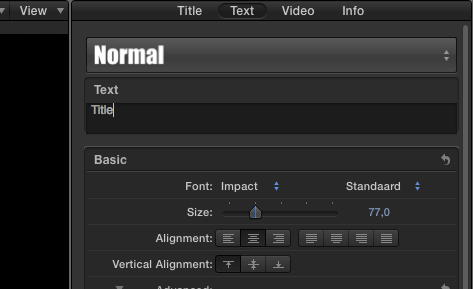
Select one of your favorite fonts from the font list (here I have selected Impact, Normal, Size 77), then in the Inspector > Text tab click on the black bar with the word "Normal":
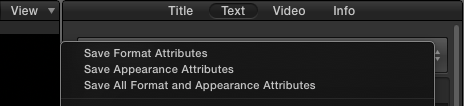
This will reveal the Save window from which you can select to save the Format Attributes (Font, Size), the Appearance Attributes (Face color, Outline color, Glow etc...) or both the Format and the Appearance Attributes:
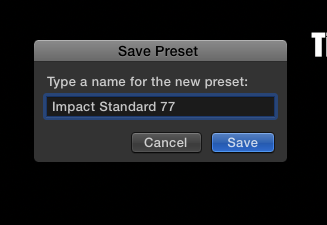
Select what you want to save (I have selected only Format). A window will pop up where you can enter a name for your preset (I have entered Impact Standard 77). Then press Save:
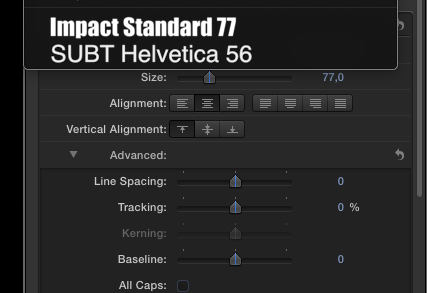
Now when I click the black bar in the Text tab I can quickly select any preset font I have saved without needing to scroll through all my fonts:
Any text selected on the timeline will instantly be changed to the font preset I have chosen:
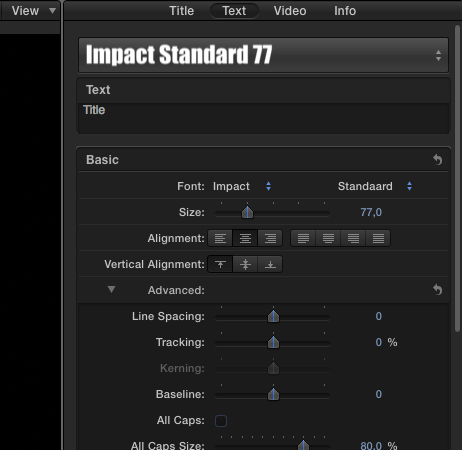
This whole process takes only a few clicks, much faster than scrolling through hundreds of fonts.
- Ronny
If you have one or more fonts that you often use you can save them as presets int the Title tool. This way you won't have to scroll through all the fonts anymore to apply one of your favorite fonts. Here's how you do this:
Select one of your favorite fonts from the font list (here I have selected Impact, Normal, Size 77), then in the Inspector > Text tab click on the black bar with the word "Normal":
This will reveal the Save window from which you can select to save the Format Attributes (Font, Size), the Appearance Attributes (Face color, Outline color, Glow etc...) or both the Format and the Appearance Attributes:
Select what you want to save (I have selected only Format). A window will pop up where you can enter a name for your preset (I have entered Impact Standard 77). Then press Save:
Now when I click the black bar in the Text tab I can quickly select any preset font I have saved without needing to scroll through all my fonts:
Any text selected on the timeline will instantly be changed to the font preset I have chosen:
This whole process takes only a few clicks, much faster than scrolling through hundreds of fonts.
- Ronny
Please Log in to join the conversation.
