


- Posts: 3
- Thank you received: 0
3 Post Moderation Rule for New Boarders (25 Jan 2021)
New boarders will have their posts moderated - Don't worry if you cannot see your post immediately.
How to draw simple objects - arrow, line, rectangle?
11 Mar 2015 07:47 - 11 Mar 2015 07:47 #61159
by 2016509
How to draw simple objects - arrow, line, rectangle? was created by 2016509
Hi
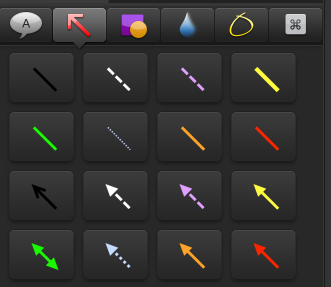
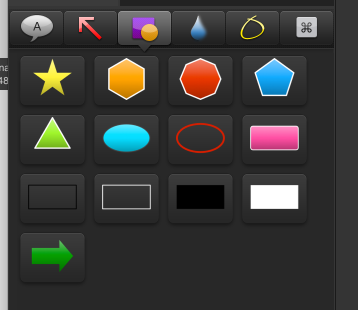
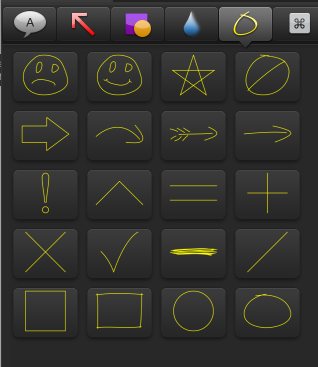
sorry for the stupid question, I new. I used to use Camtasia - there were simple tools - insert the arrow, rectangle line. How to do this in FCPX?
sorry for the stupid question, I new. I used to use Camtasia - there were simple tools - insert the arrow, rectangle line. How to do this in FCPX?
Last edit: 11 Mar 2015 07:47 by 2016509.
Please Log in to join the conversation.
- Tom Wolsky
-

- Offline
- Moderator
-

11 Mar 2015 07:55 #61160
by Tom Wolsky
Replied by Tom Wolsky on topic How to draw simple objects - arrow, line, rectangle?
Those specific annotation tools do not exist in FCP. There are generators that can create shapes, either filled or as outline. They are a variety of different shapes. You can also use dingbat fonts that have many arrows and pointers.
Please Log in to join the conversation.
11 Mar 2015 07:57 #61161
by 2016509
Replied by 2016509 on topic How to draw simple objects - arrow, line, rectangle?
Thank You
Please Log in to join the conversation.
- Karsten Schlüter
-

- Offline
- Moderator
-
Less
More
- Posts: 3790
- Thank you received: 718
11 Mar 2015 11:15 #61164
by Karsten Schlüter
Replied by Karsten Schlüter on topic How to draw simple objects - arrow, line, rectangle?
If you like more action than static arrows, the folks from rippletraining.com offer a package called Callouts, click here >>
www.rippletraining.com/plugin/callouts-2-0/
And for the DIY squad:
You can use any 'paint.app', I recommend Pixelmator, to draw any own arrows, boxes, circles, bubbles… on a transparent background, save it as png; create a Library in FCPX containing just your arsenal of graphics and drag'n drop onto your timeline. Keyframing the stills adds a bit of action....
And for the DIY squad:
You can use any 'paint.app', I recommend Pixelmator, to draw any own arrows, boxes, circles, bubbles… on a transparent background, save it as png; create a Library in FCPX containing just your arsenal of graphics and drag'n drop onto your timeline. Keyframing the stills adds a bit of action....
Please Log in to join the conversation.

11 Mar 2015 12:03 #61165
by BenB
Replied by BenB on topic How to draw simple objects - arrow, line, rectangle?
Or create you own Motion generator templates, and give yourself a ton of control over things. But the Ripple package really is the way to go, very worth it.
But, if you're doing screen movies for training, ScreenFlow is a must use, forget FCPX for that.
But, if you're doing screen movies for training, ScreenFlow is a must use, forget FCPX for that.
Please Log in to join the conversation.
- MarcoCompraTutto
-
- Offline
- New Member
-

Less
More
- Posts: 5
- Thank you received: 0
09 Nov 2021 09:44 #117386
by MarcoCompraTutto
Replied by MarcoCompraTutto on topic How to draw simple objects - arrow, line, rectangle?
I had the same need as yours, while inserting some short, small PIP explainer clips. I was tired of going back and forth from Affinity Photo, to create a transparent shape, export PNG, import to FCPX...
I discovered the free OUTLINER LITE plugin, tried, liked, and went for the paid one, not for the weird fill and texture options, but because it lets you crop the source clip from within the effect.
Time saving.
I'm not affiliate to BretFX, just paying... as usual.
hope this helps
I discovered the free OUTLINER LITE plugin, tried, liked, and went for the paid one, not for the weird fill and texture options, but because it lets you crop the source clip from within the effect.
Time saving.
I'm not affiliate to BretFX, just paying... as usual.
hope this helps
Please Log in to join the conversation.
- Karsten Schlüter
-
- Offline
- Moderator
-
Less
More
- Posts: 3790
- Thank you received: 718
10 Nov 2021 05:59 #117415
by Karsten Schlüter
Replied by Karsten Schlüter on topic How to draw simple objects - arrow, line, rectangle?
What's wrong with FCP's built-in SHAPES generator…?
support.apple.com/guide/final-cut-pro/ad...apes-veradb834a0/mac
support.apple.com/guide/final-cut-pro/ad...apes-veradb834a0/mac
Please Log in to join the conversation.
