


- Posts: 46
- Thank you received: 2
3 Post Moderation Rule for New Boarders (25 Jan 2021)
New boarders will have their posts moderated - Don't worry if you cannot see your post immediately.
This is a Raid (storage what to do)
- Happyfingers
-
 Topic Author
- Offline
- Senior Member
-

Less
More
08 Mar 2015 05:45 #61011
by Happyfingers
This is a Raid (storage what to do) was created by Happyfingers
Hello all
well my usb 3 toshiba drive just isnt fast enough, it does the job but im forever waiting for it
so im going to set up a raid, prior to a few hours ago i didnt even know what a raid was :silly:
so the question is
do i just buy another 1tb toshiba (5400) and format as a raid and get almost twice the speed im getting now (cost $79)
or
buy 2 touro 1tb (7200) and format as a raid getting even better speed (cost $190)
both of these soloutions would take up both my mac pro laptop usb ports as im assuming a usb double adapter would defeat the purpose of getting better speed
or
do i purchase 2 lacie 1tb (7200) or hitachi g tech thunderbolt and format as a raid (cost $450) this would also take both my thunderbolt ports one of which i use for a second display ?
my budget is no greater than $400 but that isnt what concerns me
i dont want to spend money and not solve the problem
im unconcerned about using raid 0 as my raw footage will be stored on a different drive
the raid will only be used for editing
speed test of toshiba hard drive was 85mb/s write and 65mb/s read
speed test for internal hard drive of mac pro was 800+ mb/s write and 800+ mb/s read (significantly different)
thanks in advance for your advice
i give good karma :woohoo:
well my usb 3 toshiba drive just isnt fast enough, it does the job but im forever waiting for it
so im going to set up a raid, prior to a few hours ago i didnt even know what a raid was :silly:
so the question is
do i just buy another 1tb toshiba (5400) and format as a raid and get almost twice the speed im getting now (cost $79)
or
buy 2 touro 1tb (7200) and format as a raid getting even better speed (cost $190)
both of these soloutions would take up both my mac pro laptop usb ports as im assuming a usb double adapter would defeat the purpose of getting better speed
or
do i purchase 2 lacie 1tb (7200) or hitachi g tech thunderbolt and format as a raid (cost $450) this would also take both my thunderbolt ports one of which i use for a second display ?
my budget is no greater than $400 but that isnt what concerns me
i dont want to spend money and not solve the problem
im unconcerned about using raid 0 as my raw footage will be stored on a different drive
the raid will only be used for editing
speed test of toshiba hard drive was 85mb/s write and 65mb/s read
speed test for internal hard drive of mac pro was 800+ mb/s write and 800+ mb/s read (significantly different)
thanks in advance for your advice
i give good karma :woohoo:
Please Log in to join the conversation.
- ronny courtens
-

- Offline
- Moderator
-

Less
More
- Posts: 4455
- Thank you received: 962
08 Mar 2015 07:55 - 08 Mar 2015 07:57 #61015
by ronny courtens
Replied by ronny courtens on topic This is a Raid (storage what to do)
Hi Mark,
There are better solutions than purchasing individual drives and striping them as RAID.
The first thing you need to be aware of is that 5400 rpm drives are simply not good enough for comfortable video editing. The second thing is that the faster your interface is, the better your throughput will be. USB3 is not bad, but Thunderbolt always gives better results especially with RAID systems. You just have to forget about your current Toshiba 5400 drive, that's too slow for video and it will be too slow even in a RAID configuration. Just keep it as an extra data backup.
- If you don't need more than 150 MB/s speeds you can stay with a single drive.
I am not going to favor particular brands, but if you just look at the d2 from LaCie you will see that you can get a 4TB Thunderbolt drive for $399: www.lacie.com/us/products/product.htm?id=10628 .
This single drive would give you theoretically 180 MB/s. In reality it will be a bit slower but still much faster than what you have now. And it has a Thunderbolt throughput, so you won't lose any connectivity at all.
- If you want to get better speeds you will need a RAID system.
As a RAID system consists of at least two drives it also is more expensive. Most dual drive RAID setups are around $600, but I have seen great results from this OWC Mercury setup that still falls within your budget expectations ($447): eshop.macsales.com/item/OWC/METB7DH4.0T/
Theoretically this system will give you 340 MB/s, in the real world this will be somewhat lower. But compared to your current setup it will provide a huge performance boost, and again you won't lose any connectivity because it has Thunderbolt throughput connectors.
Just some ideas to start with.
- Ronny
There are better solutions than purchasing individual drives and striping them as RAID.
The first thing you need to be aware of is that 5400 rpm drives are simply not good enough for comfortable video editing. The second thing is that the faster your interface is, the better your throughput will be. USB3 is not bad, but Thunderbolt always gives better results especially with RAID systems. You just have to forget about your current Toshiba 5400 drive, that's too slow for video and it will be too slow even in a RAID configuration. Just keep it as an extra data backup.
- If you don't need more than 150 MB/s speeds you can stay with a single drive.
I am not going to favor particular brands, but if you just look at the d2 from LaCie you will see that you can get a 4TB Thunderbolt drive for $399: www.lacie.com/us/products/product.htm?id=10628 .
This single drive would give you theoretically 180 MB/s. In reality it will be a bit slower but still much faster than what you have now. And it has a Thunderbolt throughput, so you won't lose any connectivity at all.
- If you want to get better speeds you will need a RAID system.
As a RAID system consists of at least two drives it also is more expensive. Most dual drive RAID setups are around $600, but I have seen great results from this OWC Mercury setup that still falls within your budget expectations ($447): eshop.macsales.com/item/OWC/METB7DH4.0T/
Theoretically this system will give you 340 MB/s, in the real world this will be somewhat lower. But compared to your current setup it will provide a huge performance boost, and again you won't lose any connectivity because it has Thunderbolt throughput connectors.
Just some ideas to start with.
- Ronny
Last edit: 08 Mar 2015 07:57 by ronny courtens.
Please Log in to join the conversation.
- Karsten Schlüter
-

- Offline
- Moderator
-
Less
More
- Posts: 3790
- Thank you received: 718
08 Mar 2015 08:10 - 08 Mar 2015 08:28 #61016
by Karsten Schlüter
Replied by Karsten Schlüter on topic This is a Raid (storage what to do)
… and some ideas from the 'No Budget Corner' ... :
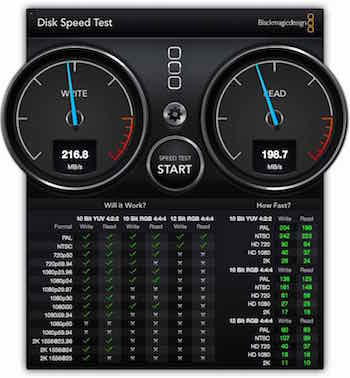
This is the DiskSpeed for my "Two 2.5" Toshibas for 60€ each as a software Raid0"
Yes, I know Raid0 multiplies the 'chance' for a crash, but I'm using this Raid just as 'player' for a project. The original datas are kept save on another drive. Worst case: I have to copy from there and re-link. I'm no news-room, so time is no issue.
And, yes, I know, usb asks for precious CPU power ... for delivering 4k, for my needs, fast enough.
hmmm,not quite;
In a few weeks, I will purchase two tiny (128GB) SSDs, and combine them to a Raid0 …
Sure, a nice Thunderbolt-case with some fast drives would be 'best practice' ... but worse for my wallet. :lol:
meant as suggestion …
This is the DiskSpeed for my "Two 2.5" Toshibas for 60€ each as a software Raid0"
Yes, I know Raid0 multiplies the 'chance' for a crash, but I'm using this Raid just as 'player' for a project. The original datas are kept save on another drive. Worst case: I have to copy from there and re-link. I'm no news-room, so time is no issue.
And, yes, I know, usb asks for precious CPU power ... for delivering 4k, for my needs, fast enough.
hmmm,not quite;
In a few weeks, I will purchase two tiny (128GB) SSDs, and combine them to a Raid0 …
Sure, a nice Thunderbolt-case with some fast drives would be 'best practice' ... but worse for my wallet. :lol:
meant as suggestion …
Last edit: 08 Mar 2015 08:28 by Karsten Schlüter.
Please Log in to join the conversation.
- Happyfingers
-
Topic Author
- Offline
- Senior Member
-
Less
More
- Posts: 46
- Thank you received: 2
08 Mar 2015 08:28 #61017
by Happyfingers
Replied by Happyfingers on topic This is a Raid (storage what to do)
thanks for the info Ronny and Karsten
i should of mentioned i want to be portable
i edit both at work and when im at hockey whilst my son is playing (yes of course i watch him sometimes :woohoo: )
he played 3 games in a row last week so that is almost 2 hours of non stop hockey
hes very fit
im just a hack, a 2 bit editor :silly:
so im hoping 2 7200 as raid 0 will surely be better than 1 5400 toshiba ?
i just dont want to be slowed down by the external hard drive/s
anyone know if 2 x 7200 will be quick enough ?
Karsten im assuming you got those speeds with 2 x 5400 toshibas ?
basically whats been happening is as i add edits and go to playback on the timeline (after rendering) the footage is choppy and the hard drive is revving its nipples off (it exports ok)
was hoping 2 x 7200 as raid would stop that from happening ????
once again thanks for the advice
also Ronny
usa price and Aus price are worlds apart
we enjoyed our trip to usa a few years back (disney world plus allure of the seas)
if i could give but one tragic example
a humble taco from most mexican type places in usa = $1 or less
a humble taco anywhere in Aus = $5 or more :ohmy:
apply that to just about everything, youd be amazed
if anyones coming over to visit let me know, ill show you the kangaroos :lol: they are free :woohoo:
i should of mentioned i want to be portable
i edit both at work and when im at hockey whilst my son is playing (yes of course i watch him sometimes :woohoo: )
he played 3 games in a row last week so that is almost 2 hours of non stop hockey
hes very fit
im just a hack, a 2 bit editor :silly:
so im hoping 2 7200 as raid 0 will surely be better than 1 5400 toshiba ?
i just dont want to be slowed down by the external hard drive/s
anyone know if 2 x 7200 will be quick enough ?
Karsten im assuming you got those speeds with 2 x 5400 toshibas ?
basically whats been happening is as i add edits and go to playback on the timeline (after rendering) the footage is choppy and the hard drive is revving its nipples off
(it exports ok)was hoping 2 x 7200 as raid would stop that from happening ????
once again thanks for the advice
also Ronny
usa price and Aus price are worlds apart
we enjoyed our trip to usa a few years back (disney world plus allure of the seas)
if i could give but one tragic example
a humble taco from most mexican type places in usa = $1 or less
a humble taco anywhere in Aus = $5 or more :ohmy:
apply that to just about everything, youd be amazed
if anyones coming over to visit let me know, ill show you the kangaroos :lol: they are free :woohoo:
Please Log in to join the conversation.

Less
More
- Posts: 971
- Thank you received: 46
08 Mar 2015 09:15 #61018
by MsJustine
Replied by MsJustine on topic This is a Raid (storage what to do)
I know the pain of how cheap the USA is compared to home...
Looking at hard drives here, in South Africa, way more than 150% of the cost in the USA..
Duty, exchange rates, mark ups make ownership pricy..
I could only afford the 8gb RAM retina macbook pro, the next model up, cost more than my car!!
Looking at hard drives here, in South Africa, way more than 150% of the cost in the USA..
Duty, exchange rates, mark ups make ownership pricy..
I could only afford the 8gb RAM retina macbook pro, the next model up, cost more than my car!!
Please Log in to join the conversation.
- Karsten Schlüter
-
- Offline
- Moderator
-
Less
More
- Posts: 3790
- Thank you received: 718
08 Mar 2015 09:15 - 08 Mar 2015 09:18 #61019
by Karsten Schlüter
That is correct. Screenshot not 'shopped :LOL:
The whole specs of my set-up:
• 5x cams simultanously in use (soccer games of my son), 4x1080/25fps (I call them 'sacrifice cams', indeed, this weekend one was 'killed' by a perfect instep kick ) , and my new 'main' cam, Lumix fz1000, 4k (hurray, re-framing in fullHD)
• MacMini late 2012, 16GBs Ram
• two 3.5" Intenso usb3 drives
• two 2.5" Toshibas usb3 drives, via DiskUtlity combined to a Raid0
4k on raid, the other 4 sources on the 3.5"
=> editing as Multicam works like charm (ok, some stutter here&then )
I'm actually editing first game of the season - alone the fz1k delivers ~50GB material. But, my personal, non-scientific advice for Multicam: each stream its own platter. ok, due to budget restrictions 2 streams per platter...
again: me hobbyist, this is lowest min. specs...
Replied by Karsten Schlüter on topic This is a Raid (storage what to do)
Happyfingers wrote: Karsten im assuming you got those speeds with 2 x 5400 toshibas ?
That is correct. Screenshot not 'shopped :LOL:
The whole specs of my set-up:
• 5x cams simultanously in use (soccer games of my son), 4x1080/25fps (I call them 'sacrifice cams', indeed, this weekend one was 'killed' by a perfect instep kick
) , and my new 'main' cam, Lumix fz1000, 4k (hurray, re-framing in fullHD)• MacMini late 2012, 16GBs Ram
• two 3.5" Intenso usb3 drives
• two 2.5" Toshibas usb3 drives, via DiskUtlity combined to a Raid0
4k on raid, the other 4 sources on the 3.5"
=> editing as Multicam works like charm (ok, some stutter here&then
)I'm actually editing first game of the season - alone the fz1k delivers ~50GB material. But, my personal, non-scientific advice for Multicam: each stream its own platter. ok, due to budget restrictions 2 streams per platter...
again: me hobbyist, this is lowest min. specs...
Last edit: 08 Mar 2015 09:18 by Karsten Schlüter.
Please Log in to join the conversation.
- Happyfingers
-
Topic Author
- Offline
- Senior Member
-
Less
More
- Posts: 46
- Thank you received: 2
08 Mar 2015 09:29 #61020
by Happyfingers
Replied by Happyfingers on topic This is a Raid (storage what to do)
ok some of that went over my head
do you mean importing from 5 cams at once ? or some sort of live stream setup ?
if your hobbyist then i am something far lower than that :woohoo:
i just got the one gopro and a panasonic ft5
i was just looking at a website that Ronny linked to, they have a owc mercurry 7200 1 tb for $99
the cheapest i could find in Aus was $350 for the same drive but the older 5400 version
i could get 2 newer better drives mailed to me from USA for cheaper than i could buy 1 older slower version in Aus
too many middle men :sick:
do you mean importing from 5 cams at once ? or some sort of live stream setup ?
if your hobbyist then i am something far lower than that :woohoo:
i just got the one gopro and a panasonic ft5
i was just looking at a website that Ronny linked to, they have a owc mercurry 7200 1 tb for $99
the cheapest i could find in Aus was $350 for the same drive but the older 5400 version
i could get 2 newer better drives mailed to me from USA for cheaper than i could buy 1 older slower version in Aus
too many middle men :sick:
Please Log in to join the conversation.
- ronny courtens
-
- Offline
- Moderator
-
Less
More
- Posts: 4455
- Thank you received: 962
08 Mar 2015 09:47 #61022
by ronny courtens
Replied by ronny courtens on topic This is a Raid (storage what to do)
Thanks for the extra information, that makes things much clearer.
You don't need a RAID at all, and you certainly don't want two separate drives if portability is one of your concerns.
A single 2TB Thunderbolt drive will give you higher speeds than two 1TB 5400rpm USB3 drives striped at RAID 0, and it will be much easier to take on the road. If you want a true "road warrior" drive this is a really good one: www.lacie.com/au/products/product.htm?id=10629
As you see I have posted the link to the Aussie site, giving you the correct price in AUD
Yes, 370 AUD is more expensive than stitching two 5400 rpm drives together, but:
- It is perfectly portable (bus-powered)
- It only takes up 1 Thunderbolt port, making the second port available for your second monitor at work
- It also has USB3 connectivity
- It is very strong, shock, dust and water-resistant
- It delivers 350 MB/s which is 100 MB/s faster than a 2-drive 5400 rpm RAID 0 setup and 4 times faster than what you have now
Of course all these advantages have a price, so it's up to you to decide wether they matter to you or not. If you work with a 350$ program on a 2000$ computer I would never skim on 200$ for the price of my drives.
- Ronny
You don't need a RAID at all, and you certainly don't want two separate drives if portability is one of your concerns.
A single 2TB Thunderbolt drive will give you higher speeds than two 1TB 5400rpm USB3 drives striped at RAID 0, and it will be much easier to take on the road. If you want a true "road warrior" drive this is a really good one: www.lacie.com/au/products/product.htm?id=10629
As you see I have posted the link to the Aussie site, giving you the correct price in AUD
Yes, 370 AUD is more expensive than stitching two 5400 rpm drives together, but:
- It is perfectly portable (bus-powered)
- It only takes up 1 Thunderbolt port, making the second port available for your second monitor at work
- It also has USB3 connectivity
- It is very strong, shock, dust and water-resistant
- It delivers 350 MB/s which is 100 MB/s faster than a 2-drive 5400 rpm RAID 0 setup and 4 times faster than what you have now
Of course all these advantages have a price, so it's up to you to decide wether they matter to you or not. If you work with a 350$ program on a 2000$ computer I would never skim on 200$ for the price of my drives.
- Ronny
Please Log in to join the conversation.
Less
More
- Posts: 971
- Thank you received: 46
08 Mar 2015 10:11 #61023
by MsJustine
Replied by MsJustine on topic This is a Raid (storage what to do)
No matter what way you compare, life outside Fortress USA is mighty spendy!!
Please Log in to join the conversation.
- Karsten Schlüter
-
- Offline
- Moderator
-
Less
More
- Posts: 3790
- Thank you received: 718
08 Mar 2015 10:14 - 08 Mar 2015 10:16 #61024
by Karsten Schlüter
No, sorry to confuse you:
I'm recording one match with 5 cams simultaneously.
Then, I import each SDcard after another.
… then, I'm using FCPX Multicam feature to synch all recordings
in edit, I can switch with a sngle click , what camangle is shown...
=> What I tried to imply: even 4k Multicam is manageable with cheap, underpowered equip.
Ronny's suggestion is in all aspects 'better'… but more expensive.
you know the phrase "good, cheap, fast - pick two"
My set-up is fast 'n cheap.
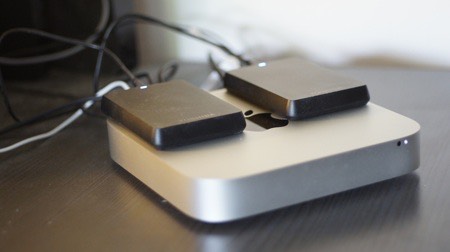
... and a beauty. Not meant for on-the-road, too much clutter.
Replied by Karsten Schlüter on topic This is a Raid (storage what to do)
Happyfingers wrote: …do you mean importing from 5 cams at once ? …
No, sorry to confuse you:
I'm recording one match with 5 cams simultaneously.
Then, I import each SDcard after another.
… then, I'm using FCPX Multicam feature to synch all recordings
in edit, I can switch with a sngle click , what camangle is shown...
=> What I tried to imply: even 4k Multicam is manageable with cheap, underpowered equip.
Ronny's suggestion is in all aspects 'better'… but more expensive.
you know the phrase "good, cheap, fast - pick two"
My set-up is fast 'n cheap.
... and a beauty. Not meant for on-the-road, too much clutter.
Last edit: 08 Mar 2015 10:16 by Karsten Schlüter.
Please Log in to join the conversation.
- Happyfingers
-
Topic Author
- Offline
- Senior Member
-
Less
More
- Posts: 46
- Thank you received: 2
08 Mar 2015 10:14 #61025
by Happyfingers
storage i can deal with
but im still upset about the tacos :lol: :lol: :lol:
Replied by Happyfingers on topic This is a Raid (storage what to do)
MsJustine wrote: No matter what way you compare, life outside Fortress USA is mighty spendy!!
storage i can deal with
but im still upset about the tacos :lol: :lol: :lol:
Please Log in to join the conversation.
- Happyfingers
-
Topic Author
- Offline
- Senior Member
-
Less
More
- Posts: 46
- Thank you received: 2
08 Mar 2015 10:30 #61026
by Happyfingers
Replied by Happyfingers on topic This is a Raid (storage what to do)
ok the 2 x 7200 which would work would cost $200 and take 2 usb ports leaving me with none, data would be split across 2 drives
the 2tb lacie i can get for $310 if i ride into the city on the motorbike (30 mins each way) :woohoo:
i spent 3k on the laptop and about 1k on the gopro
the missus is already in the sh!ts with me :lol:
so looks like im going for a ride
thanks for the advice
the 2tb lacie i can get for $310 if i ride into the city on the motorbike (30 mins each way) :woohoo:
i spent 3k on the laptop and about 1k on the gopro
the missus is already in the sh!ts with me :lol:
so looks like im going for a ride
thanks for the advice
Please Log in to join the conversation.
- ronny courtens
-
- Offline
- Moderator
-
Less
More
- Posts: 4455
- Thank you received: 962
08 Mar 2015 10:34 #61027
by ronny courtens
Replied by ronny courtens on topic This is a Raid (storage what to do)
Have a great ride and keep us posted on the results of this drive
- Ronny
- Ronny
Please Log in to join the conversation.
- Happyfingers
-
Topic Author
- Offline
- Senior Member
-
Less
More
- Posts: 46
- Thank you received: 2
08 Mar 2015 10:57 #61028
by Happyfingers
Replied by Happyfingers on topic This is a Raid (storage what to do)
Ronny does it matter that this drive is 5400 ?
Hard Disk: 5400 RPM/64 MB cache lacie rugged thunderbolt 2tb
Hard Disk: 5400 RPM/64 MB cache lacie rugged thunderbolt 2tb
Please Log in to join the conversation.
- ronny courtens
-
- Offline
- Moderator
-
Less
More
- Posts: 4455
- Thank you received: 962
08 Mar 2015 11:08 #61029
by ronny courtens
Replied by ronny courtens on topic This is a Raid (storage what to do)
Nope in this case it does not matter because it has 64 MB Cache and a Thunderbolt interface. This provides effective speeds that are higher than a 7200 rpm drive with lower cache and a slow interface.
- Ronny
- Ronny
Please Log in to join the conversation.


08 Mar 2015 20:36 - 08 Mar 2015 21:04 #61040
by joema
As Ronny said rpm is only a very rough guide. A newer tech 5400 rpm drive with higher areal density can have higher transfer speed than an older 7200 rpm drive.
Another big advantage of the Lacie unit is it's bus-powered via Thunderbolt. USB 3 is generally limited to sourcing about 4.5 watts, so that's why you don't see USB bus-powered 3.5" 7200 rpm drives. Even more complex are the various USB sub-specifications such as "battery charging spec" which increases USB 3 to 7.5 watts. The problem is you often don't know if your system has this.
By contrast all Thunderbolt ports can source 10 watts, so a purely bus-powered HDD can be a lot faster.
Yes there are other approaches but the Lacie is probably your best option given your needs. It has excellent benchmarks for a single drive and the portability you need, plus USB 3 as a fallback interface.
Lacie doesn't list the power consumption specs so there is a slight possibility using USB 3 on a non-Apple computer might not provide enough power. I think Mac USB ports provide at least 7.5 watts, so they will probably work. Your main need is a Thunderbolt connection to your MacBook, so you're OK there.
The Lacie will be vastly faster than your current portable drive, is rugged, bus-powered, and is much simpler than dealing with multiple drives and software RAID.
Edit/add: OTOH I just re-tested a 1TB HGST Touro S formatted for HFS+ and it did about 125 MB/sec write, 132 MB/sec read on Blackmagic using 4GB test size. That is essentially as fast as the reported numbers on the Lacie.
The Lacie perf. numbers can be tricky since it comes in SSD and HDD versions. Of course the SSD numbers are much higher, but you are considering the HDD version.
The Lacie is still a good choice but upon closer look I'm not sure it's any faster than the Touro S.
Yet another option would be the Seagate Backup Plus Fast, which is a portable bus-powered USB 3 drive with internal RAID 0: www.pcworld.com/article/2128220/seagate-...ouble-the-speed.html
I'm not totally sure it will run off a single USB 3 port due to power consumption, but since Macs have higher-power USB ports, it might.
Replied by joema on topic This is a Raid (storage what to do)
Happyfingers wrote: Ronny does it matter that this drive is 5400 ?
Hard Disk: 5400 RPM/64 MB cache lacie rugged thunderbolt 2tb
As Ronny said rpm is only a very rough guide. A newer tech 5400 rpm drive with higher areal density can have higher transfer speed than an older 7200 rpm drive.
Another big advantage of the Lacie unit is it's bus-powered via Thunderbolt. USB 3 is generally limited to sourcing about 4.5 watts, so that's why you don't see USB bus-powered 3.5" 7200 rpm drives. Even more complex are the various USB sub-specifications such as "battery charging spec" which increases USB 3 to 7.5 watts. The problem is you often don't know if your system has this.
By contrast all Thunderbolt ports can source 10 watts, so a purely bus-powered HDD can be a lot faster.
Yes there are other approaches but the Lacie is probably your best option given your needs. It has excellent benchmarks for a single drive and the portability you need, plus USB 3 as a fallback interface.
Lacie doesn't list the power consumption specs so there is a slight possibility using USB 3 on a non-Apple computer might not provide enough power. I think Mac USB ports provide at least 7.5 watts, so they will probably work. Your main need is a Thunderbolt connection to your MacBook, so you're OK there.
The Lacie will be vastly faster than your current portable drive, is rugged, bus-powered, and is much simpler than dealing with multiple drives and software RAID.
Edit/add: OTOH I just re-tested a 1TB HGST Touro S formatted for HFS+ and it did about 125 MB/sec write, 132 MB/sec read on Blackmagic using 4GB test size. That is essentially as fast as the reported numbers on the Lacie.
The Lacie perf. numbers can be tricky since it comes in SSD and HDD versions. Of course the SSD numbers are much higher, but you are considering the HDD version.
The Lacie is still a good choice but upon closer look I'm not sure it's any faster than the Touro S.
Yet another option would be the Seagate Backup Plus Fast, which is a portable bus-powered USB 3 drive with internal RAID 0: www.pcworld.com/article/2128220/seagate-...ouble-the-speed.html
I'm not totally sure it will run off a single USB 3 port due to power consumption, but since Macs have higher-power USB ports, it might.
Last edit: 08 Mar 2015 21:04 by joema.
Please Log in to join the conversation.
- Happyfingers
-
Topic Author
- Offline
- Senior Member
-
Less
More
- Posts: 46
- Thank you received: 2
08 Mar 2015 22:33 #61042
by Happyfingers
Replied by Happyfingers on topic This is a Raid (storage what to do)
this is what is confusing me
ive been watching some youtube speed test and file transfer test and the lacie speed test is just the dame as my current 5400 toshiba 1tb hard drive so how could it solve the issue of jittery editing ?
maybe its better to only edit at home with a desktop hard drive
im wanting better speed than i have now
the sole function of a raid setup would be for editing not storage
ive been watching some youtube speed test and file transfer test and the lacie speed test is just the dame as my current 5400 toshiba 1tb hard drive so how could it solve the issue of jittery editing ?
maybe its better to only edit at home with a desktop hard drive
im wanting better speed than i have now
the sole function of a raid setup would be for editing not storage
Please Log in to join the conversation.
09 Mar 2015 00:34 #61049
by joema
If you mean the Toshiba Canvio portable USB drives, I have dozens of those. Under exactly the same conditions, tested with exactly the same machine and benchmark, with the same HFS+ disk format, the Toshiba Canvio is about 55% as fast as the 1TB HGST Touro S or HGST Mobile Pro. That probably about the same speed as the Lacie 2TB rugged drive, although I haven't personally tested that. I'd probably give the Lacie a slight edge.
Upon further study I think the fastest bus-powered mobile drive you can get is probably the 4TB Seagate Backup Plus Fast (about $250 USD). It is USB 3 only, so you'd need a Mac with USB 3 ports. It is internally RAID0, but you said the reliability isn't a factor. The 2TB Lacie HDD rugged is a great drive and would be significantly faster than your Toshiba drive (and it is Thunderbolt). The rugged aspect of the Lacie is nice. However the Seagate appears to be faster.
However once disk I/O rates pass the threshold where it's a bottleneck, increasingly higher I/O rates don't make that much difference. The weakest link becomes something else. I know from lots of experience those little 5400 Toshiba drives are quite slow -- regardless of how benchmarks reflect that. I would never edit off one.
I think the Lacie is a very good drive and I like the Thunderbolt interface. For editing I trust that more. However people use constantly-connected USB 3 drives and often do OK.
Replied by joema on topic This is a Raid (storage what to do)
Happyfingers wrote: ...the lacie speed test is just the same as my current 5400 toshiba 1tb hard drive so how could it solve the issue of jittery editing ?
If you mean the Toshiba Canvio portable USB drives, I have dozens of those. Under exactly the same conditions, tested with exactly the same machine and benchmark, with the same HFS+ disk format, the Toshiba Canvio is about 55% as fast as the 1TB HGST Touro S or HGST Mobile Pro. That probably about the same speed as the Lacie 2TB rugged drive, although I haven't personally tested that. I'd probably give the Lacie a slight edge.
Upon further study I think the fastest bus-powered mobile drive you can get is probably the 4TB Seagate Backup Plus Fast (about $250 USD). It is USB 3 only, so you'd need a Mac with USB 3 ports. It is internally RAID0, but you said the reliability isn't a factor. The 2TB Lacie HDD rugged is a great drive and would be significantly faster than your Toshiba drive (and it is Thunderbolt). The rugged aspect of the Lacie is nice. However the Seagate appears to be faster.
However once disk I/O rates pass the threshold where it's a bottleneck, increasingly higher I/O rates don't make that much difference. The weakest link becomes something else. I know from lots of experience those little 5400 Toshiba drives are quite slow -- regardless of how benchmarks reflect that. I would never edit off one.
I think the Lacie is a very good drive and I like the Thunderbolt interface. For editing I trust that more. However people use constantly-connected USB 3 drives and often do OK.
Please Log in to join the conversation.
- Happyfingers
-
Topic Author
- Offline
- Senior Member
-
Less
More
- Posts: 46
- Thank you received: 2
09 Mar 2015 00:43 #61050
by Happyfingers
Replied by Happyfingers on topic This is a Raid (storage what to do)
Ok thanks
Allow me to throw a spanner in
LaCie 4tb raid0 rugged
Due for release any day now
$500 arrrrh
Runs off bus with thunderport
External power supply if usb 3
Any thoughts ?
I'm thinking of waiting til we get back from phuket as I only want to spend once
I want to get this right the first time
It's on the LaCie website
Allow me to throw a spanner in
LaCie 4tb raid0 rugged
Due for release any day now
$500 arrrrh
Runs off bus with thunderport
External power supply if usb 3
Any thoughts ?
I'm thinking of waiting til we get back from phuket as I only want to spend once
I want to get this right the first time
It's on the LaCie website
Please Log in to join the conversation.
- Happyfingers
-
Topic Author
- Offline
- Senior Member
-
Less
More
- Posts: 46
- Thank you received: 2
09 Mar 2015 02:07 #61053
by Happyfingers
Replied by Happyfingers on topic This is a Raid (storage what to do)
Samsung 850 EVO 1TB Solid State Drive
and then theres this :blush:
which i can get for $528
seems quick on youtube
and then theres this :blush:
which i can get for $528
seems quick on youtube
Please Log in to join the conversation.
