


- Posts: 15
- Thank you received: 0
3 Post Moderation Rule for New Boarders (25 Jan 2021)
New boarders will have their posts moderated - Don't worry if you cannot see your post immediately.
Keyboard shortcut for Play Full Screen
- Circuit Factory
-
 Topic Author
- Offline
- New Member
-

Less
More
07 Mar 2015 13:01 #60978
by Circuit Factory
Keyboard shortcut for Play Full Screen was created by Circuit Factory
Hi Guys,
Does anyone know why Command, Shift and F might stop working at times? I always use this shortcut and every now and then, it just gives me the error sound.
Not a huge issue, but i'm trying to master this software and therefore want to fill all the gaps in my understanding.
Thanks to the experts.
Phil
Does anyone know why Command, Shift and F might stop working at times? I always use this shortcut and every now and then, it just gives me the error sound.
Not a huge issue, but i'm trying to master this software and therefore want to fill all the gaps in my understanding.
Thanks to the experts.
Phil
Please Log in to join the conversation.
- ronny courtens
-

- Offline
- Moderator
-

Less
More
- Posts: 4455
- Thank you received: 962
07 Mar 2015 16:00 #60984
by ronny courtens
Replied by ronny courtens on topic Keyboard shortcut for Play Full Screen
Hey Phil,
This shortcut has never given me any problems. Just be aware that it won't work when a Project file is selected (highlighted in yellow) in the active Clip Browser.
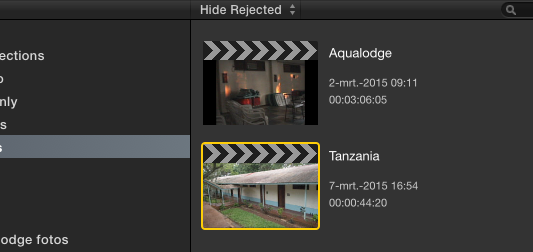
In this case you will hear the error sound. In all other cases it should always work properly.
To play Projects full screen you need to open them in the timeline, then press CMD+SHIFT+F.
- Ronny
This shortcut has never given me any problems. Just be aware that it won't work when a Project file is selected (highlighted in yellow) in the active Clip Browser.
In this case you will hear the error sound. In all other cases it should always work properly.
To play Projects full screen you need to open them in the timeline, then press CMD+SHIFT+F.
- Ronny
Please Log in to join the conversation.
24 Dec 2016 15:01 #84246
by jesse.alk
Replied by jesse.alk on topic Keyboard shortcut for Play Full Screen
I have this issue all the time, and it seems to have persisted into 10.3.1. Did you ever find a solution? The keyboard command will suddenly stop working and give an error sound, and won't work again until I restart the program. Definitely have the clip in the Event highlighted only. I constantly use this shortcut to jump in and out of full screen when I am favoriting/rejecting ranges during logging.
Please Log in to join the conversation.
