


- Posts: 28
- Thank you received: 0
3 Post Moderation Rule for New Boarders (25 Jan 2021)
New boarders will have their posts moderated - Don't worry if you cannot see your post immediately.
Importing Media Files
07 Mar 2015 01:23 #60967
by mb300e
Importing Media Files was created by mb300e
Will FCPX import AVI files from a hard drive? I have loads of them created from DV tape when imported to a PC using Premiere Pro.
I do not have my copy of FCPX installed yet so cannot check it out first hand.
Thanks,
Peter B.
I do not have my copy of FCPX installed yet so cannot check it out first hand.
Thanks,
Peter B.
Please Log in to join the conversation.

07 Mar 2015 06:02 - 07 Mar 2015 06:03 #60968
by BenB
Replied by BenB on topic Importing Media Files
AVI? MS doesn't even support that anymore Sorry, no offense intended, just surprised. Well, since you have them, I'd look at ffmpegX to make them readable for a Mac.
Last edit: 07 Mar 2015 06:03 by BenB.
Please Log in to join the conversation.
- Karsten Schlüter
-

- Offline
- Moderator
-

Less
More
- Posts: 3790
- Thank you received: 718
07 Mar 2015 08:58 #60971
by Karsten Schlüter
Replied by Karsten Schlüter on topic Importing Media Files
avi is just a wrapper or media container - like a box of chocolate, you never know .... :whistle:
try it
or…
use the free tool iMediaHud and check what's inside
or…
you mentioned DV and avi = Microsoft: unfortunately MS used its own, propriary 'flavour' of DV … for that codec exists no Mac-converter, afaik. If that is the case, you have to convert on a PC first.
try it
or…
use the free tool iMediaHud and check what's inside
or…
you mentioned DV and avi = Microsoft: unfortunately MS used its own, propriary 'flavour' of DV … for that codec exists no Mac-converter, afaik. If that is the case, you have to convert on a PC first.
Please Log in to join the conversation.
- ronny courtens
-

- Offline
- Moderator
-
Less
More
- Posts: 4455
- Thank you received: 962
07 Mar 2015 11:53 #60973
by ronny courtens
Replied by ronny courtens on topic Importing Media Files
DV.avi has been supported since the 10.0.6 update and can be imported without any issues in FCP X. But you never really know what is inside these containers, if this is a proprietary "form" of DV you still might experience problems. So, as has been said: just try it and it probably should work. If it doesn't work open the files in MPEG Streamclip or whatever and batch-convert them to a proper format. QT DV will be more than sufficient for this footage.
- Ronny
- Ronny
Please Log in to join the conversation.
07 Mar 2015 15:20 #60980
by mb300e
Replied by mb300e on topic Importing Media Files
Thanks everyone for the prompt responses. As I said I do not have FCPX installed yet, most likely will today though. I just need to pull the trigger.
I followed Karsten's suggestion and installed iMediaHUD and dropped one of many thousands of AVI (clips) files originating from a DV camcorder and imported in 2012 to PC using Premiere Pro.
Here is a copy of the results:
General
Complete name : /Volumes/Y3 4TB/Video_TS/CapeFearBotanical/Untitled Clip 01 02.avi
Format : AVI
Format/Info : Audio Video Interleave
Commercial name : DVCPRO
File size : 64.5 MiB
Duration : 17s 818ms
Overall bit rate mode : Constant
Overall bit rate : 30.4 Mbps
Recorded date : 2012-06-16 10:31:07.000
Video
ID : 0
Format : DV
Commercial name : DVCPRO
Codec ID : dvsd
Codec ID/Hint : Sony
Duration : 17s 818ms
Bit rate mode : Constant
Bit rate : 24.4 Mbps
Encoded bit rate : 28.8 Mbps
Width : 720 pixels
Height : 480 pixels
Display aspect ratio : 16:9
Frame rate mode : Constant
Frame rate : 29.970 fps
Standard : NTSC
Color space : YUV
Chroma subsampling : 4:1:1
Bit depth : 8 bits
Scan type : Interlaced
Scan order : Bottom Field First
Compression mode : Lossy
Bits/(Pixel*Frame) : 2.357
Time code of first frame : 00:13:22;18
Time code source : Subcode time code
Stream size : 61.1 MiB (95%)
Encoding settings : ae mode=full automatic / wb mode=automatic / white balance= / fcm=manual focus
Audio
ID : 1
Format : PCM
Format settings, Endianness : Little
Format settings, Sign : Signed
Codec ID : 1
Duration : 17s 818ms
Bit rate mode : Constant
Bit rate : 1 536 Kbps
Channel(s) : 2 channels
Sampling rate : 48.0 KHz
Bit depth : 16 bits
Stream size : 3.26 MiB (5%)
Comments, good or bad, would be most welcome.
Peter B.
I followed Karsten's suggestion and installed iMediaHUD and dropped one of many thousands of AVI (clips) files originating from a DV camcorder and imported in 2012 to PC using Premiere Pro.
Here is a copy of the results:
General
Complete name : /Volumes/Y3 4TB/Video_TS/CapeFearBotanical/Untitled Clip 01 02.avi
Format : AVI
Format/Info : Audio Video Interleave
Commercial name : DVCPRO
File size : 64.5 MiB
Duration : 17s 818ms
Overall bit rate mode : Constant
Overall bit rate : 30.4 Mbps
Recorded date : 2012-06-16 10:31:07.000
Video
ID : 0
Format : DV
Commercial name : DVCPRO
Codec ID : dvsd
Codec ID/Hint : Sony
Duration : 17s 818ms
Bit rate mode : Constant
Bit rate : 24.4 Mbps
Encoded bit rate : 28.8 Mbps
Width : 720 pixels
Height : 480 pixels
Display aspect ratio : 16:9
Frame rate mode : Constant
Frame rate : 29.970 fps
Standard : NTSC
Color space : YUV
Chroma subsampling : 4:1:1
Bit depth : 8 bits
Scan type : Interlaced
Scan order : Bottom Field First
Compression mode : Lossy
Bits/(Pixel*Frame) : 2.357
Time code of first frame : 00:13:22;18
Time code source : Subcode time code
Stream size : 61.1 MiB (95%)
Encoding settings : ae mode=full automatic / wb mode=automatic / white balance= / fcm=manual focus
Audio
ID : 1
Format : PCM
Format settings, Endianness : Little
Format settings, Sign : Signed
Codec ID : 1
Duration : 17s 818ms
Bit rate mode : Constant
Bit rate : 1 536 Kbps
Channel(s) : 2 channels
Sampling rate : 48.0 KHz
Bit depth : 16 bits
Stream size : 3.26 MiB (5%)
Comments, good or bad, would be most welcome.
Peter B.
Please Log in to join the conversation.
- ronny courtens
-
- Offline
- Moderator
-
Less
More
- Posts: 4455
- Thank you received: 962
07 Mar 2015 15:33 - 07 Mar 2015 15:34 #60981
by ronny courtens
Replied by ronny courtens on topic Importing Media Files
Hi Peter,
I don't see why we should make guesses when it's so easy to try this yourself. Just install FCP X (there is a trial version), import a file and you will know for sure. But from what I see it should not be a problem, it's just DVCPRO footage.
- Ronny
I don't see why we should make guesses when it's so easy to try this yourself. Just install FCP X (there is a trial version), import a file and you will know for sure. But from what I see it should not be a problem, it's just DVCPRO footage.
- Ronny
Last edit: 07 Mar 2015 15:34 by ronny courtens.
Please Log in to join the conversation.
07 Mar 2015 15:41 #60982
by mb300e
You are absolutely right Ronnie, I need to pull the darn trigger and give it a try. Things have been hectic here lately getting ready for a 50th. In the mean time as I get five minutes or so, I am continuing to gather useful hints and tips info.
This is my first involvement with Macs since the mid 80s and it is a bit of a magical mystery tour. PCs vs Macs seems like the American English language and English English; the same but different.
Bear with me I will get there.
Peter B.
Replied by mb300e on topic Importing Media Files
ronny courtens wrote: Hi Peter,
I don't see why we should make guesses when it's so easy to try this yourself. Just install FCP X (there is a trial version), import a file and you will know for sure. But from what I see it should not be a problem, it's just DVCPRO footage.
- Ronny
You are absolutely right Ronnie, I need to pull the darn trigger and give it a try. Things have been hectic here lately getting ready for a 50th. In the mean time as I get five minutes or so, I am continuing to gather useful hints and tips info.
This is my first involvement with Macs since the mid 80s and it is a bit of a magical mystery tour. PCs vs Macs seems like the American English language and English English; the same but different.
Bear with me I will get there.
Peter B.
Please Log in to join the conversation.
- ronny courtens
-
- Offline
- Moderator
-
Less
More
- Posts: 4455
- Thank you received: 962
07 Mar 2015 15:46 #60983
by ronny courtens
Replied by ronny courtens on topic Importing Media Files
Haha, I see what you mean. Yep it's quite a jump but I think you will find it is worth doing it.
You don't need to purchase FCP X right away if you are not sure. There is a fully functional trial that will allow you to evaluate the application. Download it and you will immediately see if it handles this footage. As it is DVCPRO in an AVI container I guess it will. But with AVI and Premiere you are never quite sure If it does not work as expected, get back here and we will guide you through al this.
- Ronny
You don't need to purchase FCP X right away if you are not sure. There is a fully functional trial that will allow you to evaluate the application. Download it and you will immediately see if it handles this footage. As it is DVCPRO in an AVI container I guess it will. But with AVI and Premiere you are never quite sure
If it does not work as expected, get back here and we will guide you through al this.- Ronny
Please Log in to join the conversation.
07 Mar 2015 16:18 #60985
by mb300e
Thanks again Ronny et al,
This is only my second topic post on the forum, and have been getting good and useful info in responses and by searching. I will definitely get back to one and all once I have FCPX installed. A good deal of my time has been used up getting the Mac Pro set up for Picture and Video work and learning the deltas with my windows PCs of which I have two desktops and three laptops in use with only two of them in use for video and audio work.
Here are the Mac Pro specs: It was originally built as a Server but is now running Yosemite 10.10.2 and configured with 8 GB of 1066 MHz DDR3 ECC SDRAM, two 2TB and one 4TB HDs, two 18X duallayer "SuperDrives", an ATI Radeon HD 5770 graphics card with 1 GB of GDDR5 memory, and single 3.2 GHz Quad Core "Nehalem" Xeon processor.
Ports include five USB 2.0 ports, four Firewire "800" ports, dual Gigabit Ethernet, two Mini DisplayPorts and a duallink DVI port, AirPort Extreme (802.11a/b/g/n) and Bluetooth 2.1+EDR, plus one external storage drive for backup to the backups and good measure.
I think it ought to meet or exceed my needs for a while.
Best regards from a Mac newbie in sunny and warm Florida,
Peter B.
Replied by mb300e on topic Importing Media Files
ronny courtens wrote: Haha, I see what you mean. Yep it's quite a jump but I think you will find it is worth doing it.
You don't need to purchase FCP X right away if you are not sure. There is a fully functional trial that will allow you to evaluate the application. Download it and you will immediately see if it handles this footage. As it is DVCPRO in an AVI container I guess it will. But with AVI and Premiere you are never quite sure
- Ronny
Thanks again Ronny et al,
This is only my second topic post on the forum, and have been getting good and useful info in responses and by searching. I will definitely get back to one and all once I have FCPX installed. A good deal of my time has been used up getting the Mac Pro set up for Picture and Video work and learning the deltas with my windows PCs of which I have two desktops and three laptops in use with only two of them in use for video and audio work.
Here are the Mac Pro specs: It was originally built as a Server but is now running Yosemite 10.10.2 and configured with 8 GB of 1066 MHz DDR3 ECC SDRAM, two 2TB and one 4TB HDs, two 18X duallayer "SuperDrives", an ATI Radeon HD 5770 graphics card with 1 GB of GDDR5 memory, and single 3.2 GHz Quad Core "Nehalem" Xeon processor.
Ports include five USB 2.0 ports, four Firewire "800" ports, dual Gigabit Ethernet, two Mini DisplayPorts and a duallink DVI port, AirPort Extreme (802.11a/b/g/n) and Bluetooth 2.1+EDR, plus one external storage drive for backup to the backups and good measure.
I think it ought to meet or exceed my needs for a while.
Best regards from a Mac newbie in sunny and warm Florida,
Peter B.
Please Log in to join the conversation.
- Karsten Schlüter
-
- Offline
- Moderator
-
Less
More
- Posts: 3790
- Thank you received: 718
07 Mar 2015 19:14 #60992
by Karsten Schlüter
Replied by Karsten Schlüter on topic Importing Media Files
What Ronny said:
Should be handled flawless
But .....
I doubt there's is the option to save it as avi when processed.
Should be handled flawless
But .....
I doubt there's is the option to save it as avi when processed.
Please Log in to join the conversation.
- ronny courtens
-
- Offline
- Moderator
-
Less
More
- Posts: 4455
- Thank you received: 962
07 Mar 2015 20:25 #60994
by ronny courtens
Replied by ronny courtens on topic Importing Media Files
I don't think that will be problem either. No-one in the world wants to save to AVI anymore 
- Ronny
- Ronny
Please Log in to join the conversation.
07 Mar 2015 20:50 #60996
by mb300e
Hi Ronny, I am not concerned about saving video in AVI format, my concern was FCPX's ability to handle AVI container formats which the specs say it does. I have thousands of AVI files gathered over the years from cameras and NTSC and PAL tape decks. I would still want to be able to edit them in FCPX which it looks like I can.
I finally installed the app today, but have not had a chance to dig into it yet. The first task will be to set up some libraries and import some existing AVI files and put it through some basic paces.
I can't think of any reason why I shouldn't keep my Media, Cache and Backups on my 2nd or 3rd internal drive. Anyone have any thoughts on this? I have never liked keeping my data on the same drive as the op sys and apps.
Peter B.
Replied by mb300e on topic Importing Media Files
ronny courtens wrote: I don't think that will be problem either. No-one in the world wants to save to AVI anymore
- Ronny
Hi Ronny, I am not concerned about saving video in AVI format, my concern was FCPX's ability to handle AVI container formats which the specs say it does. I have thousands of AVI files gathered over the years from cameras and NTSC and PAL tape decks. I would still want to be able to edit them in FCPX which it looks like I can.
I finally installed the app today, but have not had a chance to dig into it yet. The first task will be to set up some libraries and import some existing AVI files and put it through some basic paces.
I can't think of any reason why I shouldn't keep my Media, Cache and Backups on my 2nd or 3rd internal drive. Anyone have any thoughts on this? I have never liked keeping my data on the same drive as the op sys and apps.
Peter B.
Please Log in to join the conversation.
- ronny courtens
-
- Offline
- Moderator
-
Less
More
- Posts: 4455
- Thank you received: 962
07 Mar 2015 21:03 #60997
by ronny courtens
Replied by ronny courtens on topic Importing Media Files
You always should keep your Media folder on an external drive. If the AVI files are on a fast external drive (FireWire or internal SATA, but NEVER on a USB2 drive) you can import using "Leave Files in Place". This will create links to the original media without physically copying the files over to the FCP X media folder.
The Cache folder can be stored anywhere you wish, the Backups folder should be on a different drive than the one your Library is stored on. This way, if the Library drive fails you still will have backups of your libraries on a good drive.
Your system should be able to handle DVCPRO without any issues. But 8 GB RAM is really the minimum required to run FCP X smoothly. If you feel you got performance issues, especially on long projects with many clips, upgrading the RAM to 16 GB will make huge difference.
- Ronny
The Cache folder can be stored anywhere you wish, the Backups folder should be on a different drive than the one your Library is stored on. This way, if the Library drive fails you still will have backups of your libraries on a good drive.
Your system should be able to handle DVCPRO without any issues. But 8 GB RAM is really the minimum required to run FCP X smoothly. If you feel you got performance issues, especially on long projects with many clips, upgrading the RAM to 16 GB will make huge difference.
- Ronny
Please Log in to join the conversation.
07 Mar 2015 22:55 #61002
by mb300e
I shall see how it goes. The proof of the pudding is in the eating, yes?
Peter B.
Replied by mb300e on topic Importing Media Files
ronny courtens wrote: Your system should be able to handle DVCPRO without any issues. But 8 GB RAM is really the minimum required to run FCP X smoothly. If you feel you got performance issues, especially on long projects with many clips, upgrading the RAM to 16 GB will make huge difference.
- Ronny
I shall see how it goes. The proof of the pudding is in the eating, yes?
Peter B.
Please Log in to join the conversation.


07 Mar 2015 22:57 #61003
by joema
I just tested importing some AVI material from a Nikon D300 and a Panasonic AG-DVX100p, which was a commonly used DV camcorder for documentaries. X handled it OK. I did find some old AVI files it would not import from an old Contour action cam (popular before GoPro). However these can easily be transcoded using external utilities.
You said you haven't used Macs since the 1980s. As an essentially new Mac user, some common sources of confusion are (1) The menu bar and (2) Minimizing vs hiding apps.
With Windows apps, the menu bar follows them around. With Mac apps, the menu bar always is at the screen top and changes based on what app is selected.
The minimize button on each window works differently on Mac vs Windows.
I strongly recommend you watch this brief video if nothing else: macmost.com/minimizing-windows-versus-hiding-apps.html
Here are some other areas of common need for someone new to OS X:
Taking a hard drive inventory: MacMost Taking a Hard Drive Inventory
Using the Preview Pane: MacMost Using the Preview Pane in Yosemite
Using Spotlight Search: MacMost Using Spotlight Search
Using Finder List View: MacMost Using Finder List View
Menu Bar Basics and Tricks: MacMost Menu Bar Basics and Tricks
Using Launch Pad: MacMost Using LaunchPad
Capturing the Screen on Your Mac: MacMost Capturing the Screen On Your Mac
How to Force Quit Apps: MacMost How To Force Quit Apps
Replied by joema on topic Importing Media Files
mb300e wrote: ...my concern was FCPX's ability to handle AVI container formats which the specs say it does. I have thousands of AVI files gathered over the years from cameras and NTSC and PAL tape decks...
I just tested importing some AVI material from a Nikon D300 and a Panasonic AG-DVX100p, which was a commonly used DV camcorder for documentaries. X handled it OK. I did find some old AVI files it would not import from an old Contour action cam (popular before GoPro). However these can easily be transcoded using external utilities.
You said you haven't used Macs since the 1980s. As an essentially new Mac user, some common sources of confusion are (1) The menu bar and (2) Minimizing vs hiding apps.
With Windows apps, the menu bar follows them around. With Mac apps, the menu bar always is at the screen top and changes based on what app is selected.
The minimize button on each window works differently on Mac vs Windows.
I strongly recommend you watch this brief video if nothing else: macmost.com/minimizing-windows-versus-hiding-apps.html
Here are some other areas of common need for someone new to OS X:
Taking a hard drive inventory: MacMost Taking a Hard Drive Inventory
Using the Preview Pane: MacMost Using the Preview Pane in Yosemite
Using Spotlight Search: MacMost Using Spotlight Search
Using Finder List View: MacMost Using Finder List View
Menu Bar Basics and Tricks: MacMost Menu Bar Basics and Tricks
Using Launch Pad: MacMost Using LaunchPad
Capturing the Screen on Your Mac: MacMost Capturing the Screen On Your Mac
How to Force Quit Apps: MacMost How To Force Quit Apps
Please Log in to join the conversation.
08 Mar 2015 16:46 - 08 Mar 2015 16:59 #61032
by mb300e
Replied by mb300e on topic Importing Media Files
Well I installed FCPX yesterday evening, viewed a couple of FCPX video lessons, then today put it through some simple tasks.
1. Imported some AVI files. These had previously been created from a multi standard VHS tape deck via a Laird Convertor, then via FireWire to a Dell Desktop running Premiere Pro 2. I had no issues importing them into an event.
2. Burn a DVD. Dropped the AVI files into a project timeline, did a little trimming at the tail end then burned them to a DVD disc. The disc played fine in the Mac Superdrive, a Windows 7 Laptop and a Pioneer DVD player.
So endeth the first lesson (test)...so far so good. The next chapter will be to import some video again from the tape deck, Laird Convertor and FireWire except this time to the Mac.
Stand by for further bulletins from Peter B's Skunkworks lab, though now it is almost time for a round of golf first.
Peter B.
1. Imported some AVI files. These had previously been created from a multi standard VHS tape deck via a Laird Convertor, then via FireWire to a Dell Desktop running Premiere Pro 2. I had no issues importing them into an event.
2. Burn a DVD. Dropped the AVI files into a project timeline, did a little trimming at the tail end then burned them to a DVD disc. The disc played fine in the Mac Superdrive, a Windows 7 Laptop and a Pioneer DVD player.
So endeth the first lesson (test)...so far so good. The next chapter will be to import some video again from the tape deck, Laird Convertor and FireWire except this time to the Mac.
Stand by for further bulletins from Peter B's Skunkworks lab, though now it is almost time for a round of golf first.
Peter B.
Last edit: 08 Mar 2015 16:59 by mb300e.
Please Log in to join the conversation.
- ronny courtens
-
- Offline
- Moderator
-
Less
More
- Posts: 4455
- Thank you received: 962
08 Mar 2015 16:59 #61033
by ronny courtens
Replied by ronny courtens on topic Importing Media Files
Hi Peter,
Glad you are having a good time with FCP X
If you are using the Laird 6000D or similar you will be able to import from the converter straight into FCP X because this model has time code output. OTOH if you are using a converter that has no time code output you will have to capture the video using QT player or another digitizing app first and then import the digitized video into FCP X.
- Ronny
Glad you are having a good time with FCP X
If you are using the Laird 6000D or similar you will be able to import from the converter straight into FCP X because this model has time code output. OTOH if you are using a converter that has no time code output you will have to capture the video using QT player or another digitizing app first and then import the digitized video into FCP X.
- Ronny
Please Log in to join the conversation.
08 Mar 2015 17:31 #61035
by mb300e
So far so good Ronny. I just realised that my 6000D is in the shop for repair and my 6000C has some bad electrolytics in it. It is par for the course I don't have any replacements either. I don't think my 5500 has time code output so if I need to copy more tape I can still create AVIs using Premiere Pro system as a stop gap. I should call the shop next week to see if there is any progress on my repair. If it is not ready, I will do a work around...or maybe the shop can lend me a "box"
Although I have enough AVI files to keep me busy for several months non-stop with FCPX.
Peter B.
Replied by mb300e on topic Importing Media Files
ronny courtens wrote: Hi Peter,
Glad you are having a good time with FCP X
If you are using the Laird 6000D or similar you will be able to import from the converter straight into FCP X because this model has time code output. OTOH if you are using a converter that has no time code output you will have to capture the video using QT player or another digitizing app first and then import the digitized video into FCP X.
- Ronny
So far so good Ronny. I just realised that my 6000D is in the shop for repair and my 6000C has some bad electrolytics in it. It is par for the course I don't have any replacements either. I don't think my 5500 has time code output so if I need to copy more tape I can still create AVIs using Premiere Pro system as a stop gap. I should call the shop next week to see if there is any progress on my repair. If it is not ready, I will do a work around...or maybe the shop can lend me a "box"
Although I have enough AVI files to keep me busy for several months non-stop with FCPX.
Peter B.
Please Log in to join the conversation.
09 Mar 2015 00:17 #61048
by mb300e
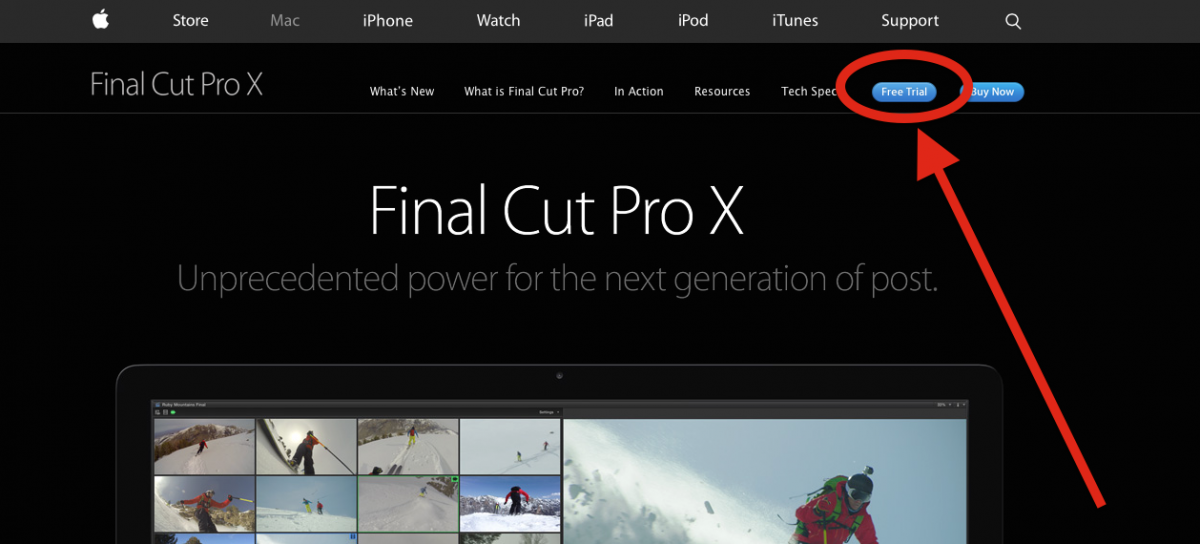
Hi Ronny, I just noticed that Apple charged my AMEX card for the FCPX app. I cannot find anything on the Apple Store page for FCPX about a 30 day trial period. Could you point me to a page where I could find the info I have not been able to find any information.
Thanks in advance.
Peter B.
Replied by mb300e on topic Importing Media Files
ronny courtens wrote: Haha, I see what you mean. Yep it's quite a jump but I think you will find it is worth doing it.
You don't need to purchase FCP X right away if you are not sure. There is a fully functional trial that will allow you to evaluate the application.
- Ronny
Hi Ronny, I just noticed that Apple charged my AMEX card for the FCPX app. I cannot find anything on the Apple Store page for FCPX about a 30 day trial period. Could you point me to a page where I could find the info I have not been able to find any information.
Thanks in advance.
Peter B.
Please Log in to join the conversation.
09 Mar 2015 01:59 #61051
by BenB
Replied by BenB on topic Importing Media Files
Please Log in to join the conversation.
