


- Posts: 46
- Thank you received: 2
3 Post Moderation Rule for New Boarders (25 Jan 2021)
New boarders will have their posts moderated - Don't worry if you cannot see your post immediately.
prores 422 wtf is happening ?
- Happyfingers
-
 Topic Author
- Offline
- Senior Member
-

Less
More
03 Mar 2015 10:13 #60743
by Happyfingers
prores 422 wtf is happening ? was created by Happyfingers
hello all
so ive been reading the forum trying to understand things a little better
i downloaded mpeg streamclip and converted the gopro footage 1080 at 120fps to prores 422 (before importing)
then i go to fcpx and start a new project but when i look at the background task it is still taking quite some time to transcode and analysis ????
i thought the whole idea of converting to prores 422 was so this wouldnt be required ???
i did not select optimised media or proxy
any ideas whats going on ? is this normal ?
so ive been reading the forum trying to understand things a little better
i downloaded mpeg streamclip and converted the gopro footage 1080 at 120fps to prores 422 (before importing)
then i go to fcpx and start a new project but when i look at the background task it is still taking quite some time to transcode and analysis ????
i thought the whole idea of converting to prores 422 was so this wouldnt be required ???
i did not select optimised media or proxy
any ideas whats going on ? is this normal ?
Please Log in to join the conversation.
- peteramwiggins
-

- Offline
- Administrator
-

- The Administrator :)
Less
More
- Posts: 1049
- Thank you received: 404
03 Mar 2015 10:19 #60744
by peteramwiggins
Administrator
Replied by peteramwiggins on topic prores 422 wtf is happening ?
Do not convert the GoPro footage before importing.
Import the native GoPro footage into FCPX with the optimise selection toggled on, then FCPX will convert it to Prores 422
Peter
Import the native GoPro footage into FCPX with the optimise selection toggled on, then FCPX will convert it to Prores 422
Peter
Administrator
Please Log in to join the conversation.
- Tom Wolsky
-

- Offline
- Moderator
-

03 Mar 2015 11:45 #60746
by Tom Wolsky
Replied by Tom Wolsky on topic prores 422 wtf is happening ?
Peter's correct of course. For the other question use Cmd-9 for the background task window to see what's going on in processing.
Please Log in to join the conversation.

03 Mar 2015 12:02 #60747
by BenB
Replied by BenB on topic prores 422 wtf is happening ?
What analyzing options are you selecting in your import window? Can you give us a screen shot of your import window?
Please Log in to join the conversation.
- Happyfingers
-
Topic Author
- Offline
- Senior Member
-
Less
More
- Posts: 46
- Thank you received: 2
03 Mar 2015 22:19 #60778
by Happyfingers
Replied by Happyfingers on topic prores 422 wtf is happening ?
it seems im having a media management issue :ohmy:
currently im setting up my libary to live on a usb3 1 terrabyte hard drive, i have to do this or the prores files fill my macpro hard drive 500gig, even if i have only 30 mins of 1080 @120fps footage (inline roller hockey)
I want to shoot at 120fps as it gives a nice smooth slow motion when playing back legendary goals or expert ball control demonstrations (usually not from me :woohoo: )
however as im sure you are all aware this makes for a clunky experience when wanting to play those files in fcpx to edit them, so im guessing i need a thunderbolt drive ?
the missus is none to impressed with the 4 or so k i have spent in the last few weeks on gopro and mac stuff :ohmy:
what size drive should i be looking at ? portable or not portable ? Lacie ?
do you use the external drive just on a project by project basis, cleaning it out as you complete each project ?
otherwise it would just fill up within weeks ?
currently im setting up my libary to live on a usb3 1 terrabyte hard drive, i have to do this or the prores files fill my macpro hard drive 500gig, even if i have only 30 mins of 1080 @120fps footage (inline roller hockey)
I want to shoot at 120fps as it gives a nice smooth slow motion when playing back legendary goals or expert ball control demonstrations (usually not from me :woohoo: )
however as im sure you are all aware this makes for a clunky experience when wanting to play those files in fcpx to edit them, so im guessing i need a thunderbolt drive ?
the missus is none to impressed with the 4 or so k i have spent in the last few weeks on gopro and mac stuff :ohmy:
what size drive should i be looking at ? portable or not portable ? Lacie ?
do you use the external drive just on a project by project basis, cleaning it out as you complete each project ?
otherwise it would just fill up within weeks ?
Please Log in to join the conversation.
04 Mar 2015 00:14 #60783
by BenB
Replied by BenB on topic prores 422 wtf is happening ?
Never put libraries or media on your system drive.
Be sure all drives have at least 10-15% free space.
Be sure your drives are at least 7200rpm if they are spinning disks.
USB 3 should be fast enough, but your Mac's specs will determine how it handles 4K H.264 off of a GoPro.
Optimized should work just fine, either way, I'm sure.
If you have a good enough Mac, you shouldn't have to optimize, anyway.
Be sure all drives have at least 10-15% free space.
Be sure your drives are at least 7200rpm if they are spinning disks.
USB 3 should be fast enough, but your Mac's specs will determine how it handles 4K H.264 off of a GoPro.
Optimized should work just fine, either way, I'm sure.
If you have a good enough Mac, you shouldn't have to optimize, anyway.
Please Log in to join the conversation.
- Happyfingers
-
Topic Author
- Offline
- Senior Member
-
Less
More
- Posts: 46
- Thank you received: 2
04 Mar 2015 02:42 #60793
by Happyfingers
Replied by Happyfingers on topic prores 422 wtf is happening ?
ok im using a brand new mac pro retina laptop
2.5 ghz intel core i7
16 gb 1600 mhz ddr3 (will upgrade this when ram becomes available, havnt found any in AUS) (and cash)
nividia geforce gt 750m 2048mb
i am currently running a test to see if the usb can handle the non optimized media and so far it seems to be working so thanks for that
these youtube videos ive been watching must be out of date

2.5 ghz intel core i7
16 gb 1600 mhz ddr3 (will upgrade this when ram becomes available, havnt found any in AUS) (and cash)
nividia geforce gt 750m 2048mb
i am currently running a test to see if the usb can handle the non optimized media and so far it seems to be working so thanks for that
these youtube videos ive been watching must be out of date
Please Log in to join the conversation.
04 Mar 2015 02:52 #60795
by BenB
Replied by BenB on topic prores 422 wtf is happening ?
There's a ton of informational stuff on YouTube. Half of it is really good. Unfortunately the other half is misguided, misinformed junk. Get training from a reputable training site, save yourself time and headaches.
16GB RAM should be plenty, I'd not worry about upgrading that for a long time.
16GB RAM should be plenty, I'd not worry about upgrading that for a long time.
Please Log in to join the conversation.
- Karsten Schlüter
-

- Offline
- Moderator
-
Less
More
- Posts: 3790
- Thank you received: 718
04 Mar 2015 05:17 - 04 Mar 2015 05:19 #60803
by Karsten Schlüter
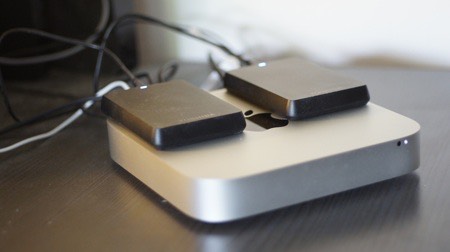
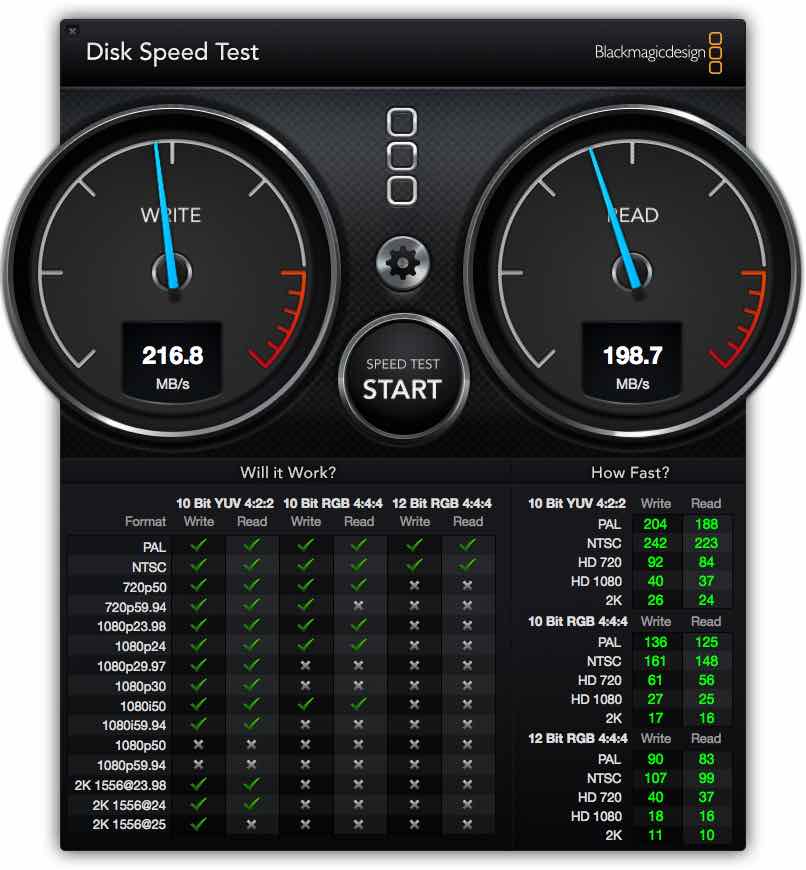
This is my 4k-set-up: two cheap Toshiba 2.5", bundled via DiskUtility as a Raid0 (yes, I know, multiples the chance for a crash .... I edit not for living ) = <99€ . Using this Raid for Events; when project done, data gets located to some slower, 'morgue drive' (usb3 again) for 'final storage'. FCPX' awesome behind-the-scene data-base cares automatically to collect everything … pretty easy.
Works like charm, and fast enough
… see attached BMDiskSpeed result.
Yes, hobbyist construction, but when a low-end set-up is doing it, any professional set-up (2/4 bays hardware raid) will do it even better.
Replied by Karsten Schlüter on topic prores 422 wtf is happening ?
Happyfingers wrote: …i am currently running a test to see if the usb can handle the non optimized media and so far it seems to be working …
This is my 4k-set-up: two cheap Toshiba 2.5", bundled via DiskUtility as a Raid0 (yes, I know, multiples the chance for a crash .... I edit not for living
) = <99€ . Using this Raid for Events; when project done, data gets located to some slower, 'morgue drive' (usb3 again) for 'final storage'. FCPX' awesome behind-the-scene data-base cares automatically to collect everything … pretty easy.
Works like charm, and fast enough
… see attached BMDiskSpeed result.
Yes, hobbyist construction, but when a low-end set-up is doing it, any professional set-up (2/4 bays hardware raid) will do it even better.
Last edit: 04 Mar 2015 05:19 by Karsten Schlüter.
Please Log in to join the conversation.
