


3 Post Moderation Rule for New Boarders (25 Jan 2021)
New boarders will have their posts moderated - Don't worry if you cannot see your post immediately.
How can I change the metadata of a WAVE file?
- JPM Editor
-
 Topic Author
- Offline
- Premium Member
-

I'm working on a short film shot in R3D at true 24FPS (not 23.976).
The audio was captured with an external recorder, but unfortunately, it seems they didn't record at 24FPS. So the WAV files start drifting out-of-sync pretty badly after the slate (like if they were recorded at 25 FPS).
The thing is that, as far as FCPX or Avid are concerned (I've tried both NLEs just in case), the wav files don't have a Frame Rate. Therefore, you edit them into the timeline and can't choose "Automatic Speed" or change the "Rate Conform".
It seems to me that the audio recorder did the conform internally from 24FPS to 25 FPS.
Yes, I could retime the audio manually in the FCPX timeline to 104% speed. I did it as a test and the audio plays back in sync with the 24 fps R3D footage. But the sound mix will be done in Pro Tools later, and as far as I know, X2Pro can't translate FCPX speed changes into the AAF. So that's not an option.
Does anybody know of a fast and reliable way to conform the audio files back to 24FPS speed in a batch? I would prefer to avoid Cinema Tools, since Oliver Peters has pointed out that FCPX may have issues with it.
I would really appreciate any help. Thanks in advance!
Jesús
@jesus_edits
Jesús Pérez-Miranda
Cut People CEO & Founder
www.cutpeople.es
Please Log in to join the conversation.

Some audio recorders will assign SMPTE timecode, but audio natively records at a specific sample rate. Video is normally 48kHz, but can sometimes be 44.1kHz, or even higher like 98kHz.
An NLE will interpret the sample rate, and conform samples to time out according to the Timeline. An audio sample is like a video frame. 48kHz is 48,000 samples per second. If you drop that into a 98kHz Timeline, you get drift, as the NLE counts the first 98,000 samples as the first second of audio, not the native 48,000 samples. It doesn't work like video much. Similar, but not the same by default.
So, you need to take those audio files into Compressor or Audacity or something and reconfirm the sample rates to what you need them to be, in order to match the video and Timeline.
Please Log in to join the conversation.
- JPM Editor
-
Topic Author
- Offline
- Premium Member
-

I forgot to mention the sample rate, sorry about that.
- The sample rate of the audio files is 48 kHz.
- The R3D don't have audio embedded, so no sample rate there.
- And the Project (timeline) is created at 48 kHz.
- EDIT TO ADD: The audio files have timecode embedded. They don't start in the default 00:00:00:00.
To what sample rate should I reconform the audio files? According to my calculations, that would be 48000 Hz - 4%, which equals 46.080 Hz. Am I right?
The problem is: would FCPX have a problem if I edit those files in a 48 KHz timeline?
Jesús Pérez-Miranda
Cut People CEO & Founder
www.cutpeople.es
Please Log in to join the conversation.
- JPM Editor
-
Topic Author
- Offline
- Premium Member
-
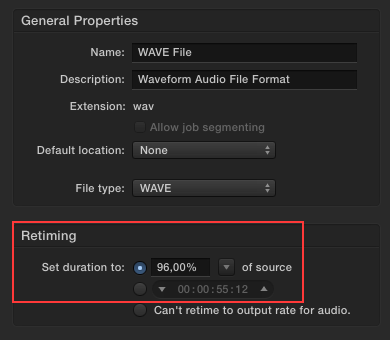
It works and plays back perfectly in sync with the R3D footage now.
Am I loosing too much quality by maintaining the 48 KHz frame rate in the 96% retimed audio files?
Should I do a pitch conversion as well? If so, can I do that inside Compressor or do I need dedicated audio software?
Many thanks!
Jesús
@jesus_edits
Jesús Pérez-Miranda
Cut People CEO & Founder
www.cutpeople.es
Please Log in to join the conversation.
- JPM Editor
-
Topic Author
- Offline
- Premium Member
-
For some reason, Compressor ignores the timecode of the original WAV file:
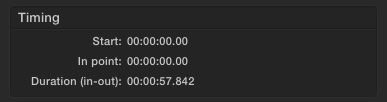
While Final Cut Pro X reads the timecode of the original file perfectly:

Is there a way to retain as much as the original metadata of the file in the converted file?
Thanks again!
Jesús
@jesus_edits
Jesús Pérez-Miranda
Cut People CEO & Founder
www.cutpeople.es
Please Log in to join the conversation.
- Andreas Kiel
-
- Offline
- Platinum Member
-

- Posts: 1077
- Thank you received: 189
Use Sound Devices Wave Agent to change the sample description (rate). This will keep the original samples and the metadata.
- Andreas
Please Log in to join the conversation.

JPM Editor wrote: It seems to me that the audio recorder did the conform internally from 24FPS to 25 FPS.
This seems pretty strange to me, have you talked to the sound recordist about this? Are there really any audio devices that would record a file of incorrect duration?
Please Log in to join the conversation.
- JPM Editor
-
Topic Author
- Offline
- Premium Member
-
Andreas Kiel wrote: Using Compressor will resample the file. Additionally you will loose all metadata.
Use Sound Devices Wave Agent to change the sample description (rate). This will keep the original samples and the metadata.
Thanks Andreas for sharing your knowledge!
This sounds like a great fix.
I will check into Wave Agent as soon as I can!
rgpearson wrote: This seems pretty strange to me, have you talked to the sound recordist about this? Are there really any audio devices that would record a file of incorrect duration?
It seems really strange to me too! I'm trying to reach the sound recordist for more info. Maybe he attempted a conversion afterwards and he shouldn't? I will post here my findings when I know more.
Thank you all!
Jesús
@jesus_edits
Jesús Pérez-Miranda
Cut People CEO & Founder
www.cutpeople.es
Please Log in to join the conversation.
- JPM Editor
-
Topic Author
- Offline
- Premium Member
-
rgpearson wrote:
JPM Editor wrote: It seems to me that the audio recorder did the conform internally from 24FPS to 25 FPS.
This seems pretty strange to me, have you talked to the sound recordist about this? Are there really any audio devices that would record a file of incorrect duration?
You were right, Roy!
Finally I was able to reach the sound guys and they told me they converted the files because they thought they recorded the audio @25FPS.
As Ben already explained, audio records at a specific sample rate, not a frame rate. The NLE then maps the corresponding samples to each frame of the project. Naturally, the number of samples per frame depends on the FPS of the project itself.
Anyway, everything works perfectly fine now with the original audio files. Thank God they didn't delete them! :whistle:
Thank you all again for your input and support, and sorry for taking up your time.
All the best,
Jesús
@jesus_edits
Jesús Pérez-Miranda
Cut People CEO & Founder
www.cutpeople.es
Please Log in to join the conversation.
Please Log in to join the conversation.
- JPM Editor
-
Topic Author
- Offline
- Premium Member
-
You made me laugh, Roy!
This is not a project of mine. I was just helping out some friends that will actually edit this short film.

But yeah, it still shocks me the mistakes people make over and over again! No planing, no testing, no talking to each other... A classic post production mess!
Cheers, mate!
Jesús
@jesus_edits
Jesús Pérez-Miranda
Cut People CEO & Founder
www.cutpeople.es
Please Log in to join the conversation.
