


3 Post Moderation Rule for New Boarders (25 Jan 2021)
New boarders will have their posts moderated - Don't worry if you cannot see your post immediately.
Color Finale is here

Anyone has tried it already ?
Please Log in to join the conversation.
- JPM Editor
-

- Offline
- Premium Member
-

try.colorgradingcentral.com/colorfinale/
It looks amazing!
It's great that you can change the order of the CC stack. I would love to do that in FCPX Inspector panel as well... Will that functionality be added in the coming releases?
The opacity slider for each layer is also a very nice touch! There is also a Master Opacity slider in the Inspector to control the intensity of the whole effect.
I love the interface, very much in line with FCPX: it gives plenty of control while keeping it simple for efficiency and ease of use.
There are no color pickers yet, which would come in handy for the Primary Correction section. But Denver has made it very clear that this is just the beginning.
I'm sure this plugin is going to grow a lot in the next months and will include some amazing things!
I will take a closer look to the trial when I get a chance.
Cheers,
Jesús
@jesus_edits
Jesús Pérez-Miranda
Cut People CEO & Founder
www.cutpeople.es
Please Log in to join the conversation.

Thanks to Denver Riddle at Color Grading Central for the Great work.
François
PS
In the ColorBoard, i wish we could add an other instance of CC directly from the color controls inspector and not have go back to general inspector, it would save a lot of time for stacking primary treatments
Please Log in to join the conversation.
Has anyone seen any independent reviews yet ... would like to take advantage of the discount offering ... but would like to hear more opinions from users with more experience in this area.
Please Log in to join the conversation.
- Squamish ed
-
- Offline
- Elite Member
-

- Posts: 238
- Thank you received: 20
Thanks
Ed
Please Log in to join the conversation.
- DmitriZigany
-
- Offline
- Platinum Member
-

- Posts: 730
- Thank you received: 26
Am I correct in assuming that if you have this there's no need to puchase LUT Utility as it's "built in" into Color Finale?
Please Log in to join the conversation.

As for Mavericks, an email was sent out about that. Here's what it says, sans links:
"PLEASE TAKE THE TIME TO READ THIS
Let me first off say we have been overwhelmed
by the enthusiasm and positive feedback for CF!
We also have a survey for Mavericks and legacy
card owners concerning CF support:
Mavericks support for Color Finale POLL
(Please click to take survey if you're interested in
Mavericks support)
For the most part the release has gone off without a
hitch but we do want to address some important items
that have come up:
1) If you're running Mavericks 10.9 you may experience
a crash or it won't function properly; currently we're
not supporting Mavericks (we have stated this)
2) Even if you've updated to Yosemite but have an older graphics
card supporting OpenCL v1.0 this will cause a crash in Final Cut.
Color Finale requires OpenCL v1.2 click here to see if your
graphics card supports OpenCL v1.2
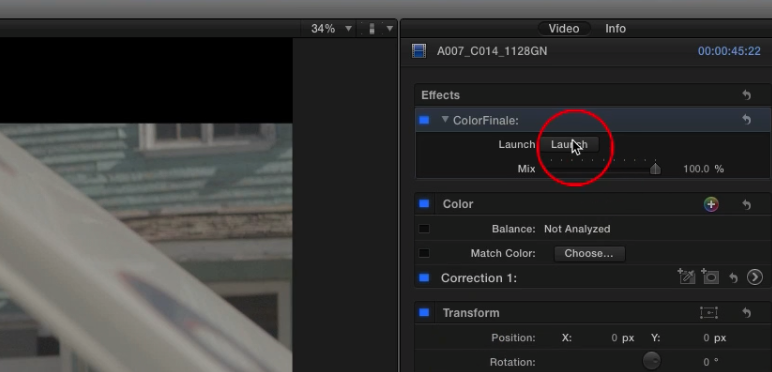
3) If after installing you don't see the "Open" button to
launch CF in the inspector, make sure the 'ColorFinale' app
has been moved to the main /Applications folder.
4) If you encounter a bug where after deleting an instance of
CF and then it's been re added it won't launch when clicking
'Open' we are working on a fix for this and in the meantime just
adjust the 'Mix' slider just below it to refresh the memory.
This will then let you launch the UI and business as usual.
5) If you're a prior LUT Utility owner and want to use your
same LUTs in CF, run the 'ColorFinale' app from main Applications
folder. Go to "File" then down to "Import from LUT Utility"
this is a migration assistant. Be sure to RESTART FCPX to
refresh the changes.
6) If you want your LUTs to show up as 'Groups' you can do this
by going to /Movies/Motion Templates/Effects/Color Finale/LUTs
in the Finder and creating groups with folders. Restart FCP X
to refresh the changes.
If this doesn't address a question you may have had please
click below to submit a support ticket:
Please click HERE for technical support
These are our biggest observations. Again we have been really
pleased with how excited you have been been and the results
we're already seeing.
If you should need anything else please let me know. I'm doing
my very best to get to your emails
 "
Here's a link to the survey mentioned.
apps.facebook.com/my-polls/cddmed
Please Log in to join the conversation.
- Squamish ed
-
- Offline
- Elite Member
-
- Posts: 238
- Thank you received: 20
Ed
Please Log in to join the conversation.
- Paul Cryer
-
- Offline
- Junior Member
-

- Posts: 24
- Thank you received: 0
Please Log in to join the conversation.
- DmitriZigany
-
- Offline
- Platinum Member
-
- Posts: 730
- Thank you received: 26
Will be interesting to see where it takes me. I have only ever worked with colour correction in FCPX (well and a bit in photoshop of course) so I'm sure it will take a little getting used to.
I was meaning to learn Davinci, but the only reason for that would have been for LUTs and a bit more control over colour grading.
I'm sure there's gonna be a free update to FCPX coming on tuesday that adds this functionality now though

Please Log in to join the conversation.

how can I activate the writing?
I Yosemite 10.10.5.
thank you.
Please Log in to join the conversation.
I do not see the button "Launch" the inspector next to the words "final color"
thank you.

Please Log in to join the conversation.
It looks like the plugin is known by FCPX but not really installed, so it shows an empty effect.
I'd start by re-installing Color Finale.
Also you could email Denver Riddle directly, he always answers for support.
Please Log in to join the conversation.
What OS X version are you running?
What FCPX version are you running?
Please Log in to join the conversation.
Please Log in to join the conversation.
I just asked now about youtbe him, thanks.manoucho wrote: Gator
It looks like the plugin is known by FCPX but not really installed, so it shows an empty effect.
I'd start by re-installing Color Finale.
Also you could email Denver Riddle directly, he always answers for support.
Please Log in to join the conversation.
