


- Posts: 10
- Thank you received: 0
3 Post Moderation Rule for New Boarders (25 Jan 2021)
New boarders will have their posts moderated - Don't worry if you cannot see your post immediately.
pixels in the shadows when exporting footage
- Loki Hodson
-
 Topic Author
- Offline
- New Member
-

Less
More
23 Feb 2015 02:23 #60253
by Loki Hodson
pixels in the shadows when exporting footage was created by Loki Hodson
Hey there, I hope you are all well, I'm finding when exporting footage from final Cut X I'm getting a lot of pixels in the shadows, I've filmed with the Black Magic Cinema Camera and completed a small amount of colour correction, then exported in many different ways H264 for online, Pro Res 422 Source and Pro Res 422 HQ that the black magic has filmed in. I Filmed the footage at 30p and edited in 25p. I run a 3tb 2013 iMac with 32gb ram, NVIDIA GeForce GTX 780M 4096 MB Graphics, 3.5 GHz Intel Core i7 processor.
Please Help!!!
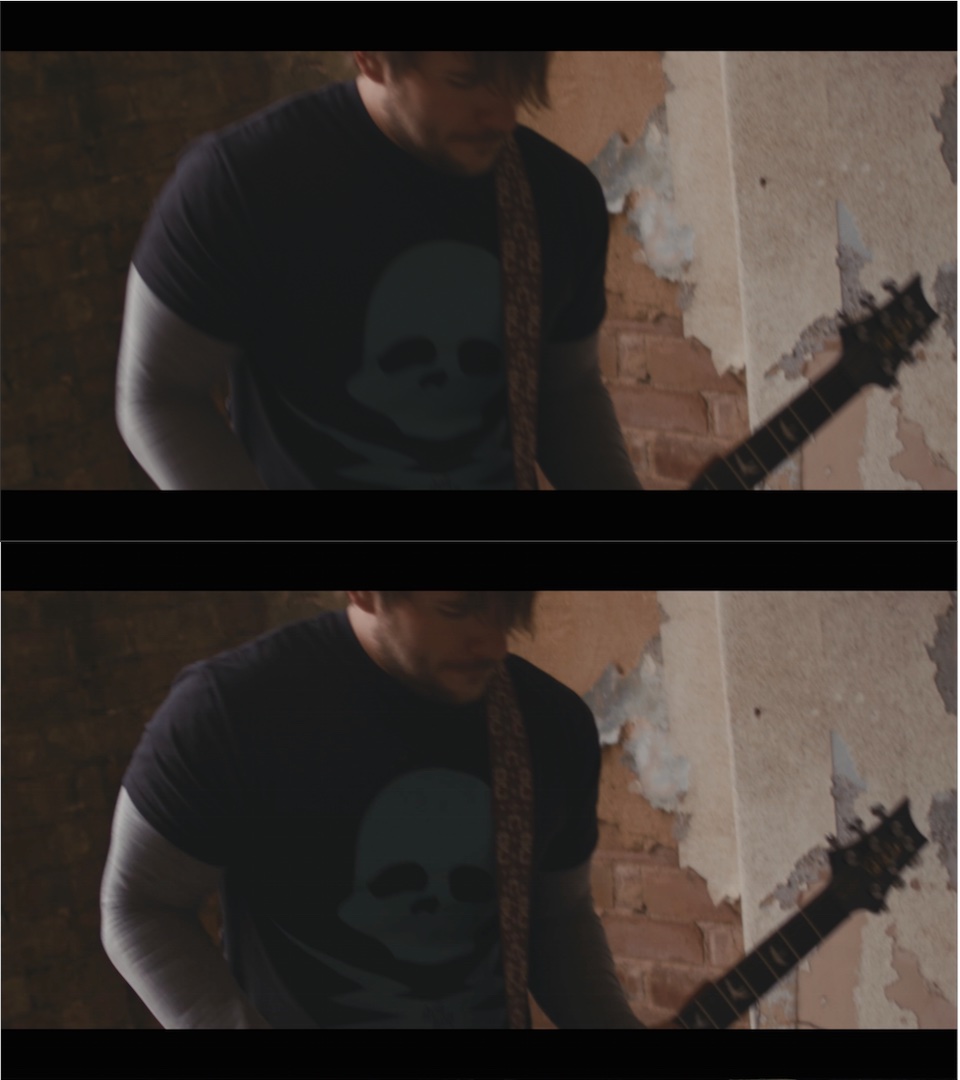
One of the pictures is a screen shot from the editing screen and the other is after export, look at the pixels especially in the shadows?
Please Help!!!
One of the pictures is a screen shot from the editing screen and the other is after export, look at the pixels especially in the shadows?
Please Log in to join the conversation.
- Loki Hodson
-
Topic Author
- Offline
- New Member
-
Less
More
- Posts: 10
- Thank you received: 0
23 Feb 2015 02:26 - 23 Feb 2015 02:28 #60256
by Loki Hodson
Replied by Loki Hodson on topic pixels in the shadows when exporting footage
Hopefully the pictures will show this time
Last edit: 23 Feb 2015 02:28 by Loki Hodson.
Please Log in to join the conversation.
- Loki Hodson
-
Topic Author
- Offline
- New Member
-
Less
More
- Posts: 10
- Thank you received: 0
23 Feb 2015 02:30 #60257
by Loki Hodson
Replied by Loki Hodson on topic pixels in the shadows when exporting footage
In those pictures you can mostly see it in the skull on his top, I have this problem with all my projects.
Please Log in to join the conversation.
- Karsten Schlüter
-

- Offline
- Moderator
-

Less
More
- Posts: 3790
- Thank you received: 718
23 Feb 2015 08:03 #60261
by Karsten Schlüter
Replied by Karsten Schlüter on topic pixels in the shadows when exporting footage
Hard to see, your recording looks a lil' underexposured and too 'flat' imho , anyhow
The inventors of h.264 allowed the. codec to fudge in the dark areas - usually, those contain less detial, so "blocks" are allowed for the sake of smaller files.
Sooooo - check the whole processing chain:
When recording such low key, action-packed scenes, use highest bit-rate cam offers.
On import, cif optional, use 'native' codec (on your beatst of a Mac optimizing shouldn't be needed)
On export, check FIRST your Preview settings (that tin switch in the preview window) - not you incidntly export in Proxy"quality"
If you use "manual" exporting sttings, choose some high profile and high bitrates, for fullHD 10-20 mbps shoiuld do the trick.
The inventors of h.264 allowed the. codec to fudge in the dark areas - usually, those contain less detial, so "blocks" are allowed for the sake of smaller files.
Sooooo - check the whole processing chain:
When recording such low key, action-packed scenes, use highest bit-rate cam offers.
On import, cif optional, use 'native' codec (on your beatst of a Mac optimizing shouldn't be needed)
On export, check FIRST your Preview settings (that tin switch in the preview window) - not you incidntly export in Proxy"quality"
If you use "manual" exporting sttings, choose some high profile and high bitrates, for fullHD 10-20 mbps shoiuld do the trick.
Please Log in to join the conversation.
- Loki Hodson
-
Topic Author
- Offline
- New Member
-
Less
More
- Posts: 10
- Thank you received: 0
23 Feb 2015 11:13 #60268
by Loki Hodson
Replied by Loki Hodson on topic pixels in the shadows when exporting footage
Hey there, it does improve when exporting at source or 422 HQ, would it be better to run it through compressor after to prepare for web use as well, would it compress it to a better looking file instead of exporting from Final Cut X as H.264?
Please Log in to join the conversation.
- Karsten Schlüter
-
- Offline
- Moderator
-
Less
More
- Posts: 3790
- Thank you received: 718
23 Feb 2015 11:27 #60269
by Karsten Schlüter
Replied by Karsten Schlüter on topic pixels in the shadows when exporting footage
It depends all on the settings mainly bitrates.
Not on the tool.
If, and that is just an assumption, the damaga was done on recording (not visible for the naked eye!) you can try the ol' trick and apply some tiny fraction of 'noise' = film grain to your
Not on the tool.
If, and that is just an assumption, the damaga was done on recording (not visible for the naked eye!) you can try the ol' trick and apply some tiny fraction of 'noise' = film grain to your
Please Log in to join the conversation.
- Loki Hodson
-
Topic Author
- Offline
- New Member
-
Less
More
- Posts: 10
- Thank you received: 0
23 Feb 2015 11:31 #60270
by Loki Hodson
Replied by Loki Hodson on topic pixels in the shadows when exporting footage
The footage on camera is great, when I import into final cut its fantastic, through colour correct. I complete a full screen playback before exporting from final cut, I have found while exporting it in 422 HQ I'm not showing the pixels, however the file sizes are massive, would these just simply upload to on line (i.e. youtube, vimeo) and then they will compress it or can I do this before to get faster upload?
Thanks for your help on this.
Thanks for your help on this.
Please Log in to join the conversation.
- Karsten Schlüter
-
- Offline
- Moderator
-
Less
More
- Posts: 3790
- Thank you received: 718
23 Feb 2015 12:20 #60271
by Karsten Schlüter
Again, you can not notice compression in the first generation of a file (or at last, you shouldn't)
Your cam supports six diff. Codec settings - which one did you use?
Have you tried my advice conc. Adding grain before compression?
Have you checked, as mentioned in my first post, your preview settings?
Replied by Karsten Schlüter on topic pixels in the shadows when exporting footage
Loki Hodson wrote: The footage on camera is great, when I import into final cut its fantastic, i
Again, you can not notice compression in the first generation of a file (or at last, you shouldn't)
Your cam supports six diff. Codec settings - which one did you use?
Have you tried my advice conc. Adding grain before compression?
Have you checked, as mentioned in my first post, your preview settings?
Please Log in to join the conversation.
- Loki Hodson
-
Topic Author
- Offline
- New Member
-
Less
More
- Posts: 10
- Thank you received: 0
23 Feb 2015 12:25 #60272
by Loki Hodson
Replied by Loki Hodson on topic pixels in the shadows when exporting footage
Where is it you check if its proxy in preview settings?
I shot in pro res 422 HQ with the Blackmagic, do you think using neat video first then putting grain on afterwards before exporting.
Once again thank you so much for your help on this.
I shot in pro res 422 HQ with the Blackmagic, do you think using neat video first then putting grain on afterwards before exporting.
Once again thank you so much for your help on this.
Please Log in to join the conversation.

23 Feb 2015 12:33 #60275
by BenB
Replied by BenB on topic pixels in the shadows when exporting footage
If the original is fine, you're only seeing H.264 artifacts. That happens. What is the total duration of the video you want to upload? We need to adjust the bit rate that you're exporting as. I'm going to assume you're using a stock preset, without making changes.
Please Log in to join the conversation.
- Karsten Schlüter
-
- Offline
- Moderator
-
Less
More
- Posts: 3790
- Thank you received: 718
23 Feb 2015 12:34 #60276
by Karsten Schlüter
Replied by Karsten Schlüter on topic pixels in the shadows when exporting footage
In the upper right where you set the size of preview theres a setting, to playback optimized/proxy OR original.
Depending on your import settings, should be original.
Check this first before applying more harm to your project
Depending on your import settings, should be original.
Check this first before applying more harm to your project
Please Log in to join the conversation.
- Loki Hodson
-
Topic Author
- Offline
- New Member
-
Less
More
- Posts: 10
- Thank you received: 0
23 Feb 2015 13:28 #60284
by Loki Hodson
Replied by Loki Hodson on topic pixels in the shadows when exporting footage
Oh yes, I see that, yeah it's set to original. I think just the export of h.264 doesn't like me haha
Please Log in to join the conversation.
- Loki Hodson
-
Topic Author
- Offline
- New Member
-
Less
More
- Posts: 10
- Thank you received: 0
23 Feb 2015 14:26 #60290
by Loki Hodson
Replied by Loki Hodson on topic pixels in the shadows when exporting footage
Hey Ben, currently its not a finished project but it will be a complete multicam music video when complete, The colour correction is what I have done to give it a warm feel, no preset just the colour adjustment in Final Cut, I was just exporting a small clip to show the band when I saw it and it's not the first time I've seen it.
Would uploading the project at source to youtube work?
Would uploading the project at source to youtube work?
Please Log in to join the conversation.
23 Feb 2015 16:45 #60297
by BenB
Replied by BenB on topic pixels in the shadows when exporting footage
Maybe...
Please Log in to join the conversation.

23 Feb 2015 17:31 #60301
by timfo
Replied by timfo on topic pixels in the shadows when exporting footage
Ah yes, the disappointment of compression. My advice: if an edit is headed to YouTube, just try to remain calm and recognize that your work transcends blurry pixels and motion artifacts.
To your last point, uploading ProRes to Youtube will really just result in a longer encoding time. You'll still notice artifacts. That's just Youtube taking your work and "optimizing" it. I'm a bit of a perfectionist too, but I learned to let go of Youtube foibles when someone explained to me that something around 90% of views on youtube's player are left at 480p or (gasp) 360p. In other words, almost nobody will watch your work at 1080p or higher.
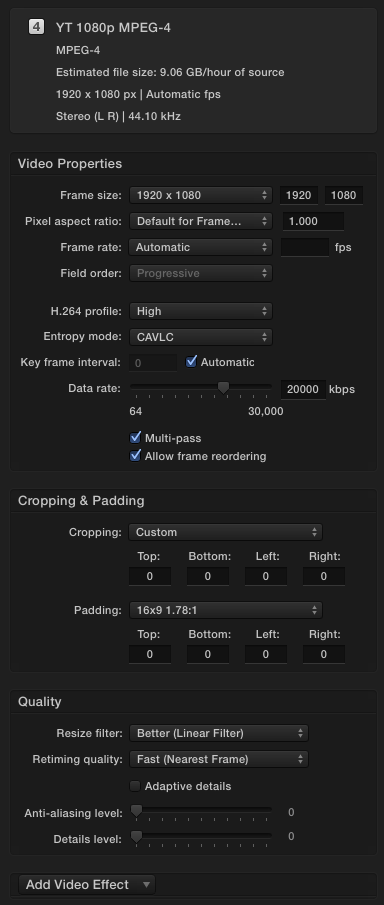
That being said, I do seem to get the best results from a custom Compressor setting that someone posted to FCP.co a while back. See attached picture.
To your last point, uploading ProRes to Youtube will really just result in a longer encoding time. You'll still notice artifacts. That's just Youtube taking your work and "optimizing" it. I'm a bit of a perfectionist too, but I learned to let go of Youtube foibles when someone explained to me that something around 90% of views on youtube's player are left at 480p or (gasp) 360p. In other words, almost nobody will watch your work at 1080p or higher.
That being said, I do seem to get the best results from a custom Compressor setting that someone posted to FCP.co a while back. See attached picture.
Please Log in to join the conversation.
- Loki Hodson
-
Topic Author
- Offline
- New Member
-
Less
More
- Posts: 10
- Thank you received: 0
23 Feb 2015 19:18 #60306
by Loki Hodson
Replied by Loki Hodson on topic pixels in the shadows when exporting footage
Thank you everyone, you've all been amazing!!
Please Log in to join the conversation.
