


- Posts: 11
- Thank you received: 0
3 Post Moderation Rule for New Boarders (25 Jan 2021)
New boarders will have their posts moderated - Don't worry if you cannot see your post immediately.
Still importing media
- Thebutchersboy
-
 Topic Author
- Offline
- New Member
-

Less
More
22 Feb 2015 15:39 #60233
by Thebutchersboy
Still importing media was created by Thebutchersboy
FORGOT TO ADD IMAGES
PLEASE SEE ATTACHED
Hi ,
I am attempting to finalise a project on FCP, but it won't allow me to do it, the popup is saying that FCp is still referring the files. I downloaded the files from a 32Gb SD card over a week ago, so I am surprised to see that the software is still referecing the media.
Coupled to that, I realised that when I remove the SD card from the iMac, the files that are still being referenced then appears as 'missing' in both the event library and the timeline.
First picture is the screen shot when trying to finalise the video, and can't progress beyond this pop up.
The second image, is when the SD card is removed, feeling quiet nauseous, a lot of work has gone into this work.
Any ideas, we would greatly appreciate it.
Deadline next Saturday, need this gripped ASAP, many thanks :sick:
PLEASE SEE ATTACHED
Hi ,
I am attempting to finalise a project on FCP, but it won't allow me to do it, the popup is saying that FCp is still referring the files. I downloaded the files from a 32Gb SD card over a week ago, so I am surprised to see that the software is still referecing the media.
Coupled to that, I realised that when I remove the SD card from the iMac, the files that are still being referenced then appears as 'missing' in both the event library and the timeline.
First picture is the screen shot when trying to finalise the video, and can't progress beyond this pop up.
The second image, is when the SD card is removed, feeling quiet nauseous, a lot of work has gone into this work.
Any ideas, we would greatly appreciate it.
Deadline next Saturday, need this gripped ASAP, many thanks :sick:
Please Log in to join the conversation.
- Thebutchersboy
-
Topic Author
- Offline
- New Member
-
Less
More
- Posts: 11
- Thank you received: 0
22 Feb 2015 15:41 #60234
by Thebutchersboy
Replied by Thebutchersboy on topic Still importing media
It won't up load the images, have to do it on their own posts
Please Log in to join the conversation.
22 Feb 2015 15:52 - 22 Feb 2015 15:56 #60235
by deaky
Replied by deaky on topic Still importing media
It sounds like you didn't care of what happened to the media when importing, and thus imported a reference to the media on the card - hence, you'd need the card in place to access the media.
Did you actually copy the media from the card to your computer? (ie, do you still have a copy of the media?).
If so, then you should be able to relink the media to the files on your system.
If you do not have a copy of the media at all, you'll need the card back (and hope the media is still there).
Examine the clips and look at the Settings view in the inspector - it should tell you the path of the file FCP expects - are these still referencing the card?
Did you actually copy the media from the card to your computer? (ie, do you still have a copy of the media?).
If so, then you should be able to relink the media to the files on your system.
If you do not have a copy of the media at all, you'll need the card back (and hope the media is still there).
Examine the clips and look at the Settings view in the inspector - it should tell you the path of the file FCP expects - are these still referencing the card?
Last edit: 22 Feb 2015 15:56 by deaky.
Please Log in to join the conversation.
- ronny courtens
-

- Offline
- Moderator
-

Less
More
- Posts: 4455
- Thank you received: 962
22 Feb 2015 15:56 #60236
by ronny courtens
Replied by ronny courtens on topic Still importing media
Hi John,
1. Make sure your card is inserted in the computer or that the camera with the card is connected to your system
2. Select all the clips in your Clip Library
3. Choose File > Import > Reimport from Camera/Archive > Continue
4. Wait until the import is completed 100%. Do not quit FCP X or remove the card before this
- Ronny
1. Make sure your card is inserted in the computer or that the camera with the card is connected to your system
2. Select all the clips in your Clip Library
3. Choose File > Import > Reimport from Camera/Archive > Continue
4. Wait until the import is completed 100%. Do not quit FCP X or remove the card before this
- Ronny
Please Log in to join the conversation.
- Thebutchersboy
-
Topic Author
- Offline
- New Member
-
Less
More
- Posts: 11
- Thank you received: 0
22 Feb 2015 16:44 #60243
by Thebutchersboy
Replied by Thebutchersboy on topic Still importing media
Thanks Ronny, done, your advice was the same as a random post left on the FCP forum on the Apple Uk web site, done it, all is good, footage now being uploaded to Vimeo.
Deaky, no idea what your talking about.
Many thanks
Jon
Deaky, no idea what your talking about.
Many thanks
Jon
Please Log in to join the conversation.
- ronny courtens
-
- Offline
- Moderator
-
Less
More
- Posts: 4455
- Thank you received: 962
22 Feb 2015 17:27 - 22 Feb 2015 17:30 #60245
by ronny courtens
Replied by ronny courtens on topic Still importing media
Jon,
Glad to hear it works now.
When you import from a camera or camera card, always check that after importing you don't see a white camera icon on any of the clips in the Clip Browser:
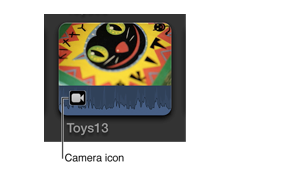
If you see such an icon on any clips in the Clip Browser this means the importing has failed or has been interrupted and the clips have not been imported properly. When you have such clips you won't be able to export your edit. In such cases you can use the Re-import from Camera/Archive to finalize the importing.
- Ronny
Glad to hear it works now.
When you import from a camera or camera card, always check that after importing you don't see a white camera icon on any of the clips in the Clip Browser:
If you see such an icon on any clips in the Clip Browser this means the importing has failed or has been interrupted and the clips have not been imported properly. When you have such clips you won't be able to export your edit. In such cases you can use the Re-import from Camera/Archive to finalize the importing.
- Ronny
Last edit: 22 Feb 2015 17:30 by ronny courtens.
Please Log in to join the conversation.
