


- Posts: 8
- Thank you received: 0
3 Post Moderation Rule for New Boarders (25 Jan 2021)
New boarders will have their posts moderated - Don't worry if you cannot see your post immediately.
color matching in FCPX
22 Feb 2015 02:00 - 22 Feb 2015 02:01 #60193
by ianthom
color matching in FCPX was created by ianthom
Hi All,
I posted this over at the Phillip Bloom forum and didn't get a response, so thought I would try here (and open to any other ideas for forum placement)
I was watching the Phillip Bloom A7s tutorial at B&H (here) and at 37:30 he says something really interesting....He comments that 'If you use a colour passport at the start of each shot, it will give some great results when using the colour matching feature of FCPX' this made me stop, and wonder, first of all how would this workflow work (i.e would FCPX automatically detect the presence of the colour chart at the start of each clip, or would something else have to be done) and once 'detected' would it be simply a case of doing the 'colour match' as per normal?any final cut pro x ninja's want to chime in here? particularly anyone who understands the 'mechanics' of the colour match process better (ie does the feature simply 'analyse' the start of each shot) as using a chart to match cameras/shots is always a great way to do it, but as a 'run n gunner' I have been looking for an easier way....
Thoughts?
I posted this over at the Phillip Bloom forum and didn't get a response, so thought I would try here (and open to any other ideas for forum placement)
I was watching the Phillip Bloom A7s tutorial at B&H (here) and at 37:30 he says something really interesting....He comments that 'If you use a colour passport at the start of each shot, it will give some great results when using the colour matching feature of FCPX' this made me stop, and wonder, first of all how would this workflow work (i.e would FCPX automatically detect the presence of the colour chart at the start of each clip, or would something else have to be done) and once 'detected' would it be simply a case of doing the 'colour match' as per normal?any final cut pro x ninja's want to chime in here? particularly anyone who understands the 'mechanics' of the colour match process better (ie does the feature simply 'analyse' the start of each shot) as using a chart to match cameras/shots is always a great way to do it, but as a 'run n gunner' I have been looking for an easier way....
Thoughts?
Last edit: 22 Feb 2015 02:01 by ianthom.
Please Log in to join the conversation.

22 Feb 2015 02:55 #60194
by bobmax48
Replied by bobmax48 on topic color matching in FCPX
Please Log in to join the conversation.
22 Feb 2015 03:40 #60197
by ianthom
Replied by ianthom on topic color matching in FCPX
I think you are absolutely right,
and I have used the passports with devinci before-my question is more around the 'mechanics' of getting this to work with FCPX...
i.e
-when would you need to record the passport?
-would it be at the start of every shot?
-would it need to cover the whole frame?
-what would be the workflow on ingest?
-is fcpx doing an 'average' color assessment across the length of the shot? or is it the first section?
thoughts?
and I have used the passports with devinci before-my question is more around the 'mechanics' of getting this to work with FCPX...
i.e
-when would you need to record the passport?
-would it be at the start of every shot?
-would it need to cover the whole frame?
-what would be the workflow on ingest?
-is fcpx doing an 'average' color assessment across the length of the shot? or is it the first section?
thoughts?
Please Log in to join the conversation.

22 Feb 2015 03:49 #60198
by FernKraft
Replied by FernKraft on topic color matching in FCPX
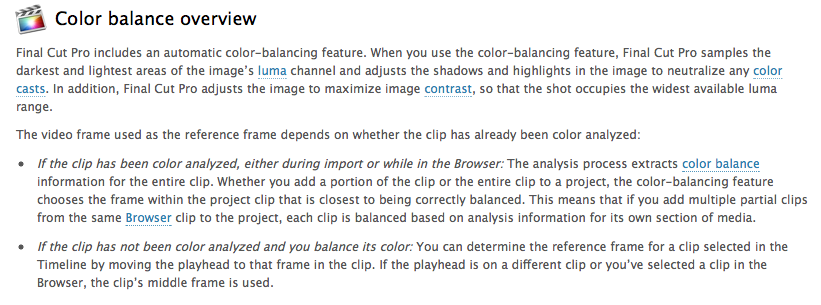
If you click Balance colour when looking at the chart, in theory FCPX will balance to white on that chart. If you let FCPX analyze first, then click balance, it looks through the whole clip for proper balance. (at least that is my understanding)
The trick is to click balance, and use the match colour option while "scrubbing" over the chart. That should give you the "best" result from a match colour.
However, with DaVinci Resolve, you can place a "window" around the chart which will match exactly to it's supported colour charts. Then you can save that information for all the other clips from that camera in the same location.
Either program is really quite amazing... Wizardry really...
Hope that helps.
ps. Never forget to properly white balance your camera though...
The trick is to click balance, and use the match colour option while "scrubbing" over the chart. That should give you the "best" result from a match colour.
However, with DaVinci Resolve, you can place a "window" around the chart which will match exactly to it's supported colour charts. Then you can save that information for all the other clips from that camera in the same location.
Either program is really quite amazing... Wizardry really...
Hope that helps.
ps. Never forget to properly white balance your camera though...
Please Log in to join the conversation.
22 Feb 2015 04:00 #60199
by FernKraft
Replied by FernKraft on topic color matching in FCPX
The manual explains it better than I...
Please Log in to join the conversation.
22 Feb 2015 04:27 #60200
by ianthom
Thanks Mate,
great answer! and kinda matched up with what I had 'theorised' already...
my only remaining question is the best workflow to support this-would it be best to have all my clips 'on a timeline' (as i *think* this is the only time the colour match tool will work) perform the colour matching with the clips I want to use, then cut em up- or would it be better to 'import onto timeline' (like I do when I need to fix the occasional white balance) directly from the events?
does that make sense?
Replied by ianthom on topic color matching in FCPX
FernKraft wrote: If you click Balance colour when looking at the chart, in theory FCPX will balance to white on that chart. If you let FCPX analyze first, then click balance, it looks through the whole clip for proper balance. (at least that is my understanding)
The trick is to click balance, and use the match colour option while "scrubbing" over the chart. That should give you the "best" result from a match colour.
However, with DaVinci Resolve, you can place a "window" around the chart which will match exactly to it's supported colour charts. Then you can save that information for all the other clips from that camera in the same location.
Either program is really quite amazing... Wizardry really...
Hope that helps.
ps. Never forget to properly white balance your camera though...
Thanks Mate,
great answer! and kinda matched up with what I had 'theorised' already...
my only remaining question is the best workflow to support this-would it be best to have all my clips 'on a timeline' (as i *think* this is the only time the colour match tool will work) perform the colour matching with the clips I want to use, then cut em up- or would it be better to 'import onto timeline' (like I do when I need to fix the occasional white balance) directly from the events?
does that make sense?
Please Log in to join the conversation.
22 Feb 2015 04:57 #60203
by FernKraft
Replied by FernKraft on topic color matching in FCPX
Depends, is the answer.
Here is roughly what I do... of course this is all dependant on moon cycles, what underwear I'm wearing, the weather, headaches, have i had a good breakfast, etc...
rarely do I analyze colour. If i do it, it's more to humour myself.
As for clicking balance colour with out analyze, I hit it all the time, I have it as a short cut... "H" for hue.
(oddly you can only use this short cut when you have the clip selected. the magic ball won't let you use this short cut...very weird) ((unlike my short cut "G" for grade, which turns on and off the colour grade))
I'll use this as a starting point if I like the direction FCPX is taking the colour grade.
I only do my grading at the end, once my cut is as close to "final" as possible. That is unless I'm bored, or something is really out of whack or bugging me.
I almost never use match colour... no real reason why not though...
the only time I would have ALL my clips on the timeline is if I was doing a string-out for a client which they requested. This may involve a "first touch/light" grade to make it look as close to the final product, so they don't see a LOG or RAW image.
I hope that helps.
all the best,
Here is roughly what I do... of course this is all dependant on moon cycles, what underwear I'm wearing, the weather, headaches, have i had a good breakfast, etc...
rarely do I analyze colour. If i do it, it's more to humour myself.
As for clicking balance colour with out analyze, I hit it all the time, I have it as a short cut... "H" for hue.
(oddly you can only use this short cut when you have the clip selected. the magic ball won't let you use this short cut...very weird) ((unlike my short cut "G" for grade, which turns on and off the colour grade))
I'll use this as a starting point if I like the direction FCPX is taking the colour grade.
I only do my grading at the end, once my cut is as close to "final" as possible. That is unless I'm bored, or something is really out of whack or bugging me.
I almost never use match colour... no real reason why not though...
the only time I would have ALL my clips on the timeline is if I was doing a string-out for a client which they requested. This may involve a "first touch/light" grade to make it look as close to the final product, so they don't see a LOG or RAW image.
I hope that helps.
all the best,
Please Log in to join the conversation.
22 Feb 2015 05:39 #60204
by ianthom
Replied by ianthom on topic color matching in FCPX
Yeah good call 
and I suppose that leads me to why I am interested in using a colour passport-trying to match an s700 and an a7s, both shot in slog2, and the colour difference between the two often gives me issues...
That is why I am thinking of bringing all the clips that I have used a passport with into the timeline, doing the colour match 'scrubbing' process then cutting it up (sounds weird, but I can't work out another way to do it!)
and I suppose that leads me to why I am interested in using a colour passport-trying to match an s700 and an a7s, both shot in slog2, and the colour difference between the two often gives me issues...
That is why I am thinking of bringing all the clips that I have used a passport with into the timeline, doing the colour match 'scrubbing' process then cutting it up (sounds weird, but I can't work out another way to do it!)
Please Log in to join the conversation.
22 Feb 2015 06:14 #60205
by FernKraft
Replied by FernKraft on topic color matching in FCPX
in theory, if I understand the situation correctly and if the sun, moon, stars and such are aligned.
I'd use my own eye and scopes, and a proper colour correct montitor. (not necessarily in that order)
(trust nothing)
You could, however, click balance in the event browser while looking at the "passport". (don't analyze the clip)
((custom kepboard shortcut - "H" "Hue")) (does anybody use the hand tool???)
When you bring in the clip to your timeline, it should bring in your "event balanced setting"....
Now edit as normal...
(continue to trust nothing though....)
all the best,
I'd use my own eye and scopes, and a proper colour correct montitor. (not necessarily in that order)
(trust nothing)
You could, however, click balance in the event browser while looking at the "passport". (don't analyze the clip)
((custom kepboard shortcut - "H" "Hue")) (does anybody use the hand tool???)
When you bring in the clip to your timeline, it should bring in your "event balanced setting"....
Now edit as normal...
(continue to trust nothing though....)
all the best,
Please Log in to join the conversation.
22 Feb 2015 06:21 #60206
by ianthom
Ok....so I have been doing some testing, and here is what I am thinking!
-I select the clips I have used the passport with at the start of the clip in the events
-I create a compound clip of all these clips
-I 'open this compound clip in the timeline'
-I then use the scrubbing method to match the colour
-I then create a fresh timeline, and pull out the bits of the compound clip (post correction) and follow my normal workflow...anyone got any easier suggestions?
would be great if fcpx had a grid similar to resolve
Replied by ianthom on topic color matching in FCPX
ianthom wrote: Yeah good call
and I suppose that leads me to why I am interested in using a colour passport-trying to match an s700 and an a7s, both shot in slog2, and the colour difference between the two often gives me issues...
That is why I am thinking of bringing all the clips that I have used a passport with into the timeline, doing the colour match 'scrubbing' process then cutting it up (sounds weird, but I can't work out another way to do it!)
Ok....so I have been doing some testing, and here is what I am thinking!
-I select the clips I have used the passport with at the start of the clip in the events
-I create a compound clip of all these clips
-I 'open this compound clip in the timeline'
-I then use the scrubbing method to match the colour
-I then create a fresh timeline, and pull out the bits of the compound clip (post correction) and follow my normal workflow...anyone got any easier suggestions?
would be great if fcpx had a grid similar to resolve
Please Log in to join the conversation.
22 Feb 2015 06:24 #60207
by FernKraft
Replied by FernKraft on topic color matching in FCPX
try post 60205... that should be quicker....
Please Log in to join the conversation.
22 Feb 2015 06:26 #60208
by ianthom
Replied by ianthom on topic color matching in FCPX
that would be ideal...however when clicking in the event browser 'color match' is not an option...
should also clarify that this is a 'fast and dirty' method for those jobs when proper scope/vector work is just not viable (and don't worry-I trust nothing
should also clarify that this is a 'fast and dirty' method for those jobs when proper scope/vector work is just not viable (and don't worry-I trust nothing
Please Log in to join the conversation.
22 Feb 2015 06:28 #60209
by FernKraft
Replied by FernKraft on topic color matching in FCPX
You will have to actually click on the clip in the event browser if you are using the "custom keyboard shortcut" that I use...."H" for hue.
I've sent a message to apple about this...
you'll also have to click in the timeline too...
all the best,
I've sent a message to apple about this...
you'll also have to click in the timeline too...
all the best,
Please Log in to join the conversation.
22 Feb 2015 06:29 #60210
by FernKraft
Replied by FernKraft on topic color matching in FCPX
ahhh, I see....
Please Log in to join the conversation.
22 Feb 2015 06:45 #60211
by FernKraft
Replied by FernKraft on topic color matching in FCPX
...
The Only thing I can think of is doing a fist touch before you import....
match them before you import them...?
Technically you could use FCPX for that...
Otherwise, matching to cameras is almost always a pain...
you can create "presets" for similar scenes...
When it comes to colour, FCPX is an NLE, not a Davinci or the like...
all the best,
The Only thing I can think of is doing a fist touch before you import....
match them before you import them...?
Technically you could use FCPX for that...
Otherwise, matching to cameras is almost always a pain...
you can create "presets" for similar scenes...
When it comes to colour, FCPX is an NLE, not a Davinci or the like...
all the best,
Please Log in to join the conversation.
22 Feb 2015 07:03 #60212
by ianthom
Replied by ianthom on topic color matching in FCPX
Thanks mate,
and thanks for all your help...and yes I absolutely agree that fcpx is not davinci, but its what I get to work with during working hours-and as I said as much as I love proper color correcting, sometimes my turnaround deadlines just don't leave the option....what did you mean by a 'color match before I import them' ?
and thanks for all your help...and yes I absolutely agree that fcpx is not davinci, but its what I get to work with during working hours-and as I said as much as I love proper color correcting, sometimes my turnaround deadlines just don't leave the option....what did you mean by a 'color match before I import them' ?
Please Log in to join the conversation.
22 Feb 2015 07:13 #60213
by FernKraft
Replied by FernKraft on topic color matching in FCPX
I would bring them into DaVinci first, colour match them as close as possible, then export prores from DaVinci. This is done almost real time depending on the computer.
Then import them into Fcpx for the edit
It's just a matter of time.
Or I'd grade in DaVinci after the edit.
Fast, cheap, good... Pick two.
All the best,
Then import them into Fcpx for the edit
It's just a matter of time.
Or I'd grade in DaVinci after the edit.
Fast, cheap, good... Pick two.
All the best,
Please Log in to join the conversation.
22 Feb 2015 07:37 #60215
by FernKraft
Replied by FernKraft on topic color matching in FCPX
You could in theory use the timeline index to copy colour corrections between the cameras, scenes, and such. Just depends how detailed your meta data is.... Would that work?
That works often for docs...
All the best,
That works often for docs...
All the best,
Please Log in to join the conversation.
22 Jan 2016 03:20 #72448
by Persanyu
Replied by Persanyu on topic color matching in FCPX
You will have good luck.FernKraft wrote: Depends, is the answer.
Here is roughly what I do... of course this is all dependant on moon cycles, what underwear I'm wearing, the weather, headaches, have i had a good breakfast, etc...
rarely do I analyze colour. If i do it, it's more to humour myself.
As for clicking balance colour with out analyze, I hit it all the time, I have it as a short cut... "H" for hue.
(oddly you can only use this short cut when you have the clip selected. the magic ball won't let you use this short cut...very weird) ((unlike my short cut "G" for grade, which turns on and off the colour grade))
I'll use this as a starting point if I like the direction FCPX is taking the colour grade.
I only do my grading at the end, once my cut is as close to "final" as possible. That is unless I'm bored, or something is really out of whack or bugging me.
I almost never use match colour... no real reason why not though...
the only time I would have ALL my clips on the timeline is if I was doing a string-out for a client which they requested. This may involve a "first touch/light" grade to make it look as close to the final product, so they don't see a LOG or RAW image.
I hope that helps.
all the best,
Please Log in to join the conversation.
