


- Posts: 377
- Thank you received: 9
3 Post Moderation Rule for New Boarders (25 Jan 2021)
New boarders will have their posts moderated - Don't worry if you cannot see your post immediately.
Rate conform
21 Feb 2015 12:49 #60159
by dkag7
Rate conform was created by dkag7
Rate conform keeps changing my clip incorrectly, how to shut this off?
I have a 23.98 project with all 23.98 clips.
Rate conform keeps changing the clip (multicam) to 25.
Why?
Both clips in the MC are 23.98
The Project was created at 23.98.
Why is the multicam clip at 25??
Why is it doing this, and how to fix it so the MC is correct at 23.98?
thanks
Kurt
I have a 23.98 project with all 23.98 clips.
Rate conform keeps changing the clip (multicam) to 25.
Why?
Both clips in the MC are 23.98
The Project was created at 23.98.
Why is the multicam clip at 25??
Why is it doing this, and how to fix it so the MC is correct at 23.98?
thanks
Kurt
Please Log in to join the conversation.
- Tom Wolsky
-

- Offline
- Moderator
-

21 Feb 2015 12:56 #60161
by Tom Wolsky
Replied by Tom Wolsky on topic Rate conform
What software version are you using? Show info on the clips and the multicam clip.
Please Log in to join the conversation.
21 Feb 2015 13:02 #60162
by dkag7
Replied by dkag7 on topic Rate conform
Hi,
10.1.4 on Yosemite.
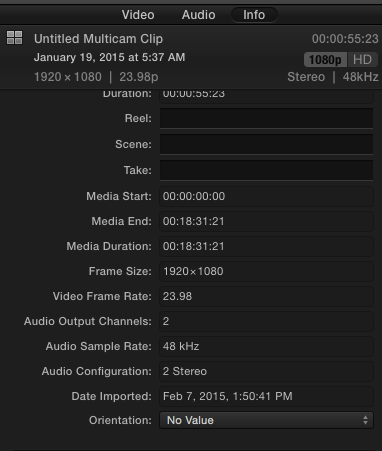
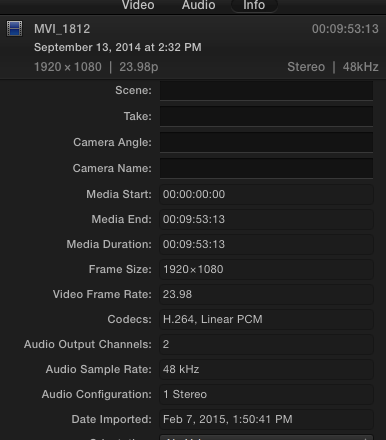
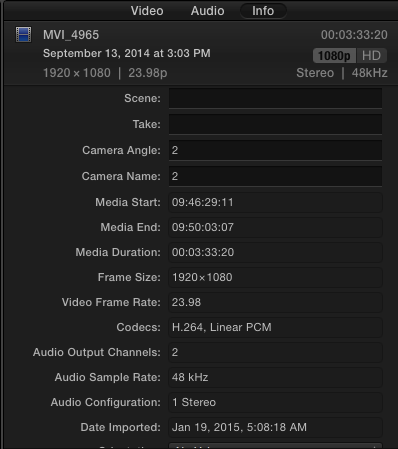
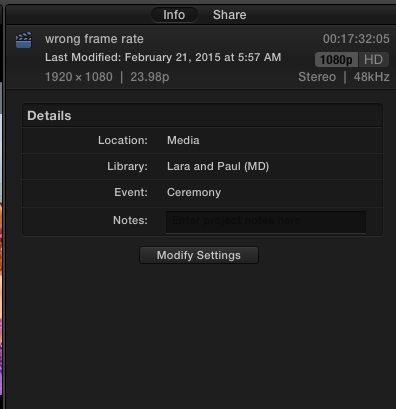
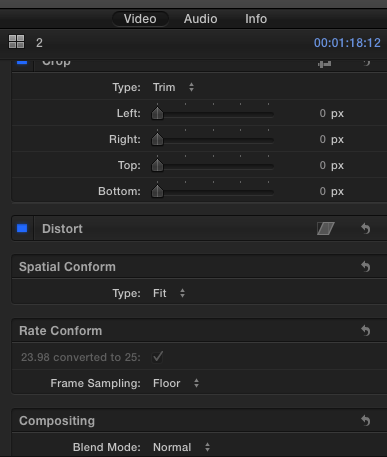
10.1.4 on Yosemite.
Please Log in to join the conversation.
21 Feb 2015 13:05 #60163
by dkag7
Replied by dkag7 on topic Rate conform
To explain the pics,
the 2nd and 3rd pics are the clips within the multicam (top picture)
4th pic is the project
last pic is the inspector on the Multi cam clip
the 2nd and 3rd pics are the clips within the multicam (top picture)
4th pic is the project
last pic is the inspector on the Multi cam clip
Please Log in to join the conversation.
21 Feb 2015 13:14 #60164
by dkag7
Replied by dkag7 on topic Rate conform
I had another event/project in the library with a correct framerate, so what I did was snapshot the correct framerate project, then, from the browser drop the MC inside. It is now at the right framerate.
So I deleted all the other clips so just the MC is in the snapshot project, renamed it so I can get back to work on it (now I need to re edit all the MC again however). If I copy from the timeline it still has the 25 issue..
So I have a fix for now, but I would like to know why this happened, and why it cant be changed.
thanks again
Kurt
So I deleted all the other clips so just the MC is in the snapshot project, renamed it so I can get back to work on it (now I need to re edit all the MC again however). If I copy from the timeline it still has the 25 issue..
So I have a fix for now, but I would like to know why this happened, and why it cant be changed.
thanks again
Kurt
Please Log in to join the conversation.
- ronny courtens
-

- Offline
- Moderator
-
Less
More
- Posts: 4455
- Thank you received: 962
21 Feb 2015 13:41 #60168
by ronny courtens
Replied by ronny courtens on topic Rate conform
Hi Kurt,
When you create a multicam clip a window pops up where you can check and modify the settings for the multicam clip. It is good practice to always click the Custom Settings button in that window to make sure that the multicam clip will have the format and frame rate you expect.
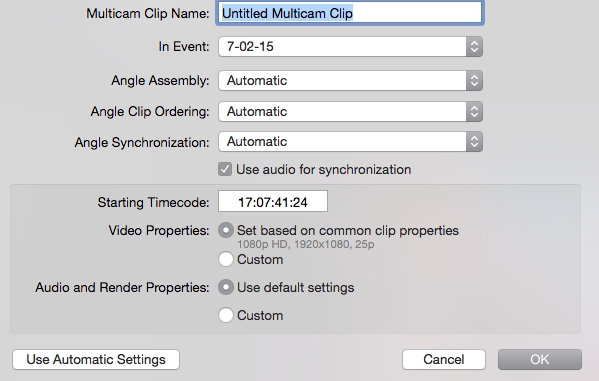
If for some reason the format and/or frame rate shown in the Video Properties are not what you would want it to be, you can click the Custom button to modify these settings.
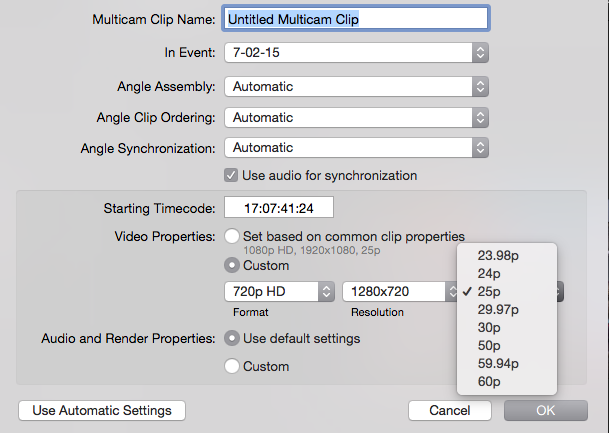
Then you press OK to create your multicam clip and you will be sure that it will have the correct settings.
- Ronny
When you create a multicam clip a window pops up where you can check and modify the settings for the multicam clip. It is good practice to always click the Custom Settings button in that window to make sure that the multicam clip will have the format and frame rate you expect.
If for some reason the format and/or frame rate shown in the Video Properties are not what you would want it to be, you can click the Custom button to modify these settings.
Then you press OK to create your multicam clip and you will be sure that it will have the correct settings.
- Ronny
Please Log in to join the conversation.
- Tom Wolsky
-
- Offline
- Moderator
-
21 Feb 2015 13:46 #60169
by Tom Wolsky
Replied by Tom Wolsky on topic Rate conform
There is something odd here Ronny because the clips, the multicam, and the project are all showing as 23.98.
Please Log in to join the conversation.
21 Feb 2015 13:51 #60171
by dkag7
Replied by dkag7 on topic Rate conform
Ronny, If for example when I made the MC and chose 25fps incorrectly, shouldn't it read 25fps as its properties?
thanks
Kurt
thanks
Kurt
Please Log in to join the conversation.
- ronny courtens
-
- Offline
- Moderator
-
Less
More
- Posts: 4455
- Thank you received: 962
21 Feb 2015 15:20 #60175
by ronny courtens
Replied by ronny courtens on topic Rate conform
Ah I had not noticed that the multicam clip info showed the correct frame rate, my bad. So yes, there is something odd here. Apparently the multiclip frame rate was interpreted as being different from the Project frame rate. The strange thing is that it does work correctly on another Project timeline. Which leads me to think that the issue is not with the multicam clip.
I have tried to reproduce the issue but I couldn't. Nor can I find any other reports about such an issue. So we may have to classify this as unique unexpected behavior.
I this ever happens again (which I doubt) the best solution is to select the multiclip on the timeline and in the retiming menu select Automatic Speed. This will override the auto-conform mode and make the multiclip play at the correct frame rate and speed.
- Ronny
I have tried to reproduce the issue but I couldn't. Nor can I find any other reports about such an issue. So we may have to classify this as unique unexpected behavior.
I this ever happens again (which I doubt) the best solution is to select the multiclip on the timeline and in the retiming menu select Automatic Speed. This will override the auto-conform mode and make the multiclip play at the correct frame rate and speed.
- Ronny
Please Log in to join the conversation.
