


3 Post Moderation Rule for New Boarders (25 Jan 2021)
New boarders will have their posts moderated - Don't worry if you cannot see your post immediately.
Make Event from clips in a project


18 Feb 2015 17:42 #59976
by foxytom
Make Event from clips in a project was created by foxytom
Is there any way that I could take all the clips in a given project and put them into an event, as a list of clips, that I would then be able to select from in order to make a new project?
So, say I have done an assemble and, rather than duplicate the project, I can just put certain selected clips into the new timeline.
So, say I have done an assemble and, rather than duplicate the project, I can just put certain selected clips into the new timeline.
Please Log in to join the conversation.
- Tom Wolsky
-

- Offline
- Moderator
-

18 Feb 2015 17:57 #59978
by Tom Wolsky
Replied by Tom Wolsky on topic Make Event from clips in a project
With the project open in the browser use the filter in the upper to select Used. Mark as favs the bits you want use. Switch left side filter to favs.
Please Log in to join the conversation.


18 Feb 2015 18:35 - 18 Feb 2015 18:39 #59985
by BenB
Replied by BenB on topic Make Event from clips in a project
Or just make one Smart Search to cover both settings at once.
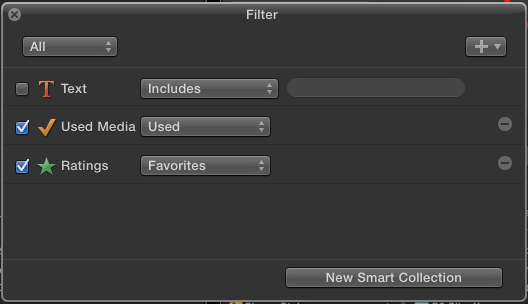
But then, that's after you set it up only for Used media, THEN make Favorite ranges. But yeah, something along these lines. Neat trick, Tom, good to know. I'd never thought about combining the two like that.
But then, that's after you set it up only for Used media, THEN make Favorite ranges. But yeah, something along these lines. Neat trick, Tom, good to know. I'd never thought about combining the two like that.
Last edit: 18 Feb 2015 18:39 by BenB.
Please Log in to join the conversation.
- Tom Wolsky
-
- Offline
- Moderator
-
18 Feb 2015 18:40 #59986
by Tom Wolsky
Replied by Tom Wolsky on topic Make Event from clips in a project
Select used first. Then mark favs. It's a way of keywording or favoritng clips in a project of selects.
Please Log in to join the conversation.

18 Feb 2015 20:21 #59988
by bobmax48
Replied by bobmax48 on topic Make Event from clips in a project
Tom would you explain how you have a Project open in the Browser? I am confused.
Please Log in to join the conversation.
- Tom Wolsky
-
- Offline
- Moderator
-
18 Feb 2015 20:25 #59989
by Tom Wolsky
Replied by Tom Wolsky on topic Make Event from clips in a project
Sorry, I miswrote. I meant open in timeline.
Please Log in to join the conversation.
19 Feb 2015 13:55 #60024
by foxytom
Replied by foxytom on topic Make Event from clips in a project
Thanks Peeps,
When selecting the filter in the "upper" (I assume, Tom Wolsky, that you mean left) I only seem to be able to select "unused", as opposed to "used"
The filter is interesting. It works but I have to deselect it every time I go to a new project and there are some strange behaviours. It seems to merge some clips (into very long, almost rushes length clips) and when I hit the F key it seems to deselect some clips. Hmmm
Anyhow, you've got me on the right track and I'm v grateful.
T
When selecting the filter in the "upper" (I assume, Tom Wolsky, that you mean left) I only seem to be able to select "unused", as opposed to "used"
The filter is interesting. It works but I have to deselect it every time I go to a new project and there are some strange behaviours. It seems to merge some clips (into very long, almost rushes length clips) and when I hit the F key it seems to deselect some clips. Hmmm
Anyhow, you've got me on the right track and I'm v grateful.
T
Please Log in to join the conversation.
- Tom Wolsky
-
- Offline
- Moderator
-
19 Feb 2015 14:17 #60026
by Tom Wolsky
Replied by Tom Wolsky on topic Make Event from clips in a project
I often make that mistake, but this time I did mean right. The magnifying glass or Cmd-F brings up the HUD Ben showed. This lets you select used.
Please Log in to join the conversation.
