


- Posts: 377
- Thank you received: 9
3 Post Moderation Rule for New Boarders (25 Jan 2021)
New boarders will have their posts moderated - Don't worry if you cannot see your post immediately.
magnetic areas in viewer
16 Feb 2015 13:12 #59839
by dkag7
magnetic areas in viewer was created by dkag7
HI,
Is there a way to turn off the magnetic areas in the viewer?
I know command key will temporarily turn them off while using OSC, but is there a way to have them always off?
thanks
Kurt
Is there a way to turn off the magnetic areas in the viewer?
I know command key will temporarily turn them off while using OSC, but is there a way to have them always off?
thanks
Kurt
Please Log in to join the conversation.

16 Feb 2015 13:22 #59840
by Jimmyfinn
Replied by Jimmyfinn on topic magnetic areas in viewer
If you mean whilst repositioning a clip then don't drag from the centre of the clip!
Please Log in to join the conversation.
- ronny courtens
-

- Offline
- Moderator
-

Less
More
- Posts: 4455
- Thank you received: 962
16 Feb 2015 14:17 #59843
by ronny courtens
Replied by ronny courtens on topic magnetic areas in viewer
That's correct.
- Ronny
- Ronny
Please Log in to join the conversation.
- Jonathan Levin
-

- Offline
- Platinum Member
-

Less
More
- Posts: 786
- Thank you received: 21
16 Feb 2015 16:32 #59855
by Jonathan Levin
Replied by Jonathan Levin on topic magnetic areas in viewer
Using the Position tool to move clips around makes it non-magnetic. Also try it with and without Snapping enabled.
Please Log in to join the conversation.
- Jonathan Levin
-
- Offline
- Platinum Member
-
Less
More
- Posts: 786
- Thank you received: 21
16 Feb 2015 16:34 #59856
by Jonathan Levin
Replied by Jonathan Levin on topic magnetic areas in viewer
Wait a minute. So there is an area within a clip that makes it non-magnetic????
Please Log in to join the conversation.
16 Feb 2015 16:54 #59858
by dkag7
Replied by dkag7 on topic magnetic areas in viewer
Thanks but neither of these will disable the magnetic areas in the viewer when using/moving OSC points.
If you have a filter that has OSC, move its position using the OSC, in the center of the viewer you will hit a ‘yellow line’ that the OSC will 'stick to’.
If you hold the command key during the time you are moving the OSC, this yellow center line becomes disabled and you can now move the OSC point free without the OSC sticking to the yellow line.
What I am after is have this yellow line always off.
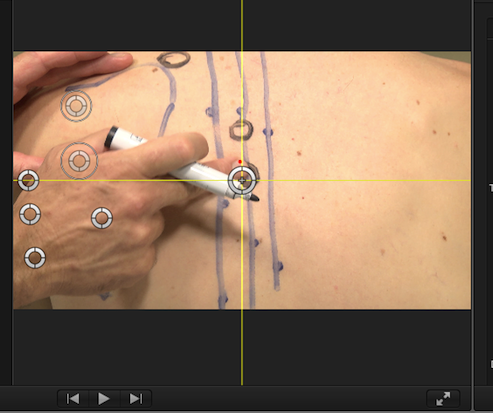
If you have a filter that has OSC, move its position using the OSC, in the center of the viewer you will hit a ‘yellow line’ that the OSC will 'stick to’.
If you hold the command key during the time you are moving the OSC, this yellow center line becomes disabled and you can now move the OSC point free without the OSC sticking to the yellow line.
What I am after is have this yellow line always off.
Please Log in to join the conversation.
