


- Posts: 238
- Thank you received: 20
3 Post Moderation Rule for New Boarders (25 Jan 2021)
New boarders will have their posts moderated - Don't worry if you cannot see your post immediately.
CAN I MODIFY THIS PROJECT?
- Squamish ed
-
 Topic Author
- Offline
- Elite Member
-

Less
More
14 Feb 2015 23:59 #59776
by Squamish ed
Ed
CAN I MODIFY THIS PROJECT? was created by Squamish ed
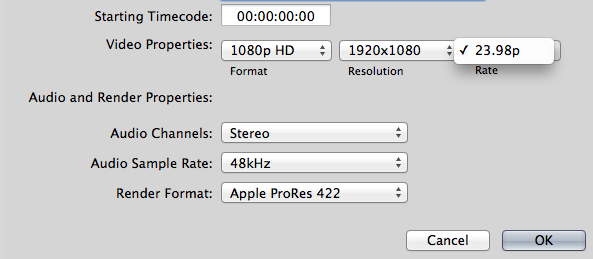
I've always let FCPX automatically set the project frame rate because my clips are ~30 fps 95% of the time with ~60 making up the other 5%. My current project info shows the project is set at 23.98. Don't know how this could have happened as I never have used this frame rate.
I looked at the Project info and selected Modify to change this but my only option is 23.97. Can I change this in this project or do I need to create a new project at the frame rate I want and copy over my timeline?
I looked at the Project info and selected Modify to change this but my only option is 23.97. Can I change this in this project or do I need to create a new project at the frame rate I want and copy over my timeline?
Ed
Please Log in to join the conversation.
- Tom Wolsky
-

- Offline
- Moderator
-

15 Feb 2015 00:10 #59778
by Tom Wolsky
Replied by Tom Wolsky on topic CAN I MODIFY THIS PROJECT?
You can't change the timebase of a project if there's media in it. Select everything and Cmd-X to cut it. Change the project properties to the correct timebase. Paste everything back into it Cmd-V.
Please Log in to join the conversation.
- Squamish ed
-
Topic Author
- Offline
- Elite Member
-
Less
More
- Posts: 238
- Thank you received: 20
15 Feb 2015 04:47 #59780
by Squamish ed
Ed
Replied by Squamish ed on topic CAN I MODIFY THIS PROJECT?
Thanks Tom. Once again your generosity in sharing your knowledge has helped me out. I really appreciate it.
Ed
Please Log in to join the conversation.
