


- Posts: 2
- Thank you received: 0
3 Post Moderation Rule for New Boarders (25 Jan 2021)
New boarders will have their posts moderated - Don't worry if you cannot see your post immediately.
Multiple Chapter Markers in the same place
09 Feb 2015 00:57 #59490
by owainwbm
Multiple Chapter Markers in the same place was created by owainwbm
Hey guys
New around here and new to video editing.
I've just exported my first project from Final Cut Pro X and the file works great! However there is one issue I'm having trouble with.
There is 3 chapters in the same place with in a few seconds of each other. I've tried highlighted the entire timeline and removed all markers and replaced them. I've also deleted the clip and replaced it but that didn't work ether.
Any help here would be great.
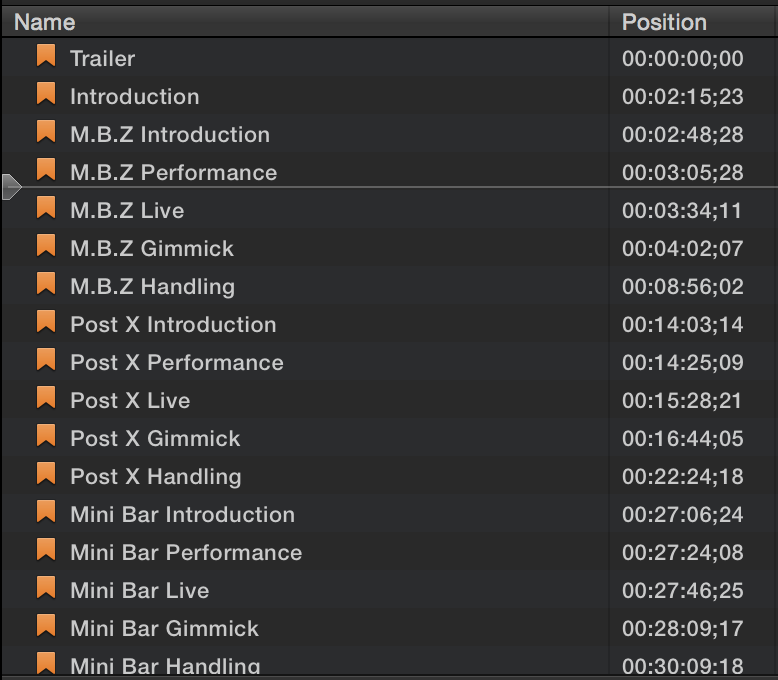
Ive attached two images one of the chapter list with the duplicate section and one of the time line where the one marker is.
Kind regards
Owain
New around here and new to video editing.
I've just exported my first project from Final Cut Pro X and the file works great! However there is one issue I'm having trouble with.
There is 3 chapters in the same place with in a few seconds of each other. I've tried highlighted the entire timeline and removed all markers and replaced them. I've also deleted the clip and replaced it but that didn't work ether.
Any help here would be great.
Ive attached two images one of the chapter list with the duplicate section and one of the time line where the one marker is.
Kind regards
Owain


Please Log in to join the conversation.
- Tom Wolsky
-

- Offline
- Moderator
-

09 Feb 2015 01:22 #59491
by Tom Wolsky
Replied by Tom Wolsky on topic Multiple Chapter Markers in the same place
Open the timeline index. Click on tags. Find the chapter markers you want to delete and delete them there.
Please Log in to join the conversation.
09 Feb 2015 01:27 - 09 Feb 2015 06:04 #59492
by owainwbm
Hi Tom
Thanks for getting back to me. I opened up my timeline index but there is only the one Chapter marker in there for that section (M.B.Z Live).
Very strange indeed.
*FIXED*
Realised I could use iDVD to remove the unwanted chapters. Thank god for iLife lol.
Thanks again!
Owain
Replied by owainwbm on topic Multiple Chapter Markers in the same place
Tom Wolsky wrote: Open the timeline index. Click on tags. Find the chapter markers you want to delete and delete them there.
Hi Tom
Thanks for getting back to me. I opened up my timeline index but there is only the one Chapter marker in there for that section (M.B.Z Live).
Very strange indeed.
*FIXED*
Realised I could use iDVD to remove the unwanted chapters. Thank god for iLife lol.
Thanks again!
Owain
Last edit: 09 Feb 2015 06:04 by owainwbm. Reason: FIX
Please Log in to join the conversation.
