


- Posts: 3
- Thank you received: 0
3 Post Moderation Rule for New Boarders (25 Jan 2021)
New boarders will have their posts moderated - Don't worry if you cannot see your post immediately.
"broken" pixels in videos
- musamakeup
-
 Topic Author
- Offline
- New Member
-

Less
More
06 Feb 2015 23:24 #59425
by musamakeup
"broken" pixels in videos was created by musamakeup
Hi, I have a BIG problem with my videos..
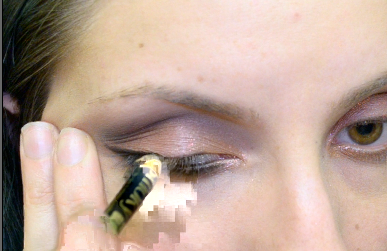
I don't know hot to explain, but during editing and also after exported my video (I export directly on my Youtube account to make it faster, even if it takes me almost 8 hours to upload a 20 minutes video) I noticed this

I record my videos with a reflex, Nikon D5100, and I don't know if it's a camera, SD, mac or program problem, but I really don't know what to do..
I need to upload HD videos on my channel, since they are about makeup and most of them are close-ups, and this problem it's very annoying.
I hope some of you can help me
Thanks!
I don't know hot to explain, but during editing and also after exported my video (I export directly on my Youtube account to make it faster, even if it takes me almost 8 hours to upload a 20 minutes video) I noticed this
I record my videos with a reflex, Nikon D5100, and I don't know if it's a camera, SD, mac or program problem, but I really don't know what to do..
I need to upload HD videos on my channel, since they are about makeup and most of them are close-ups, and this problem it's very annoying.
I hope some of you can help me
Thanks!
Please Log in to join the conversation.
- Karsten Schlüter
-

- Offline
- Moderator
-

Less
More
- Posts: 3790
- Thank you received: 718
07 Feb 2015 11:42 #59433
by Karsten Schlüter
Replied by Karsten Schlüter on topic "broken" pixels in videos
These 'broken pixels' (nice description! ) or 'blocks' are compression artifacts ...
reasons:
a too slow SDcard/media in camera
a too low bit-rate in recording-settings (what are your in-cam-settings, anyhow?)
a too low bit-rate in export-settings from FCPX/Compressor/whatever...
The first two things can not be fixed in post, damage is done.
#3 .. what are your export settings, you're using, I assume, the YouTube-share-setting?
In case , you're using Proxies - have you set FCPX back to 'original/optimized' BEFORE sharing..?
reasons:
a too slow SDcard/media in camera
a too low bit-rate in recording-settings (what are your in-cam-settings, anyhow?)
a too low bit-rate in export-settings from FCPX/Compressor/whatever...
The first two things can not be fixed in post, damage is done.
#3 .. what are your export settings, you're using, I assume, the YouTube-share-setting?
In case , you're using Proxies - have you set FCPX back to 'original/optimized' BEFORE sharing..?
Please Log in to join the conversation.
- musamakeup
-
Topic Author
- Offline
- New Member
-
Less
More
- Posts: 3
- Thank you received: 0
08 Feb 2015 01:07 #59456
by musamakeup
Replied by musamakeup on topic "broken" pixels in videos
Yeah, I upload my videos on YT direclty from FCP because sometimes it takes me AGES to share a 20 mins video.
I used to record them in Full HD, 25fps and I think they were too much; today I tried with 24fps and "normal" resolution, instead than "high", and seems ok (for now), but I'm afraid to have some serious problems with my Mac; after 5 years and 3 batteries.......
Anyway I bought a new SD as well, because the one I'm using right now it's very old and might be "damaged", or at least, very used.. I will try with that!
Also, I download my clips direclty from the SD, without any cable, so it might be this as well..
Omg, I did so many stupid things :pinch:
Thanks for your help, I will try with different settings until I'll find the perfect one
Now I just need to make my upload faster :silly:
I used to record them in Full HD, 25fps and I think they were too much; today I tried with 24fps and "normal" resolution, instead than "high", and seems ok (for now), but I'm afraid to have some serious problems with my Mac; after 5 years and 3 batteries.......
Anyway I bought a new SD as well, because the one I'm using right now it's very old and might be "damaged", or at least, very used.. I will try with that!
Also, I download my clips direclty from the SD, without any cable, so it might be this as well..
Omg, I did so many stupid things :pinch:
Thanks for your help, I will try with different settings until I'll find the perfect one
Now I just need to make my upload faster :silly:
Please Log in to join the conversation.
- Karsten Schlüter
-
- Offline
- Moderator
-
Less
More
- Posts: 3790
- Thank you received: 718
08 Feb 2015 06:44 #59460
by Karsten Schlüter
Probably I wasn't clear:
I'm talking about bit-rates, not resolution, frame-rates etc.
The bit-rate defines the amount of data delivered per second. Imagine you have to powder a face within a minute - #1 with a small brush, #2 with a huge tassel ... #1 results in blemishes = not enough powder = 'artifacts', #2 all fine.
... savvy?
... hmm, c'mon, don't feed my stereotypes, Dear, and be so 'girly' - it's a technical problem, and I'm pretty sure it can be fixed.
What about my last suggestion - Proxy vs Original? .....
Replied by Karsten Schlüter on topic "broken" pixels in videos
musamakeup wrote: …I used to record them in Full HD, 25fps and I think they were too much; …
Probably I wasn't clear:
I'm talking about bit-rates, not resolution, frame-rates etc.
The bit-rate defines the amount of data delivered per second. Imagine you have to powder a face within a minute - #1 with a small brush, #2 with a huge tassel ... #1 results in blemishes = not enough powder = 'artifacts', #2 all fine.
... savvy?
musamakeup wrote: … Omg, I did so many stupid things :pinch: …
... hmm, c'mon, don't feed my stereotypes, Dear, and be so 'girly'
- it's a technical problem, and I'm pretty sure it can be fixed.What about my last suggestion - Proxy vs Original? .....
Please Log in to join the conversation.
- musamakeup
-
Topic Author
- Offline
- New Member
-
Less
More
- Posts: 3
- Thank you received: 0
09 Feb 2015 07:47 #59497
by musamakeup
Replied by musamakeup on topic "broken" pixels in videos
actually.. I have no idea :dry:
I have FCP since a couple of months and I just know the basics to cut, edit and export.. no other extras.. same for other settings, as the reflex is quite new as well and I still have to set it.. I just know that I use all the HD settings, but I think I solved most of my problems by recording with a lower definition..
Also, I think it's a Mac problem, as it's very old (something like 5 years old), slow because of Yosemite OS and video codec is not suitable to HD videos and "professional" stuff I just have to settle to a lower definition, and, maybe, buy a new Mac (when I'll be famous and rich haha *never*)
and, of course, thoroughly study FCP and my reflex settings to learn how to maximize my video editing..
But.. I'm lazy, and I don't have patience :pinch:
I have FCP since a couple of months and I just know the basics to cut, edit and export.. no other extras.. same for other settings, as the reflex is quite new as well and I still have to set it.. I just know that I use all the HD settings, but I think I solved most of my problems by recording with a lower definition..
Also, I think it's a Mac problem, as it's very old (something like 5 years old), slow because of Yosemite OS and video codec is not suitable to HD videos and "professional" stuff
I just have to settle to a lower definition, and, maybe, buy a new Mac (when I'll be famous and rich haha *never*)and, of course, thoroughly study FCP and my reflex settings to learn how to maximize my video editing..
But.. I'm lazy, and I don't have patience :pinch:
Please Log in to join the conversation.
- Karsten Schlüter
-
- Offline
- Moderator
-
Less
More
- Posts: 3790
- Thank you received: 718
09 Feb 2015 08:43 - 09 Feb 2015 08:44 #59498
by Karsten Schlüter
hold on for a second - "no idea" but a technical diagnosis "not suitable" - hm, really?
Looks like you want 'cooking recipes', instead of tech lingo/from the ground learning.-
OK, I try to make it as simple as possible:
5 points - manageable... even for the lazy ones
If you prefer to 'solve' your issues by a 3k$ investment - I don't curb you. :whistle:
(but even state-of-the-art hardware will not work, when utilized wrong... )
Replied by Karsten Schlüter on topic "broken" pixels in videos
musamakeup wrote: actually.. I have no idea
.... video codec is not suitable to HD videos ...
hold on for a second - "no idea" but a technical diagnosis "not suitable" - hm, really?
Looks like you want 'cooking recipes', instead of tech lingo/from the ground learning.-
OK, I try to make it as simple as possible:
- get a class10 SDcard for your Nikon
- set Nikon to 1080/30, 'high'
- use as much light as possible for your recordings - use lamps, lights, sun light.
- do NOT optimize nor proxy on import
- export using the YT-preset
5 points - manageable... even for the lazy ones
If you prefer to 'solve' your issues by a 3k$ investment - I don't curb you. :whistle:
(but even state-of-the-art hardware will not work, when utilized wrong... )
Last edit: 09 Feb 2015 08:44 by Karsten Schlüter.
Please Log in to join the conversation.
