


- Posts: 377
- Thank you received: 9
3 Post Moderation Rule for New Boarders (25 Jan 2021)
New boarders will have their posts moderated - Don't worry if you cannot see your post immediately.
audio to text
03 Feb 2015 22:07 #59285
by dkag7
Replied by dkag7 on topic audio to text
I also could not get any event to work.
But I also could not export any XML from soundbite to FCPX because the XML icon would never enable... I thought that it would only enable during an event/project analysis and not a folder analysis..?
So i cant get any export of an xml to fcpx
Is there some trick to enabling the button?
thanks
Kurt
But I also could not export any XML from soundbite to FCPX because the XML icon would never enable... I thought that it would only enable during an event/project analysis and not a folder analysis..?
So i cant get any export of an xml to fcpx
Is there some trick to enabling the button?
thanks
Kurt
Please Log in to join the conversation.


03 Feb 2015 22:13 #59286
by thinkfilm
Replied by thinkfilm on topic audio to text
I think you have to make sure that at least one file name is selected in the list otherwise the Export buttons are greyed out. Does that work for you ?
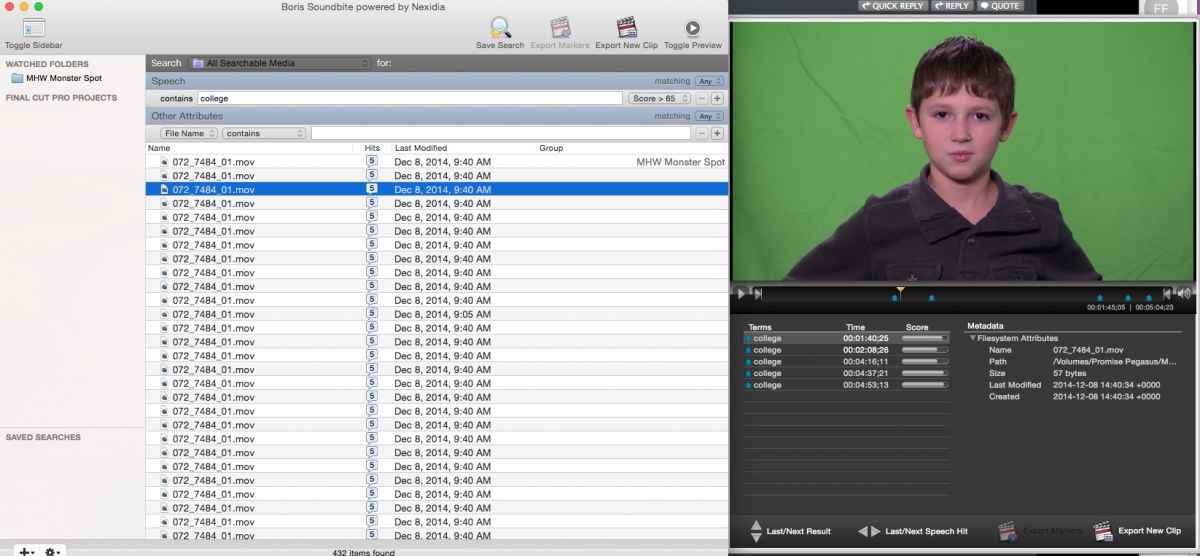
- see attached.
- see attached.
Please Log in to join the conversation.
03 Feb 2015 22:15 #59287
by dkag7
Replied by dkag7 on topic audio to text
your export markers button is also greyed out..
Do you mean you exported a clip?
(and from that step you can make an xml?)
Do you mean you exported a clip?
(and from that step you can make an xml?)
Please Log in to join the conversation.
03 Feb 2015 22:20 #59288
by thinkfilm
Replied by thinkfilm on topic audio to text
Yes, that's right. What I did actually was just to select a clip then go to the File menu and choose Export to FCPX XML - then imported that in FCPX. - see attached.
Does that work for you?
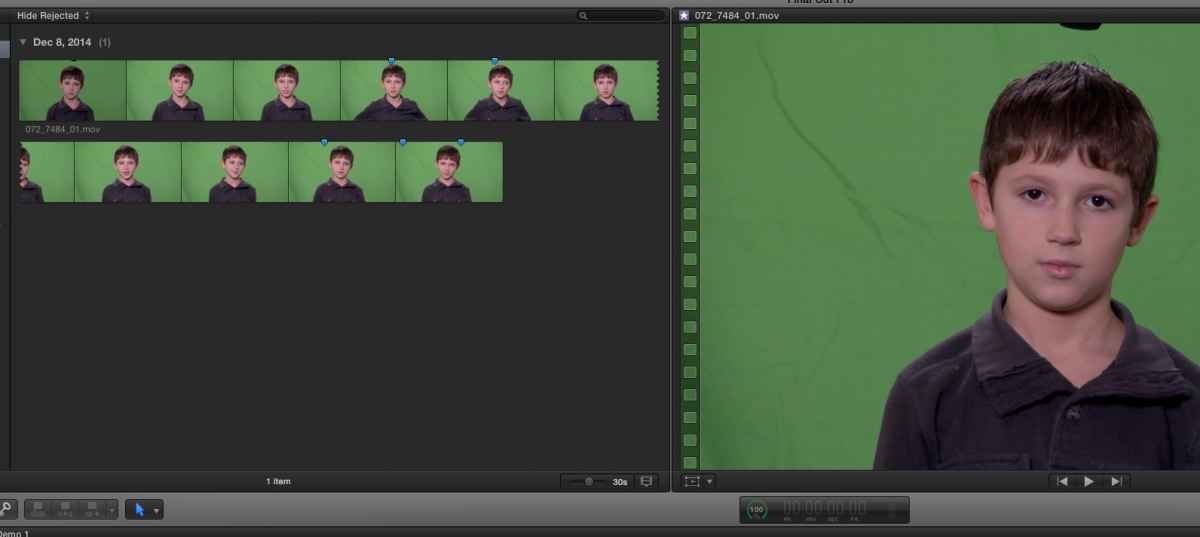
Does that work for you?
Please Log in to join the conversation.
03 Feb 2015 22:25 #59289
by dkag7
Replied by dkag7 on topic audio to text
Oh, OK
I cant check it now but ill try later.
So when you export it didnt really make a new .mov or .wav, it just associated from the original file and then created the xml.?
I thought it would make a completely new file with some markers...
I hope it works with multicam (if of course it can work at all with a project..)
thanks
Kurt
I cant check it now but ill try later.
So when you export it didnt really make a new .mov or .wav, it just associated from the original file and then created the xml.?
I thought it would make a completely new file with some markers...
I hope it works with multicam (if of course it can work at all with a project..)
thanks
Kurt
Please Log in to join the conversation.
03 Feb 2015 22:33 #59290
by thinkfilm
Replied by thinkfilm on topic audio to text
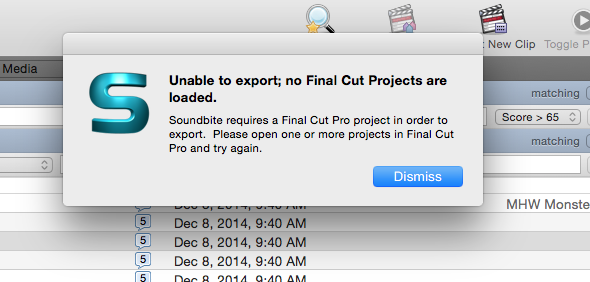
That's correct - the Soundbite XML export just references the original media clip, doesn't create a new one. It seems FCPX has to be open to use the Export New Clip button - I haven't tried this but this is the alert I get when FCPX is closed - see attached.
I've got to switch over to kid duty myself now but I can check back later with more.
I've got to switch over to kid duty myself now
but I can check back later with more. Please Log in to join the conversation.
06 Feb 2015 18:17 #59417
by dkag7
Replied by dkag7 on topic audio to text
I didnt have much luck.
When I export as an xml from soundbite to FCPX, FCPX opens it OK but:
1. If i put it in a different library that has the clips soundbite worked on, FCPX sees this clip as missing media (with the wrong name) so it can never find it (but the markers are there that sound bite made)
2. If I open soundbites xml in the library that has the media that soundbite was working on, a black 'compound clip' looking icon is imported, also with no video. But also, this icon has no markers on it at all...
3. If I select 'create a new bin' when exporting the xml from soundbite, it gives an error (i forget what it was exactly now) but it can not continue. I believe that because fcpx dont have bins, its messing up somewhere..
4. still no analyzing done by soundbite when I drag in a FCPX project.
also I still have not heard back from borris about the questions I emailed tham about fcpx compatibility.
Kurt
'
When I export as an xml from soundbite to FCPX, FCPX opens it OK but:
1. If i put it in a different library that has the clips soundbite worked on, FCPX sees this clip as missing media (with the wrong name) so it can never find it (but the markers are there that sound bite made)
2. If I open soundbites xml in the library that has the media that soundbite was working on, a black 'compound clip' looking icon is imported, also with no video. But also, this icon has no markers on it at all...
3. If I select 'create a new bin' when exporting the xml from soundbite, it gives an error (i forget what it was exactly now) but it can not continue. I believe that because fcpx dont have bins, its messing up somewhere..
4. still no analyzing done by soundbite when I drag in a FCPX project.
also I still have not heard back from borris about the questions I emailed tham about fcpx compatibility.
Kurt
'
Please Log in to join the conversation.
06 Feb 2015 18:35 #59420
by thinkfilm
Replied by thinkfilm on topic audio to text
The Soundbite xml imports into FCPX ok for me and I can see the indexed clip with markers after importing the xml into the same library that contains the original media - in other words, the "Watched Folder" that I specified in Soundbite.
Like you, I've never been able to get the project import to work in Soundbite. I can see the project listed in Soundbite's sidebar and if I mouse (hover) over it a tip pops up that says 'Preparing to index" but nothing further ever happens.
Even thought the watched folder route mostly works, it does take a long time to index and it does display multiple redundant hits (on the same file name) when I search on a word. Perhaps this is related to the type of media or codec of the footage in my library - I don't know. Soundbite's documentation is a little vague about this and only states that unsupported formats won't be indexed - and there won't be any alerts to this.
I've never tried to create anew bin because as you said this doesn't apply to FCPX.
I hope you do hear back from Boris support - they did follow-up with me several times after my initial inquiries. It took a few days though.
Like you, I've never been able to get the project import to work in Soundbite. I can see the project listed in Soundbite's sidebar and if I mouse (hover) over it a tip pops up that says 'Preparing to index" but nothing further ever happens.
Even thought the watched folder route mostly works, it does take a long time to index and it does display multiple redundant hits (on the same file name) when I search on a word. Perhaps this is related to the type of media or codec of the footage in my library - I don't know. Soundbite's documentation is a little vague about this and only states that unsupported formats won't be indexed - and there won't be any alerts to this.
I've never tried to create anew bin because as you said this doesn't apply to FCPX.
I hope you do hear back from Boris support - they did follow-up with me several times after my initial inquiries. It took a few days though.
Please Log in to join the conversation.
