


- Posts: 9
- Thank you received: 0
3 Post Moderation Rule for New Boarders (25 Jan 2021)
New boarders will have their posts moderated - Don't worry if you cannot see your post immediately.
Audio import has 1970 date
22 Nov 2011 00:44 #2240
by tvlincoln
Audio import has 1970 date was created by tvlincoln
Importing audio into FCP X from my Zoom H4N the Content Created date is always 1 Jan 1970 despite the Zoom having he correct date set. Is this just a restriction of FCP X?
Cheers
Karl
Cheers
Karl
Please Log in to join the conversation.

22 Nov 2011 05:11 - 22 Nov 2011 05:12 #2242
by BenB
Replied by BenB on topic Re: Audio import has 1970 date
Check the System preferences of your Mac, set the calendar.
Ah yes, 1970, that was such a magical, carefree time...
Ah yes, 1970, that was such a magical, carefree time...
Last edit: 22 Nov 2011 05:12 by BenB.
Please Log in to join the conversation.
22 Nov 2011 14:21 #2243
by tvlincoln
Replied by tvlincoln on topic Re: Audio import has 1970 date
The system date and time on the Mac are set fine, and if I browse the files in the Finder I can see them with the date on them. It's just when importing into FCP X I get the Content Created date set as 1970. Just seems odd that FCP X doesn't pick it up from the timestamp on the file itself. These are wav files btw, I'll try creating mp3s on the Zoom and see if that works better, not ideal though even if it does
Please Log in to join the conversation.
22 Nov 2011 17:49 #2246
by BenB
Replied by BenB on topic Re: Audio import has 1970 date
Stay away from MP3 files for two reasons. First, not officially supported. Second, they're not professional quality audio files.
Are you updated to FCP X 0.0.2?
I'd get Digital Rebellion's free "Preference Manager" to properly and safely trash FCP X preferences.
Running Disk Utility to "repair" all drives would be a good move, also.
Do those two and see what happens.
Are you updated to FCP X 0.0.2?
I'd get Digital Rebellion's free "Preference Manager" to properly and safely trash FCP X preferences.
Running Disk Utility to "repair" all drives would be a good move, also.
Do those two and see what happens.
Please Log in to join the conversation.

22 Nov 2011 21:15 - 22 Nov 2011 21:37 #2248
by Soundwise
It is also Zoom's restriction, since you'll notice that it's the same in Finder. The creation date of Zoom files is usually this 1970 date and the modification date is the actual date the file was created ie. recorded. Too bad FCP X does not read the modification date, only the creation date.
Good thing is that FCP X reads the TOD info of the file, which is like the timecode.
One workaround to this date problem is to modify or change the Zoom files' creation dates to modification dates in Finder level before importing them to FCP X. It is a one click operation with a free tool like BatchTouch
Hope this helps
Replied by Soundwise on topic Re: Audio import has 1970 date
tvlincoln wrote: Importing audio into FCP X from my Zoom H4N the Content Created date is always 1 Jan 1970 despite the Zoom having he correct date set. Is this just a restriction of FCP X?
Cheers
Karl
It is also Zoom's restriction, since you'll notice that it's the same in Finder. The creation date of Zoom files is usually this 1970 date and the modification date is the actual date the file was created ie. recorded. Too bad FCP X does not read the modification date, only the creation date.
Good thing is that FCP X reads the TOD info of the file, which is like the timecode.
One workaround to this date problem is to modify or change the Zoom files' creation dates to modification dates in Finder level before importing them to FCP X. It is a one click operation with a free tool like BatchTouch
Hope this helps
Last edit: 22 Nov 2011 21:37 by Soundwise.
Please Log in to join the conversation.
22 Nov 2011 21:53 #2251
by tvlincoln
Replied by tvlincoln on topic Re: Audio import has 1970 date
Tried all of these and none of them work unfortunately, thanks for the suggestions anyway
Please Log in to join the conversation.
22 Nov 2011 21:55 #2252
by tvlincoln
Replied by tvlincoln on topic Re: Audio import has 1970 date
Ah yes I see it now, Date Modified is correct but Date Created is 1970, damn 
I'll check out that that BatchTouch you mentioned, sounds like a great fix, thanks!
I'll check out that that BatchTouch you mentioned, sounds like a great fix, thanks!
Soundwise wrote:
tvlincoln wrote: Importing audio into FCP X from my Zoom H4N the Content Created date is always 1 Jan 1970 despite the Zoom having he correct date set. Is this just a restriction of FCP X?
Cheers
Karl
It is also Zoom's restriction, since you'll notice that it's the same in Finder. The creation date of Zoom files is usually this 1970 date and the modification date is the actual date the file was created ie. recorded. Too bad FCP X does not read the modification date, only the creation date.
Good thing is that FCP X reads the TOD info of the file, which is like the timecode.
One workaround to this date problem is to modify or change the Zoom files' creation dates to modification dates in Finder level before importing them to FCP X. It is a one click operation with a free tool like BatchTouch
Hope this helps
Please Log in to join the conversation.
22 Nov 2011 21:59 - 22 Nov 2011 22:08 #2253
by Soundwise
You mean, that you couldn't change the creation dates to modification dates? It is very easy task, but you have to do it in finder before importing the clips to FCP X.
Oh, seems like you got it now! Was too quick.
BTW, if you use BatchTouch the shortcut for changing the whole folders clips' Creation dates to Modification dates is cmd-5. You find it also under the "Special" menu.
Replied by Soundwise on topic Re: Audio import has 1970 date
tvlincoln wrote: Tried all of these and none of them work unfortunately, thanks for the suggestions anyway
You mean, that you couldn't change the creation dates to modification dates? It is very easy task, but you have to do it in finder before importing the clips to FCP X.
Oh, seems like you got it now! Was too quick.
BTW, if you use BatchTouch the shortcut for changing the whole folders clips' Creation dates to Modification dates is cmd-5. You find it also under the "Special" menu.
Last edit: 22 Nov 2011 22:08 by Soundwise.
Please Log in to join the conversation.
22 Nov 2011 22:03 #2254
by tvlincoln
Replied by tvlincoln on topic Re: Audio import has 1970 date
I was referring to the previous message. I tried that Batchtouch tool but it and it does the job perfectly, thanks again 
Please Log in to join the conversation.

22 Nov 2011 22:41 #2256
by tpayton
Replied by tpayton on topic Re: Audio import has 1970 date
This is actually not a FCP X issue at all, it is a H4N issue. Not a fix for your previous files, but there is a firmware fix for the H4n time date stamp. It was reported to Zoom last year and they fixed it in version 1.60 last sumer. It is now up to 1.72. You can get the update here:
www.zoom.co.jp/downloads/h4n/software/
As you can see here is some unmodified H4n Audio, and it has the correct content creation dates:

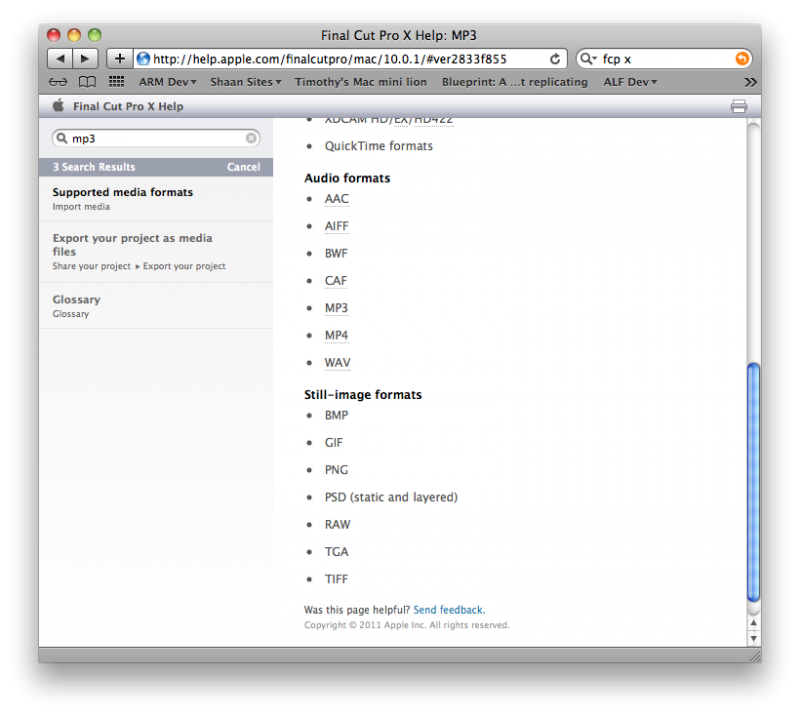
Regarding the MP3 format in FCP X. I have heard from trusted folk, including Ben that it is not supported in FCP X (although it has been working fine for me), but the FCP X manual says it is a supported format: See here:
help.apple.com/finalcutpro/mac/10.0.1/#ver2833f855
www.zoom.co.jp/downloads/h4n/software/
As you can see here is some unmodified H4n Audio, and it has the correct content creation dates:
Regarding the MP3 format in FCP X. I have heard from trusted folk, including Ben that it is not supported in FCP X (although it has been working fine for me), but the FCP X manual says it is a supported format: See here:
help.apple.com/finalcutpro/mac/10.0.1/#ver2833f855
Please Log in to join the conversation.
22 Nov 2011 22:49 - 22 Nov 2011 22:50 #2257
by BenB
Replied by BenB on topic Re: Audio import has 1970 date
MP3, supported or not, works or not, it's still a highly compressed "consumer delivery" format. It simply is overly compressed and can not carry the dynamic range and fidelity required of professional audio engineering. Stick with Linear PCM (AIFF uncompressed) or WAV.
Last edit: 22 Nov 2011 22:50 by BenB.
Please Log in to join the conversation.
22 Nov 2011 22:59 #2261
by Soundwise
That is very strange, since I have 1.72 on my H4n. I also have H2n (1.00) and they both have this Creation date bug.
Replied by Soundwise on topic Re: Audio import has 1970 date
tpayton wrote: This is actually not a FCP X issue at all, it is a H4N issue. Not a fix for your previous files, but there is a firmware fix for the H4n time date stamp. It was reported to Zoom last year and they fixed it in version 1.60 last sumer. It is now up to 1.72. You can get the update here:
www.zoom.co.jp/downloads/h4n/software/
That is very strange, since I have 1.72 on my H4n. I also have H2n (1.00) and they both have this Creation date bug.
Please Log in to join the conversation.
22 Nov 2011 23:45 #2268
by tvlincoln
Replied by tvlincoln on topic Re: Audio import has 1970 date
Thanks. I'll give the 1.72 update a go and see if it fixes it.
tpayton wrote: This is actually not a FCP X issue at all, it is a H4N issue. Not a fix for your previous files, but there is a firmware fix for the H4n time date stamp. It was reported to Zoom last year and they fixed it in version 1.60 last sumer. It is now up to 1.72. You can get the update here:
www.zoom.co.jp/downloads/h4n/software/
As you can see here is some unmodified H4n Audio, and it has the correct content creation dates:
Regarding the MP3 format in FCP X. I have heard from trusted folk, including Ben that it is not supported in FCP X (although it has been working fine for me), but the FCP X manual says it is a supported format: See here:
help.apple.com/finalcutpro/mac/10.0.1/#ver2833f855
Please Log in to join the conversation.
22 Nov 2011 23:46 #2269
by tvlincoln
Replied by tvlincoln on topic Re: Audio import has 1970 date
I was trying out MP3 to see if I got the same bug as with the Wav files, not to use when recording. My background is as a music producer so I know the difference thanks.
BenB wrote: MP3, supported or not, works or not, it's still a highly compressed "consumer delivery" format. It simply is overly compressed and can not carry the dynamic range and fidelity required of professional audio engineering. Stick with Linear PCM (AIFF uncompressed) or WAV.
Please Log in to join the conversation.
22 Nov 2011 23:53 #2271
by tvlincoln
Replied by tvlincoln on topic Re: Audio import has 1970 date
Well Zoom H4n 1.72 applied, and the Created date on the files is still 1970
Please Log in to join the conversation.
22 Nov 2011 23:58 - 22 Nov 2011 23:59 #2273
by BenB
Replied by BenB on topic Re: Audio import has 1970 date
Sounds like an issue with the Zoom Hn4. I record to various devices, MBP, cameras, etc, but no Zoom models, and I have never seen this problem.
Are you running Lion by any chance?
Did you trash your FCP X preferences?
Have you contacted Zoom about it?
Are you running Lion by any chance?
Did you trash your FCP X preferences?
Have you contacted Zoom about it?
Last edit: 22 Nov 2011 23:59 by BenB.
Please Log in to join the conversation.
