


- Posts: 1080
- Thank you received: 106
3 Post Moderation Rule for New Boarders (25 Jan 2021)
New boarders will have their posts moderated - Don't worry if you cannot see your post immediately.
So FCPX's scaling ability is kind of crappy.
28 Jan 2015 19:52 - 28 Jan 2015 20:01 #58979
by Redifer
So FCPX's scaling ability is kind of crappy. was created by Redifer
I'm probably gonna get a lot of heat for posting this, but here goes.
I do a show which is 1080p. It includes lots of videogame footage that often does not originate at 1080p and must be scaled. FCPX sucks at scaling compared to FCP7.
Click on this link to view a comparison image. It's too wide to embed into the skinny forum page
www.joeredifer.com/crap/Vakyria.png
Bottom line: If I want the best image quality for my show, I am forced to use FCP7.
EDIT: I find that using DISTORT in FCPX gives slightly better results than the Scaling slider in the inspector but still nowhere near as good as FCP7.
I do a show which is 1080p. It includes lots of videogame footage that often does not originate at 1080p and must be scaled. FCPX sucks at scaling compared to FCP7.
Click on this link to view a comparison image. It's too wide to embed into the skinny forum page
www.joeredifer.com/crap/Vakyria.png
Bottom line: If I want the best image quality for my show, I am forced to use FCP7.
EDIT: I find that using DISTORT in FCPX gives slightly better results than the Scaling slider in the inspector but still nowhere near as good as FCP7.
Last edit: 28 Jan 2015 20:01 by Redifer.
Please Log in to join the conversation.

28 Jan 2015 20:37 #58980
by anickt
Replied by anickt on topic So FCPX's scaling ability is kind of crappy.
Did you take the screen cap with the viewer set to Better Quality or Better Performance?
Please Log in to join the conversation.
- ronny courtens
-

- Offline
- Moderator
-

Less
More
- Posts: 4455
- Thank you received: 962
28 Jan 2015 21:47 - 28 Jan 2015 21:49 #58981
by ronny courtens
Replied by ronny courtens on topic So FCPX's scaling ability is kind of crappy.
I think you hit the nail right on the head, Nick.
Here you see a 640x480 image scaled up to 1920x1080 both in X (left) and in 7 (right). Not only is the scaling quality better in FCP X, it also does not have the ugly gamma shift that FCP7 is notorious for:
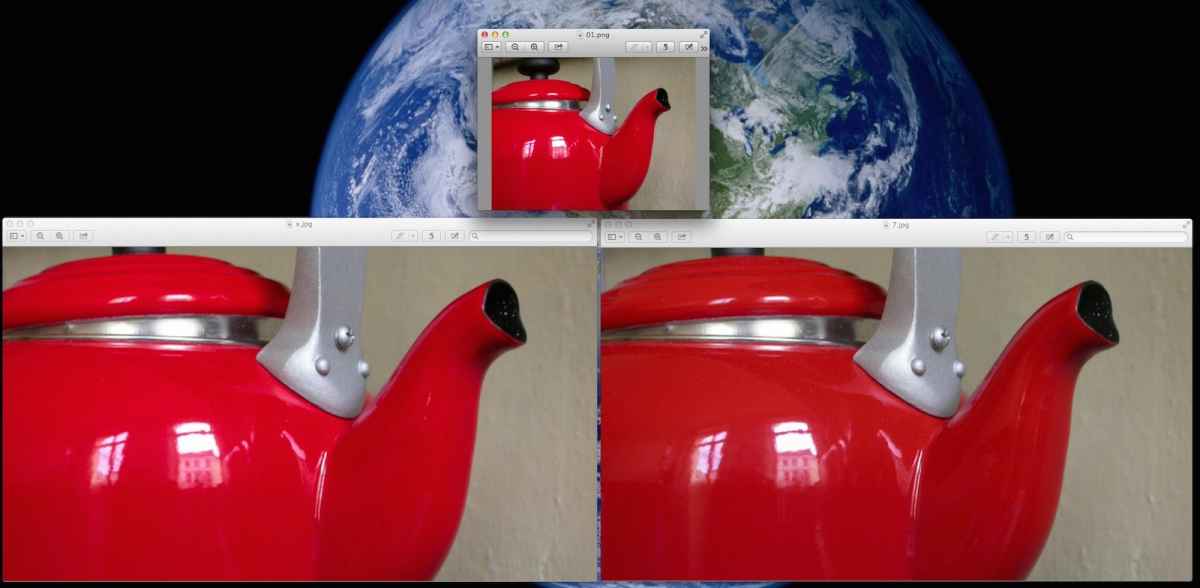
If you want I can post the screenshot at full resolution, but I think the image speaks for itself. This is incorrect information.
- Ronny
Here you see a 640x480 image scaled up to 1920x1080 both in X (left) and in 7 (right). Not only is the scaling quality better in FCP X, it also does not have the ugly gamma shift that FCP7 is notorious for:
If you want I can post the screenshot at full resolution, but I think the image speaks for itself. This is incorrect information.
- Ronny
Last edit: 28 Jan 2015 21:49 by ronny courtens.
Please Log in to join the conversation.
- Tom Wolsky
-

- Offline
- Moderator
-
28 Jan 2015 22:47 #58983
by Tom Wolsky
Replied by Tom Wolsky on topic So FCPX's scaling ability is kind of crappy.
It may depend on the content. In my test, like yours Ronny, with 480i media scaled, FCPX looks better, ugly, but better,
Please Log in to join the conversation.

28 Jan 2015 23:28 #58985
by BenB
Replied by BenB on topic So FCPX's scaling ability is kind of crappy.
Man, like, SD to HD? Really? X should outperform 7 with the new AVFramwork.
Again, much depends, as in any scenario, on the qualties of the original media.
"Garbage in, garbage out", as we said back int the very early days of digital...
Again, much depends, as in any scenario, on the qualties of the original media.
"Garbage in, garbage out", as we said back int the very early days of digital...
Please Log in to join the conversation.
29 Jan 2015 01:46 - 29 Jan 2015 01:47 #58994
by Redifer
It doesn't matter which it is set to. The screen cap was set while the playhead was still. Changing it from Better Quality to Better Performance does not degrade nor improve the image. FCPX is worse. I knew I'd get deniers in this thread. Tell you what... Download this test file and try to get as good of a result with FCPX as I did with FCP7. This is the original sized file. It's just the way this system records. The edges of the image should extend to the 16:9 border in 1080p. There should be no black bars. www.joeredifer.com/crap/480ptest.mov - 22MB
Replied by Redifer on topic So FCPX's scaling ability is kind of crappy.
anickt wrote: Did you take the screen cap with the viewer set to Better Quality or Better Performance?
It doesn't matter which it is set to. The screen cap was set while the playhead was still. Changing it from Better Quality to Better Performance does not degrade nor improve the image. FCPX is worse. I knew I'd get deniers in this thread. Tell you what... Download this test file and try to get as good of a result with FCPX as I did with FCP7. This is the original sized file. It's just the way this system records. The edges of the image should extend to the 16:9 border in 1080p. There should be no black bars. www.joeredifer.com/crap/480ptest.mov - 22MB
Not relevant in this discussion as the media is the same in both scenarios. There's less garbage with FCP7.BenB wrote: Again, much depends, as in any scenario, on the qualties of the original media.
"Garbage in, garbage out", as we said back in the very early days of digital...
Last edit: 29 Jan 2015 01:47 by Redifer.
Please Log in to join the conversation.
- Tom Wolsky
-
- Offline
- Moderator
-
29 Jan 2015 02:23 #58995
by Tom Wolsky
Replied by Tom Wolsky on topic So FCPX's scaling ability is kind of crappy.
In the clip to the right of the face is an icon between the number 2 and Biggun. What shape is that icon in FCP7?
Please Log in to join the conversation.
29 Jan 2015 03:12 - 29 Jan 2015 03:15 #58996
by Redifer
Replied by Redifer on topic So FCPX's scaling ability is kind of crappy.
Whatever shape is the result of stretching the image to the edges of the screen. The PSP is a handheld game system with a 16:9 screen and it's not possible to output its video in the proper aspect ratio via component. It's a square vs non-square pixel issue. But the video is the native resolution.
www.joeredifer.com/crap/fcp7vc2.png
www.joeredifer.com/crap/fcp7vc2.png
Last edit: 29 Jan 2015 03:15 by Redifer.
Please Log in to join the conversation.
- Tom Wolsky
-
- Offline
- Moderator
-
29 Jan 2015 03:24 #58997
by Tom Wolsky
Replied by Tom Wolsky on topic So FCPX's scaling ability is kind of crappy.
It's square in X.
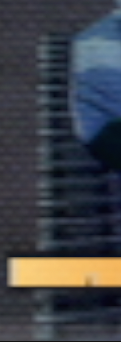
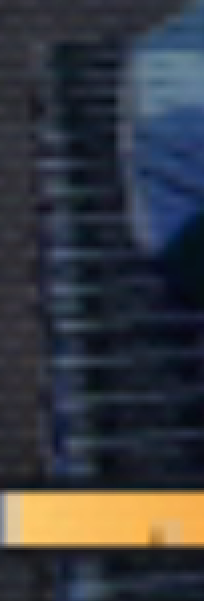
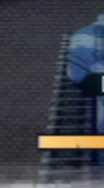
Which is which?
Which is which?
Please Log in to join the conversation.
- Tom Wolsky
-
- Offline
- Moderator
-
29 Jan 2015 03:38 #58999
by Tom Wolsky
Replied by Tom Wolsky on topic So FCPX's scaling ability is kind of crappy.
The output file looks better in FCP7 to me. As I said it depends on the material. Other material scaled similarly looks better in X.
Please Log in to join the conversation.
29 Jan 2015 06:08 - 29 Jan 2015 06:15 #59002
by Redifer
This is absolutely correct information. I proved it with my images. Your pre-compressed images really don't show much, but the right image looks better scaling-wise for sure. Here's the thing... my example is a bitmapped image. Why would FCPX scale one bitmapped image up one way compared to any another bitmapped image? The scaling in FCPX is worse than it is in FCP7. Another basic example:

FCPX's scaler adds more blur and loses more detail than FCP7's scaler. This is 100% fact.
Here's the original image just in case you think I cheated:

Again if I want the best image quality for my scaled footage, I am forced to use FCP7.
Replied by Redifer on topic So FCPX's scaling ability is kind of crappy.
Ronny wrote: This is incorrect information.
This is absolutely correct information. I proved it with my images. Your pre-compressed images really don't show much, but the right image looks better scaling-wise for sure. Here's the thing... my example is a bitmapped image. Why would FCPX scale one bitmapped image up one way compared to any another bitmapped image? The scaling in FCPX is worse than it is in FCP7. Another basic example:
FCPX's scaler adds more blur and loses more detail than FCP7's scaler. This is 100% fact.
Here's the original image just in case you think I cheated:
Again if I want the best image quality for my scaled footage, I am forced to use FCP7.
Last edit: 29 Jan 2015 06:15 by Redifer.
Please Log in to join the conversation.
- Karsten Schlüter
-

- Offline
- Moderator
-
Less
More
- Posts: 3790
- Thank you received: 718
29 Jan 2015 06:31 #59005
by Karsten Schlüter
hmm, I don't really dare to participate in this discussion (e.g. no FCpro at hand) - but non of my 'video players' (QuicktimeX, MPlayerX, VLC, or MpegStreamclip) shows your 480ptest.mov in 200%-zoom such a 'sharp' target as in your side-by-side screen grab... !!
something more 'fundamental' than just FCPX...?
… just my humble observation ................... <creeping back under my stone> :S
Replied by Karsten Schlüter on topic So FCPX's scaling ability is kind of crappy.
Redifer wrote: … Click on this link to view a comparison image. ….
hmm, I don't really dare to participate in this discussion (e.g. no FCpro at hand) - but non of my 'video players' (QuicktimeX, MPlayerX, VLC, or MpegStreamclip) shows your 480ptest.mov in 200%-zoom such a 'sharp' target as in your side-by-side screen grab... !!
something more 'fundamental' than just FCPX...?
… just my humble observation ................... <creeping back under my stone> :S
Please Log in to join the conversation.
29 Jan 2015 06:41 - 29 Jan 2015 06:45 #59006
by Redifer
Replied by Redifer on topic So FCPX's scaling ability is kind of crappy.
Those apps may use the same scaling algorithm that FCPX does which is probably embedded in the OS. FCP7 apparently does it's own thing. Though if you resize it and make a new file with MPEG Streamclip it will scale better than FCPX. Quicktime 7 makes it look good as well.
Last edit: 29 Jan 2015 06:45 by Redifer.
Please Log in to join the conversation.
- ronny courtens
-
- Offline
- Moderator
-
Less
More
- Posts: 4455
- Thank you received: 962
29 Jan 2015 11:21 #59010
by ronny courtens
Replied by ronny courtens on topic So FCPX's scaling ability is kind of crappy.
Thank you for posting the reference file, that's much easier for comparing because every format will yield different results.
I have upscaled the reference video in X, 7 and Compressor. In 7 I have set Motion Filtering to "Best" and in Compressor I have set the Resize Filter to "Best". I have exported a 422 QT movie from each of the applications, opened the QT movie in QT7 and made the screenshots.
Of course all three look like crap. As Ben said: it's crap in, crap out. Even worse: the original video is not even 480p, it's 480 x 270 in a 480p frame with large black borders around the picture. So you have to scale up quite a bit and you have to stretch it to fit within the 1920x1080 frame.
This is how the result looks in FCP X:
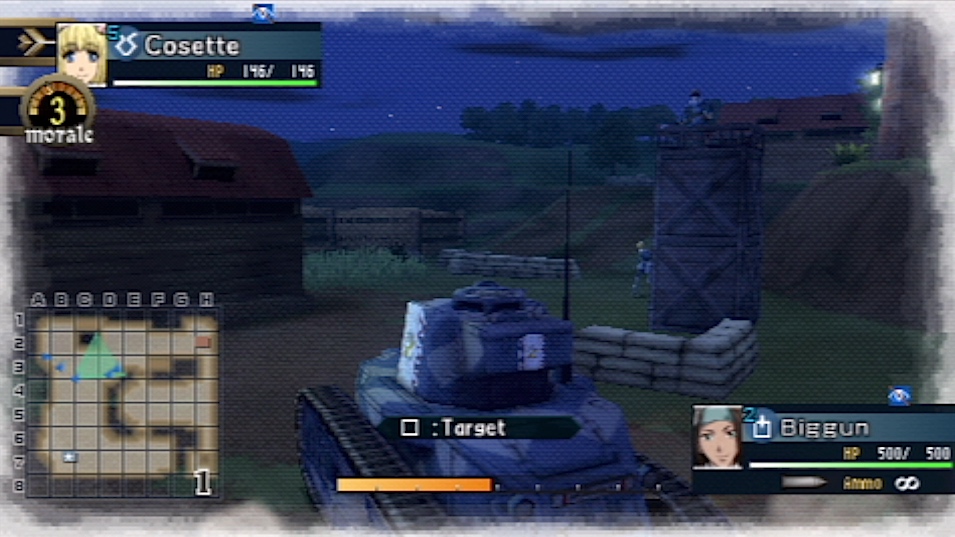
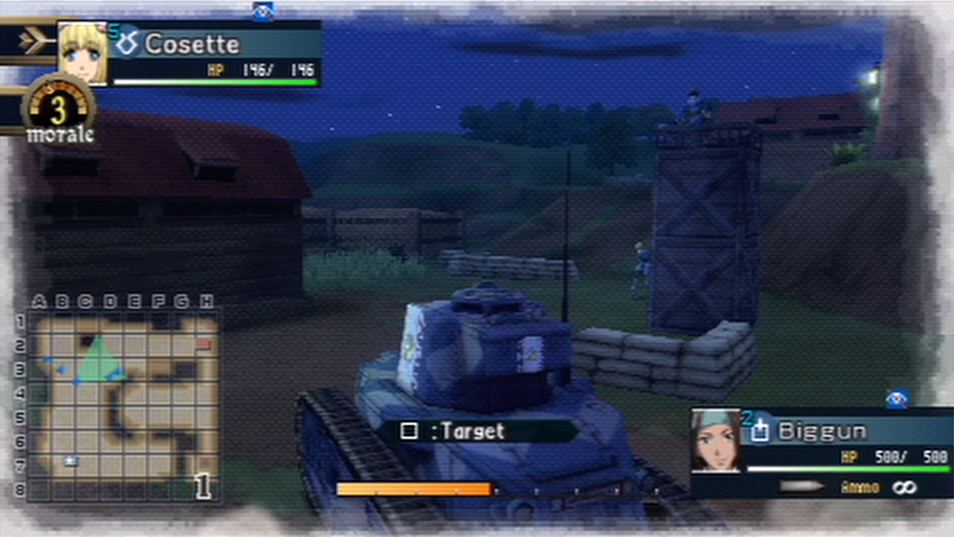
This is FCP7. The result is slightly sharper indeed. You do get banding artifacts which are specifically apparent in the orange rectangle in the picture. Maybe that's because 7 adds artificial sharpening to the image when Motion Filtering is set to "Best", I don't know. But the artifacts are there:
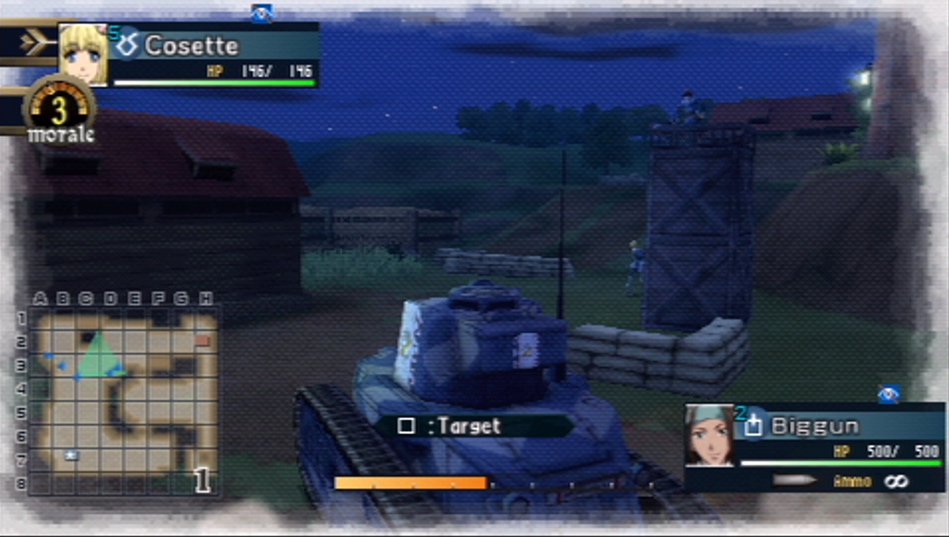
The "best" result however comes from Compressor. More details in the upscaled picture and no artifacts:
So yes, for this very particular video and format you get a sharper image using FCP7 than in FCP X if you take the sharpening artifacts as granted. For a better result I would advise putting the file through Compressor first, then bring it into the NLE of your choice.
- Ronny
I have upscaled the reference video in X, 7 and Compressor. In 7 I have set Motion Filtering to "Best" and in Compressor I have set the Resize Filter to "Best". I have exported a 422 QT movie from each of the applications, opened the QT movie in QT7 and made the screenshots.
Of course all three look like crap. As Ben said: it's crap in, crap out. Even worse: the original video is not even 480p, it's 480 x 270 in a 480p frame with large black borders around the picture. So you have to scale up quite a bit and you have to stretch it to fit within the 1920x1080 frame.
This is how the result looks in FCP X:
This is FCP7. The result is slightly sharper indeed. You do get banding artifacts which are specifically apparent in the orange rectangle in the picture. Maybe that's because 7 adds artificial sharpening to the image when Motion Filtering is set to "Best", I don't know. But the artifacts are there:
The "best" result however comes from Compressor. More details in the upscaled picture and no artifacts:
So yes, for this very particular video and format you get a sharper image using FCP7 than in FCP X if you take the sharpening artifacts as granted. For a better result I would advise putting the file through Compressor first, then bring it into the NLE of your choice.
- Ronny
Please Log in to join the conversation.
- Oliver Peters
-

- Offline
- Platinum Member
-

Less
More
- Posts: 335
- Thank you received: 62
29 Jan 2015 15:43 #59025
by Oliver Peters
Replied by Oliver Peters on topic So FCPX's scaling ability is kind of crappy.
I think part of this is based on the calculations X uses. Upscaling from SD to HD is based on a 720x486 D1-spec image. That scales well to 1920x1080. When you use a 480 image, there are 6 vertical pixels missing, when means the image is centered for 3 and 3 (480 within 486), which is an odd number and, therefore, does not line up properly. If the image were shifted to 2 and 4 for an even offset, you'd get better results. So when you upscale, one thing to try is to shift the source position up or down slightly and see whether you get better results. Unfortunately the position values are not pixels, you'll have to tinker a bit. I've noticed similar aliasing issues when editing 480 SD content (from DV sources) into a new 486 SD sequence in X.
- Oliver
- Oliver
Please Log in to join the conversation.

29 Jan 2015 17:04 #59026
by thinkfilm
Replied by thinkfilm on topic So FCPX's scaling ability is kind of crappy.
Hey Guys,
FWIW, I just wanted to say thanks to all of you - Redifer, Ronny, Tom, Oliver et al - for an interesting and in depth series of posts/discussion on scaling. Personally, I don't have occasion to do much SD to HD upscaling but I know there are times when this may desirable for certain material or just a creative choice for certain projects.
While it's easy to sense the passion between the lines about the FCP7 v FCPX debate in this, nonetheless the examples you've all provided are useful and add to the knowledge base. I had never considered the issue of the 720x486 image spec as having a role in the scaling for instance - thanks for that, Oliver.
Also, some of the minor sniping in the back and forth gave me a chuckle Thanks again.
FWIW, I just wanted to say thanks to all of you - Redifer, Ronny, Tom, Oliver et al - for an interesting and in depth series of posts/discussion on scaling. Personally, I don't have occasion to do much SD to HD upscaling but I know there are times when this may desirable for certain material or just a creative choice for certain projects.
While it's easy to sense the passion between the lines about the FCP7 v FCPX debate in this, nonetheless the examples you've all provided are useful and add to the knowledge base. I had never considered the issue of the 720x486 image spec as having a role in the scaling for instance - thanks for that, Oliver.
Also, some of the minor sniping in the back and forth gave me a chuckle
Thanks again. Please Log in to join the conversation.
- sperezrleon
-

- Offline
- Junior Member
-

- No hay mucho que decir... ni siquiera tengo cita favorita :)
Less
More
- Posts: 35
- Thank you received: 1
29 Jan 2015 20:05 #59031
by sperezrleon
Replied by sperezrleon on topic So FCPX's scaling ability is kind of crappy.
In my experience Premier does it better, actually even better than Davinci, Smoke and definitely better than Scratch. But its good to know that FCPX is no that good at this.
Please Log in to join the conversation.
29 Jan 2015 20:55 - 29 Jan 2015 20:57 #59032
by Redifer
Replied by Redifer on topic So FCPX's scaling ability is kind of crappy.
I just checked it in Premiere CS6 and it has scaling on par with FCPX. I don't have the subscription/rental based versions of Premiere to try.sperezrleon wrote: In my experience Premier does it better, actually even better than Davinci, Smoke and definitely better than Scratch.
Actually 480x272, but the point here is that when scaling xx% in either FCPX or FCP7, FCP7 wins. Running two and a half hours of video footage per game through Compressor first would indeed yield better results, but there is not enough time on the planet for that. 2&1/2 hours of raw footage per game. More than 10 games per episode. Plus, Compressor is slow. It's not up to the task. I need the best instant scaling quality possible and unfortunately FCP7 wins that battle. So having black bars or the original resolution is irrelevant in this discussion... FCPX doesn't scale as well. It's just less crucial when the scaling isn't so extreme. I'd rather put up with a few sharpening halos than lose so much more detail altogether. Hopefully Apple improves the currently-weak scaling abilities of FCPX.Ronny wrote: the original video is not even 480p, it's 480 x 270 in a 480p frame with large black borders around the picture.
Last edit: 29 Jan 2015 20:57 by Redifer.
Please Log in to join the conversation.
- sperezrleon
-
- Offline
- Junior Member
-
- No hay mucho que decir... ni siquiera tengo cita favorita :)
Less
More
- Posts: 35
- Thank you received: 1
30 Jan 2015 06:08 #59042
by sperezrleon
Replied by sperezrleon on topic So FCPX's scaling ability is kind of crappy.
Yeah, never used CS6 for scaling so don't know je je, started using Premier seriously until CC, they have a 30 day free trial, you should give it a Try. But if i get some free time tomorrow will be happy to test and see, this is a very interesting subject je je.
Please Log in to join the conversation.
- jjsanderson
-
- Offline
- Elite Member
-

30 Jan 2015 15:09 #59057
by jjsanderson
Replied by jjsanderson on topic So FCPX's scaling ability is kind of crappy.
Daft question: has anyone tried slapping a post-sharpening filter on the scaled footage in FCPX, to ape the FCP7 look?
By-and-large, I've had better scaling results in X than 7, but I've thankfully not had to do anything this extreme. I can see that X looks softer in the example, but it really does look like a sharpening issue and that's easily fixable, right?
By-and-large, I've had better scaling results in X than 7, but I've thankfully not had to do anything this extreme. I can see that X looks softer in the example, but it really does look like a sharpening issue and that's easily fixable, right?
Please Log in to join the conversation.
