


- Posts: 42
- Thank you received: 0
3 Post Moderation Rule for New Boarders (25 Jan 2021)
New boarders will have their posts moderated - Don't worry if you cannot see your post immediately.
How to delete blade speed
- BambooMagic
-
 Topic Author
- Offline
- Senior Member
-

Less
More
24 Jan 2015 15:41 #58838
by BambooMagic
How to delete blade speed was created by BambooMagic
I'm working on a project that requires several speed ramps for each clip. After doing a first cut, I find that a few blade speeds are a couple of frames off. Is there a way to remove a blade speed?
Please Log in to join the conversation.

24 Jan 2015 15:59 - 24 Jan 2015 16:05 #58839
by Jimmyfinn
Replied by Jimmyfinn on topic How to delete blade speed
If they need tweaking rather than removing, double click the grey speed ramping bar to reveal the Speed Transiton menu. Select Source Frame > Edit and move the filmstrip icon to update where the ramp starts.
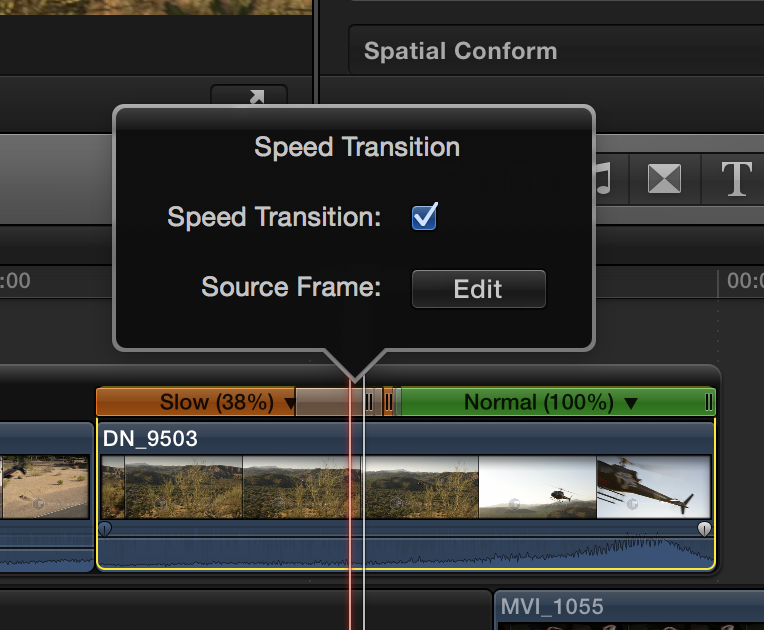
Last edit: 24 Jan 2015 16:05 by Jimmyfinn.
Please Log in to join the conversation.
- BambooMagic
-
Topic Author
- Offline
- Senior Member
-
Less
More
- Posts: 42
- Thank you received: 0
24 Jan 2015 16:38 #58841
by BambooMagic
Replied by BambooMagic on topic How to delete blade speed
Good enough for me. Thanks!
But is there a way to remove a blade speed completely?
But is there a way to remove a blade speed completely?
Please Log in to join the conversation.

24 Jan 2015 18:51 #58842
by BenB
Replied by BenB on topic How to delete blade speed
Unfortunately, no, you can't remove one individual speed segment cut like that. Wish you could. I've filled out the feedback form asking for it. Hope others do, also. All you can do it reset the whole clip's speed so it is back to normal. You lose all speed cuts at once, but there's not much else you can do. Besides set all speed segments to 100% and cut in a new spot, adding more cuts.
Please Log in to join the conversation.
