


- Posts: 4
- Thank you received: 0
3 Post Moderation Rule for New Boarders (25 Jan 2021)
New boarders will have their posts moderated - Don't worry if you cannot see your post immediately.
FCP X (10.1.4), no video in shared QT movie
24 Jan 2015 14:10 #58832
by jeand2

FCP X (10.1.4), 27” iMac 3.5 GHz Intel Core i7, 24 GB RAM, NVIDIA GeForce GTX 780M 4096 MB, OS X 10.9.5 (13F34)
All of a sudden, I no longer can see video in shared projects (created and exported as QT movies, ProRes 4444, 1080p, 29.97 fps, stereo 48000 kHz 24-bit).
Audio is there, but no video.
The current project shows at 24 GB in the share dialogue, “audio and video” are selected, but the final exported/shared file reads at about 600 MB only, and even if the QT Pro 7 inspector shows the correct info (codec is reported as ProRes 4444, etc.), there is no image in the video, only audio.
Other previously shared movies play normally either in QT 7 or X.
As a test, I also re-shared an older successfully completed project, and it exported just fine, its shared QT movie shows the video, and the audio plays fine as well, so this problem seems to be with my current project “only."
I’ve also had trouble viewing the project in the FCP X viewer, individual clips display normally when scrubbed, but the project itself often shows no image when scrubbed.
This is not constant, sometimes I can see the project in the viewer when I play or scrub it in the timeline, sometimes not, and I have no clue why (maybe I inadvertently triggered a “feature” by hitting the wrong keys?).
I’ve been working furiously with FCP X since it came out, have done many movies with it using the exact same settings I am now, have no idea why it stopped working all of a sudden.
Puzzled and in serious trouble, one of my movies, a work-in-progress, is due for a festival that will be held in mid-February, and as things are right now, I can edit it, see it (most of the time) in the viewer, but can’t share/export it.
Thanks for your help.
FCP X (10.1.4), no video in shared QT movie was created by jeand2
FCP X (10.1.4), 27” iMac 3.5 GHz Intel Core i7, 24 GB RAM, NVIDIA GeForce GTX 780M 4096 MB, OS X 10.9.5 (13F34)
All of a sudden, I no longer can see video in shared projects (created and exported as QT movies, ProRes 4444, 1080p, 29.97 fps, stereo 48000 kHz 24-bit).
Audio is there, but no video.
The current project shows at 24 GB in the share dialogue, “audio and video” are selected, but the final exported/shared file reads at about 600 MB only, and even if the QT Pro 7 inspector shows the correct info (codec is reported as ProRes 4444, etc.), there is no image in the video, only audio.
Other previously shared movies play normally either in QT 7 or X.
As a test, I also re-shared an older successfully completed project, and it exported just fine, its shared QT movie shows the video, and the audio plays fine as well, so this problem seems to be with my current project “only."
I’ve also had trouble viewing the project in the FCP X viewer, individual clips display normally when scrubbed, but the project itself often shows no image when scrubbed.
This is not constant, sometimes I can see the project in the viewer when I play or scrub it in the timeline, sometimes not, and I have no clue why (maybe I inadvertently triggered a “feature” by hitting the wrong keys?).
I’ve been working furiously with FCP X since it came out, have done many movies with it using the exact same settings I am now, have no idea why it stopped working all of a sudden.
Puzzled and in serious trouble, one of my movies, a work-in-progress, is due for a festival that will be held in mid-February, and as things are right now, I can edit it, see it (most of the time) in the viewer, but can’t share/export it.
Thanks for your help.
Please Log in to join the conversation.

24 Jan 2015 19:01 #58844
by BenB
Replied by BenB on topic FCP X (10.1.4), no video in shared QT movie
Let's go through the normal steps, as abnormal as this issue may be. Yes, very strange indeed. Turn off background rendering, delete all cache files (especially renders and analysis files), trash prefs.
But since you're using ProRes 4x4, which are HUGE files, I'd ask what the specs of your media drive are: capacity, free space, connection type.
Next, I'd as where the External Media files are, since in a 24GB Library, that uses PR4x4, I'd expect the Library to be way more massive than that.
Finally, I'd ask where the files originated, what made them PR4x4? Because if QTPlayer isn't showing images, there is something wrong with the files themselves, I'd guess.
But since you're using ProRes 4x4, which are HUGE files, I'd ask what the specs of your media drive are: capacity, free space, connection type.
Next, I'd as where the External Media files are, since in a 24GB Library, that uses PR4x4, I'd expect the Library to be way more massive than that.
Finally, I'd ask where the files originated, what made them PR4x4? Because if QTPlayer isn't showing images, there is something wrong with the files themselves, I'd guess.
Please Log in to join the conversation.
24 Jan 2015 19:33 #58845
by jeand2
Replied by jeand2 on topic FCP X (10.1.4), no video in shared QT movie
Many thanks for the speedy reply.
All source material is computer generated (hand-drwn and procedural), no cameras are used (or very rarely), hence ProRes 4444.
I got the idea from Larry Jordan’s site, it really makes a noticeable difference.
I used to work with ProRes 422 (HQ) and I never looked back once I tested 4444.
Lots of storage space on a collection of external drives as well as on a network, the system drive is the internal 1TB “Fusion” drive that shipped with the iMac.
All Media files are on external drives and set to be kept in their original location when importing media into FCP X.
I “solved” the problem with the following steps, but I honestly don’t have a clue as to what caused it: I first quit and relaunched FCP X with the cmd-option keys so as to reset prefs.
Made no difference.
I then created a new project, with the exact same settings as for my original but “faulty" one, then manually selected all the clips and transitions (shift-click) in the faulty timeline, copied them and pasted them in the new project timeline (I suspected that if I had done a "cmd-a," it would have also copied whatever was causing the problem, even if, to my eyes, it was/is invisible).
That did it, as soon as it started background rendering, I could tell by looking at the timer that this was now a much beefier process than before.
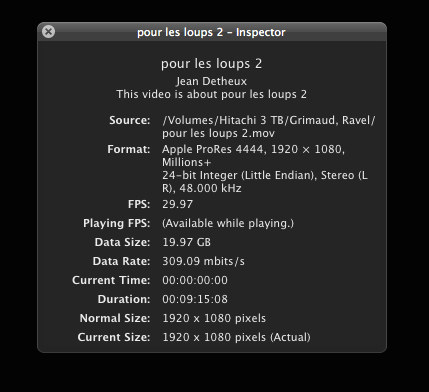
I shared/exported the project and ended up with a pristine QT movie (reading just under 20 GB, inspector window screenshot attached).
Big relief, but a bit disturbed by the fact that I haven’t got a clue as to what caused the problem.
Delighted to have found your space on the web, great resource, I’ll visit often.
Thanks again
All source material is computer generated (hand-drwn and procedural), no cameras are used (or very rarely), hence ProRes 4444.
I got the idea from Larry Jordan’s site, it really makes a noticeable difference.
I used to work with ProRes 422 (HQ) and I never looked back once I tested 4444.
Lots of storage space on a collection of external drives as well as on a network, the system drive is the internal 1TB “Fusion” drive that shipped with the iMac.
All Media files are on external drives and set to be kept in their original location when importing media into FCP X.
I “solved” the problem with the following steps, but I honestly don’t have a clue as to what caused it: I first quit and relaunched FCP X with the cmd-option keys so as to reset prefs.
Made no difference.
I then created a new project, with the exact same settings as for my original but “faulty" one, then manually selected all the clips and transitions (shift-click) in the faulty timeline, copied them and pasted them in the new project timeline (I suspected that if I had done a "cmd-a," it would have also copied whatever was causing the problem, even if, to my eyes, it was/is invisible).
That did it, as soon as it started background rendering, I could tell by looking at the timer that this was now a much beefier process than before.
I shared/exported the project and ended up with a pristine QT movie (reading just under 20 GB, inspector window screenshot attached).
Big relief, but a bit disturbed by the fact that I haven’t got a clue as to what caused the problem.
Delighted to have found your space on the web, great resource, I’ll visit often.
Thanks again
Please Log in to join the conversation.
25 Jan 2015 02:12 - 25 Jan 2015 02:13 #58847
by BenB
Replied by BenB on topic FCP X (10.1.4), no video in shared QT movie
Did you ever try trashing all the cache files, especially all render files? I would have been very curious to know if that would've fixed the problematic Project timeline.
And yes, all my graphic files, still and motion, are PR4x4. Great codec for that type of work, and saves on image sequence folder size and hassle, plus, still smaller than uncompressed.
And yes, all my graphic files, still and motion, are PR4x4. Great codec for that type of work, and saves on image sequence folder size and hassle, plus, still smaller than uncompressed.
Last edit: 25 Jan 2015 02:13 by BenB.
Please Log in to join the conversation.
25 Jan 2015 02:31 #58848
by jeand2
Replied by jeand2 on topic FCP X (10.1.4), no video in shared QT movie
Here’s a question for you: is there a way to delete only the project’s cache and render files, and not the whole event's (event which may hold several projects)?
I have to catch up with the time lost over this, deadline is looming, so as soon as I managed to regain the use of my project, I stopped trying to figure out what had happened.
Glad to see I was not imagining the quality difference between ProRes 422 and 4444, a shame most festivals only accept 422 (and/or DCP) as screening copies, 4444 would probably give them (and my work) a greater bang of the money.
Thanks again
I have to catch up with the time lost over this, deadline is looming, so as soon as I managed to regain the use of my project, I stopped trying to figure out what had happened.
Glad to see I was not imagining the quality difference between ProRes 422 and 4444, a shame most festivals only accept 422 (and/or DCP) as screening copies, 4444 would probably give them (and my work) a greater bang of the money.
Thanks again
Please Log in to join the conversation.
25 Jan 2015 05:06 #58849
by BenB
Replied by BenB on topic FCP X (10.1.4), no video in shared QT movie
For screening, PR422 should give great results.
in FCPX you can highlight a Library, and Event, or just a Project, and go to the File menu, and see "Delete Generated [Library/Event/Project] Files..." It is context sensitive. Delete ALL render files.
Cache files, which I'd delete next if that doesn't work, are in the Library package. Right-click the Library in the Finder, select Open Package Contents. Inside of each Event folder is an Analysis folder for that specific Event. So you can manually dig in and clear those. Aside from Optical Flow, most of that can be rebuilt very quickly by FCPX.
in FCPX you can highlight a Library, and Event, or just a Project, and go to the File menu, and see "Delete Generated [Library/Event/Project] Files..." It is context sensitive. Delete ALL render files.
Cache files, which I'd delete next if that doesn't work, are in the Library package. Right-click the Library in the Finder, select Open Package Contents. Inside of each Event folder is an Analysis folder for that specific Event. So you can manually dig in and clear those. Aside from Optical Flow, most of that can be rebuilt very quickly by FCPX.
Please Log in to join the conversation.
25 Jan 2015 15:43 - 25 Jan 2015 15:44 #58854
by jeand2
Replied by jeand2 on topic FCP X (10.1.4), no video in shared QT movie
Yes, I’ve seen several movies of mine in various festivals screened with ProRes 422 (HQ) and they looked fine, but for the kind of images I am creating, I can see a very noticeable difference on my monitors when using PR 4444.
I’ve yet to see any of my pieces in a movie theatre using PR4444.
Mind you, until festivals accepted PR422 as screening copies, all my work had to be “degraded” to DigiBeta, and that really had a negative impact on the image quality.
Thank you for the info about cache and render files deleting, I did not know all of that, especially about finding the cache files in the Finder, very useful.
If this problem surfaces again, I will try your suggestions and report.
I’ve yet to see any of my pieces in a movie theatre using PR4444.
Mind you, until festivals accepted PR422 as screening copies, all my work had to be “degraded” to DigiBeta, and that really had a negative impact on the image quality.
Thank you for the info about cache and render files deleting, I did not know all of that, especially about finding the cache files in the Finder, very useful.
If this problem surfaces again, I will try your suggestions and report.
Last edit: 25 Jan 2015 15:44 by jeand2. Reason: spelling error
Please Log in to join the conversation.
