


- Posts: 730
- Thank you received: 26
3 Post Moderation Rule for New Boarders (25 Jan 2021)
New boarders will have their posts moderated - Don't worry if you cannot see your post immediately.
Export for Television?
- DmitriZigany
-
 Topic Author
- Offline
- Platinum Member
-

Less
More
23 Jan 2015 01:56 #58805
by DmitriZigany
Export for Television? was created by DmitriZigany
Hey!
This is a follow up to my earlier thread, but enough has chaned so I started a new one.
I've been asked to supply two versions of a music video I made. One MXF file for MTV and one for DMDS.
I've got no further info than that they want a MXF file, so first question is, how to I export an MXF file?
Secondly there's the DMDS (Digital Media Distribution System). The I've got some more info ( promo.dmds.com/uploads ). Some of my questions regarding this here:
Max peak audio no greater than -10 dbFS
I got the sound file, and usually music is mastered to pretty close to 0dB. Does that mean I should lower the volume so it doesn't go over -10dB? Or is the -10 dbFS something different?
Include a 5 second slate
Include 2 seconds of black before the video starts
The slate, I guess that is a text stating what the video is? Name of artist, song, director, etc?
The black should be after slate, before video, I assume?
Black levels: 0 IRE for HD
Ensure broadcast safe chroma levels (below 120 IRE)
How is this best achieved? I did slam the Broadcast Safe effect on an adjustment layer
This will be my first ever export for television and the first time something I've shot & edited will be shown on television, so I'm pretty stoked! But please bear with me and all the newbie questions in regards to exporting for television
This is a follow up to my earlier thread, but enough has chaned so I started a new one.
I've been asked to supply two versions of a music video I made. One MXF file for MTV and one for DMDS.
I've got no further info than that they want a MXF file, so first question is, how to I export an MXF file?
Secondly there's the DMDS (Digital Media Distribution System). The I've got some more info ( promo.dmds.com/uploads ). Some of my questions regarding this here:
Max peak audio no greater than -10 dbFS
I got the sound file, and usually music is mastered to pretty close to 0dB. Does that mean I should lower the volume so it doesn't go over -10dB? Or is the -10 dbFS something different?
Include a 5 second slate
Include 2 seconds of black before the video starts
The slate, I guess that is a text stating what the video is? Name of artist, song, director, etc?
The black should be after slate, before video, I assume?
Black levels: 0 IRE for HD
Ensure broadcast safe chroma levels (below 120 IRE)
How is this best achieved? I did slam the Broadcast Safe effect on an adjustment layer
This will be my first ever export for television and the first time something I've shot & edited will be shown on television, so I'm pretty stoked! But please bear with me and all the newbie questions in regards to exporting for television
Please Log in to join the conversation.

23 Jan 2015 05:12 #58809
by dgwvideo
Creating history....one edit at a time !
Replied by dgwvideo on topic Export for Television?
In the digital realm. dbFS refers to the decibel level relative to full scale, with 0db being the maximum digital level. If you are mastering from FCPX, the -10dbFS will mean to ensure that your audio meters do not exceed -10db on the meters. If you mastered your audio at 0db, you are exactly at the maximum digital level before the signal is clipped and lost. The broadcasters are requesting headroom apparently at 10db below the maximum digital amplitude. In the analog world, dbFS does not apply, and levels are referred to simply as db (or dbU).
You can share the export in MXF directly from FCPX, although I generally deliver Mpeg2 broadcast files if the intent is for TV use.
Create a static graphic slate or color bars that describe the video title, program length and any other info that's being asked of you and give it a duration of 5 seconds. Place that at the start of the video.
After the 5 second slate, use a solid generator set for black at 0 IRE and give that a duration of 2 seconds. Your program material will begin immediately following that in the timeline.
Use the waveform monitor in FCPX to ensure the black solid generator is at 0 IRE on the scale.
Also use the waveform monitor (and Vector-scope) to ensure your program content maintains it's low black levels at or just above 0 IRE and that the highlights do not exceed 120. This is adjusted using the exposure controls in the color board. You might also reduce highlights closer to 100 IRE depending on how you've graded your content. Some local stations have tendencies to blow out the highs, so unless this is going to a National broadcaster you might be safer with highs limited to around 100 IRE.
The FCPX manual can give you some basic advice on making those adjustments.
If you've applied the Broadcast safe filter, it should have handled most of this for you, depending on which filter you used and who made it. I would recommend you go thru and check to be sure all sections of the program material meet the above criteria.
Hope this helps.
You can share the export in MXF directly from FCPX, although I generally deliver Mpeg2 broadcast files if the intent is for TV use.
Create a static graphic slate or color bars that describe the video title, program length and any other info that's being asked of you and give it a duration of 5 seconds. Place that at the start of the video.
After the 5 second slate, use a solid generator set for black at 0 IRE and give that a duration of 2 seconds. Your program material will begin immediately following that in the timeline.
Use the waveform monitor in FCPX to ensure the black solid generator is at 0 IRE on the scale.
Also use the waveform monitor (and Vector-scope) to ensure your program content maintains it's low black levels at or just above 0 IRE and that the highlights do not exceed 120. This is adjusted using the exposure controls in the color board. You might also reduce highlights closer to 100 IRE depending on how you've graded your content. Some local stations have tendencies to blow out the highs, so unless this is going to a National broadcaster you might be safer with highs limited to around 100 IRE.
The FCPX manual can give you some basic advice on making those adjustments.
If you've applied the Broadcast safe filter, it should have handled most of this for you, depending on which filter you used and who made it. I would recommend you go thru and check to be sure all sections of the program material meet the above criteria.
Hope this helps.
Creating history....one edit at a time !
Please Log in to join the conversation.
- DmitriZigany
-
Topic Author
- Offline
- Platinum Member
-
Less
More
- Posts: 730
- Thank you received: 26
23 Jan 2015 14:26 - 23 Jan 2015 14:29 #58814
by DmitriZigany
Replied by DmitriZigany on topic Export for Television?
Thanks!
I used to have a music studio for 10 years and been filming and editing for the past three years, so most how the "how to" in FCPX are clear to me. It's just that I know next to nothing about the broadcast requirements. Everything I've done so far has been for direct to YouTube/Vimeo.
For example, if they say blacks at 0 IRE and you have a few instances like this:
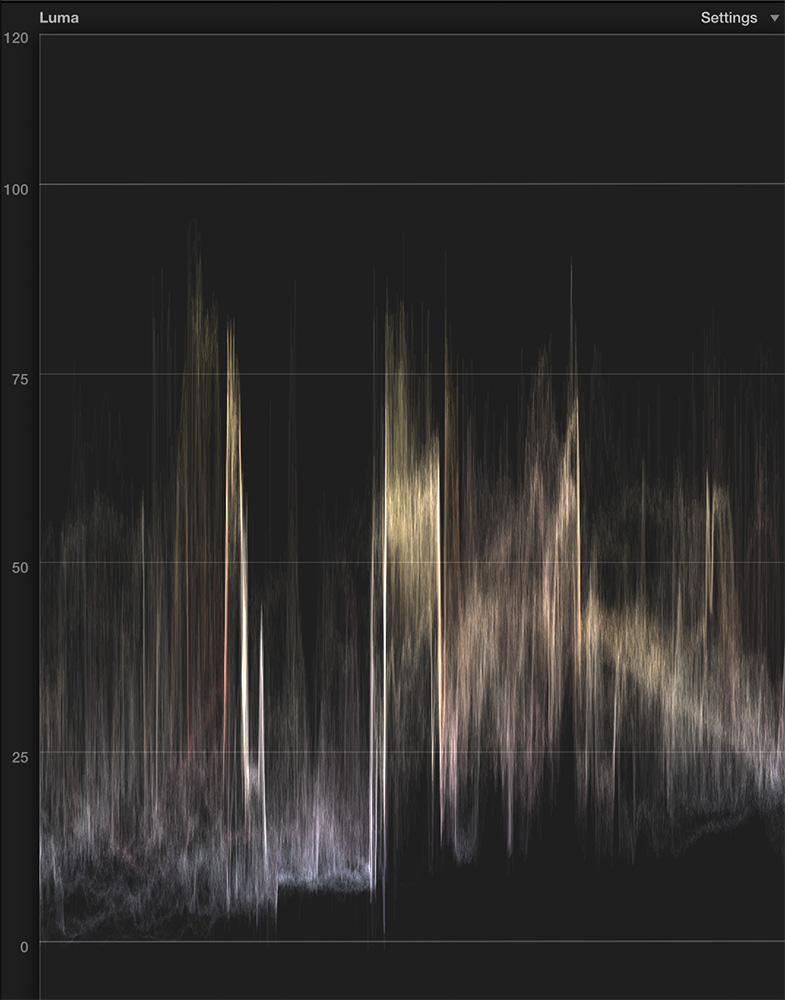
Will that mean it won't work/be refused? Are there any plug ins that work like audio limiters but for luma?
I have always tried to make highlights not go above 100 and black below 0 but for tiny peaks like this I haven't bothered. But I have zero reference to what's the broadcasters demand...
I used to have a music studio for 10 years and been filming and editing for the past three years, so most how the "how to" in FCPX are clear to me. It's just that I know next to nothing about the broadcast requirements. Everything I've done so far has been for direct to YouTube/Vimeo.
For example, if they say blacks at 0 IRE and you have a few instances like this:
Will that mean it won't work/be refused? Are there any plug ins that work like audio limiters but for luma?
I have always tried to make highlights not go above 100 and black below 0 but for tiny peaks like this I haven't bothered. But I have zero reference to what's the broadcasters demand...
Last edit: 23 Jan 2015 14:29 by DmitriZigany.
Please Log in to join the conversation.


23 Jan 2015 14:29 - 23 Jan 2015 14:30 #58815
by thinkfilm
Replied by thinkfilm on topic Export for Television?
To dgwvideo: FWIW, your definition of dbFS and why a broadcaster might require a -10dbFS spec was the the clearest description I've read. Very helpful in explaining something that always bewildered me. Thanks for that.
Last edit: 23 Jan 2015 14:30 by thinkfilm.
Please Log in to join the conversation.
23 Jan 2015 15:52 #58816
by dgwvideo
Creating history....one edit at a time !
Replied by dgwvideo on topic Export for Television?
A broadcast safe filter, such as you referenced will perform the luma conformity similar to an audio limiter, so you already have that covered. Your waveform looks acceptable and I believe most, if not all broadcasters would have no issue with that. Also, broadcasters will generally make some adjustments before they air if signals are way out of spec.
Also, with respect to audio for video, a common practice is to set nominal levels at -12 db ( hence the request for any peaks not to exceed -10db). It is also common to see levels nominal at -20db particularly for films that require a high dynamic range ( i.e dialogue around -20 to -18 leaving room for explosions and loud portions of the film to provide high energy at -12 or -10).
Also, with respect to audio for video, a common practice is to set nominal levels at -12 db ( hence the request for any peaks not to exceed -10db). It is also common to see levels nominal at -20db particularly for films that require a high dynamic range ( i.e dialogue around -20 to -18 leaving room for explosions and loud portions of the film to provide high energy at -12 or -10).
Creating history....one edit at a time !
Please Log in to join the conversation.
- DmitriZigany
-
Topic Author
- Offline
- Platinum Member
-
Less
More
- Posts: 730
- Thank you received: 26
25 Jan 2015 18:58 #58859
by DmitriZigany
Replied by DmitriZigany on topic Export for Television?
Thanks again!
Please Log in to join the conversation.
- ronny courtens
-

- Offline
- Moderator
-

Less
More
- Posts: 4455
- Thank you received: 962
26 Jan 2015 17:22 #58876
by ronny courtens
Replied by ronny courtens on topic Export for Television?
Great explanation, Dan. And entirely correct, as always.
- Ronny
- Ronny
Please Log in to join the conversation.
27 Jan 2015 05:38 #58912
by dgwvideo
Creating history....one edit at a time !
Replied by dgwvideo on topic Export for Television?
Kind words appreciated, Ronny.
Creating history....one edit at a time !
Please Log in to join the conversation.

28 Jan 2015 11:25 - 28 Jan 2015 11:28 #58961
by Deano
Replied by Deano on topic Export for Television?
As a person who's delivered broadcast content to several TV Networks here in Oz via FCPX... delving into the subscription Television realm (cable) is a nice, gentle way to start delivering Broadcast content! 
You haven't quite lived until you sit side-by-side with a major TV Network Technical Engineer as they ingest your pride and joy into a legalizer or some such!
:ohmy:
That said, I have seen a relaxing of standards to be honest. For good and bad.
Some pointers in general (a lot of this is outside the realm of a single music video but may prove helpful):
Be professional. Ask what Timecode layout do they prefer? What should your project timecode start at for their best benefit?
Make sure you supply a run-sheet, with segments marked with the IN and OUT points (Timecode) included, as well as the Total Run Time of your Episode (TRT).
Keep a tidy timeline and timecode around it. In other words - cut to the '00' frame. Don't leave silly junk frames. Don't leave an out point at e.g. 01:15:22:07 - frame it off neatly to 01:15:22:00.
In segment breaks, confirm how much slug (black) they need. If they don't care, have 30-secs between and incorporate a 10-second countdown within that.
Its these little things that a Network will appreciate - trust me.
Learn about LKFS Audio Loudness Measurements. For now, always aim to mix your audio between -12 and -6 DB at a pinch.
One thing I still get baffled with when I work with some editors:
NEVER audio mix down with headphones.
Even if you have monitoring speakers on your edit suite, make sure you listen to the finished PGM audio on a TV monitor. I will say the Apple Display Monitor is not a terrible first 'mix down' option...but definitely listen to your finished product on a device that your viewers will actually watch it on!
Also I have been working in a stereo mix PGM Masters so far in FCPX but I am about to tackle my first Multichannel Audio delivery. Some Networks want clean audio so they can strip the VO for international distribution and also for re-using vision.
On that, always keep clean versions of your show masters. That is - content that is stripped of all graphics. ROLES in FCPX will assist greatly here.
Apply the Broadcast Safe Filter in FCP X on an ADJUSTMENT LAYER. There's a lot of good into on the net about the whys and wherefores of this - in simple terms any adjustments made via the inspector will override any Broadcast Safe adjustments you make. A simple update from Apple for the ability drag that filter down the list in the inspector would fix all those issues
You may want to apply TWO Broadcast safe filters - one for CHROMA and one for LUMA. I typically just apply the LUMA adjustment and that's fine. For some delivery requirements I will do both - especially if they require 75% Colour Bars. But if in doubt, add both.
Respect TITLE and ACTION Safe areas with Graphics and Text. I still am amazed at the content that gets through that doesn't comply in this area.
The new MXF OP1a output options in FCPX/Compressor is a godsend from Apple. This simplifies a lot of things down in the Broadcast space. At least for me who deals in the XDCAM HD422 50i (interlaced) world.
Theres so much more I could say, but I won't for now. Needless to say I love a lot about FCPX, there's things I wish were improved but I get excited when I see the software gaining traction in the broadcast space.
Any questions, let me know.
Dean...
You haven't quite lived until you sit side-by-side with a major TV Network Technical Engineer as they ingest your pride and joy into a legalizer or some such!
:ohmy:
That said, I have seen a relaxing of standards to be honest. For good and bad.
Some pointers in general (a lot of this is outside the realm of a single music video but may prove helpful):
Be professional. Ask what Timecode layout do they prefer? What should your project timecode start at for their best benefit?
Make sure you supply a run-sheet, with segments marked with the IN and OUT points (Timecode) included, as well as the Total Run Time of your Episode (TRT).
Keep a tidy timeline and timecode around it. In other words - cut to the '00' frame. Don't leave silly junk frames. Don't leave an out point at e.g. 01:15:22:07 - frame it off neatly to 01:15:22:00.
In segment breaks, confirm how much slug (black) they need. If they don't care, have 30-secs between and incorporate a 10-second countdown within that.
Its these little things that a Network will appreciate - trust me.
Learn about LKFS Audio Loudness Measurements. For now, always aim to mix your audio between -12 and -6 DB at a pinch.
One thing I still get baffled with when I work with some editors:
NEVER audio mix down with headphones.
Even if you have monitoring speakers on your edit suite, make sure you listen to the finished PGM audio on a TV monitor. I will say the Apple Display Monitor is not a terrible first 'mix down' option...but definitely listen to your finished product on a device that your viewers will actually watch it on!
Also I have been working in a stereo mix PGM Masters so far in FCPX but I am about to tackle my first Multichannel Audio delivery. Some Networks want clean audio so they can strip the VO for international distribution and also for re-using vision.
On that, always keep clean versions of your show masters. That is - content that is stripped of all graphics. ROLES in FCPX will assist greatly here.
Apply the Broadcast Safe Filter in FCP X on an ADJUSTMENT LAYER. There's a lot of good into on the net about the whys and wherefores of this - in simple terms any adjustments made via the inspector will override any Broadcast Safe adjustments you make. A simple update from Apple for the ability drag that filter down the list in the inspector would fix all those issues
You may want to apply TWO Broadcast safe filters - one for CHROMA and one for LUMA. I typically just apply the LUMA adjustment and that's fine. For some delivery requirements I will do both - especially if they require 75% Colour Bars. But if in doubt, add both.
Respect TITLE and ACTION Safe areas with Graphics and Text. I still am amazed at the content that gets through that doesn't comply in this area.
The new MXF OP1a output options in FCPX/Compressor is a godsend from Apple. This simplifies a lot of things down in the Broadcast space. At least for me who deals in the XDCAM HD422 50i (interlaced) world.
Theres so much more I could say, but I won't for now. Needless to say I love a lot about FCPX, there's things I wish were improved but I get excited when I see the software gaining traction in the broadcast space.
Any questions, let me know.
Dean...
Last edit: 28 Jan 2015 11:28 by Deano.
Please Log in to join the conversation.
- peteramwiggins
-

- Offline
- Administrator
-

- The Administrator :)
Less
More
- Posts: 1049
- Thank you received: 404
28 Jan 2015 11:43 #58962
by peteramwiggins
Administrator
Replied by peteramwiggins on topic Export for Television?
Great advice, thank you for posting
Administrator
Please Log in to join the conversation.
- WillRogersFAN
-
- Offline
- New Member
-

Less
More
- Posts: 10
- Thank you received: 0
28 Jan 2015 13:12 #58968
by WillRogersFAN
Replied by WillRogersFAN on topic Export for Television?
Awesome post!
What are you using for closed captioning the mxf file? MacCaption?
What are you using for closed captioning the mxf file? MacCaption?
Please Log in to join the conversation.
- Andreas Kiel
-
- Offline
- Platinum Member
-
Less
More
- Posts: 1077
- Thank you received: 189
28 Jan 2015 17:52 - 28 Jan 2015 17:53 #58976
by Andreas Kiel
Replied by Andreas Kiel on topic Export for Television?
MacCaption is the standard (expensive) way.
But you can use Compressor to add a .scc file to the MXF package - I haven't tried with MXF though.
Be aware of the CC rules.
@ Dean: great post!
- Andreas
But you can use Compressor to add a .scc file to the MXF package - I haven't tried with MXF though.
Be aware of the CC rules.
@ Dean: great post!
- Andreas
Last edit: 28 Jan 2015 17:53 by Andreas Kiel.
Please Log in to join the conversation.
- DmitriZigany
-
Topic Author
- Offline
- Platinum Member
-
Less
More
- Posts: 730
- Thank you received: 26
01 Feb 2015 15:34 - 01 Feb 2015 15:36 #59141
by DmitriZigany
Replied by DmitriZigany on topic Export for Television?
Thanks Dean!
Good stuff. Although much of it is way beyond my comprehension at this time
For audio, I was just supplied an audio file that is mastered the usual way, not much dynamic range and peaking at around -0.5 dB. So there's nothing I can do about it other than just reducing the volume.
Close Captioning I shouldn't have to care about since there's only music?
I have no contact with the stations other than some PDFs with specs. So can't really ask them anything.
"The new MXF OP1a output options in FCPX/Compressor is a godsend from Apple. This simplifies a lot of things down in the Broadcast space. At least for me who deals in the XDCAM HD422 50i (interlaced) world."
One of the stations wanted just that. The material is filmed in 25p. Is the MXF OP1a option the way to go then?
And where can I find it? Can't find any 1080 50i options really. And they all have 8 channels of audio, is that something I should care about?
Damn, this stuff is complicated. At least when you have never done it before
Good stuff. Although much of it is way beyond my comprehension at this time
For audio, I was just supplied an audio file that is mastered the usual way, not much dynamic range and peaking at around -0.5 dB. So there's nothing I can do about it other than just reducing the volume.
Close Captioning I shouldn't have to care about since there's only music?
I have no contact with the stations other than some PDFs with specs. So can't really ask them anything.
"The new MXF OP1a output options in FCPX/Compressor is a godsend from Apple. This simplifies a lot of things down in the Broadcast space. At least for me who deals in the XDCAM HD422 50i (interlaced) world."
One of the stations wanted just that. The material is filmed in 25p. Is the MXF OP1a option the way to go then?
And where can I find it? Can't find any 1080 50i options really. And they all have 8 channels of audio, is that something I should care about?
Damn, this stuff is complicated. At least when you have never done it before
Last edit: 01 Feb 2015 15:36 by DmitriZigany.
Please Log in to join the conversation.
- DmitriZigany
-
Topic Author
- Offline
- Platinum Member
-
Less
More
- Posts: 730
- Thank you received: 26
01 Feb 2015 16:13 #59144
by DmitriZigany
Replied by DmitriZigany on topic Export for Television?
Ok, so another issue has popped up. The american staion want 60i or 30p. My material is 25p. How do you solve this issue?
Please Log in to join the conversation.
- ronny courtens
-
- Offline
- Moderator
-
Less
More
- Posts: 4455
- Thank you received: 962
01 Feb 2015 18:44 #59148
by ronny courtens
Replied by ronny courtens on topic Export for Television?
@Dean:
Excellent explanation!
@Dmitri:
If you are overwhelmed by the different specs you can send me the different PDFs of the broadcasters and I will explain in detail how you should prepare your edit for delivery and how you should deliver to each client. One caveat, though: I am leaving for a job in Denmark tomorrow so I will probably only be able to reply next Thursday. If that's OK with you, you can send the delivery specs to ronnycourtens(at)mac(dot)com.
- Ronny
Excellent explanation!
@Dmitri:
If you are overwhelmed by the different specs you can send me the different PDFs of the broadcasters and I will explain in detail how you should prepare your edit for delivery and how you should deliver to each client. One caveat, though: I am leaving for a job in Denmark tomorrow so I will probably only be able to reply next Thursday. If that's OK with you, you can send the delivery specs to ronnycourtens(at)mac(dot)com.
- Ronny
Please Log in to join the conversation.
- DmitriZigany
-
Topic Author
- Offline
- Platinum Member
-
Less
More
- Posts: 730
- Thank you received: 26
02 Feb 2015 01:27 #59184
by DmitriZigany
Replied by DmitriZigany on topic Export for Television?
Thanks Ronny!
I might take you up on that offer if I haven't figured it out until next Thursday!
Until then, have a good one in Denmark and eat lots of Smørrebrød!
I might take you up on that offer if I haven't figured it out until next Thursday!
Until then, have a good one in Denmark and eat lots of Smørrebrød!
Please Log in to join the conversation.
02 Feb 2015 10:11 - 02 Feb 2015 10:25 #59189
by Deano
Replied by Deano on topic Export for Television?
Hi Guys,
Sorry been flat out with work
As for Closed Captioning, in Australia its really an option not mandatory... but there are some services and softwares you can use to assist as has been mentioned.
As for mixed Frame rates - that's frankly one of FCPX's strengths. Just ensure your Project Settings show the correct frame rate at the bottom for delivery.
If you are dealing with an interlaced Project, you may need to be aware of field order and de-interlacing requirements.
Yes - the MXF export options are fine. If you are exporting just a stereo pair out, then you can export out directly using a Compressor Preset as an export option like attached:
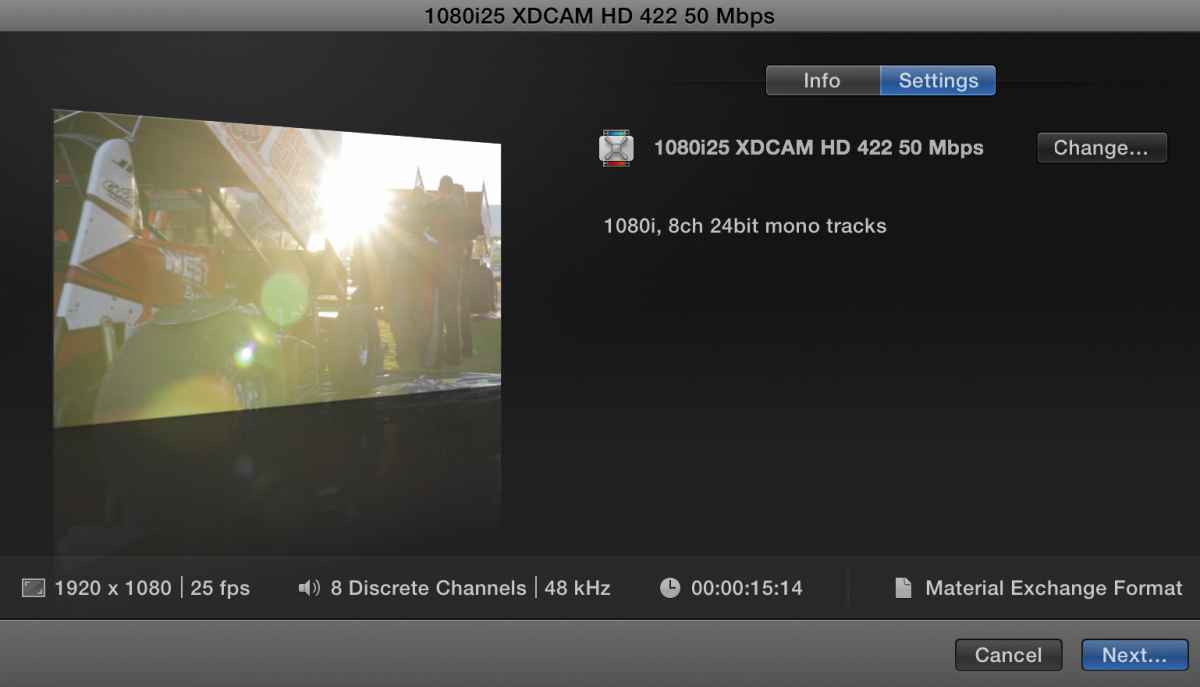
As part of the MXF (XDCAM) process, it will add 6 muted channels by default. Don't stress about that.
The trick will be if they need M&E or 4-channel audio, then you will need to assign ROLES for the audio, export a multi-track quicktime and THEN deal with it in compressor with some of the presets available:
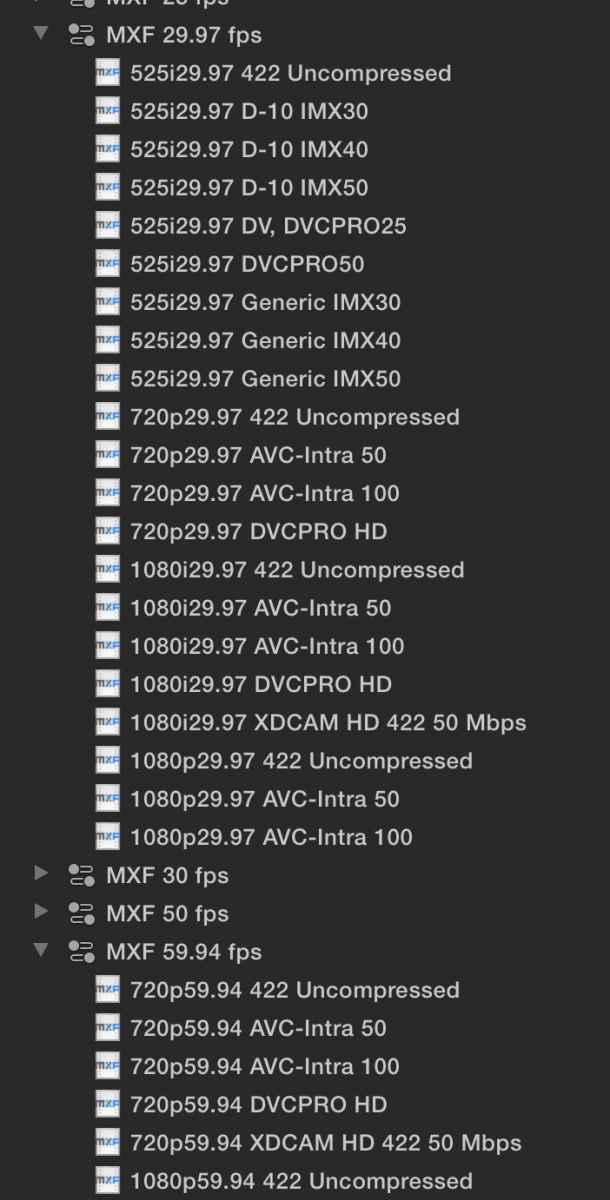
Note: I would say you need to look specifically at the 29.97 or 59.94 MXF export options.... 50i is PAL...
The other '50' is the bitrate of the XDCAM export, which is 50 mbps.
Final word on Audio. Get it spot on to their requirements, apply a limiter or such to ensure its all good.
Dean...
Sorry been flat out with work
As for Closed Captioning, in Australia its really an option not mandatory... but there are some services and softwares you can use to assist as has been mentioned.
As for mixed Frame rates - that's frankly one of FCPX's strengths. Just ensure your Project Settings show the correct frame rate at the bottom for delivery.
If you are dealing with an interlaced Project, you may need to be aware of field order and de-interlacing requirements.
Yes - the MXF export options are fine. If you are exporting just a stereo pair out, then you can export out directly using a Compressor Preset as an export option like attached:
As part of the MXF (XDCAM) process, it will add 6 muted channels by default. Don't stress about that.
The trick will be if they need M&E or 4-channel audio, then you will need to assign ROLES for the audio, export a multi-track quicktime and THEN deal with it in compressor with some of the presets available:
Note: I would say you need to look specifically at the 29.97 or 59.94 MXF export options.... 50i is PAL...
The other '50' is the bitrate of the XDCAM export, which is 50 mbps.
Final word on Audio. Get it spot on to their requirements, apply a limiter or such to ensure its all good.
Dean...
Last edit: 02 Feb 2015 10:25 by Deano. Reason: Grammar.
Please Log in to join the conversation.

02 Feb 2015 13:08 #59191
by BenB
Replied by BenB on topic Export for Television?
Thinking out loud, You can also duplicate on of those MXF presets and change the number of channels, etc, and customize one to give you 2 channel audio, or whatever other tweaks one may need.
Please Log in to join the conversation.
- DmitriZigany
-
Topic Author
- Offline
- Platinum Member
-
Less
More
- Posts: 730
- Thank you received: 26
02 Feb 2015 13:45 #59195
by DmitriZigany
Replied by DmitriZigany on topic Export for Television?
Thanks again, Dean!
Slowly it's getting a little clearer, although I'm not there yet
"Final word on Audio. Get it spot on to their requirements, apply a limiter or such to ensure its all good."
Considering this is a music video, they have probably taken great care mixing and mastering it. And although radio stations and TV broadcast usually add their own compression/limiting, I don't feel like I want to be responsible for adding any audio processing. So I guess I have to be content with just lowering the volume. It's already a modernly mastered mix, meaning little dynamic range and heavily limited...
If possible I would like to touch the audio as little as possible and just use it as was provided to me.
Slowly it's getting a little clearer, although I'm not there yet
"Final word on Audio. Get it spot on to their requirements, apply a limiter or such to ensure its all good."
Considering this is a music video, they have probably taken great care mixing and mastering it. And although radio stations and TV broadcast usually add their own compression/limiting, I don't feel like I want to be responsible for adding any audio processing. So I guess I have to be content with just lowering the volume. It's already a modernly mastered mix, meaning little dynamic range and heavily limited...
If possible I would like to touch the audio as little as possible and just use it as was provided to me.
Please Log in to join the conversation.
- DmitriZigany
-
Topic Author
- Offline
- Platinum Member
-
Less
More
- Posts: 730
- Thank you received: 26
05 Feb 2015 15:32 #59372
by DmitriZigany
Replied by DmitriZigany on topic Export for Television?
The new MXF OP1a output options in FCPX/Compressor is a godsend from Apple. This simplifies a lot of things down in the Broadcast space. At least for me who deals in the XDCAM HD422 50i (interlaced) world.
Where can I find this output option? Is it called something else? I can't find it! Can't find any option for 50i either. I only see 1080i25 export options.
XDCAM HD422 50Mb/s mxf OP1a file and 50i is what they want.
How can I export my video shot and edited as 25p in this format?
I'm going crazy here and need to deliver soon (preferably yesterday).
Thanks!
Where can I find this output option? Is it called something else? I can't find it! Can't find any option for 50i either. I only see 1080i25 export options.
XDCAM HD422 50Mb/s mxf OP1a file and 50i is what they want.
How can I export my video shot and edited as 25p in this format?
I'm going crazy here and need to deliver soon (preferably yesterday).
Thanks!
Please Log in to join the conversation.
