


- Posts: 58
- Thank you received: 0
3 Post Moderation Rule for New Boarders (25 Jan 2021)
New boarders will have their posts moderated - Don't worry if you cannot see your post immediately.
Corrupted Font Drop Down Menu
- Mike Petty
-
 Topic Author
- Offline
- Senior Member
-

Less
More
19 Jan 2015 16:06 #58632
by Mike Petty
Corrupted Font Drop Down Menu was created by Mike Petty
Hey all...
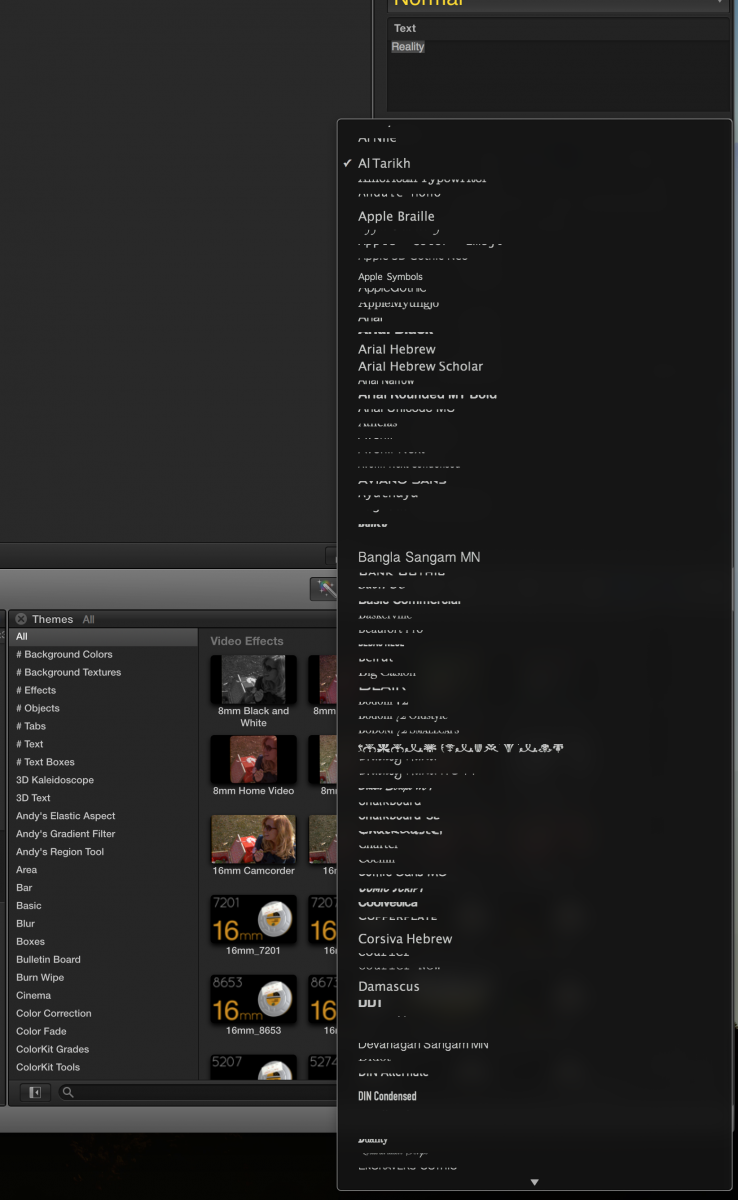
For whatever reason my font menu has become corrupted. I can change fonts no problem but the WYSWYG presentation is mostly gibberish.
I have removed all non standard fonts in Font Book and dumped FCPX Prefs - No Luck.
I can reinstall FCPX but I have a ton of plug ins and don't want to spend a day reloading them...
Any thoughts or recommendations.
MP
For whatever reason my font menu has become corrupted. I can change fonts no problem but the WYSWYG presentation is mostly gibberish.
I have removed all non standard fonts in Font Book and dumped FCPX Prefs - No Luck.
I can reinstall FCPX but I have a ton of plug ins and don't want to spend a day reloading them...
Any thoughts or recommendations.
MP
Please Log in to join the conversation.

19 Jan 2015 18:04 #58635
by BenB
Replied by BenB on topic Corrupted Font Drop Down Menu
Uninstalling and reinstalling FCPX won't effect any plugins. Even if you use FCS Remover to do it right. But I don't think this is a reinstall-the-app solution, not right off the bat.
Have you checked the font menus other apps? Is this specific to FCPX? Can you post a screen shot?
Have you checked the font menus other apps? Is this specific to FCPX? Can you post a screen shot?
Please Log in to join the conversation.
- Mike Petty
-
Topic Author
- Offline
- Senior Member
-
Less
More
- Posts: 58
- Thank you received: 0
19 Jan 2015 18:30 #58637
by Mike Petty
Replied by Mike Petty on topic Corrupted Font Drop Down Menu
I just checked Pixelmator and Pages drop down menu's and they are fine.
Attaching a screen shot below
MP
Attaching a screen shot below
MP
Please Log in to join the conversation.
- Mike Petty
-
Topic Author
- Offline
- Senior Member
-
Less
More
- Posts: 58
- Thank you received: 0
19 Jan 2015 18:36 #58638
by Mike Petty
Replied by Mike Petty on topic Corrupted Font Drop Down Menu
/Users/michaelpetty/Desktop/Screenshot 2015-01-19 12.25.42.png
Please Log in to join the conversation.
19 Jan 2015 21:50 #58662
by BenB
Replied by BenB on topic Corrupted Font Drop Down Menu
Yikes!
Please Log in to join the conversation.
- Mike Petty
-
Topic Author
- Offline
- Senior Member
-
Less
More
- Posts: 58
- Thank you received: 0
21 Jan 2015 01:49 - 21 Jan 2015 01:50 #58743
by Mike Petty
Replied by Mike Petty on topic Corrupted Font Drop Down Menu
Anybody have any ideas or do I just dump everything and reinstall FCPX?
Last edit: 21 Jan 2015 01:50 by Mike Petty.
Please Log in to join the conversation.
21 Jan 2015 13:00 #58754
by BenB
Replied by BenB on topic Corrupted Font Drop Down Menu
What OS and FCPX versions are you running?
Please Log in to join the conversation.
- Mike Petty
-
Topic Author
- Offline
- Senior Member
-
Less
More
- Posts: 58
- Thank you received: 0
21 Jan 2015 13:34 #58758
by Mike Petty
Replied by Mike Petty on topic Corrupted Font Drop Down Menu
The latest of both...everything is up to date.
Please Log in to join the conversation.


21 Jan 2015 13:47 #58760
by anickt
Replied by anickt on topic Corrupted Font Drop Down Menu
I have seen Repair Permissions (appear to) correct a funky menu display. Would be worth a try.
Please Log in to join the conversation.


24 Feb 2015 19:31 - 24 Feb 2015 19:32 #60392
by smg669
Replied by smg669 on topic Corrupted Font Drop Down Menu
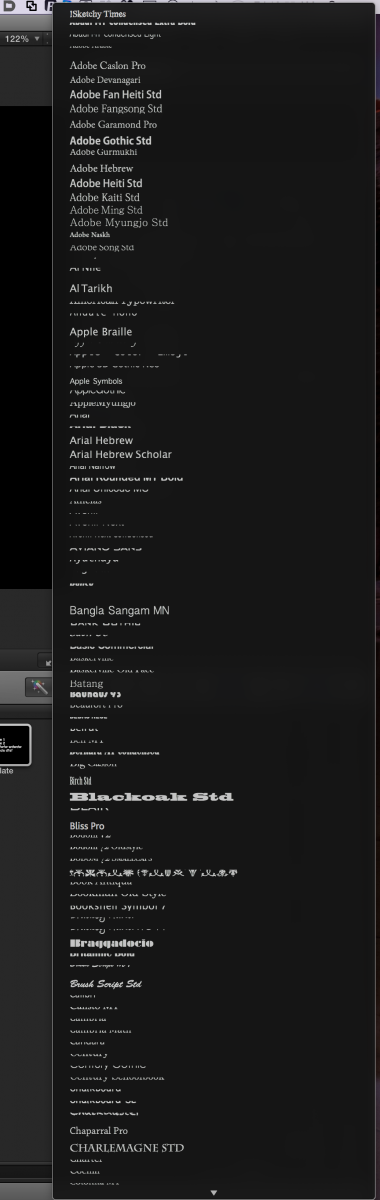
I'm having the same issue. Anyone else?
Mike, are you using a third party font manager? FontExplorer Pro?
Did you recently install FXFactory 5.x?
S
Mike, are you using a third party font manager? FontExplorer Pro?
Did you recently install FXFactory 5.x?
S
Last edit: 24 Feb 2015 19:32 by smg669.
Please Log in to join the conversation.
- WillRogersFAN
-
- Offline
- New Member
-

Less
More
- Posts: 10
- Thank you received: 0
24 Feb 2015 19:47 #60395
by WillRogersFAN
Replied by WillRogersFAN on topic Corrupted Font Drop Down Menu
I was having an issue very similar. My font menu would just disappear or not display text at all within FCPX. I finally decided that I had installed far too many fonts. I disabled a majority of the fonts that I had installed or had downloaded and it fixed my problem.
One thing i tried to do leading up to my solution was repairing my fonts or validating my fonts using font book. if you select All of your fonts in font book and then use the validate command in the menu bar you can see if you have any duplicates or fonts that are damaged. This will fix some issues.
Hope this helps!
One thing i tried to do leading up to my solution was repairing my fonts or validating my fonts using font book. if you select All of your fonts in font book and then use the validate command in the menu bar you can see if you have any duplicates or fonts that are damaged. This will fix some issues.
Hope this helps!
Please Log in to join the conversation.
- Mike Petty
-
Topic Author
- Offline
- Senior Member
-
Less
More
- Posts: 58
- Thank you received: 0
04 Mar 2015 18:08 #60847
by Mike Petty
Replied by Mike Petty on topic Corrupted Font Drop Down Menu
To everybody who responded...thanks for the input. I have done all of the things suggested and nothing has worked.
So...I took the extreme measure of doing a clean install of the Mac OS (Yosemite) and a fresh install of FCPX. I hated to do it but it appeared to be the only solution...and it did indeed work. Problem Solved!
What I will be doing next is reinstalling all of my plug ins (FX factory, Core Melt, CrumplePop Stuff, etc)...one at a time to insure that they were not the problem
Then I will slowly and carefully reinstall my dozens of fonts (all from reputable font houses) into Font Book, validate them and then see what happens to the WYSWYG drop down menu in FCPX.
Tedious but there it is. Also, this is why you have at least two production computers so one can be pulled offline to do all this stuff (and why external T'bolt hard drives make things really easy going from one production computer to another.
MP
So...I took the extreme measure of doing a clean install of the Mac OS (Yosemite) and a fresh install of FCPX. I hated to do it but it appeared to be the only solution...and it did indeed work. Problem Solved!
What I will be doing next is reinstalling all of my plug ins (FX factory, Core Melt, CrumplePop Stuff, etc)...one at a time to insure that they were not the problem
Then I will slowly and carefully reinstall my dozens of fonts (all from reputable font houses) into Font Book, validate them and then see what happens to the WYSWYG drop down menu in FCPX.
Tedious but there it is. Also, this is why you have at least two production computers so one can be pulled offline to do all this stuff (and why external T'bolt hard drives make things really easy going from one production computer to another.
MP
Please Log in to join the conversation.
