


3 Post Moderation Rule for New Boarders (25 Jan 2021)
New boarders will have their posts moderated - Don't worry if you cannot see your post immediately.
Nice keyboard stickers for FCPX
- JPM Editor
-
 Topic Author
- Offline
- Premium Member
-

Less
More
18 Jan 2015 20:57 #58619
by JPM Editor
Jesús Pérez-Miranda
Cut People CEO & Founder
www.cutpeople.es
Nice keyboard stickers for FCPX was created by JPM Editor
Hi guys,
I just found a site called Miuxe that sells stickers for Video, Audio & Graphic applications, and of course, for Final Cut Pro X!
Normally, I don't recommend buying stickers sets because I find them messy and of very poor quality. But these ones look really good! And what's even better, the company that makes them has worldwide free delivery! So I just purchased a set of FCPX stickers with black letters (there is also a white letters option).
I'll let you know how they turn out to be, in case anybody else is interested on finding a good alternative to the official keyboards or skins .
I just found a site called Miuxe that sells stickers for Video, Audio & Graphic applications, and of course, for Final Cut Pro X!
Normally, I don't recommend buying stickers sets because I find them messy and of very poor quality. But these ones look really good! And what's even better, the company that makes them has worldwide free delivery! So I just purchased a set of FCPX stickers with black letters (there is also a white letters option).
I'll let you know how they turn out to be, in case anybody else is interested on finding a good alternative to the official keyboards or skins .
Jesús Pérez-Miranda
Cut People CEO & Founder
www.cutpeople.es
Please Log in to join the conversation.
- Scrubelicious
-

- Offline
- Platinum Member
-

Less
More
- Posts: 1228
- Thank you received: 114
18 Jan 2015 23:06 #58620
by Scrubelicious
Replied by Scrubelicious on topic Nice keyboard stickers for FCPX
I have tried out the Final Cut Pro X Skin from Logickeyboard for the Macbook Pro. At first I was impressed but after 8 months I have noticed...
that the skin loses it's fitted shape do to the heat from the Macbook Pro produces and the material that the skin is made from (silicon I guess) starts to rub off on the keyboard.
Little input from me.
that the skin loses it's fitted shape do to the heat from the Macbook Pro produces and the material that the skin is made from (silicon I guess) starts to rub off on the keyboard.
Little input from me.
Please Log in to join the conversation.
- JPM Editor
-
Topic Author
- Offline
- Premium Member
-
18 Jan 2015 23:27 #58621
by JPM Editor
Jesús Pérez-Miranda
Cut People CEO & Founder
www.cutpeople.es
Replied by JPM Editor on topic Nice keyboard stickers for FCPX
Thanks for sharing your experiences, Scrubelicious.
I have two skins from Editor Keys , one for Avid and the other for FCP7, both for the Apple USB numeric keyboard.
They fit all right in the keyboard and keep in good shape after years of use... but I never liked the soft padded feel that the skin gives to the keyboard. That's another reason why I wanted to try these stickers instead.
Of course, there is nothing like a real keyboard with real keys, but that increases the prize almost too much. Maybe some other time for me.
I have two skins from Editor Keys , one for Avid and the other for FCP7, both for the Apple USB numeric keyboard.
They fit all right in the keyboard and keep in good shape after years of use... but I never liked the soft padded feel that the skin gives to the keyboard. That's another reason why I wanted to try these stickers instead.
Of course, there is nothing like a real keyboard with real keys, but that increases the prize almost too much. Maybe some other time for me.
Jesús Pérez-Miranda
Cut People CEO & Founder
www.cutpeople.es
Please Log in to join the conversation.
- Karsten Schlüter
-

- Offline
- Moderator
-

Less
More
- Posts: 3790
- Thank you received: 718
19 Jan 2015 06:03 #58626
by Karsten Schlüter
call me Grumpy Ol' Man, but ...
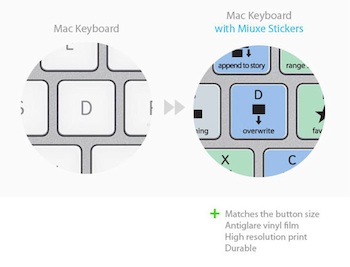
misses 2/3rd of the story ... doesn't it?
What about ctrl-D and cmd-D? .....
the 'single-letter shortcuts' are easy to remind (the ones, I use frequently) but those 'combos' are hard for me ...
:blink:
Replied by Karsten Schlüter on topic Nice keyboard stickers for FCPX
JPM Editor wrote: … But these ones look really good! …
call me Grumpy Ol' Man, but ...
misses 2/3rd of the story ... doesn't it?
What about ctrl-D and cmd-D? .....
the 'single-letter shortcuts' are easy to remind (the ones, I use frequently) but those 'combos' are hard for me ...
:blink:
Please Log in to join the conversation.
- JPM Editor
-
Topic Author
- Offline
- Premium Member
-
19 Jan 2015 09:21 - 19 Jan 2015 09:23 #58627
by JPM Editor
I agree with you, Karsten, to a certain point.
If you switch to other editing platforms quite often like I do, having the single-letter shortcuts right on top of the keyboard as a reminder can be very helpful, and certainly reduce the time it takes to make the transition.
Also, this shortcuts cover some of the basic two-keys shortcuts as well, like the ones that allow you to navigate between the different windows (Cmd 1-9), Zoom In/Out (Cmd +/-) or Create Storyline (Cmd G).
http://cdn.shopify.com/s/files/1/0448/3105/products/keyboard-ultra-slim-finalcut-X_grande.jpg?v=1399680261
Of course, there are many more shortcuts to memorize in order to be an efficient editor, but it's easier to make room for those once you get the basic ones out of the way, and having them right on the keyboard helps on that.
See if this links help you to memorize some of the complicated ones:
Cheers,
Jesús
Jesús Pérez-Miranda
Cut People CEO & Founder
www.cutpeople.es
Replied by JPM Editor on topic Nice keyboard stickers for FCPX
Karsten Schlüter wrote: misses 2/3rd of the story ... doesn't it?
What about ctrl-D and cmd-D? .....
the 'single-letter shortcuts' are easy to remind (the ones, I use frequently) but those 'combos' are hard for me ...
I agree with you, Karsten, to a certain point.
If you switch to other editing platforms quite often like I do, having the single-letter shortcuts right on top of the keyboard as a reminder can be very helpful, and certainly reduce the time it takes to make the transition.
Also, this shortcuts cover some of the basic two-keys shortcuts as well, like the ones that allow you to navigate between the different windows (Cmd 1-9), Zoom In/Out (Cmd +/-) or Create Storyline (Cmd G).
http://cdn.shopify.com/s/files/1/0448/3105/products/keyboard-ultra-slim-finalcut-X_grande.jpg?v=1399680261
Of course, there are many more shortcuts to memorize in order to be an efficient editor, but it's easier to make room for those once you get the basic ones out of the way, and having them right on the keyboard helps on that.
See if this links help you to memorize some of the complicated ones:
- FCPX Menus Cheat Sheet , by Scott Simmons.
- Final Cut Pro Keyboard Shortcuts , by Dennis ( @danskitwit )
Cheers,
Jesús
Jesús Pérez-Miranda
Cut People CEO & Founder
www.cutpeople.es
Last edit: 19 Jan 2015 09:23 by JPM Editor.
Please Log in to join the conversation.
- Karsten Schlüter
-
- Offline
- Moderator
-
Less
More
- Posts: 3790
- Thank you received: 718
19 Jan 2015 10:48 #58628
by Karsten Schlüter
Thanks, Jesús (when I'll tell my son this afternoon, I got a message from Jesus... scnr!! :silly: corny German humor!!), for the links - the cheatsheet is in use here, plus a custom one. I think , every editor has its own 'set' of most-wanted ones, or, better, most-forgotton-ones ... the ones in daily use are meanwhile in muscle-memory here. or, they should. -
back2topic:
I considered a designated FCPX-keyboard when I started to use the app, but the ones with 'all' shortcuts are more confusing than helpful - for me! Plus, as a hobbyist, no daily use, nor other NLes in sue here (some shortcuts of FCPX do work in iMOvie!) , ... no, I have to learn it.-
Plus, I mentioned in some other thread: I'm noticing a scheme behind all those shortcuts, at last behind most... e.g. right hand ones are for precision working (jkl, , .) left hand is for 'selecting' (cmd-1,-2,-3, 1,2,3 ...) etc etc ...
And finally: the German keyboard has (very) different shortcuts ... best example:
alt-[ (which has a nice memo: "alter the beginning of a clip", that bracket looks identical to the clip-'handle') or alt-] are on our keyboards alt-ß and alt-ü .... no memo for that... :evil:
... to say something nice at the end:
Those stickers have a very Mac-like design, and the price is tempting.-
Replied by Karsten Schlüter on topic Nice keyboard stickers for FCPX
JPM Editor wrote: ....
Cheers,
- FCPX Menus Cheat Sheet , by Scott Simmons.
- Final Cut Pro Keyboard Shortcuts , by Dennis ( @danskitwit )
Jesús
Thanks, Jesús (when I'll tell my son this afternoon, I got a message from Jesus... scnr!! :silly: corny German humor!!), for the links - the cheatsheet is in use here, plus a custom one. I think , every editor has its own 'set' of most-wanted ones, or, better, most-forgotton-ones ... the ones in daily use are meanwhile in muscle-memory here. or, they should. -
back2topic:
I considered a designated FCPX-keyboard when I started to use the app, but the ones with 'all' shortcuts are more confusing than helpful - for me! Plus, as a hobbyist, no daily use, nor other NLes in sue here (some shortcuts of FCPX do work in iMOvie!) , ... no, I have to learn it.-
Plus, I mentioned in some other thread: I'm noticing a scheme behind all those shortcuts, at last behind most... e.g. right hand ones are for precision working (jkl, , .) left hand is for 'selecting' (cmd-1,-2,-3, 1,2,3 ...) etc etc ...
And finally: the German keyboard has (very) different shortcuts ... best example:
alt-[ (which has a nice memo: "alter the beginning of a clip", that bracket looks identical to the clip-'handle') or alt-] are on our keyboards alt-ß and alt-ü .... no memo for that... :evil:
... to say something nice at the end:
Those stickers have a very Mac-like design, and the price is tempting.-
Please Log in to join the conversation.

