


- Posts: 5
- Thank you received: 0
3 Post Moderation Rule for New Boarders (25 Jan 2021)
New boarders will have their posts moderated - Don't worry if you cannot see your post immediately.
forgive me if I am being a complete and utter moron....
- paul the 6th
-
 Topic Author
- Offline
- New Member
-

Less
More
15 Jan 2015 23:41 #58540
by paul the 6th
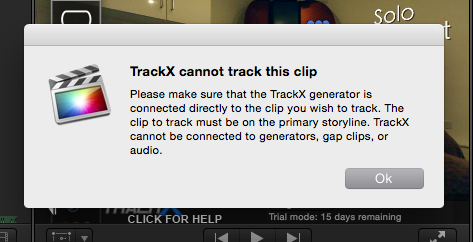
But what are these vertical lines which link to the first bit of content added to the time line? I'm trying to sort out some motion tracking titles using TrackX and keep getting the attached dialogue - not sure what the vertical lines are but from what I can work out it's trying to track motion of that 'master' bit of content which all the lines are linking to.
Thank you in advance for any and all help guys, and apologies if this is a common question. Forum looks great btw!
Thank you in advance for any and all help guys, and apologies if this is a common question. Forum looks great btw!

Please Log in to join the conversation.
- paul the 6th
-
Topic Author
- Offline
- New Member
-
Less
More
- Posts: 5
- Thank you received: 0
15 Jan 2015 23:57 #58541
by paul the 6th
Replied by paul the 6th on topic forgive me if I am being a complete and utter moron....
(images of said lines and dialogue posted as attachments btw)
Please Log in to join the conversation.

16 Jan 2015 07:50 #58546
by plysat
Can't sleep? Try this: fcpxpert.net ;-)
Replied by plysat on topic forgive me if I am being a complete and utter moron....
You're not being a moron. You do, however, need to learn how FCP X works.  the vertical lines are connection points, and Track X only works on clips in the Primary Storyline. Now, go check out some tutorials that explain what I just said.

Sorry for the sarcasm, but the questions you're asking can be answered by reading the help docs in FCP X, or doing some basic tutorials. There's some great free info here, or at ripple training.com that will explain it all. It's worth taking the time.
the vertical lines are connection points, and Track X only works on clips in the Primary Storyline. Now, go check out some tutorials that explain what I just said. Sorry for the sarcasm, but the questions you're asking can be answered by reading the help docs in FCP X, or doing some basic tutorials. There's some great free info here, or at ripple training.com that will explain it all. It's worth taking the time.
Can't sleep? Try this: fcpxpert.net ;-)
Please Log in to join the conversation.

16 Jan 2015 15:10 #58565
by BenB
Replied by BenB on topic forgive me if I am being a complete and utter moron....
Check here in the help manual.
help.apple.com/finalcutpro/mac/10.1/#ver7a77ef9e
help.apple.com/finalcutpro/mac/10.1/#ver7a77ef9e
Please Log in to join the conversation.
- Squamish ed
-
- Offline
- Elite Member
-

Less
More
- Posts: 238
- Thank you received: 20
17 Jan 2015 00:00 #58585
by Squamish ed
Ed
Replied by Squamish ed on topic forgive me if I am being a complete and utter moron....
Coremelt has a lot of good (and free) video tutorials here:
vimeo.com/channels/coremelttrackx for TrackX and here:
vimeo.com/channels/coremeltslicex/page:1 for SliceX.
It's sometimes puzzling to figure out how all this software works but your efforts to learn will be well rewarded.
Enjoy!
vimeo.com/channels/coremelttrackx for TrackX and here:
vimeo.com/channels/coremeltslicex/page:1 for SliceX.
It's sometimes puzzling to figure out how all this software works but your efforts to learn will be well rewarded.
Enjoy!
Ed
Please Log in to join the conversation.
- paul the 6th
-
Topic Author
- Offline
- New Member
-
Less
More
- Posts: 5
- Thank you received: 0
17 Jan 2015 12:35 #58591
by paul the 6th
Replied by paul the 6th on topic forgive me if I am being a complete and utter moron....
Hi guys, thank you very much indeed for the pointers - the very reason I posted was so someone could say "oh, those are called connection points" and then I could go and read up on how it works etc. Been using FCP on and off for about a year or two but now investing in how to use it properly, so thank you; objective accomplished 
Please Log in to join the conversation.
- paul the 6th
-
Topic Author
- Offline
- New Member
-
Less
More
- Posts: 5
- Thank you received: 0
17 Jan 2015 13:37 #58592
by paul the 6th
Replied by paul the 6th on topic forgive me if I am being a complete and utter moron....
guys - thank you so much! Just playing around (see also, 'Learning') at the minute and I'm already starting to get my head around things a lot more. I used premiere years ago - when I saw the magnetic timeline of FCP X I was pretty excited but now I'm starting to realise there's so much more to it than just sticky magnetic clips.
I'll continue to read and learn and experiment. Thank you so much, no doubt I'll be back soon with more questions
I'll continue to read and learn and experiment. Thank you so much, no doubt I'll be back soon with more questions
Please Log in to join the conversation.
17 Jan 2015 15:04 #58594
by BenB
Replied by BenB on topic forgive me if I am being a complete and utter moron....
Invest in structured training. You'll learn more in a week or two than you have in a year or more of hodgepodge use.
Please Log in to join the conversation.
- paul the 6th
-
Topic Author
- Offline
- New Member
-
Less
More
- Posts: 5
- Thank you received: 0
17 Jan 2015 15:38 #58597
by paul the 6th
Replied by paul the 6th on topic forgive me if I am being a complete and utter moron....
I'll have a look into training in the Yorkshire area (north of England, UK).
Thanks for the advice
Thanks for the advice
Please Log in to join the conversation.
