


- Posts: 2
- Thank you received: 0
3 Post Moderation Rule for New Boarders (25 Jan 2021)
New boarders will have their posts moderated - Don't worry if you cannot see your post immediately.
Keying with a white background
15 Jan 2015 03:58 #58483
by Tbo1999
Keying with a white background was created by Tbo1999
Ok so here's the problem, i was conducting an interview using an arctic white background. The lighting with it turned out to be a beige color. I thought I'd be able to use a keyer to give it an infinite white background. The person I was interviewing skin tone is just about the same as the background which I need to be infinite white. With that being said, when I use the Keyer to select the background it is also selecting her face immediately. Anyone have any ideas of dealing with this? Any help is appreciated and I need to have this done by Friday night.
Thanks
Thanks
Please Log in to join the conversation.
- Karsten Schlüter
-

- Offline
- Moderator
-

Less
More
- Posts: 3790
- Thank you received: 718
15 Jan 2015 07:04 #58489
by Karsten Schlüter
Replied by Karsten Schlüter on topic Keying with a white background
1) apply a screen-shot ... a person as white as an arctic white bg? That is ... very white 
2) what keyer you're using? Luma? Apply screen-shot of your settings
3) perhaps some simple color-adjustments (rise the highlights) before keying could improve your attempts ...
2) what keyer you're using? Luma? Apply screen-shot of your settings
3) perhaps some simple color-adjustments (rise the highlights) before keying could improve your attempts ...
Please Log in to join the conversation.
15 Jan 2015 13:26 #58507
by Tbo1999
Replied by Tbo1999 on topic Keying with a white background
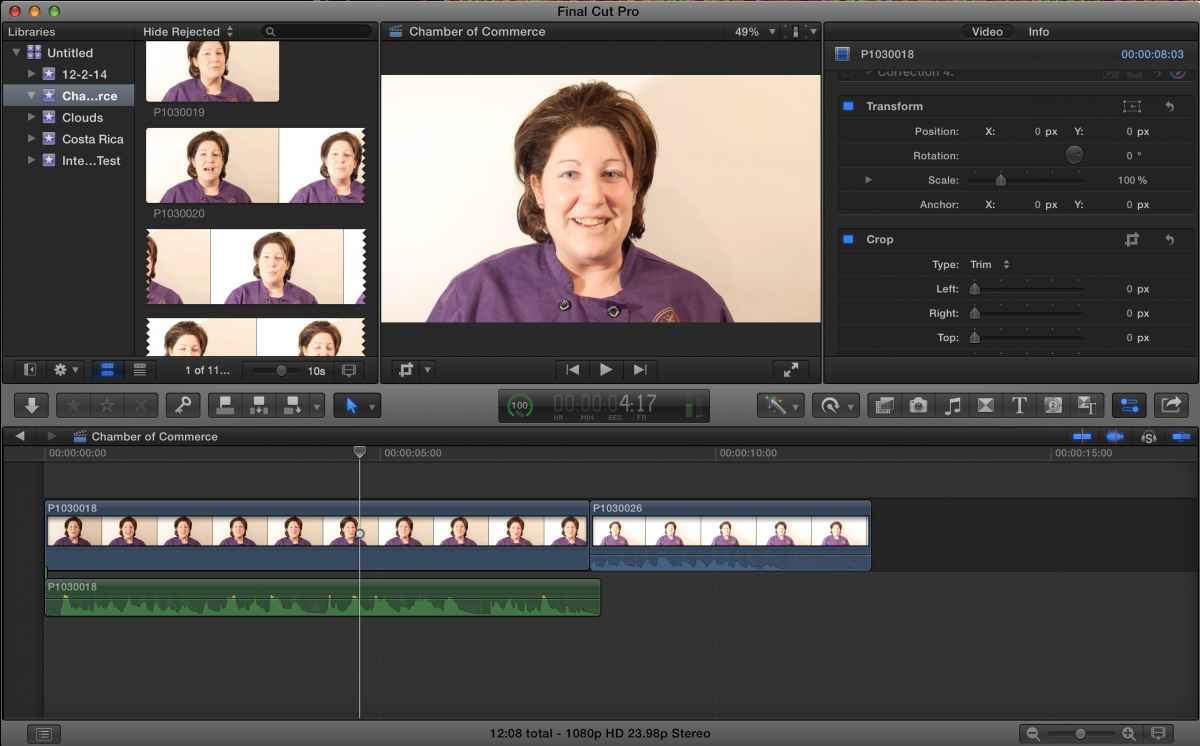
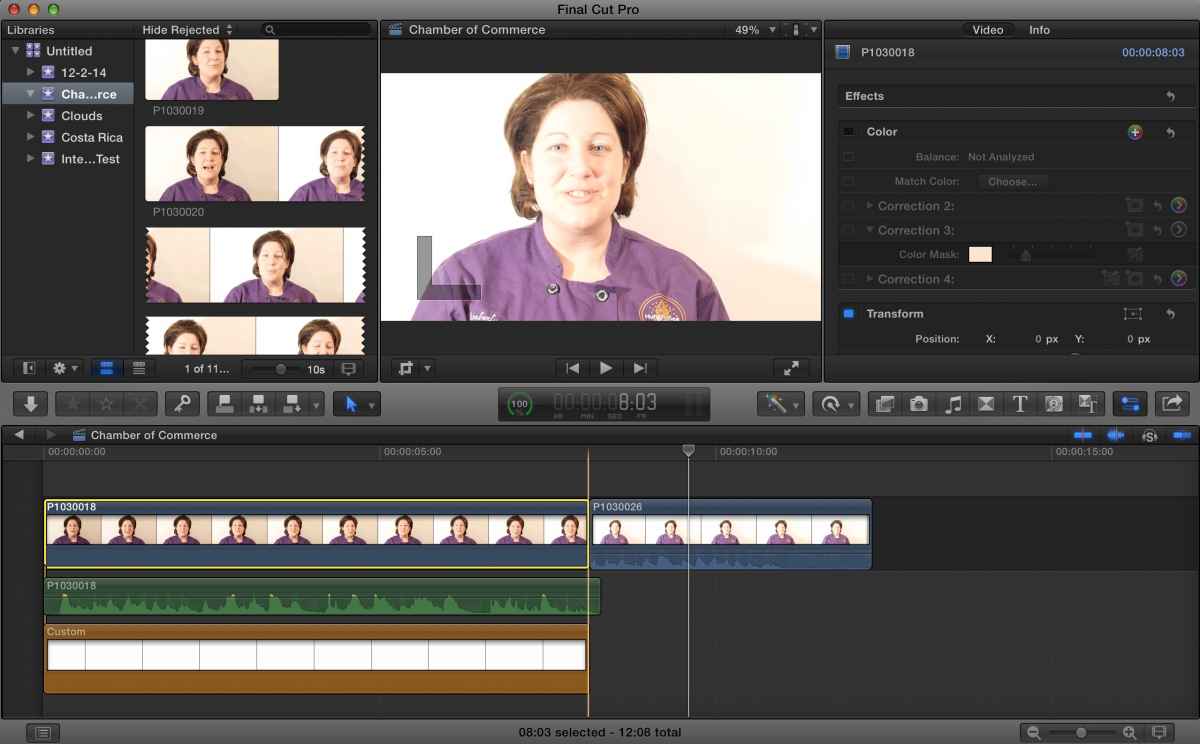
It's not that the person is super white its that the background lighting was off giving the background a color closer to the pigment of her face. I've tried using luma and Meyer but they always select her face along with the background. I'll attach some screenshots from 2 different clips. One is very exposed.
Please Log in to join the conversation.
- JarrodMFay
-

- Offline
- Elite Member
-

Less
More
- Posts: 172
- Thank you received: 34
15 Jan 2015 15:03 #58508
by JarrodMFay
Replied by JarrodMFay on topic Keying with a white background
You'll have to do a combination of color correction (preferably with secondary correction just around her face to protect any skin tone there) and depending on how well that goes then possibly some feathered rotoscoping on the right side of frame to push that to full white without effecting her. This would be pretty simple in Resolve but more challenging inside FCPX.
---> Jarrod
---> Jarrod
Please Log in to join the conversation.
- Karsten Schlüter
-
- Offline
- Moderator
-
Less
More
- Posts: 3790
- Thank you received: 718
15 Jan 2015 16:49 #58518
by Karsten Schlüter
I dare to say:
Without 'manual' masking (rotoscoping as already suggested, or using tools like SliceX) there's no way to use that for keying - have a look in the scopes:
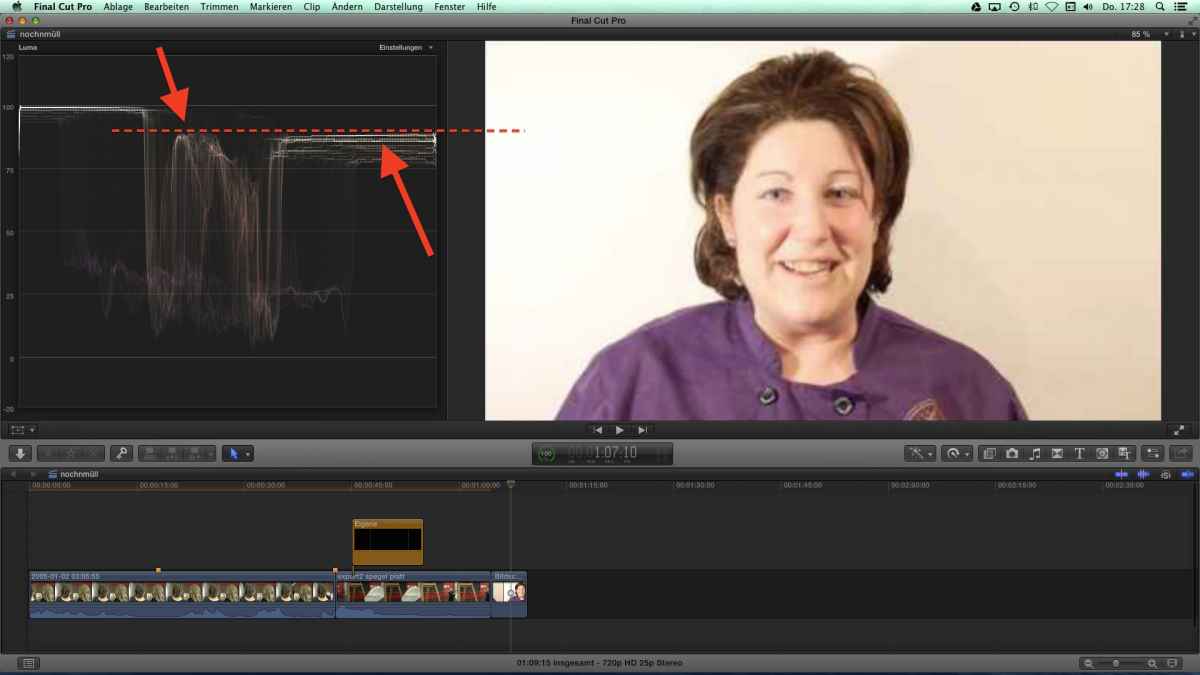
The highlight parts in the face a brighter than the bg!
or, using a color-picker:
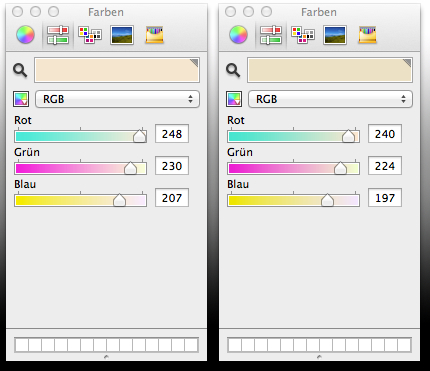
The 'whiter' one is a part of the face (!!), the colored one is the bg ... no, sorry: not useable for a luma-key.
It's always the same story: the better the recording the less fuzz in post... and vice versa.
You tried some 'Rembrandt'-lighting on your subject, but you haven't diffused it => clipped highlights; plus no extra light on the bg; plus not enough distance btw. subject and bg; plus, I assume, no manual controls on camera.... (aperture/white balance)
Meant as general advice for future projects: keep in mind, you can use a 'dirt mask' - there's no need for a full-frame bg for keying! Just the subject has to be 'covered'. For that project: at last 3 steps away from the wall! In case no more light at hand: bounce it back from the right, using some white cloth or some cardboard with some alu foil, back to the background/cover your subject ...
or, use any green cloth; a color key gives in most cases a much better result than luma; I'm actually in themaking of creating this 'infinite white bg' effect .... I'll post later some pics who we did (=school project, no budget at all!)
Replied by Karsten Schlüter on topic Keying with a white background
Tbo1999 wrote: … One is very exposed.
I dare to say:
Without 'manual' masking (rotoscoping as already suggested, or using tools like SliceX) there's no way to use that for keying - have a look in the scopes:
The highlight parts in the face a brighter than the bg!
or, using a color-picker:
The 'whiter' one is a part of the face (!!), the colored one is the bg ... no, sorry: not useable for a luma-key.
It's always the same story: the better the recording the less fuzz in post... and vice versa.
You tried some 'Rembrandt'-lighting on your subject, but you haven't diffused it => clipped highlights; plus no extra light on the bg; plus not enough distance btw. subject and bg; plus, I assume, no manual controls on camera.... (aperture/white balance)
Meant as general advice for future projects: keep in mind, you can use a 'dirt mask' - there's no need for a full-frame bg for keying! Just the subject has to be 'covered'. For that project: at last 3 steps away from the wall! In case no more light at hand: bounce it back from the right, using some white cloth or some cardboard with some alu foil, back to the background/cover your subject ...
or, use any green cloth; a color key gives in most cases a much better result than luma; I'm actually in themaking of creating this 'infinite white bg' effect .... I'll post later some pics who we did (=school project, no budget at all!)
Please Log in to join the conversation.
- JarrodMFay
-
- Offline
- Elite Member
-
Less
More
- Posts: 172
- Thank you received: 34
15 Jan 2015 17:06 #58521
by JarrodMFay
Replied by JarrodMFay on topic Keying with a white background
I would add that shooting a subject against a white background (that you want to go "completely" white) can be deceptively difficult. We've done it many times over the years and the best advice I could give is this. Have a monitor with waveform on set and make sure your background hits 100 ire before putting your subject in place. If the background is only 85-90 ire, it may look "white" on the monitor, but when you get it in post you will see any slight variances in brightness throughout the background and you will have to color correct to make it look right.
As Karsten suggested, the best way (although more time consuming in post) is to shoot green screen and key out the background to replace with white later. This offers it's own challenges, but if done properly can give you a pure white background throughout and the edges can be junk matted if your background wasn't big enough to cover the whole frame.
Nobody ever said shooting great video was easy... or did they?
---> Jarrod
As Karsten suggested, the best way (although more time consuming in post) is to shoot green screen and key out the background to replace with white later. This offers it's own challenges, but if done properly can give you a pure white background throughout and the edges can be junk matted if your background wasn't big enough to cover the whole frame.
Nobody ever said shooting great video was easy... or did they?
---> Jarrod
Please Log in to join the conversation.
- Karsten Schlüter
-
- Offline
- Moderator
-
Less
More
- Posts: 3790
- Thank you received: 718
15 Jan 2015 18:34 - 15 Jan 2015 18:38 #58524
by Karsten Schlüter
Replied by Karsten Schlüter on topic Keying with a white background
sooo, quick'n dirty:
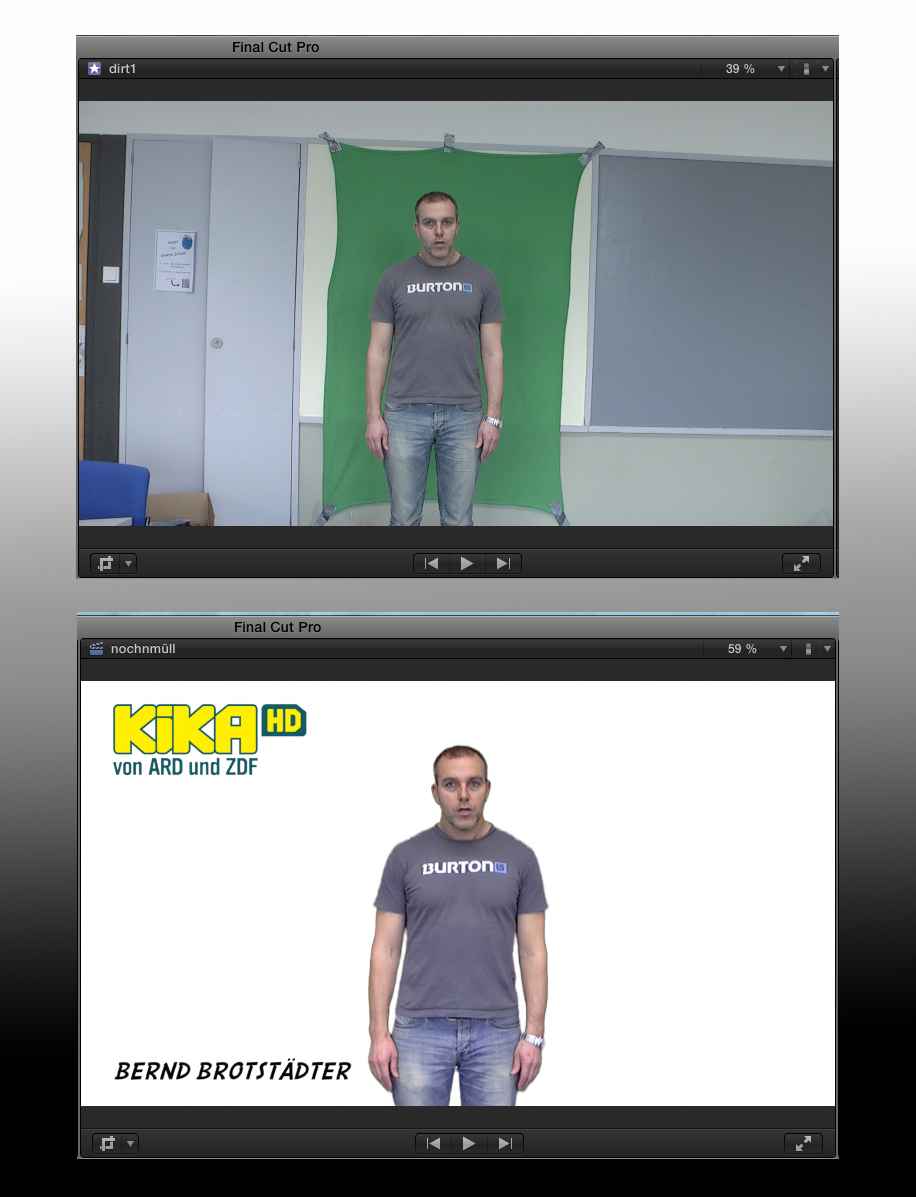
again: School project, no 'pros' involved :lol:
You see, our 'green screen' is just some blanket from the 99¢-store, taped against the wall, due to "we're late!!" no extra lights at all ....
Subject is still too close to wall (that teacher did the recoding without me, and we differ what 'close' means.... he's teaching Latin, perhaps I should advice him next time non densus?? :woohoo: ), so lots of spill... anyhow.
Dragged into FCPX, apply keyer, white generator, some 'ornaments' needed for that project - done.
For that 'non broadcast quality' this is done in minutes!
again: School project, no 'pros' involved :lol:
You see, our 'green screen' is just some blanket from the 99¢-store, taped against the wall, due to "we're late!!" no extra lights at all ....
Subject is still too close to wall (that teacher did the recoding without me, and we differ what 'close' means.... he's teaching Latin, perhaps I should advice him next time non densus?? :woohoo: ), so lots of spill... anyhow.
Dragged into FCPX, apply keyer, white generator, some 'ornaments' needed for that project - done.
For that 'non broadcast quality' this is done in minutes!
Last edit: 15 Jan 2015 18:38 by Karsten Schlüter.
Please Log in to join the conversation.
