


- Posts: 34
- Thank you received: 0
3 Post Moderation Rule for New Boarders (25 Jan 2021)
New boarders will have their posts moderated - Don't worry if you cannot see your post immediately.
Can the " Photos Browser " Contents be Changed?
14 Jan 2015 17:33 #58451
by Robes
Can the " Photos Browser " Contents be Changed? was created by Robes
Hi Again-
I understand the Photos Browser gives access to iPhoto and Aperture. I don't have Aperture (don't need it) and I don't use iPhoto. I have all my photos categorized into 1 "Photo Library" Folder (which contains multiple sub folders).
Is there a way I can access this 'photo Library' Folder through FCPX's Photos Browser? Can items be added and deleted from this Photos Browser?
Thanks for any info on this topic-
Robes
I understand the Photos Browser gives access to iPhoto and Aperture. I don't have Aperture (don't need it) and I don't use iPhoto. I have all my photos categorized into 1 "Photo Library" Folder (which contains multiple sub folders).
Is there a way I can access this 'photo Library' Folder through FCPX's Photos Browser? Can items be added and deleted from this Photos Browser?
Thanks for any info on this topic-
Robes
Please Log in to join the conversation.
- Tom Wolsky
-

- Offline
- Moderator
-

14 Jan 2015 17:40 #58452
by Tom Wolsky
Replied by Tom Wolsky on topic Can the " Photos Browser " Contents be Changed?
Drag the folder into the photo browser space where iPhoto appears.
Please Log in to join the conversation.
14 Jan 2015 18:27 #58455
by Robes
Replied by Robes on topic Can the " Photos Browser " Contents be Changed?
I just don't seem to find a way to drag & drop the folder there, maybe it's not allowed in 10.1.4, would have been nice-
Robes
Robes
Please Log in to join the conversation.
- Tom Wolsky
-
- Offline
- Moderator
-
14 Jan 2015 18:41 #58456
by Tom Wolsky
Replied by Tom Wolsky on topic Can the " Photos Browser " Contents be Changed?
It works. Make sure the Photo Browser is open. Use Cmd-Tab to switch to the Finder. Pick up the folder and use Cmd-Tab to switch back to FCP. Drop the folder in the browser area.
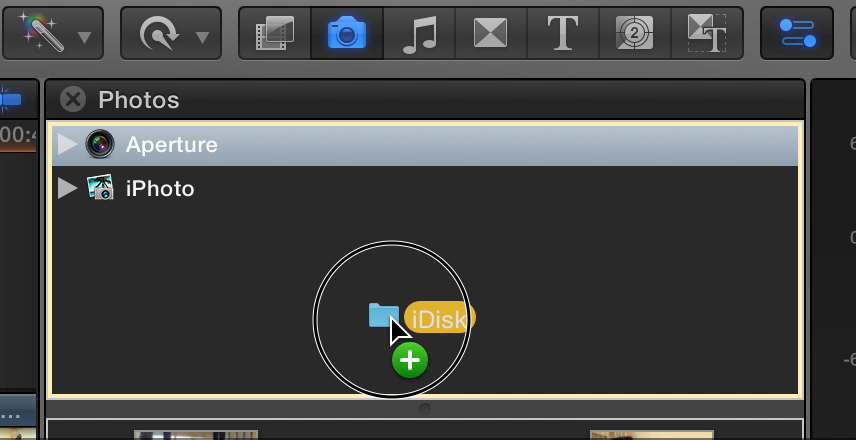
If it's not working there may be a permissions problem with the folder location.
If it's not working there may be a permissions problem with the folder location.
Please Log in to join the conversation.
14 Jan 2015 19:18 #58458
by Robes
Replied by Robes on topic Can the " Photos Browser " Contents be Changed?
Thanks for your help here Tom, but it's not working for me. I tried what you suggested as well as used disc utility to repair all permissions and still won't drop. I do not get the green "+" when over the browser and the folder springs right back to the finder.
I did a Goggle search and found it's a problem for many. I found one search, on Creative Cow, where Mark Spencer (from Applemotion & Ripple Training) could not get it to go. He said he'd play with it and get back if he found a way, that was in 2011, he never got back.
forums.creativecow.net/thread/344/1835
Guess I can live without it, it would only have been a convenience, and in no way do things come easy for me...
Robes
I did a Goggle search and found it's a problem for many. I found one search, on Creative Cow, where Mark Spencer (from Applemotion & Ripple Training) could not get it to go. He said he'd play with it and get back if he found a way, that was in 2011, he never got back.
forums.creativecow.net/thread/344/1835
Guess I can live without it, it would only have been a convenience, and in no way do things come easy for me...
Robes
Please Log in to join the conversation.
- Tom Wolsky
-
- Offline
- Moderator
-
14 Jan 2015 19:30 #58460
by Tom Wolsky
Replied by Tom Wolsky on topic Can the " Photos Browser " Contents be Changed?
2011 is ancient. It's been working for a long time. I have notice the plus doesn't appear sometimes. If the box is outline it should work. It creates a folder called Folder with the folders inside it.
Might be a problem with the location. Don't know why it's not working.
Might be a problem with the location. Don't know why it's not working.
Please Log in to join the conversation.
14 Jan 2015 21:46 - 14 Jan 2015 21:52 #58468
by Robes
Replied by Robes on topic Can the " Photos Browser " Contents be Changed?
Well, I copied my Photo library folder from the HD to the Desktop, then dragged it into the Photos Browser window (got the green "+") and it dropped in. It created the Folders folder. Problem is, all 8500 photos are randomly inside the Folders folder without a single sub folder inside. Totally inaccessible, trying to scroll as it renders would take a lifetime, simply no way to find an image.
So, now I have to find a way to delete/trash the Folder or its contents. Selecting images ---> deleting and select/drag to trash do not work, any ideas ?
I found it, control click on the Folders folder, select delete folder. I'm done with this.
So, now I have to find a way to delete/trash the Folder or its contents. Selecting images ---> deleting and select/drag to trash do not work, any ideas ?
I found it, control click on the Folders folder, select delete folder. I'm done with this.
Last edit: 14 Jan 2015 21:52 by Robes.
Please Log in to join the conversation.
- Tom Wolsky
-
- Offline
- Moderator
-
14 Jan 2015 21:54 #58469
by Tom Wolsky
Replied by Tom Wolsky on topic Can the " Photos Browser " Contents be Changed?
Right-click folder and select remove.
When I did I got the subfolders, though I did not get the images that were not in a subfolder. Obviously not working as it should.
Did you try and alias for the folder on the external hard drive?
When I did I got the subfolders, though I did not get the images that were not in a subfolder. Obviously not working as it should.
Did you try and alias for the folder on the external hard drive?
Please Log in to join the conversation.
