


- Posts: 12
- Thank you received: 0
3 Post Moderation Rule for New Boarders (25 Jan 2021)
New boarders will have their posts moderated - Don't worry if you cannot see your post immediately.
How do you add a logo to the bottom corner of your film?
14 Jan 2015 15:04 #58436
by domcross
How do you add a logo to the bottom corner of your film? was created by domcross
Hi all,
As described in the Subject, I need to add my company logo to the bottom right hand corner of the entire film that I'm putting together. I'm still very new to FCP, so would welcome some help as I can't seem to figure it out.
These guys have done what I'm looking to do: vimeo.com/110695945
Thanks in advance,
Dom.
As described in the Subject, I need to add my company logo to the bottom right hand corner of the entire film that I'm putting together. I'm still very new to FCP, so would welcome some help as I can't seem to figure it out.
These guys have done what I'm looking to do: vimeo.com/110695945
Thanks in advance,
Dom.
Please Log in to join the conversation.
- Tom Wolsky
-

- Offline
- Moderator
-

14 Jan 2015 15:10 #58437
by Tom Wolsky
Replied by Tom Wolsky on topic How do you add a logo to the bottom corner of your film?
You can either add the graphic in FCP or in Compressor when you're outputting. Create the graphic in a graphics application like Photoshop or Pixelmator. Make the graphic the size of your project, say 1920x1080 and position the logo in the lower right, allow for television title safe if you need that.
Please Log in to join the conversation.
14 Jan 2015 15:38 #58441
by domcross
Replied by domcross on topic How do you add a logo to the bottom corner of your film?
Thanks for the quick reply Tom. My logo designer has provided 2 layer versions of the logo in .psd and .png format. Will either of these do? If so, how do I add it in FCP as I wasn't planning to use Compressor?
Thanks again,
Dom.
Thanks again,
Dom.
Please Log in to join the conversation.
- Tom Wolsky
-
- Offline
- Moderator
-
14 Jan 2015 15:45 #58444
by Tom Wolsky
Replied by Tom Wolsky on topic How do you add a logo to the bottom corner of your film?
Either will do. Are they the same size as the project properties? Do they have transparency?
Put the graphic in the project as the top layer above everything else and make it the same duration as the project.
Put the graphic in the project as the top layer above everything else and make it the same duration as the project.
Please Log in to join the conversation.
14 Jan 2015 16:01 #58445
by domcross
Replied by domcross on topic How do you add a logo to the bottom corner of your film?
They do have transparency Tom, but I'm not sure how to figure out if they're the same size as the project properties.
Sorry if that's a dumb question... I'm on a steep learning curve!
Thanks,
Dom.
Sorry if that's a dumb question... I'm on a steep learning curve!
Thanks,
Dom.
Please Log in to join the conversation.
- Tom Wolsky
-
- Offline
- Moderator
-
14 Jan 2015 16:23 #58446
by Tom Wolsky
Replied by Tom Wolsky on topic How do you add a logo to the bottom corner of your film?
Import the files into FCP and put them on top of the video and see what happens.
Please Log in to join the conversation.
- Tom Wolsky
-
- Offline
- Moderator
-
14 Jan 2015 17:07 #58448
by Tom Wolsky
Replied by Tom Wolsky on topic How do you add a logo to the bottom corner of your film?
Also check the Info inspector for file information. Info in the Finder will also tell you the file dimensions.
Please Log in to join the conversation.
14 Jan 2015 17:09 #58449
by domcross
Replied by domcross on topic How do you add a logo to the bottom corner of your film?
I just tried that Tom and it imported fine, but is clearly too big a file as it covers the entire screen and some! Guess I may need the logo designer to create me a smaller version of the file, or is there something I can do from within FCP to fix this?
Thanks,
Dom.
Thanks,
Dom.
Please Log in to join the conversation.
- Tom Wolsky
-
- Offline
- Moderator
-
14 Jan 2015 17:19 #58450
by Tom Wolsky
Replied by Tom Wolsky on topic How do you add a logo to the bottom corner of your film?
If the size of the logo in relation to the project is ok you can just reposition using the ttansform function. You can scale it as well if need be, but it's really better if the image is properly sized and positioned to start. It might help the graphics artist to have a still image from the project to help size snd position the logo.
Please Log in to join the conversation.

14 Jan 2015 19:07 #58457
by Navigator
Replied by Navigator on topic How do you add a logo to the bottom corner of your film?
I experienced serious slowing down of the rendering process when adding a logo to the timeline. Is this the wrong way to ad a logo?
Please Log in to join the conversation.
- Tom Wolsky
-
- Offline
- Moderator
-
14 Jan 2015 19:20 #58459
by Tom Wolsky
Replied by Tom Wolsky on topic How do you add a logo to the bottom corner of your film?
Depends on the image but it will slow rendering. Better not to render unless you have to.
Please Log in to join the conversation.
- Karsten Schlüter
-

- Offline
- Moderator
-
Less
More
- Posts: 3790
- Thank you received: 718
15 Jan 2015 07:24 - 15 Jan 2015 07:25 #58491
by Karsten Schlüter
so, when you're new - just DO it, try it, play around!
drag any graphic 'above' your first clip; resize it; place it; then extend it across your whole timeline. These are all basics, in any NLE. You need it for every project you'll do.-
but do NOT 'discuss' it ....
it's really a no-brainer (pun intended), even my hobbyist projects are 'stamped':
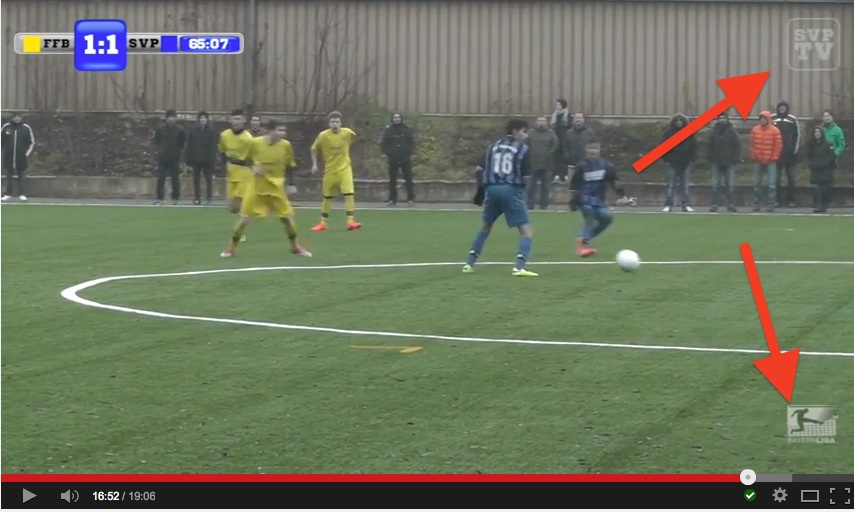
...
Replied by Karsten Schlüter on topic How do you add a logo to the bottom corner of your film?
domcross wrote: … I'm still very new to FCP, so would welcome some help as I can't seem to figure it out.…
so, when you're new - just DO it, try it, play around!
drag any graphic 'above' your first clip; resize it; place it; then extend it across your whole timeline. These are all basics, in any NLE. You need it for every project you'll do.-
- play with its comp settings in the info pane...
- play with jpgs (=no transparency), png(=transparency) ...
- play with 'ready in size & place' or with resizing in FCPX ...
but do NOT 'discuss' it ....
it's really a no-brainer (pun intended), even my hobbyist projects are 'stamped':
...
Last edit: 15 Jan 2015 07:25 by Karsten Schlüter.
Please Log in to join the conversation.
