


- Posts: 181
- Thank you received: 6
3 Post Moderation Rule for New Boarders (25 Jan 2021)
New boarders will have their posts moderated - Don't worry if you cannot see your post immediately.
FCPX DVD Menu - customize button?
- mobiletaylor
-
 Topic Author
- Offline
- Elite Member
-

Less
More
05 Jan 2015 18:01 #58018
by mobiletaylor
FCPX DVD Menu - customize button? was created by mobiletaylor
The DVD that FCPX produces has three buttons on the home screen. Chapter markers, Play, and a third button. What is that third button for? Can it be customized?
Thanks,
JT
Thanks,
JT
Please Log in to join the conversation.

05 Jan 2015 18:06 #58020
by BenB
Replied by BenB on topic FCPX DVD Menu - customize button?
Loop playback, no it can not be customized.
Please Log in to join the conversation.
- mobiletaylor
-
Topic Author
- Offline
- Elite Member
-
Less
More
- Posts: 181
- Thank you received: 6
05 Jan 2015 18:41 #58023
by mobiletaylor
Replied by mobiletaylor on topic FCPX DVD Menu - customize button?
Thanks for the quick response!
JT
JT
Please Log in to join the conversation.
- Tom Wolsky
-

- Offline
- Moderator
-

05 Jan 2015 18:55 #58025
by Tom Wolsky
Replied by Tom Wolsky on topic FCPX DVD Menu - customize button?
I only get two buttons on the home screen.
Please Log in to join the conversation.
- mobiletaylor
-
Topic Author
- Offline
- Elite Member
-
Less
More
- Posts: 181
- Thank you received: 6
05 Jan 2015 19:39 #58027
by mobiletaylor
Replied by mobiletaylor on topic FCPX DVD Menu - customize button?
Hmmmmm. Here is a screen grab from a project with chapter markers:

Please Log in to join the conversation.
- mobiletaylor
-
Topic Author
- Offline
- Elite Member
-
Less
More
- Posts: 181
- Thank you received: 6
05 Jan 2015 19:40 #58028
by mobiletaylor
Replied by mobiletaylor on topic FCPX DVD Menu - customize button?
However, I just did another DVD without chapter markers and got this:

Please Log in to join the conversation.
- mobiletaylor
-
Topic Author
- Offline
- Elite Member
-
Less
More
- Posts: 181
- Thank you received: 6
05 Jan 2015 19:40 #58029
by mobiletaylor
Replied by mobiletaylor on topic FCPX DVD Menu - customize button?
So when does FCPX add the loop playback button? Only with chapter marker projects?
JT
JT
Please Log in to join the conversation.
- Tom Wolsky
-
- Offline
- Moderator
-
05 Jan 2015 20:19 #58030
by Tom Wolsky
Replied by Tom Wolsky on topic FCPX DVD Menu - customize button?
I only have the play button and the button on the left. I have chapters but no looping.
Please Log in to join the conversation.
- mobiletaylor
-
Topic Author
- Offline
- Elite Member
-
Less
More
- Posts: 181
- Thank you received: 6
05 Jan 2015 22:36 #58035
by mobiletaylor
Replied by mobiletaylor on topic FCPX DVD Menu - customize button?
I thought that was the loop playback button you were talking about? That's the button I was originally asking about. I guess that is not the loop playback button?
Please Log in to join the conversation.
- Karsten Schlüter
-

- Offline
- Moderator
-
Less
More
- Posts: 3790
- Thank you received: 718
06 Jan 2015 07:28 #58050
by Karsten Schlüter
No, that button toggles 'subtitles'.
funny enough, even if the project has no titles at all, I'm offered that button:
plus, it doesn't differ btw. subtitles and 'closed caption'
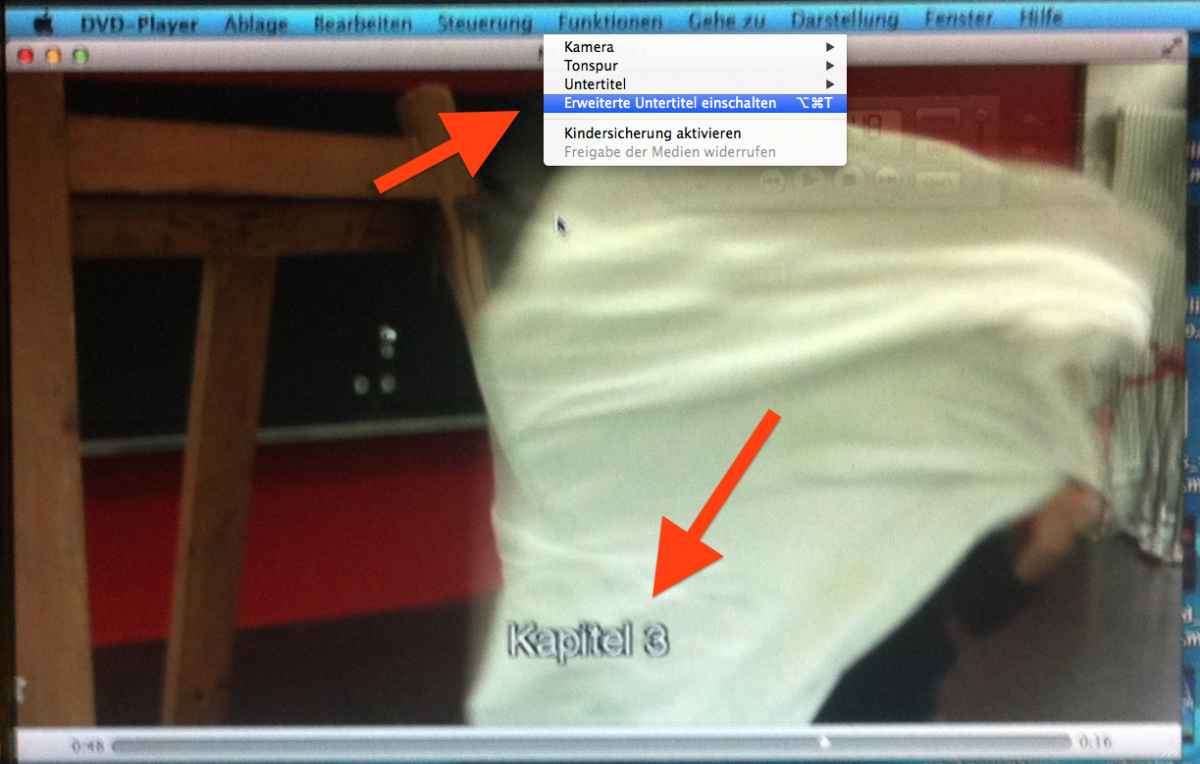
(sorry for quality - DVDplayer.app doesn't allow screen-grabs, so, ... screen-shot by iPhone :woohoo: )
In a quick'n dirty test (MacOS 10.9):
for a Project without any titles but chapters, that 'bubble' toggles closed captions, showing "Start/Chapter 1/Chapter 2" in the video - independently what you select in the DVD.app Menu Bar!
could be called bug ...
Replied by Karsten Schlüter on topic FCPX DVD Menu - customize button?
mobiletaylor wrote: … I guess that is not the loop playback button?
No, that button toggles 'subtitles'.
funny enough, even if the project has no titles at all, I'm offered that button:
plus, it doesn't differ btw. subtitles and 'closed caption'
(sorry for quality - DVDplayer.app doesn't allow screen-grabs, so, ... screen-shot by iPhone :woohoo: )
In a quick'n dirty test (MacOS 10.9):
for a Project without any titles but chapters, that 'bubble' toggles closed captions, showing "Start/Chapter 1/Chapter 2" in the video - independently what you select in the DVD.app Menu Bar!
could be called bug ...
Please Log in to join the conversation.
- mobiletaylor
-
Topic Author
- Offline
- Elite Member
-
Less
More
- Posts: 181
- Thank you received: 6
06 Jan 2015 20:33 - 06 Jan 2015 20:34 #58082
by mobiletaylor
Replied by mobiletaylor on topic FCPX DVD Menu - customize button?
Yes! That's it! I turned it on and sure enough, it shows my chapter markers as subtitles. That does seem to be a bug. Thanks for the info!
Last edit: 06 Jan 2015 20:34 by mobiletaylor. Reason: Add File
Please Log in to join the conversation.
- Karsten Schlüter
-
- Offline
- Moderator
-
Less
More
- Posts: 3790
- Thank you received: 718
07 Jan 2015 06:15 #58105
by Karsten Schlüter
hmm, in part:
showing the chapters as subtitles is a feature! closed captions...
but: overriding the settings in the menu - that is a bug, imho!
… and most probably, a DVDplayer.app bug, less FCPX' fault....
... one could test it with a commercial DVD with chapters & subs ...
DVD is sooooo out-of-focus in Cupertino... :lol:
Replied by Karsten Schlüter on topic FCPX DVD Menu - customize button?
mobiletaylor wrote: Yes! That's it! I turned it on and sure enough, it shows my chapter markers as subtitles. That does seem to be a bug. Thanks for the info!
hmm, in part:
showing the chapters as subtitles is a feature! closed captions...
but: overriding the settings in the menu - that is a bug, imho!
… and most probably, a DVDplayer.app bug, less FCPX' fault....
... one could test it with a commercial DVD with chapters & subs ...
DVD is sooooo out-of-focus in Cupertino... :lol:
Please Log in to join the conversation.
- mobiletaylor
-
Topic Author
- Offline
- Elite Member
-
Less
More
- Posts: 181
- Thank you received: 6
07 Jan 2015 15:37 #58129
by mobiletaylor
Replied by mobiletaylor on topic FCPX DVD Menu - customize button?
Yes, you are correct. I didn't realize that button was only to show subtitles. I guess I should have read it better! I thought that button had to be selected in order to get the chapter markers to show up in the DVD. Looks like that happens regardless. So, if I don't select the button I get just two choices. That's what I was looking for. Problem solved!
However, why would anyone want the chapter markers to show up as subtitles? Is that desirable?
JT
However, why would anyone want the chapter markers to show up as subtitles? Is that desirable?
JT
Please Log in to join the conversation.
07 Jan 2015 16:00 - 07 Jan 2015 16:02 #58131
by BenB
Replied by BenB on topic FCPX DVD Menu - customize button?
Actually, yes. It is a nice alternative sub-title tool. I know someone who uses the chapter markers to precisely line up sub-title explanations, which enhance the verbal instructions, in industrial safety training videos. Since it is a chapter marker, and stays on the clip where the host is narrating, she never has to worry about losing sync. No worries about connected title clips detaching from anything. She does it all in the Browser first, then edits in the Timeline.
Just another tool that helps some, not others. The option has actually been around in FCPX for some time. I never new it worked with that button, though.
help.apple.com/finalcutpro/mac/10.1/#ver9ac16f8f
"Markers: Not available for Blu-ray when using an AVCHD output device. Select the checkbox to include chapter marker text as subtitles on the output disc. Users can navigate between the chapter markers by pressing the Next Chapter or Previous Chapter button on the DVD or Blu-ray player..."

Just another tool that helps some, not others. The option has actually been around in FCPX for some time. I never new it worked with that button, though.
help.apple.com/finalcutpro/mac/10.1/#ver9ac16f8f
"Markers: Not available for Blu-ray when using an AVCHD output device. Select the checkbox to include chapter marker text as subtitles on the output disc. Users can navigate between the chapter markers by pressing the Next Chapter or Previous Chapter button on the DVD or Blu-ray player..."
Last edit: 07 Jan 2015 16:02 by BenB.
Please Log in to join the conversation.
- Andreas Kiel
-
- Offline
- Platinum Member
-

Less
More
- Posts: 1077
- Thank you received: 189
10 Jan 2015 12:24 #58264
by Andreas Kiel
Replied by Andreas Kiel on topic FCPX DVD Menu - customize button?
While this could be an option in some cases it is not a valid option for subtitles globally.
Also keep in mind that DVDs allow a maximum of 99 chapters. Additionally markers in FCP X don't have a duration (default 1 frame) and you can set it manually.
Only thing you can do is to create chapter markers with no name. This is senseless for subtitles and will cut the amount of available chapters to 50 or 49.
To get chapters with duration you have to edit an XML of the project. But I have no idea whether it would really work for subtitles. I will give it a try, and let you know.
- Andreas
Also keep in mind that DVDs allow a maximum of 99 chapters. Additionally markers in FCP X don't have a duration (default 1 frame) and you can set it manually.
Only thing you can do is to create chapter markers with no name. This is senseless for subtitles and will cut the amount of available chapters to 50 or 49.
To get chapters with duration you have to edit an XML of the project. But I have no idea whether it would really work for subtitles. I will give it a try, and let you know.
- Andreas
Please Log in to join the conversation.
10 Jan 2015 14:05 #58268
by BenB
Replied by BenB on topic FCPX DVD Menu - customize button?
"Just another tool that helps some, not others."
When you enable markers to be used as sub-titles, the duration is not 1 frame. I forget the default duration, but they stay on the screen long enough to read a full sentence.
When you enable markers to be used as sub-titles, the duration is not 1 frame. I forget the default duration, but they stay on the screen long enough to read a full sentence.
Please Log in to join the conversation.
- Andreas Kiel
-
- Offline
- Platinum Member
-
Less
More
- Posts: 1077
- Thank you received: 189
11 Jan 2015 09:54 - 11 Jan 2015 09:55 #58308
by Andreas Kiel
My post with the "1 frame duration" was misleading though true.
What happens with chapter markers (others as well) is that the "1 frame time" shows the start of a chapter. The chapter's duration is the time diff between the this start of one chapter and the start of the following chapter.
So a "Chapter Text Overlay" has nothing to do with subtitles where each of them have a start and duration. It will just display the chapter's name till the next chapter starts.
As I said you can could create empty chapters (chapters with no name) to mimic subtitles. But I haven't tried whether the 99 chapter limit apply to file based Video_TS file as well.
- Andreas
Replied by Andreas Kiel on topic FCPX DVD Menu - customize button?
When you enable markers to be used as sub-titles, the duration is not 1 frame. I forget the default duration, but they stay on the screen long enough to read a full sentence.
My post with the "1 frame duration" was misleading though true.
What happens with chapter markers (others as well) is that the "1 frame time" shows the start of a chapter. The chapter's duration is the time diff between the this start of one chapter and the start of the following chapter.
So a "Chapter Text Overlay" has nothing to do with subtitles where each of them have a start and duration. It will just display the chapter's name till the next chapter starts.
As I said you can could create empty chapters (chapters with no name) to mimic subtitles. But I haven't tried whether the 99 chapter limit apply to file based Video_TS file as well.
- Andreas
Last edit: 11 Jan 2015 09:55 by Andreas Kiel.
Please Log in to join the conversation.
