


- Posts: 6
- Thank you received: 0
3 Post Moderation Rule for New Boarders (25 Jan 2021)
New boarders will have their posts moderated - Don't worry if you cannot see your post immediately.
29.97p to 23.976 (24p)
03 Jan 2015 23:10 - 03 Jan 2015 23:14 #57933
by morpho
29.97p to 23.976 (24p) was created by morpho
I made the mistake of shooting in 29.97p and now have to convert to 23.976 fps (24p) for theater broadcast. I also need to convert it to 25 fps for PAL DVDs for my cast and crew who are on another continent. So, I am exploring options current as of January 2015.
I have Compressor 4.1.3. Can someone explain how Compressor does the frame rate conversion from 29.97 to 24p or 25 fps? Is it merely dropping frames? Does it have any kind of automated interpolation?
I experimented with a clip that has motion in it. I edited 29.97p and output to ProRes422(HQ) 29.97, then used Compressor to convert to 24p and 25 fps.
The Compressor results look okay on my computer, and I can't tell if there are motion artifacts. Unfortunately, I can't run two videos side-by-side to see if Compressor is merely dropping frames.
I have also been checking services that charge to convert using their fancy graphics hardware and got a converted sample back on the same clip. The system does some automated interpolation (not dropping frames), and it looks okay, too, though moving frame-by-frame one can catch frames with double image portions on motion. These don't occur with the Compressor conversion.
Anyway, my question is: What is Compressor's approach?
I have Compressor 4.1.3. Can someone explain how Compressor does the frame rate conversion from 29.97 to 24p or 25 fps? Is it merely dropping frames? Does it have any kind of automated interpolation?
I experimented with a clip that has motion in it. I edited 29.97p and output to ProRes422(HQ) 29.97, then used Compressor to convert to 24p and 25 fps.
The Compressor results look okay on my computer, and I can't tell if there are motion artifacts. Unfortunately, I can't run two videos side-by-side to see if Compressor is merely dropping frames.
I have also been checking services that charge to convert using their fancy graphics hardware and got a converted sample back on the same clip. The system does some automated interpolation (not dropping frames), and it looks okay, too, though moving frame-by-frame one can catch frames with double image portions on motion. These don't occur with the Compressor conversion.
Anyway, my question is: What is Compressor's approach?
Last edit: 03 Jan 2015 23:14 by morpho.
Please Log in to join the conversation.

04 Jan 2015 03:58 - 04 Jan 2015 04:00 #57938
by BenB
Replied by BenB on topic 29.97p to 23.976 (24p)
I do this with Compressor a lot and have always been happy with the results. You actually have choices, not one set method.
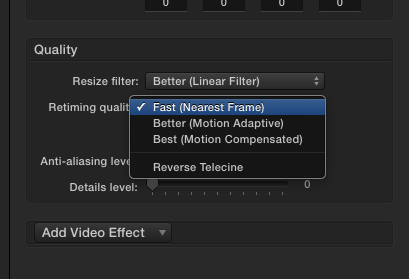
Also, you CAN in fact play the videos side by side. Open both in QT Player, resize the windows next to each other. Or make a custom frame size for an FCPX project timeline, twice the original frame size, and place both originals in that Timeline.
Also, you CAN in fact play the videos side by side. Open both in QT Player, resize the windows next to each other. Or make a custom frame size for an FCPX project timeline, twice the original frame size, and place both originals in that Timeline.
Last edit: 04 Jan 2015 04:00 by BenB.
Please Log in to join the conversation.
04 Jan 2015 19:12 - 04 Jan 2015 19:14 #57967
by morpho
Replied by morpho on topic 29.97p to 23.976 (24p)
Thanks. I tried out Compressor 4.1.3, and here are the results.
Settings available in Inspector -> Video, Quality:
- Resize filter - Fast, Better, Best (default Better)
- Retiming quality - Fast, Better, Best (default Better)
- Adaptive details - check or uncheck (default unchecked)
- Anti-aliasing level - sliding bar 0-100 (default 0)
- Details level - sliding bar 0-100 (default 0)
Input: Scrolling titles white on black background, ProRes422 HQ, 1920x1080, 29.97p, 1 minute 18 seconds
Output 1: To Custom-> MXF 25 fps -> 1080p 422 Uncompressed (just for the helluvit, as I might make that my master file codec)
Settings in Inspector->Video: Defaults
Result: Render time 25 minutes? Awfully jerky scrolling titles
Output 2: To Custom-> MXF 25 fps -> 1080p 422 Uncompressed
Settings in Inspector->Video, Quality:
- Resize filter: Best
- Retiming quality: Best
- Adaptive details: Not checked
- Other options: Defaults (0 on sliding bar)
Results: Render time 40 minutes. Dramatically better than Output 1. No jerky motion, but slight twinkling in the scrolling text (this might be just due to my computer screen, since I see it a little in the original file, too).
Output 3: To Custom-> MXF 25 fps -> 1080i XDCAM HD 422 50 Mbps (the Uncompressed version wound up 8 Gb, and really no need for Uncompressed just to diagnose motion issues)
Settings in Inspector->Video, Quality:
- Resize filter: Best
- Retiming quality: Best
- Adaptive details: Checked
- Other options: Defaults (0 on sliding bar)
Results: Render time ~50 minutes. (Compressor doesn\'t show when it\'s done). Oy, the twinkly text of Output 2 became much worse, wobbly and uneven! Don\'t know if that\'s because of the codec or because Adaptive details was checked.
Output 4: To Custom-> MXF 25 fps -> 1080p 422 Uncompressed, to see if it\'s the codec or the Adaptive optics making things worse.
Settings in Inspector->Video, Quality:
- Resize filter: Best
- Retiming quality: Best
- Adaptive details: Checked
- Other options: Defaults (0 on sliding bar)
Results: Render time guess 40 minutes. The problem with Output 3 was recompressing to the XDCAM interlaced codec. Output 4 is just hint better than Output 2 and hard to tell, but the scrolling seems possibly smoother. It is pretty respectable compared to the original 29.97 fps clip, and I\'m guessing many people would not notice.
Conclusion: With these three options in Video Quality set to best, Compressor\'s convert from 29.97p to 25 fps is quite respectable. The catch is one should export to Uncompressed to avoid further degradation in other codecs, and it\'s odd one cannot select to output to the original ProRes codec as the input. So, at 40-45 minutes per 1:18 minutes for my film, and 8.17 GB Uncompressed, my 20-minute film will need 10-11.5 hours and 125 GB to convert. I guess I can tolerate that running overnight.
In Compressor 4.1.3, I don\'t see any option to output to Apple ProRes 422 HQ at non-29.97 frame rates: all the MXF output options do not include ProRes. I guess one\'s input file already has to be in the desired frame rate, and then video can be converted to other codecs. One can convert to both other frame rates and other codecs in the same export, but not to ProRes.
I think I'll go with hiring a Teranex service to convert to 24p for theater projection, but for making PAL DVDs at 25 fps, I think Compressor should be sufficient (with the appropriate Video Quality options set). Will do the frame rate conversions without scrolling titles, then add scrolling titles back in FCP with the converted film so that they are completely smooth.
Settings available in Inspector -> Video, Quality:
- Resize filter - Fast, Better, Best (default Better)
- Retiming quality - Fast, Better, Best (default Better)
- Adaptive details - check or uncheck (default unchecked)
- Anti-aliasing level - sliding bar 0-100 (default 0)
- Details level - sliding bar 0-100 (default 0)
Input: Scrolling titles white on black background, ProRes422 HQ, 1920x1080, 29.97p, 1 minute 18 seconds
Output 1: To Custom-> MXF 25 fps -> 1080p 422 Uncompressed (just for the helluvit, as I might make that my master file codec)
Settings in Inspector->Video: Defaults
Result: Render time 25 minutes? Awfully jerky scrolling titles
Output 2: To Custom-> MXF 25 fps -> 1080p 422 Uncompressed
Settings in Inspector->Video, Quality:
- Resize filter: Best
- Retiming quality: Best
- Adaptive details: Not checked
- Other options: Defaults (0 on sliding bar)
Results: Render time 40 minutes. Dramatically better than Output 1. No jerky motion, but slight twinkling in the scrolling text (this might be just due to my computer screen, since I see it a little in the original file, too).
Output 3: To Custom-> MXF 25 fps -> 1080i XDCAM HD 422 50 Mbps (the Uncompressed version wound up 8 Gb, and really no need for Uncompressed just to diagnose motion issues)
Settings in Inspector->Video, Quality:
- Resize filter: Best
- Retiming quality: Best
- Adaptive details: Checked
- Other options: Defaults (0 on sliding bar)
Results: Render time ~50 minutes. (Compressor doesn\'t show when it\'s done). Oy, the twinkly text of Output 2 became much worse, wobbly and uneven! Don\'t know if that\'s because of the codec or because Adaptive details was checked.
Output 4: To Custom-> MXF 25 fps -> 1080p 422 Uncompressed, to see if it\'s the codec or the Adaptive optics making things worse.
Settings in Inspector->Video, Quality:
- Resize filter: Best
- Retiming quality: Best
- Adaptive details: Checked
- Other options: Defaults (0 on sliding bar)
Results: Render time guess 40 minutes. The problem with Output 3 was recompressing to the XDCAM interlaced codec. Output 4 is just hint better than Output 2 and hard to tell, but the scrolling seems possibly smoother. It is pretty respectable compared to the original 29.97 fps clip, and I\'m guessing many people would not notice.
Conclusion: With these three options in Video Quality set to best, Compressor\'s convert from 29.97p to 25 fps is quite respectable. The catch is one should export to Uncompressed to avoid further degradation in other codecs, and it\'s odd one cannot select to output to the original ProRes codec as the input. So, at 40-45 minutes per 1:18 minutes for my film, and 8.17 GB Uncompressed, my 20-minute film will need 10-11.5 hours and 125 GB to convert. I guess I can tolerate that running overnight.
In Compressor 4.1.3, I don\'t see any option to output to Apple ProRes 422 HQ at non-29.97 frame rates: all the MXF output options do not include ProRes. I guess one\'s input file already has to be in the desired frame rate, and then video can be converted to other codecs. One can convert to both other frame rates and other codecs in the same export, but not to ProRes.
I think I'll go with hiring a Teranex service to convert to 24p for theater projection, but for making PAL DVDs at 25 fps, I think Compressor should be sufficient (with the appropriate Video Quality options set). Will do the frame rate conversions without scrolling titles, then add scrolling titles back in FCP with the converted film so that they are completely smooth.
Last edit: 04 Jan 2015 19:14 by morpho.
Please Log in to join the conversation.
05 Jan 2015 01:58 #57979
by BenB
Replied by BenB on topic 29.97p to 23.976 (24p)
First, MXF and ProRes are very different animals, different codecs. If you export ProRes you're not losing any image quality, but saving drive space. Yes, you can change frame rates and export ProRes just fine.
Scrolling titles can be a problem with changing frame rates.
Scrolling titles can be a problem with changing frame rates.
Please Log in to join the conversation.
05 Jan 2015 02:08 - 05 Jan 2015 02:09 #57980
by morpho
Replied by morpho on topic 29.97p to 23.976 (24p)
I think MXF is a wrapper or container, not a codec. It can contain files (video and audio) with different codecs.
My point is, in Compressor 4.1.3, there is no option to change the frame rate to 25 fps (or other) and select ProRes as the output codec. The only choices are other codecs, and Uncompressed seems to be the only choice that doesn't degrade the input image.
So, I have to:
ProRes 422 HQ 29.97 --> Compressor MXF 25 fps Uncompressed
--> convert again to ProRes 422 HQ (keeping the 25 fps)
I.e. It seems I need two steps. The middle one generates a gigantic file.
My point is, in Compressor 4.1.3, there is no option to change the frame rate to 25 fps (or other) and select ProRes as the output codec. The only choices are other codecs, and Uncompressed seems to be the only choice that doesn't degrade the input image.
So, I have to:
ProRes 422 HQ 29.97 --> Compressor MXF 25 fps Uncompressed
--> convert again to ProRes 422 HQ (keeping the 25 fps)
I.e. It seems I need two steps. The middle one generates a gigantic file.
Last edit: 05 Jan 2015 02:09 by morpho.
Please Log in to join the conversation.
- Russ Haskell
-

- Offline
- Elite Member
-

Less
More
- Posts: 176
- Thank you received: 24
05 Jan 2015 02:46 #57984
by Russ Haskell
Replied by Russ Haskell on topic 29.97p to 23.976 (24p)
You can change the frame rate with a Pro Res output setting. In the Inspector>Video>Video Properties. Then select the retiming quality in Quality>Retiming Quality.
Russ
Russ
Please Log in to join the conversation.
05 Jan 2015 05:16 - 05 Jan 2015 05:17 #57986
by BenB
Replied by BenB on topic 29.97p to 23.976 (24p)
"My point is, in Compressor 4.1.3, there is no option to change the frame rate to 25 fps (or other) and select ProRes as the output codec."
Absolutely not true. Here I have ProRes and all my frame rate choices.

Absolutely not true. Here I have ProRes and all my frame rate choices.
Last edit: 05 Jan 2015 05:17 by BenB.
Please Log in to join the conversation.
05 Jan 2015 06:06 #57989
by morpho
Replied by morpho on topic 29.97p to 23.976 (24p)
You're right! I didn't see that! Hooray, thanks for the tip!
Please Log in to join the conversation.
- Andreas Kiel
-
- Offline
- Platinum Member
-

Less
More
- Posts: 1077
- Thank you received: 189
05 Jan 2015 10:05 #57993
by Andreas Kiel
Replied by Andreas Kiel on topic 29.97p to 23.976 (24p)
I don't understand why you want to have 25 fps.
Every PAL player can play NTSC, 24fps, 25fps.
- Andreas
Every PAL player can play NTSC, 24fps, 25fps.
- Andreas
Please Log in to join the conversation.
05 Jan 2015 16:20 - 05 Jan 2015 16:23 #58009
by morpho
Replied by morpho on topic 29.97p to 23.976 (24p)
Oh, I didn't know that PAL players can play NTSC, 24 fps. I thought they require 25 fps.
For a PAL DVD, to what format is best to output my film?
MPEG-1/2, 720x576, 24 or 25 fps?
Thanks, again.
For a PAL DVD, to what format is best to output my film?
MPEG-1/2, 720x576, 24 or 25 fps?
Thanks, again.
Last edit: 05 Jan 2015 16:23 by morpho.
Please Log in to join the conversation.

07 Apr 2019 17:43 #99538
by Albo
Replied by Albo on topic 29.97p to 23.976 (24p)
I know this is an old post but it answered some of my questions.
I imagine the post is still valid today?
I now shoot at 24 fps but another project is 29,97.
Some festivals are asking me for a screening copy.
I don't have Compressor but I don't mind getting it if needed.
What would be best practice and simplest.
Leave it 29,97 or convert?
Thanks.
I imagine the post is still valid today?
I now shoot at 24 fps but another project is 29,97.
Some festivals are asking me for a screening copy.
I don't have Compressor but I don't mind getting it if needed.
What would be best practice and simplest.
Leave it 29,97 or convert?
Thanks.
Please Log in to join the conversation.

07 Apr 2019 18:13 #99540
by JoeEditor
Replied by JoeEditor on topic 29.97p to 23.976 (24p)
Give the festival exactly what they ask for.
Please Log in to join the conversation.
07 Apr 2019 18:53 #99542
by Albo
Replied by Albo on topic 29.97p to 23.976 (24p)
I always do that.
In some cases they have not specified anything.
But back to my question.
Can I simply use FCX or will Compressor do a better job of converting
if that is needed?
In some cases they have not specified anything.
But back to my question.
Can I simply use FCX or will Compressor do a better job of converting
if that is needed?
Please Log in to join the conversation.
07 Apr 2019 22:56 #99547
by JoeEditor
Replied by JoeEditor on topic 29.97p to 23.976 (24p)
They both use the same engine, won't matter. Compressor simply gives you more detailed control.
Please Log in to join the conversation.

24 Apr 2019 15:21 #99785
by joema
Here is the problem (FCPX.guru please correct if needed): If you add 29.97 material to a 23.98 timeline, and if the 29.97 material is not retimed to slow it down 25%, then each 4th frame is extraneous - 30/24=1.25.
FCPX will conform 29.97 material in a 23.98 timeline using a crude "frame discard" method. If you single step rendered output, you'll see every 4th frame of the 29.97 material is skipped, causing an uneven motion cadence.
At this point the "damage" is already done (by the initial conform) and you can't ship the timeline to Compressor to fix.
The solution is first import the 29.97 material to Compressor, use the settings similar to what FCPX.guru listed above but use 23.98 output frame rate. This converts the material using sophisticated motion compensation, not simple frame discarding. The result should have the same running time but be smooth and free of motion artifacts. You then import the converted files to FCPX and edit on a 23.98 timeline along with the real 23.98 material from other cameras.
Replied by joema on topic 29.97p to 23.976 (24p)
Albo wrote: ....I now shoot at 24 fps but another project is 29,97.
Some festivals are asking me for a screening copy. I don't have Compressor but I don't mind getting it if needed.
What would be best practice and simplest.
Leave it 29,97 or convert?...
Here is the problem (FCPX.guru please correct if needed): If you add 29.97 material to a 23.98 timeline, and if the 29.97 material is not retimed to slow it down 25%, then each 4th frame is extraneous - 30/24=1.25.
FCPX will conform 29.97 material in a 23.98 timeline using a crude "frame discard" method. If you single step rendered output, you'll see every 4th frame of the 29.97 material is skipped, causing an uneven motion cadence.
At this point the "damage" is already done (by the initial conform) and you can't ship the timeline to Compressor to fix.
The solution is first import the 29.97 material to Compressor, use the settings similar to what FCPX.guru listed above but use 23.98 output frame rate. This converts the material using sophisticated motion compensation, not simple frame discarding. The result should have the same running time but be smooth and free of motion artifacts. You then import the converted files to FCPX and edit on a 23.98 timeline along with the real 23.98 material from other cameras.
Please Log in to join the conversation.
- Tom Wolsky
-

- Offline
- Moderator
-

24 Apr 2019 15:26 #99786
by Tom Wolsky
Replied by Tom Wolsky on topic 29.97p to 23.976 (24p)
"FCPX will conform 29.97 material in a 23.98 timeline using a crude "frame discard" method."
Won't use the inspector Rate Conform in optical flow help this?
Won't use the inspector Rate Conform in optical flow help this?
Please Log in to join the conversation.
24 Apr 2019 16:10 #99788
by joema
Replied by joema on topic 29.97p to 23.976 (24p)
Thanks. Yes, that works just as well, and avoids having to manually transcode in Compressor. Using that method you can have an already-edited 23.98 timeline containing some 29.97 material, select only the 29.97 clips and in Inspector Video Properties under Rate Conform, pick Frame Sampling: Optical Flow.
Please Log in to join the conversation.
