


- Posts: 30
- Thank you received: 1
3 Post Moderation Rule for New Boarders (25 Jan 2021)
New boarders will have their posts moderated - Don't worry if you cannot see your post immediately.
Shift f to add second clip in viewer
01 Jan 2015 19:33 - 01 Jan 2015 19:36 #57884
by kman198
Shift f to add second clip in viewer was created by kman198
Excerpt Color Matching tutorial says that "shift f" will split the viewer and show where shift f was hit and where the play head is at.
I'm using 10.1.4 and that doesn't seem to work... Am I missing something here?
Kman
I'm using 10.1.4 and that doesn't seem to work... Am I missing something here?
Kman
Last edit: 01 Jan 2015 19:36 by kman198.
Please Log in to join the conversation.
- Tom Wolsky
-

- Offline
- Moderator
-

01 Jan 2015 21:23 #57888
by Tom Wolsky
Replied by Tom Wolsky on topic Shift f to add second clip in viewer
Shift-F takes you to the original clip in the browser. If you open the event viewer you can compare the original clip to the corrected clip.
Please Log in to join the conversation.
01 Jan 2015 21:52 #57889
by kman198
Replied by kman198 on topic Shift f to add second clip in viewer
I'm sorry Tom... My inexperience is surely getting in my way.
If you view Ripple training video "Excerpt Color Matching Saturation," beginning around :05 sec you will see what I'm talking about.
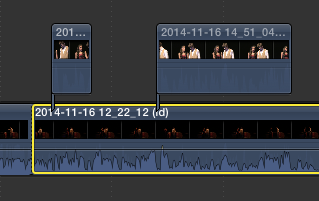
Viewing the attached png image, I would like to split the viewer between the primary story line and the attached clips, then compare and correct saturation and color issues.
If you view Ripple training video "Excerpt Color Matching Saturation," beginning around :05 sec you will see what I'm talking about.
Viewing the attached png image, I would like to split the viewer between the primary story line and the attached clips, then compare and correct saturation and color issues.
Please Log in to join the conversation.
- Tom Wolsky
-
- Offline
- Moderator
-
01 Jan 2015 21:58 #57890
by Tom Wolsky
Replied by Tom Wolsky on topic Shift f to add second clip in viewer
This shows twos viewers. The event viewer on the left and the project viewer on the right. Below each viewer is a separate waveform monitor. Have you activated the event viewer?
Please Log in to join the conversation.
