


- Posts: 181
- Thank you received: 6
3 Post Moderation Rule for New Boarders (25 Jan 2021)
New boarders will have their posts moderated - Don't worry if you cannot see your post immediately.
Problems with angle viewer
- mobiletaylor
-
 Topic Author
- Offline
- Elite Member
-

Less
More
01 Jan 2015 19:18 - 01 Jan 2015 19:19 #57882
by mobiletaylor
Problems with angle viewer was created by mobiletaylor
I've been doing more multi-cam projects lately. I'm having a terrible time with the angle viewer. I get distorted offset thumbnail views. Very frustrating. I'm using a late 2013 15" Macbook Pro. Latest version of FCPX. Anyone else see this? Any ideas?
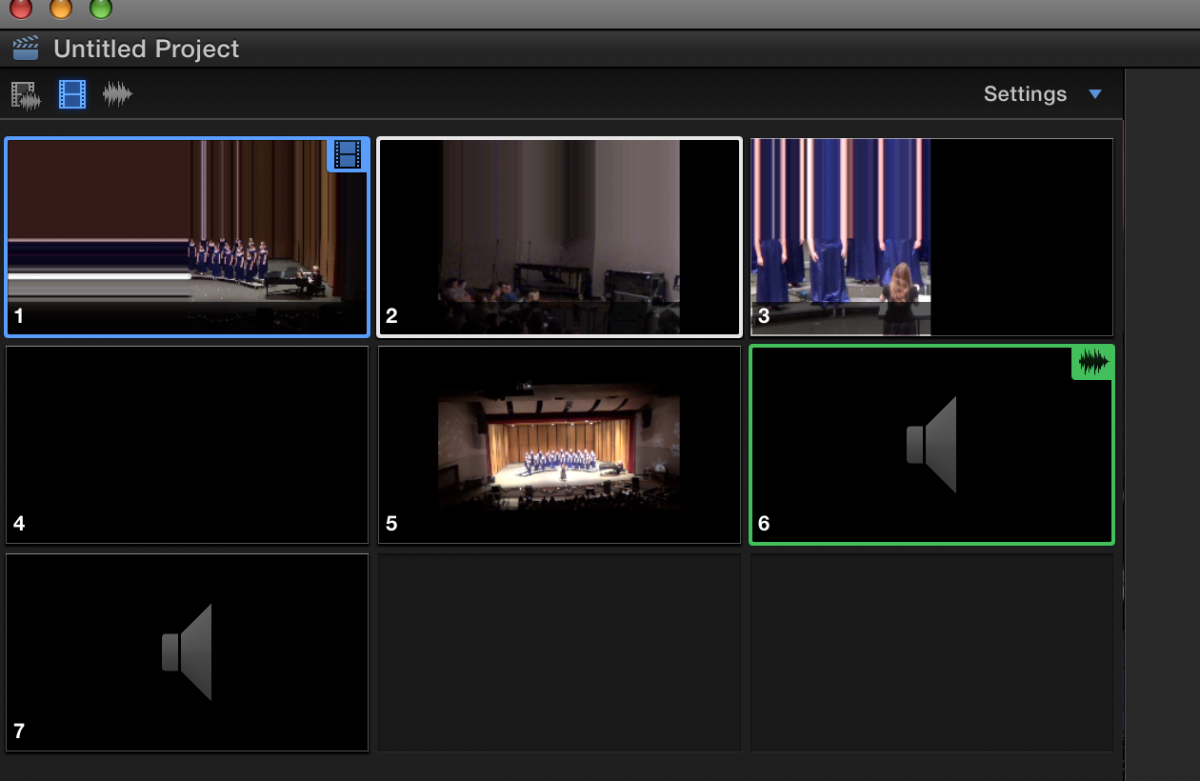
Last edit: 01 Jan 2015 19:19 by mobiletaylor.
Please Log in to join the conversation.

02 Jan 2015 02:29 #57899
by BenB
Replied by BenB on topic Problems with angle viewer
What format/codec are these clips?
If camera formats, have you tried Optimized or Proxy media?
Are you on the latest version of Yosemite, also?
RAM?
What are your media drive specs?
Do both the system drive and media drive have at least 10% each free space?
If camera formats, have you tried Optimized or Proxy media?
Are you on the latest version of Yosemite, also?
RAM?
What are your media drive specs?
Do both the system drive and media drive have at least 10% each free space?
Please Log in to join the conversation.
- mobiletaylor
-
Topic Author
- Offline
- Elite Member
-
Less
More
- Posts: 181
- Thank you received: 6
02 Jan 2015 03:39 #57902
by mobiletaylor
Replied by mobiletaylor on topic Problems with angle viewer
Ben,
16 GB RAM, 512 SD Drive 100 free.
Searched the web today and found one other person with similar problems. He mentioned something about mixed project resolutions, so I started working through my settings today. Here is what I have found so far.
My workflow for the last few projects has been:
Transfer camera footage to FCPX (1080)
Build multi-cam clip (1080)
New project (720)
Add multi-cam clip to project
Angle viewer to edit clip
I use a 720 project so I can pan/zoom/tilt any clips that need adjustment
The final project goes to DVD so 720 is more then enough
When I adjust any of the cuts to pan/zoom/tilt I change spatial conform from fit to none. This gives me all the extra room I need. However, this seems to send the angel viewer all wonky? I went back through this project and changed all spatial conform back to fit. And the problem went away. As soon as I set them back, the angel viewer breaks again.
So, can anyone else re-create this? Or is it just my machine? Would this be considered a bug, or expected behavior? Would there be a better workflow to do this? I could build the multi-cam clip as 720 (and make my pan/zoom/tilt adjustments there), but I never know what clips I will be using. Feels like I would be doing a lot of extra work, adjusting clips that may not be used.
Thanks,
JT
16 GB RAM, 512 SD Drive 100 free.
Searched the web today and found one other person with similar problems. He mentioned something about mixed project resolutions, so I started working through my settings today. Here is what I have found so far.
My workflow for the last few projects has been:
Transfer camera footage to FCPX (1080)
Build multi-cam clip (1080)
New project (720)
Add multi-cam clip to project
Angle viewer to edit clip
I use a 720 project so I can pan/zoom/tilt any clips that need adjustment
The final project goes to DVD so 720 is more then enough
When I adjust any of the cuts to pan/zoom/tilt I change spatial conform from fit to none. This gives me all the extra room I need. However, this seems to send the angel viewer all wonky? I went back through this project and changed all spatial conform back to fit. And the problem went away. As soon as I set them back, the angel viewer breaks again.
So, can anyone else re-create this? Or is it just my machine? Would this be considered a bug, or expected behavior? Would there be a better workflow to do this? I could build the multi-cam clip as 720 (and make my pan/zoom/tilt adjustments there), but I never know what clips I will be using. Feels like I would be doing a lot of extra work, adjusting clips that may not be used.
Thanks,
JT
Please Log in to join the conversation.
02 Jan 2015 15:55 #57908
by BenB
Replied by BenB on topic Problems with angle viewer
You don't need to change spacial conform to zoom/pan/tilt.
Please Log in to join the conversation.
- mobiletaylor
-
Topic Author
- Offline
- Elite Member
-
Less
More
- Posts: 181
- Thank you received: 6
02 Jan 2015 17:03 #57911
by mobiletaylor
Replied by mobiletaylor on topic Problems with angle viewer
Thank you Ben, I didn't realize that.
Some other stuff I read online made it seem like I needed to set spatial conform to none in order to get the best quality.
How much can I enlarge, and still not degrade the original video quality, If I'm using 1080P footage in a 720P timeline? Is 150% correct?
I'm about to work with some 2.7K footage from a GoPro. How much could I enlarge that in a 720P timeline? Or a 1080P timeline?
Thanks again,
JT
Some other stuff I read online made it seem like I needed to set spatial conform to none in order to get the best quality.
How much can I enlarge, and still not degrade the original video quality, If I'm using 1080P footage in a 720P timeline? Is 150% correct?
I'm about to work with some 2.7K footage from a GoPro. How much could I enlarge that in a 720P timeline? Or a 1080P timeline?
Thanks again,
JT
Please Log in to join the conversation.
02 Jan 2015 18:22 #57912
by dkag7
Replied by dkag7 on topic Problems with angle viewer
If this helps at all (not the same as what you have), I have 5 720p clips and created a 1920x1080p multicam clip.
the 1080p multicam clip is in a 1080p project.
I dont see problems with the angle window images.
Video card is gtx 680 mac pro 5,1
the 1080p multicam clip is in a 1080p project.
I dont see problems with the angle window images.
Video card is gtx 680 mac pro 5,1
Please Log in to join the conversation.
- DmitriZigany
-
- Offline
- Platinum Member
-

Less
More
- Posts: 730
- Thank you received: 26
03 Jan 2015 15:14 #57918
by DmitriZigany
Replied by DmitriZigany on topic Problems with angle viewer
I've been getting those distorted previews as well.
Been using almost exclusively footage from FS700/A7s in 1080 AVCHD.
Since 10.1.4 I haven't gotten it though.
However, now I get that when changing angle they all go black. But only when hovering over that clip not the rest of the edits... weird!
Been using almost exclusively footage from FS700/A7s in 1080 AVCHD.
Since 10.1.4 I haven't gotten it though.
However, now I get that when changing angle they all go black. But only when hovering over that clip not the rest of the edits... weird!
Please Log in to join the conversation.
- fb_100003045233641
-
- Offline
- New Member
-

Less
More
- Posts: 10
- Thank you received: 2
04 Jan 2015 13:35 #57948
by fb_100003045233641
Replied by fb_100003045233641 on topic Problems with angle viewer
I had a similar issue. Deleting the render files fixed it for me.
www.fcp.co/fcp-forum/4-final-cut-pro-x-f...cam-image-distortion
-dave
www.fcp.co/fcp-forum/4-final-cut-pro-x-f...cam-image-distortion
-dave
Please Log in to join the conversation.
-

- New Member
-
Less
More
- Thank you received: 0
27 Feb 2017 14:02 #86152
by
Replied by on topic Problems with angle viewer
I have been experiencing this problem for some time. I have had a graphics card changed on my MacPro 2013 by Apple. AMD FirePro D700 It made no difference.
The problem is a bug in the software. I went into an Apple Store and recreated the exact same problems on a 21inch iMac and a 2013 MacPro. I have also had two Apple Support tech guys manage to recreate the exact problem with their own footage. They also say what happened by remote viewing my screen as I worked and agreed it is a big problem on a machine that cost over £4000!
The problems occurs when you try to use larger resolution media than the project in a multicam workflow and set the spatial conform to none. Fill and Fit are fine.
This happens if you try to use 4K footage in a 1080p muticam project and, as I most commonly do, use 1080p in a 720p project. It does not seem codec dependant as it is created with at least 5 different codecs I have tried and obviously with the ProRes 422 and 422 HQ and the Apple guys have recreated it too.
The bug is now with the 'engineers' and they are looking for a 'fix'.
Just my opinion, i feel it does help to work with higher res files in a smaller project if you are shooting from a tripod with no camera operator. It can really help to save the composition of a clip. The breakdown of the image in the angle viewer does not affect output but does make angle switching difficult at times as you cannot see the scene in the angle to know when or whether to switch.
Hope that is of some help.
The problem is a bug in the software. I went into an Apple Store and recreated the exact same problems on a 21inch iMac and a 2013 MacPro. I have also had two Apple Support tech guys manage to recreate the exact problem with their own footage. They also say what happened by remote viewing my screen as I worked and agreed it is a big problem on a machine that cost over £4000!
The problems occurs when you try to use larger resolution media than the project in a multicam workflow and set the spatial conform to none. Fill and Fit are fine.
This happens if you try to use 4K footage in a 1080p muticam project and, as I most commonly do, use 1080p in a 720p project. It does not seem codec dependant as it is created with at least 5 different codecs I have tried and obviously with the ProRes 422 and 422 HQ and the Apple guys have recreated it too.
The bug is now with the 'engineers' and they are looking for a 'fix'.
Just my opinion, i feel it does help to work with higher res files in a smaller project if you are shooting from a tripod with no camera operator. It can really help to save the composition of a clip. The breakdown of the image in the angle viewer does not affect output but does make angle switching difficult at times as you cannot see the scene in the angle to know when or whether to switch.
Hope that is of some help.
Please Log in to join the conversation.
