


3 Post Moderation Rule for New Boarders (25 Jan 2021)
New boarders will have their posts moderated - Don't worry if you cannot see your post immediately.
Distort first and zoom after, can't make it work


01 Jan 2015 18:08 #57881
by Emmanuel
Distort first and zoom after, can't make it work was created by Emmanuel
Hi guys
I'm having a basic yet confusing problem.
I have a clip that I want to distort (compress horizontally by about 50 pixels). When I apply the distortion, of course I get black bands on the side, so I need to apply a scaling to zoom inside the clip.
BUT the clip zooms in, but "inside" the black bands.
First I was surprised, then I realized that it might be because the distortion is processed after the scaling. So I did the following:
* An adjustment layer with Distort only
* And an adjustment layer on top of it, with scaling only.
And yet, the issue is the same !
Can somebody explain it to me ? I find it very puzzling!
(PS: there is a workaround that consists in distorting the clip in the inspector, and then adding on top an adjustment layer with scaling, but I would still like to understand why using 2 adjustment layers does'nt work).
Thanks in advance !!!
I'm having a basic yet confusing problem.
I have a clip that I want to distort (compress horizontally by about 50 pixels). When I apply the distortion, of course I get black bands on the side, so I need to apply a scaling to zoom inside the clip.
BUT the clip zooms in, but "inside" the black bands.
First I was surprised, then I realized that it might be because the distortion is processed after the scaling. So I did the following:
* An adjustment layer with Distort only
* And an adjustment layer on top of it, with scaling only.
And yet, the issue is the same !
Can somebody explain it to me ? I find it very puzzling!
(PS: there is a workaround that consists in distorting the clip in the inspector, and then adding on top an adjustment layer with scaling, but I would still like to understand why using 2 adjustment layers does'nt work).
Thanks in advance !!!
Please Log in to join the conversation.

01 Jan 2015 19:54 #57887
by lichinho
Replied by lichinho on topic Distort first and zoom after, can't make it work
I tried this with no adjustment layers, just doing the distort followed by scaling.
I cannot reproduce what you describe. The whole clip scales, and if the scale factor is big enough, it will cover the whole frame.
I cannot reproduce what you describe. The whole clip scales, and if the scale factor is big enough, it will cover the whole frame.
Please Log in to join the conversation.
02 Jan 2015 00:10 - 02 Jan 2015 00:12 #57894
by Emmanuel
Replied by Emmanuel on topic Distort first and zoom after, can't make it work
Thanks for your help Lichinho
This is what I do: you can see the distort parameters on the right.
The lower adjustment layer is distort only
The upper adjustment layer is scaling only
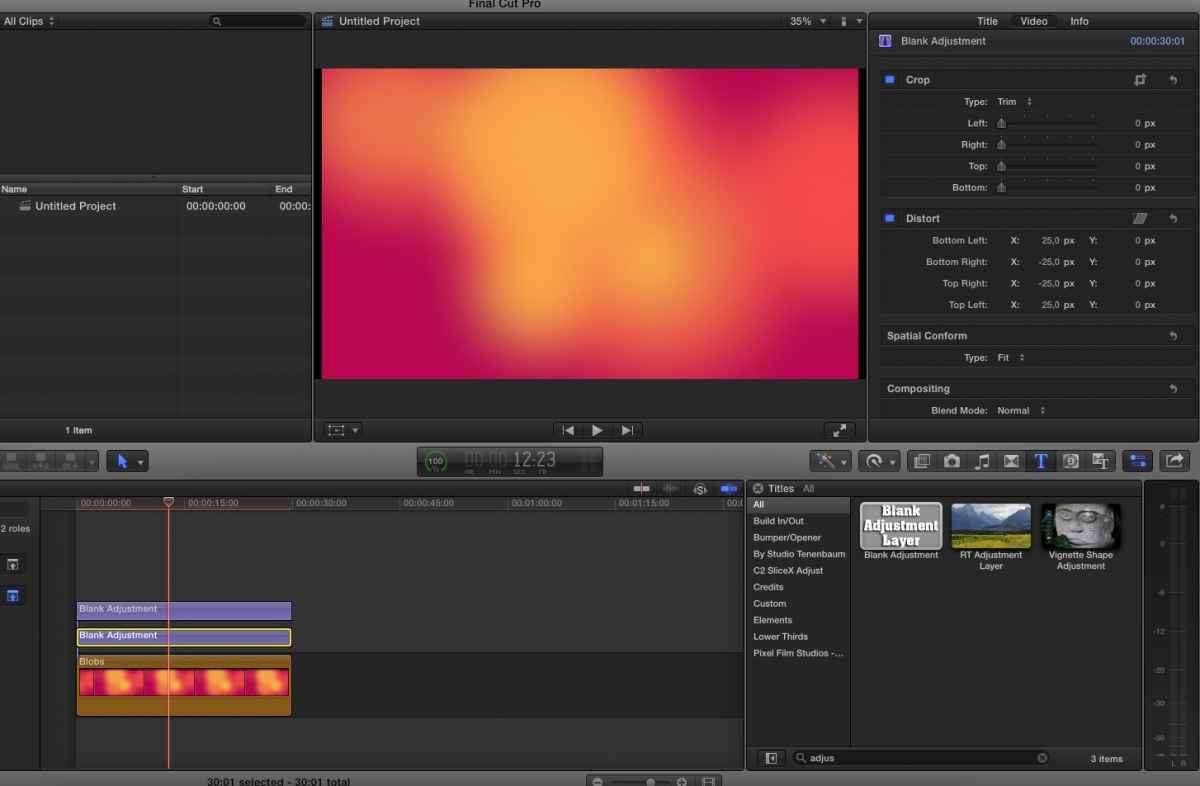
This is what I do: you can see the distort parameters on the right.
The lower adjustment layer is distort only
The upper adjustment layer is scaling only
Last edit: 02 Jan 2015 00:12 by Emmanuel.
Please Log in to join the conversation.

02 Jan 2015 02:16 - 02 Jan 2015 02:22 #57896
by BenB
Replied by BenB on topic Distort first and zoom after, can't make it work
You want distortion, but to scale without the side black bars to NOT be effected. Easy;
Reverse the adjustment layers you already have. Place distort on top, move scale to below it.
The playhead reads top to bottom. You do not want the scale effect to not alter the distort effect, so put it below, it won't touch the distort (which is being processed first).
Reverse the adjustment layers you already have. Place distort on top, move scale to below it.
The playhead reads top to bottom. You do not want the scale effect to not alter the distort effect, so put it below, it won't touch the distort (which is being processed first).
Last edit: 02 Jan 2015 02:22 by BenB.
Please Log in to join the conversation.

02 Jan 2015 02:24 - 02 Jan 2015 02:25 #57897
by marchyman
Replied by marchyman on topic Distort first and zoom after, can't make it work
Interesting. That does not work with adjustment layers. Don't know why. However, as lichinho reported there is no issued making the changed directly to the clip. I realize that might not help your use case.
Ben: give it a try. I too thought it was an order of adjustment layer issue. Didn't matter which order they were in.
Ben: give it a try. I too thought it was an order of adjustment layer issue. Didn't matter which order they were in.
Last edit: 02 Jan 2015 02:25 by marchyman.
Please Log in to join the conversation.
02 Jan 2015 02:34 - 02 Jan 2015 02:35 #57900
by BenB
Replied by BenB on topic Distort first and zoom after, can't make it work
OK, what exactly are we attempting to achieve?
1 - Doing this in the Inspector, increasing scale effects the whole clip inside the video frame, bars scale out of frame.
2 - Doing this in adjustment layers, increasing scale has no effect on the bars left by distortion (scales "inside" the bars).
Either way, I'm not sure what is not being achieved.
1 - Doing this in the Inspector, increasing scale effects the whole clip inside the video frame, bars scale out of frame.
2 - Doing this in adjustment layers, increasing scale has no effect on the bars left by distortion (scales "inside" the bars).
Either way, I'm not sure what is not being achieved.
Last edit: 02 Jan 2015 02:35 by BenB.
Please Log in to join the conversation.
03 Jan 2015 16:44 #57921
by Emmanuel
Replied by Emmanuel on topic Distort first and zoom after, can't make it work
Yes I can achieve what I want applying directly to the clip.
I was asking the question to understand if it's a bug (shall I report it to Apple?) or a design of Adjustment Layers that I didn't understand.
Ben, I'm confused by your statement:
I was under the impression that top layers have priority, e.g they are applied last. For example, I've always applied FilmConvert on an adjustment layers on top of all the others, as it is a finishing touch.
I was asking the question to understand if it's a bug (shall I report it to Apple?) or a design of Adjustment Layers that I didn't understand.
Ben, I'm confused by your statement:
The playhead reads top to bottom.
I was under the impression that top layers have priority, e.g they are applied last. For example, I've always applied FilmConvert on an adjustment layers on top of all the others, as it is a finishing touch.
Please Log in to join the conversation.
03 Jan 2015 17:50 #57922
by BenB
Replied by BenB on topic Distort first and zoom after, can't make it work
OK, adjustment layers, strange animals they are. Did some testing, as I've not done much of mixing multiple adjustment layers at one time.
- They are independent of each other.
- Doesn't matter what is on top or bottom, it seems.
This makes sense, so you can stack multiple titles and not have changes in one effect the other. Which what adjustment layers are, empty titles.
- They are independent of each other.
- Doesn't matter what is on top or bottom, it seems.
This makes sense, so you can stack multiple titles and not have changes in one effect the other. Which what adjustment layers are, empty titles.
Please Log in to join the conversation.
04 Jan 2015 11:39 #57945
by Emmanuel
Replied by Emmanuel on topic Distort first and zoom after, can't make it work
Very interesting.
But then, when you DO want an effect to be added on top of another one, is the only solution the use of a compound clip ?
I find this topic extremely important and now I'm more confused than ever.
But then, when you DO want an effect to be added on top of another one, is the only solution the use of a compound clip ?
I find this topic extremely important and now I'm more confused than ever.
Please Log in to join the conversation.
04 Jan 2015 15:14 #57953
by BenB
Replied by BenB on topic Distort first and zoom after, can't make it work
Depends on what you're trying to achieve. In this specific example, simply using the Inspector settings does one thing, stacking adjustment layers does the opposite. But combining other effects would may differ, depending on what you're doing.
Now, with this specific example, you're using "Distort". Is there a reason you want the image distorted, or are you only wanting some letterbox type effect? Because the latter, you'd just use a Mask on the clip or adjustment layer, making it very simple.
Always try to simplify effects. I notice many of my students try to over think and make effects way more complex than they need to be.
Compound Clips, as for effects, work great when applying the same effect to a group of media, or to limit the effects of blend modes.
So to answer you immediate question directly; it depends on what your goal is.
Now, with this specific example, you're using "Distort". Is there a reason you want the image distorted, or are you only wanting some letterbox type effect? Because the latter, you'd just use a Mask on the clip or adjustment layer, making it very simple.
Always try to simplify effects. I notice many of my students try to over think and make effects way more complex than they need to be.
Compound Clips, as for effects, work great when applying the same effect to a group of media, or to limit the effects of blend modes.
So to answer you immediate question directly; it depends on what your goal is.
Please Log in to join the conversation.
04 Jan 2015 16:54 #57956
by Emmanuel
Replied by Emmanuel on topic Distort first and zoom after, can't make it work
Thank you Ben, I appreciate it.
* In this precise case (distort before scaling), we both agree that it can be achieved by applying it to the clip directly.
However, for practical reasons I often use several adjustments layers: I place the most GPU intensive effects on a separate layer and I assign it a role so I can have a smooth playback.
But I need to understand the logic behind it.
* A typical example is Denoising: first denoise, then sharpen.
* Another example is adding filmgrain: first colour correct, then add grain.
* Etc. etc.
* In this precise case (distort before scaling), we both agree that it can be achieved by applying it to the clip directly.
However, for practical reasons I often use several adjustments layers: I place the most GPU intensive effects on a separate layer and I assign it a role so I can have a smooth playback.
But I need to understand the logic behind it.
* A typical example is Denoising: first denoise, then sharpen.
* Another example is adding filmgrain: first colour correct, then add grain.
* Etc. etc.
Please Log in to join the conversation.
04 Jan 2015 18:06 - 04 Jan 2015 18:09 #57964
by BenB
Replied by BenB on topic Distort first and zoom after, can't make it work
OK, denoising and sharpen are filters you can apply directly to the clip, and you can re-arrange the order of filters placed directly on a clip by dragging them up and down (above/below each other) in the Inspector. So I don't see the need to use adjustment layers for that.
Adding film grain, depends. Are you wanting to color grade the grain by itself? Place it as a clip above. Want to grade the image and grain together, add it directly to the clip. That is IF it is an effect plugin (filter).
I use film grain that comes as clips, so I have no choice but to place them above my image, adjust as needed.
There's no single universal answer to this. All effects will require different methods to achieve, some can be very tricky and very unique. Thus, each special effect you want to create for the first time, will require some thought, experimentation, and dedication.
Personally, I try to avoid adjustment layers as much as I can. I rarely need them to achieve effects. But they are handy to have around. Just remember, all they are, is an empty text template, period. Compound Clips can keep blend modes and alpha channels contained inside of themselves. Both are flexible tools with multitudes of applications and techniques that can be used with them.
Adding film grain, depends. Are you wanting to color grade the grain by itself? Place it as a clip above. Want to grade the image and grain together, add it directly to the clip. That is IF it is an effect plugin (filter).
I use film grain that comes as clips, so I have no choice but to place them above my image, adjust as needed.
There's no single universal answer to this. All effects will require different methods to achieve, some can be very tricky and very unique. Thus, each special effect you want to create for the first time, will require some thought, experimentation, and dedication.
Personally, I try to avoid adjustment layers as much as I can. I rarely need them to achieve effects. But they are handy to have around. Just remember, all they are, is an empty text template, period. Compound Clips can keep blend modes and alpha channels contained inside of themselves. Both are flexible tools with multitudes of applications and techniques that can be used with them.
Last edit: 04 Jan 2015 18:09 by BenB.
Please Log in to join the conversation.
04 Jan 2015 19:07 #57966
by Emmanuel
Replied by Emmanuel on topic Distort first and zoom after, can't make it work
OK.
Thanks for having taken the time to answer me, Ben.
Thanks for having taken the time to answer me, Ben.
Please Log in to join the conversation.
