


- Posts: 730
- Thank you received: 26
3 Post Moderation Rule for New Boarders (25 Jan 2021)
New boarders will have their posts moderated - Don't worry if you cannot see your post immediately.
Split secondary timelines/connected clips?
- DmitriZigany
-
 Topic Author
- Offline
- Platinum Member
-

Less
More
29 Dec 2014 15:43 #57771
by DmitriZigany
Split secondary timelines/connected clips? was created by DmitriZigany
Hey!
I'm editing a music video, and for reasons I can't remember anymore the audio is on the primary timeline and all the video footage is on connected clips...
I did the mistake of adding a transition between two parts so then it joined those secondary timelines. One is not dependant on exact position, while the other is (multicam clip with vocals). Is there a way to blade a secondary timeline and turn it back to two independant secondary timelines?
I'm editing a music video, and for reasons I can't remember anymore the audio is on the primary timeline and all the video footage is on connected clips...
I did the mistake of adding a transition between two parts so then it joined those secondary timelines. One is not dependant on exact position, while the other is (multicam clip with vocals). Is there a way to blade a secondary timeline and turn it back to two independant secondary timelines?
Please Log in to join the conversation.

30 Dec 2014 00:11 #57777
by Emmanuel
Replied by Emmanuel on topic Split secondary timelines/connected clips?
Not 100% certain to understand your question. If I do:
° Select the two clips you want to take out (not the transition)
° Press ALT and then drag and drop them on top of the secondary storyline (it will copy the clips, but not as a secondary storyline)
° Delete the secondary storyline that you don't want
° Select the two clips you want to take out (not the transition)
° Press ALT and then drag and drop them on top of the secondary storyline (it will copy the clips, but not as a secondary storyline)
° Delete the secondary storyline that you don't want
Please Log in to join the conversation.
- DmitriZigany
-
Topic Author
- Offline
- Platinum Member
-
Less
More
- Posts: 730
- Thank you received: 26
30 Dec 2014 05:39 #57785
by DmitriZigany
Replied by DmitriZigany on topic Split secondary timelines/connected clips?
Thanks.
Tried that but it messes things up. I want them both to remain secondary timelines after the "split".
Maybe I can just try to make them into a secondary timeline again after dragging them out. Hmmm
Tried that but it messes things up. I want them both to remain secondary timelines after the "split".
Maybe I can just try to make them into a secondary timeline again after dragging them out. Hmmm
Please Log in to join the conversation.
30 Dec 2014 07:01 - 30 Dec 2014 07:05 #57790
by plysat
Can't sleep? Try this: fcpxpert.net ;-)
Replied by plysat on topic Split secondary timelines/connected clips?
select the secondary "container" (the part outside the actual clip) and just cut/blade it as you would any clip. You'll end up with 2 individual secondaries...
Can't sleep? Try this: fcpxpert.net ;-)
Last edit: 30 Dec 2014 07:05 by plysat.
Please Log in to join the conversation.
- DmitriZigany
-
Topic Author
- Offline
- Platinum Member
-
Less
More
- Posts: 730
- Thank you received: 26
30 Dec 2014 12:10 #57792
by DmitriZigany
Replied by DmitriZigany on topic Split secondary timelines/connected clips?
That was the first thing I tried, but nothing happened. Maybe I didn't blade it at the right spot?plysat wrote: select the secondary "container" (the part outside the actual clip) and just cut/blade it as you would any clip. You'll end up with 2 individual secondaries...
Please Log in to join the conversation.

30 Dec 2014 17:05 #57805
by BenB
Replied by BenB on topic Split secondary timelines/connected clips?
Be sure to select the Connected Timeline, not the clips inside.
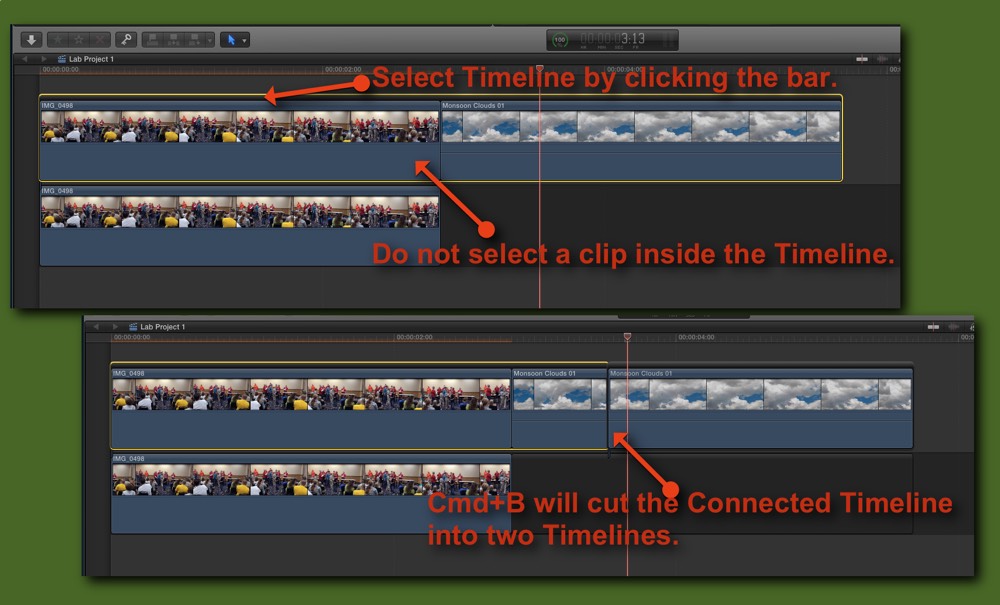
Please Log in to join the conversation.
30 Dec 2014 17:09 #57806
by plysat
Perhaps you tried to cut it on the transition? if so... delete the transition, then try again...
Can't sleep? Try this: fcpxpert.net ;-)
Replied by plysat on topic Split secondary timelines/connected clips?
DmitriZigany wrote:
That was the first thing I tried, but nothing happened. Maybe I didn't blade it at the right spot?plysat wrote: select the secondary "container" (the part outside the actual clip) and just cut/blade it as you would any clip. You'll end up with 2 individual secondaries...
Perhaps you tried to cut it on the transition? if so... delete the transition, then try again...
Can't sleep? Try this: fcpxpert.net ;-)
Please Log in to join the conversation.
- DmitriZigany
-
Topic Author
- Offline
- Platinum Member
-
Less
More
- Posts: 730
- Thank you received: 26
01 Jan 2015 17:12 #57876
by DmitriZigany
Replied by DmitriZigany on topic Split secondary timelines/connected clips?
Ok, so Cmd-B worked, thanks BenB. However using the Blade tool does not work! Weird and confusing!
Please Log in to join the conversation.
01 Jan 2015 17:15 #57878
by BenB
Replied by BenB on topic Split secondary timelines/connected clips?
The blade tool, well, no, not on a connected storyline. But Cmd-B is way faster, anyway. Just stay very aware of which is highlighted, the clip, or the storyline container.
Please Log in to join the conversation.
- DmitriZigany
-
Topic Author
- Offline
- Platinum Member
-
Less
More
- Posts: 730
- Thank you received: 26
01 Jan 2015 17:18 #57879
by DmitriZigany
Replied by DmitriZigany on topic Split secondary timelines/connected clips?
Yes, I was always paying attention to highlighting the container... But it never occured to me that the Blade tool and the key command should yield different results...
Please Log in to join the conversation.
01 Jan 2015 17:57 #57880
by Emmanuel
Replied by Emmanuel on topic Split secondary timelines/connected clips?
Wow, also learned something. Thanks guys!
Please Log in to join the conversation.

